
Rebuilding the Gmail Assistant on the Claude Agent SDK
My Gmail assistant ran clean for two months, then quietly died for a full week before I noticed. The bridge daemon that drove it had pinned itself to a stale Claude CLI version, every scheduled fire failed within seconds, and no transcript was ever written. This post walks through why I migrated the agent off Claude Routines and onto the Claude Agent SDK, what the new stack looks like on launchd, and the parity gate that has to pass before the old agent gets decommissioned.
7 days of silent failures. 1 bridge daemon pinned to a stale CLI version. 9 alternatives evaluated. 1 rebuild on the Claude Agent SDK. That is the arc of this post.
My Gmail assistant ran cleanly for two months. Then it quietly died for a full week before I noticed. The diagnosis took an hour. The rebuild took the rest of the week. The interesting part was not the rebuild itself, it was the deep-research pass that came before any code, and the architectural decisions that fell out of it.
This is the sequel to Building a Personal AI Email Assistant in 8 Hours, the post where I first stood up the agent. That version worked great. Until it didn't. And the way it failed is its own little lesson about scheduled agents.
Series Context
This is the next entry in the Claude Code Workflow series. Earlier entries covered scheduled tasks via Claude Routines, the bridge daemon model, and the trade-offs of running long-lived agents on a personal Mac. This one is about replacing all of that with the Claude Agent SDK on launchd.
The Inbox Cleanup That Wasn't#
The original v3 Gmail assistant lived at ~/.claude/agents/gmail-assistant.md, 765 lines, every twelve hours, driven by Claude Routines. It was one of the first real agents I built. The blueprint covered intent classification, VIP routing, follow-up suggestions, calendar peeks, and an "attention email" that summarized whatever needed my eyes. Two months of clean operation. Daily inbox triage on autopilot. Genuine peace of mind.
Then I noticed I had not received an attention email in a while. I checked the bridge log on the Mac Mini that runs the routines. Every twelve hours, like clockwork, this:
2026-05-06 07:01:14  Connected . gmail-assistant-workspace . main
2026-05-06 07:01:18  Session failed: Process exited with error
2026-05-06 19:01:14  Connected . gmail-assistant-workspace . main
2026-05-06 19:01:18  Session failed: Process exited with error
Four seconds from connect to crash. No transcript written. No error context surfaced to anything I would actually look at. Just a heartbeat of failure, every twelve hours, for seven straight days.
Scheduled agents need outbound failure signals
A scheduled agent that fails silently is worse than one that does not run at all. At least an agent that fails to launch tends to be loud about it. A bridge that connects, opens a session, and immediately crashes will not draw your attention until you notice the absence of the output. Build a smoke test that fires on success AND on consecutive failure. I did not have one. I do now.
What Actually Broke#
I want to be precise here, because three different failure modes were stacked on top of each other and only one was new. The new one is what killed the agent. The other two were latent risks waiting for the right moment.
Bridge Daemon Version Drift#
The Claude remote-control bridge is a long-lived daemon. On the Mac Mini it ran out of a LaunchAgent at ~/Library/LaunchAgents/com.anthropic.claude-remote-control.plist. It speaks to the Claude cloud over a persistent socket. When a routine fires, the cloud reaches through that socket to a local CLI invocation. The daemon is the bridge between the cloud-scheduled trigger and the local Claude binary on disk.
The daemon caches a reference to the resolved path of claude at startup. On 2026-05-11, my user-level ~/.local/bin/claude auto-upgraded from 2.1.96 to 2.1.139 in the background. The daemon kept running in memory pointing at the old binary handle. The on-disk binary was new. The SDK protocol between the cloud orchestrator and the local CLI had moved on between those two versions. Every scheduled fire spun up a session, the cloud spoke the new protocol, the in-memory CLI handle spoke the old protocol, the handshake failed, and the process exited inside four seconds.
A restart of the daemon would have fixed it instantly. But restarting a bridge daemon is not the kind of thing I do as routine hygiene, especially when the rest of my system is stable. I had no automation that restarted the daemon on a CLI upgrade. Strike one.
What is the bridge daemon?
The Claude remote-control bridge is the local process that lets cloud-scheduled triggers run agents on your machine. It maintains a persistent socket connection to Anthropic's scheduling infrastructure and exposes the local CLI to those scheduled fires. Without the bridge, you have no way to run a Claude Routine on your own hardware. The daemon is also where the ephemeral environment ID lives, which is the second failure mode in this post.
The Routines Rate-Limit Ceiling#
Even if the bridge had not failed, the original setup was capped by something I never thought about until I went to add a second routine. Claude Routines enforces a per-account ceiling on scheduled tasks. For my Max subscription that meant the Gmail agent was effectively the only routine I could run on a tight cadence without crowding out everything else. Every additional automation, even a one-shot daily check, was competing for the same slot budget. The bridge fragility was an outage. The routine ceiling was a soft cap on what I could build.
Ephemeral Environment IDs#
The third issue I already had a workaround for, but it deserves a mention because it explains why the bridge model is fragile in the first place. The environment_id that links a scheduled trigger to the bridge daemon is regenerated on every daemon restart. If the daemon restarts and I forget to re-pin the trigger to the new env ID, the next fire goes nowhere. I have a vector-memory entry from a month ago that says editing a routine in the claude.ai UI also wipes the env binding silently. My personal workflow had grown a small ritual around this. Anything you build a ritual around is a candidate for replacement.
Watch out for invisible state coupling
A scheduled agent that depends on a daemon, a session, a token, and an environment ID has four hidden coupling points. Anything that resets any one of them silently breaks the schedule. When you find yourself building rituals around state coupling, the right move is usually to remove the coupling, not to harden the ritual.
Three failure modes. One actual outage. Plenty of motivation to look hard at the architecture instead of just rebooting the daemon and moving on.
Why I Did The Research First#
The temptation was to just restart the bridge and call it done. The smarter move was to spend a research round first. I have done this enough times now that I have a small playbook for it. When something I have built fails in a way that exposes an architectural assumption, the right next move is not to rebuild on the same assumption. It is to ask whether the assumption still holds.
When deep research is the right first move
Before any non-trivial rebuild, spend a research round. Tool landscape scans, "did the ground move under my feet" checks, and "is there a better primitive now" questions are textbook use cases. The cost is minutes of agent fan-out. The benefit is that you stop building on top of yesterday's constraints. More on the tooling behind this in From WebSearch to Deep Research.
I fired four parallel research agents through my own /deep-research skill. Each had its own beat:
- Claude Agent SDK: status, OAuth support, pricing, examples.
- Google native AI on Gmail (Gemini in Workspace, Apps Script + Gemini Flash, Workspace Studio).
- MCP plus durable workflow architectures (Inngest, Temporal, the Gmail MCP).
- Open-source Gmail plus LLM agents (
inbox-zero, hosted SaaS comparables).
Twenty minutes later I had a 9-row comparison table at docs/research/gmail-assistant-alternatives-2026-05-13.md. Nine genuinely different options, each with a sketched fit against my actual needs. That document is what drove the rest of this work.
The Six Criteria That Mattered#
I scored every option against six weighted criteria. The weights were not theoretical, they came from the failure I had just lived through and the future use cases I knew were sitting in my plans directory.
| Criterion | Weight | Why it matters |
|---|---|---|
| Eliminates bridge fragility | HIGH | The whole reason I am here. No long-lived daemon that pins a CLI handle. |
| Parity with current pipeline | HIGH | VIP routing, attention email, intent classifier, follow-up detector all need to keep working. |
| Leverages owned assets | MEDIUM-HIGH | I already own gws (Gmail API wrapper), a ClickHouse SIEM log-lake, and a Claude subscription. |
| Migration effort | MEDIUM | Smaller is better but not at the cost of future runway. |
| Operational reliability | MEDIUM | Will it run unattended for months? |
| Future runway | MEDIUM | Can I extend it to a second agent next month without re-architecting? |
The two HIGH-weight criteria knocked out anything that kept the bridge daemon in the loop and anything that did not match the existing intent classification quality. That alone cut the candidate list in half.
Why The Agent SDK Won#
Let me walk through the runners-up first, because they teach you something about what the SDK is actually competing against.
Apps Script plus Gemini Flash. Cheapest of the lot at about $0.69 a month for my volume. Lives inside Google's own platform, no local infrastructure, no daemons. Scored badly on parity. Gemini Flash is excellent for cheap classification but my agent leans on the same Claude personality for VIP nuance and follow-up suggestions that the rest of my agents use. Migrating would mean rewriting every prompt and accepting a step down in judgment quality on the long tail.
Workspace Studio. The brand-new Google offering. Tight integration, native Gmail context. Scored badly on owned assets. I would be re-pointing my entire toolchain at Google's platform for one agent, when the rest of my stack runs through Claude.
Inngest plus Gmail MCP. Architecturally clean. Durable workflows, retries, observability. Scored badly on migration effort and operational reliability. I would need to self-host Inngest or pay for its cloud, plus stand up the Gmail MCP, plus rewrite the agent logic against MCP tools instead of gws commands. A nice path for a v3 someday, not the right move this week.
inbox-zero. Mature open-source product with real users. Scored badly on migration effort. Docker plus Postgres plus Redis to self-host, and the license is NOASSERTION which makes it ambiguous whether I can modify it for personal use. The agent logic also assumes its own data model, not mine.
That left the Claude Agent SDK. It hit every criterion green.
What is the Claude Agent SDK?
The Claude Agent SDK is Anthropic's official Python and TypeScript library for embedding Claude agents into your own programs. It exposes the same primitives Claude Code uses internally: tool calling, sub-agents, file system access, MCP, streaming. The point of difference from a bare API call is that it ships with the full Claude Code orchestration loop. Your agent gets sub-agents, hooks, plans, and the model's full agentic behavior, not just a messages.create call. You can find the docs at docs.anthropic.com/en/docs/agents-and-tools/agent-sdk and reference projects at github.com/anthropics/claude-agent-sdk-demos.
The two things that made the SDK score green where everything else was yellow:
First, OAuth via the existing subscription. I do not have to provision an ANTHROPIC_API_KEY and pay per token. The SDK falls through to the Claude Code OAuth credentials in the macOS Keychain (the Claude Code-credentials entry). That attaches my agent's usage to my Max subscription. At my volume that is effectively free.
Second, the $100 per month Agent SDK credit. Anthropic emailed me on 2026-05-13 to announce that Max 5x subscribers get a $100 monthly credit for Agent SDK and claude -p usage starting 2026-06-15. That puts a hard cost floor under the agent forever. Even if my volume grows ten times what it is today, the cost ceiling is bounded by a credit I am not paying for separately. The economics of running a personal agent fleet just changed.
OAuth is the right scope
Pulling Claude credit from your subscription is the right authorization scope for a personal agent. Provisioning a separate API key means a key that lives in a .env file, gets rotated on a schedule, and can be exfiltrated by anything that can read your secrets. The Keychain-backed OAuth flow keeps the credential in the OS secret store and ties usage to the subscription you already pay for.
The New Stack#
Here is the shape of the new agent. Same agent semantics as before. New everything underneath.
launchd, Not A Daemon#
The first change is that there is no daemon. The agent is a Python script. launchd starts it on a StartCalendarInterval schedule the same way cron would, except launchd is the right primitive on macOS for this. There is no persistent process between fires. There is no in-memory state to drift. There is no bridge to reboot. Every run is a fresh process, gets a fresh CLI handle, exits, and disappears.
A LaunchAgent plist in ~/Library/LaunchAgents/com.chrisjohnson.gmail-agent.plist is all the scheduling I need. The schedule is the same 0 */12 cadence as before. The crash isolation is much better.
OAuth Via The Subscription, Not An API Key#
The Agent SDK has a fall-through credential resolution order. If you set ANTHROPIC_API_KEY, it uses that. If you do not, it looks for Claude Code OAuth credentials in the OS secret store. On macOS that is the Keychain entry named Claude Code-credentials. The SDK pulls a session token from there, attaches the bearer header, and the API call routes through subscription billing instead of API billing.
The only catch is that the launchd-spawned process needs Keychain unlock permission. The first time the agent runs after a reboot, macOS pops a Keychain authorization dialog. After I tick "Always Allow" once, the SDK can read the credential on every subsequent launch without prompting. I documented this in the agent's installer script so future me does not waste an hour wondering why the first run after a reboot stalls.
Launchd processes do not see your login keychain by default
This is the gotcha that ate two hours of my Friday. launchd jobs run with their own session, not your interactive login session. Anything in login.keychain is unreachable unless the user explicitly grants the process keychain access. The Agent SDK handles its own credential with the one-time prompt. Anything else your agent talks to (a CLI that uses Keychain for credentials, an SSH key with a passphrase) needs its own plan. For my gws CLI I switched to a file-backed keyring instead, which is the next section.
File-Backed gws Keyring#
gws is the Gmail API wrapper I have used since the v1 agent. It speaks to Gmail, Drive, Calendar, Docs, Sheets. It encrypts its OAuth refresh tokens with a master AES key, and by default it stores that master key in your platform's secret store via the keyring Python library. On macOS that is login.keychain.
When I tried to run the agent from launchd, gws returned rc=1 with one helpful line on stderr: Using keyring backend: keyring. No error. No clue. The OAuth refresh failed silently because the keyring library could not unlock login.keychain from a launchd context.
The fix was to switch gws to a file-backed keyring. The CLI honors GOOGLE_WORKSPACE_CLI_KEYRING_BACKEND=file, which tells it to load the AES key from a plaintext file at ~/.config/gws-personal/.encryption_key (chmod 600, owned by me, in a directory not synced to iCloud). The encryption is still real, the master key is just sourced from disk instead of Keychain. For a single-user personal machine that runs the agent every twelve hours, that trade is fine.
Audit Log To ClickHouse#
The v3 agent did not log anything durable. It ran, it took action, it generated an attention email, and that was it. If I wanted to audit what it did last month, I had to reconstruct it from Gmail itself.
The new agent writes a structured audit log every run. Two tables in my existing ClickHouse SIEM log-lake (the same homenet database my network dashboard reads): gmail_run for one row per fire, gmail_message_decision for one row per message processed. The dashboard's threat intel tab will pull from those tables natively. I get visibility into the agent's behavior without writing a separate analytics layer.
There is a non-trivial privacy concern with logging individual email decisions: I never want email body content in a SIEM. The writer wraps every payload in a regex check that rejects anything that looks like body text. Subject lines, sender, label, decision, score, model name, and timestamps are all the writer sees. If a future change to the agent ever tries to log body text by accident, the writer raises and the run fails loudly. Easier to debug a failed run than to scrub a polluted SIEM.
The other two sinks exist for resilience. A Google Sheet mirror gives me cold recovery if ClickHouse is down for a day. A local JSONL file at ~/Library/Logs/gmail-agent/decisions.jsonl is the last-resort fallback if both the Sheet and ClickHouse are unreachable. If you can write a local file, you can recover the run.
Three sinks is one fewer regret
For audit telemetry on a personal agent, the cost of writing to three sinks instead of one is trivial. The cost of losing a month of decisions because your primary sink had an outage is real. Multiplex writer plus a content firewall is twenty lines of code that you do not regret later.
Two Circuit Breakers#
Every destructive operation (archive, trash, label change) flows through two circuit breakers. The first is count-based: 50 destructive ops per hour, 500 per day. The counter persists to disk between runs so a misbehaving agent cannot reset the cap by exiting and re-launching. The second is wall-clock: by default the agent self-terminates if a single run exceeds 600 seconds.
The wall-clock breaker is the one I am most attached to. During shadow week I bumped the cap to 1800 seconds because the OAuth path for the new agent is currently slower than the bridge path was on the same volume. Once I have stabilized the call pattern I will dial it back down. The point of the breaker is not to optimize for speed, it is to guarantee that a runaway run cannot consume my Anthropic credit indefinitely.
Always cap the wall clock on a scheduled agent
A long-running agent on a per-fire schedule that gets stuck in a tool-call loop can burn through credit alarmingly fast. A wall-clock breaker is the cheapest safety property you can buy. Set it generously, fire it on overrun, log it, and move on. Better to lose a single run than to wake up to a budget alert.
Autonomy Policy: Tight vs Borderline#
The v3 agent had a binary "is this OK to trash" decision. The new agent has an 8-guard autonomy policy that runs before any destructive action gets the green light. All eight have to be true to be classified as "tight". Anything else is "borderline" and the agent flags it for me to look at in the attention email instead of acting on it directly.
The eight guards:
- Sender stats meet the deletion threshold (high volume, low engagement).
- Sender is not on the VIP list.
- Sender is not on the operator allowlist (always-keep, set by me).
- The agent's phishing-signal scoring for this sender has had zero hits across all runs.
- There is no upcoming calendar event referencing this sender in the next 7 days.
- The current time is not inside an OOO window I have configured.
- The daily destructive-ops cap is not yet hit.
- The sender does not have an operator override in the last 30 days (no recent manual rescue from the trash).
If all eight pass, the message gets tight autonomy. If any fail, it is borderline. The borderline pile gets a single row in the attention email with a one-click action link. Anything in the tight pile gets acted on without nagging me.
Shadow Mode And The Parity Gate#
I am not flipping the cutover lever yet. The new agent is running in shadow mode alongside the old one for seven days. Both run on the same schedule. Both produce a decision per message. Neither one is allowed to actually mutate Gmail during shadow week. The new agent's decisions get logged to ClickHouse. The old agent's decisions still drive an actual attention email so my inbox keeps getting cleaned by the agent I already trust.
After seven days a parity report compares the two decision distributions. The gate has two thresholds. TRASH parity must be at least 95 percent (because trashing the wrong thing is the most expensive single mistake the agent can make). Overall parity (all decisions, weighted by destructiveness) must be at least 90 percent. If both pass I run scripts/cutover_phase1.sh, an atomic flip that disables the v3 LaunchAgent and enables the new one.
The bridge agent is instant rollback
After cutover the v3 LaunchAgent stays loaded, just paused. If the new agent fails badly in the first 30 days of real operation, I can flip a single launchctl command and have the bridge agent back to driving my inbox in 30 seconds. The cutover is not a one-way door. Phase 6 of the plan (decommission v3 entirely) intentionally waits for 30 days of stable post-cutover operation before deleting anything.
The shadow protocol surfaced two real bugs in the first run that the unit tests had missed. The first was that the old agent and the new agent disagreed on the time zone of "this morning" for follow-up classification. The old agent used UTC. The new agent used America/Phoenix (where I am). They were both internally consistent. They produced wildly different follow-up piles for any email that crossed midnight UTC. Fix: pinned both to local time, parity recovered. The second bug was a stale label mapping in the new agent for Newsletters/Tech that classified everything from that label as "borderline" instead of letting the tight policy run. One-character config fix.
Both bugs would have shipped if I had cutover blind. The shadow gate paid for itself in run one.
What Tonight's First Real Run Looked Like#
Tonight's shadow run was the first one I am fully happy with. Here are the actual numbers from the run log.
{
  "run_id": "20260515T193011Z-7c4a",
  "duration_seconds": 853,
  "status": "success",
  "primary": {
    "scanned": 32,
    "kept": 17,
    "archived": 11,
    "trashed": 2,
    "flagged": 1
  },
  "urgent_count": 1,
  "attention_email": {
    "subject": "URGENT: Inbox Alert - 2 items need your attention",
    "delivered": false,
    "reason": "shadow_mode"
  },
  "breakers": {
    "count_based_fired": false,
    "wall_clock_fired": false
  }
}
About 14 minutes end to end. 32 messages scanned in primary triage. 11 archived, 2 trashed, 1 flagged for follow-up, 1 urgent. The attention email was generated and held in shadow rather than sent. Zero circuit breakers tripped on this run.
The wall-clock breaker fired exactly once on an earlier run, two days ago, when an unrelated OAuth refresh blocked the agent for 628 seconds against the (then-default) 600-second cap. That is the safety property doing its job. The agent exited cleanly, logged the breaker fire, and the next scheduled run completed normally without manual intervention. I bumped the cap to 1800 for shadow week and the same call pattern now completes in 853.
What is the attention email?
The attention email is the agent's one daily output to my inbox. A single message, subject prefixed with "URGENT" if anything in the borderline pile needs my eyes, otherwise prefixed with "DIGEST". Body contains a short summary, a list of items needing decisions with one-click action links, and a section of follow-ups the agent recommends I send today. It is the only thing in the entire pipeline that touches my inbox visibly. Everything else happens in labels, archives, and the audit log.
Test coverage on the new agent: 190 unit tests, 82 percent line coverage, ruff clean, mypy --strict compatible. The Python package is at the root of gmail-agent. The companion dashboard work (a tab in my chris2ao-home-network-mission-control-dashboard that surfaces the audit log) is in a sibling repo and ships its own deploy. Both are private repos, but the architecture, the policy logic, and the parity protocol are documented in ~/.claude/plans/sleepy-forging-gosling.md if you want the full plan-of-record.
What's Next#
Two things are queued behind cutover.
First, the filter creator. v3 had a hand-wavy promise that the agent could propose Gmail filters for high-volume senders. The new agent has the audit-log foundation to do this right: I can compute "would this proposed filter have changed the decision on the last 30 days of messages from this sender" before suggesting it. Real receipts, not vibes. That work waits for cutover.
Second, model honoring on follow-ups. Right now the follow-up detector runs at the same model tier as the rest of the agent. Some follow-ups (calendaring, light scheduling) could run on Haiku 4.5 for a fraction of the cost. The Agent SDK supports per-prompt model selection trivially. Cost is not currently a constraint (subscription credit), but the $100 Agent SDK credit gives me real numbers to optimize against starting June 15.
Lessons Learned#
Five takeaways from this migration that I want to write down before they fade.
Bridges accumulate hidden state
Anything that holds a long-lived in-memory handle to a binary on disk is a candidate for silent failure when that binary is upgraded. Prefer fresh-process schedulers (launchd, cron, systemd timers) over daemon-mediated schedulers for personal automation. You give up some convenience and you get rid of an entire failure class.
Deep research before any non-trivial rebuild
I had a working agent. I had a known way to bring it back up (restart the bridge). The temptation was to just do that. Twenty minutes of /deep-research told me the ground had moved under my feet, the SDK existed, OAuth had landed, and a $100 monthly credit was about to apply. Skipping that step would have left me on the same fragile architecture for another six months.
Launchd does not share your login keychain
This will surface in any launchd-driven automation you write that needs credentials from login.keychain. The Agent SDK handles its own credential. Everything else (gws, third-party CLIs that use the system keyring) needs an explicit plan, usually a file-backed alternative with chmod 600. Find this out in dev, not at midnight after a reboot.
OAuth over a per-tenant subscription beats per-call API keys
For a personal agent, attaching usage to your subscription via the OS-stored OAuth credential is both cheaper and more secure than provisioning a long-lived API key in a .env file. The key never leaves the OS secret store. The billing surfaces as part of a subscription you already pay for. This is the right default for personal builds. Reserve API keys for shared infrastructure where subscription billing does not match the use case.
Audit logs make agents trustable
The biggest qualitative change between v3 and the new agent is not the SDK, it is the audit log. I can grep for "why did the agent trash this message" and get a structured answer. I can compute parity. I can build the dashboard tab. An agent without a decision log is one you have to take on faith. An agent with one is one you can reason about.
Cutover with a rollback plan or do not cutover
The bridge agent stays loaded, paused, for 30 days post-cutover. If anything goes sideways in real operation, one launchctl flip puts me back on the agent I already trust. The decommission phase intentionally waits until the new agent has earned the right to be the only one. This is the cheapest insurance you can buy on a migration.
If you missed the original post that this builds on, it is Building a Personal AI Email Assistant in 8 Hours. The migration above replaces almost everything in that post except the agent's personality, the VIP routing logic, and the attention-email format. Two months of operation, one outage, and a deep-research pass later, the new stack is faster to reason about, cheaper to extend, and easier to trust.
Next post in this series will be the cutover retro: what shadow week's parity report actually said, how the first week of real operation went, and what the filter-creator wiring looks like once it has 30 days of audit data to learn from.
Weekly Digest
Get a weekly email with what I learned, summaries of new posts, and direct links. No spam, unsubscribe anytime.

Related Posts
Building a Gmail cleanup agent in Claude Code, evolving it from a manual 5-step script to a fully autonomous v3 with VIP detection, delta sync, auto-labeling, and follow-up tracking. Then making it run unattended every 5 hours via scheduled triggers and a remote-control daemon on a Mac Mini.
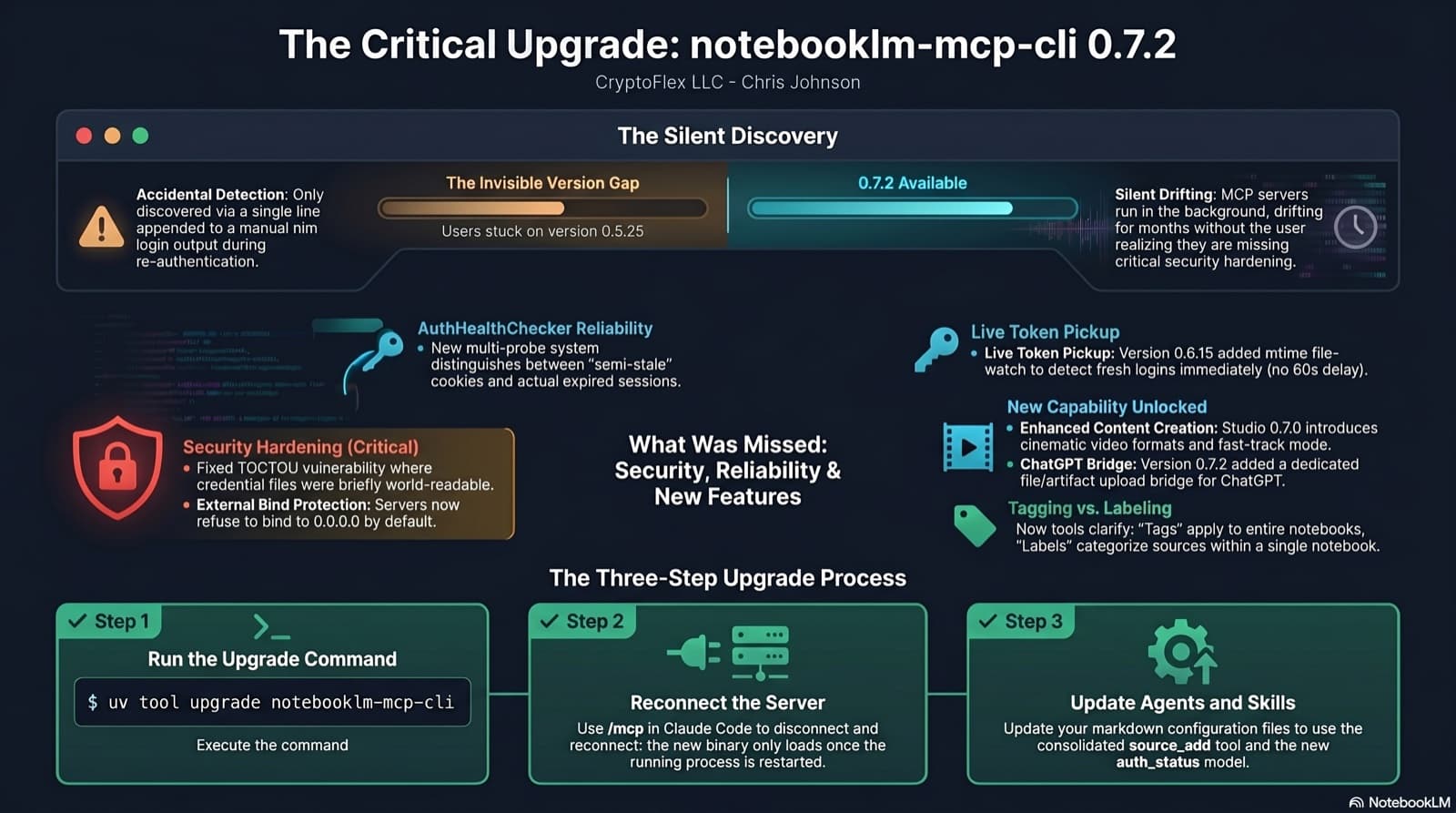
I was two minor versions behind on notebooklm-mcp-cli and had no idea until a re-auth banner interrupted a session. The gap was 0.5.25 to 0.7.2. Security fixes, auth reliability improvements, and new features I was missing the whole time. Here is the three-part upgrade that most people stop after step one.
35 MCP tools, 7 implementation tasks, 2 platforms, 1 session. How I used the superpowers brainstorming, writing-plans, and subagent-driven-development pipeline to integrate NotebookLM into Claude Code as a first-class MCP server.
Comments
Subscribers only — enter your subscriber email to comment