
Going Agentic-First: Restructuring Claude Code for Parallel Intelligence
A comprehensive configuration overhaul that transformed my Claude Code workflow from serial execution to parallel agent orchestration. 7 custom agents, 9 rules reorganized, file protection hooks, and the philosophy of why every AI-assisted developer should go agentic-first.
I spent three hours today restructuring my entire Claude Code configuration around a single principle: every non-trivial task should be decomposed into parallel agents. What started as "let me organize these rule files" turned into a fundamental rethinking of how I work with AI.
By the end of the session, I'd created 7 custom agents, reorganized 9 rules into a coherent directory structure, built a PreToolUse hook that guards sensitive files, cleaned up redundant MCP servers, and established an agentic workflow that automatically fans out tasks to specialized agents running in parallel. No more serial execution. No more "one thing at a time" when three agents could handle it simultaneously.
This post is about that transformation: the philosophy, the implementation, the mistakes, and why you should adopt agentic-first principles too.
The Problem: Organic Growth Without Structure#
Let me show you what my configuration looked like before:
~/.claude/rules/
├── agents.md
├── coding-style.md
├── git-workflow.md
├── hooks.md
├── patterns.md
├── performance.md
├── security.md
└── testing.md
Eight flat files. No subdirectories. No clear hierarchy. Just a pile of rules that had accumulated organically over two weeks of learning Claude Code. The agents.md file listed 9 plugin-provided agents but gave no guidance on when to use them or how to orchestrate them together.
My ~/.claude/commands/ directory had two custom commands (wrap-up and blog-post) that worked but used the older command format instead of the recommended skills format. My learned skills were scattered across 16 flat markdown files with no categorization. I had 5 MCP servers configured, including a filesystem server that was completely redundant with Claude Code's built-in file tools.
The Cost of Disorganization
Every session, Claude Code loads your entire rules directory into context. Eight flat files meant no way to prioritize what was critical vs. what was operational detail. I was burning tokens on hook documentation when what I really needed was the agentic workflow rules front and center.
And the biggest problem: I had no agentic workflow enforcement. Claude would handle tasks serially unless I explicitly prompted for parallel execution. Research tasks that could run simultaneously would execute one at a time. Code changes that could be reviewed in parallel would wait in sequence.
I was using a parallel-capable AI system in serial mode.
What "Agentic-First" Means#
Agentic-first development means structuring your workflow so that every non-trivial task automatically gets decomposed into specialized agents that execute in parallel. Instead of a single AI doing everything sequentially, you fan out work to multiple agents, each with a specific role and model size optimized for that role.
Here's the difference visually:
SERIAL EXECUTION (before):

  User Request
       │
       ▼
  Research repos (3 min)
       │
       ▼
  Analyze patterns (2 min)
       │
       ▼
  Write code (4 min)
       │
       ▼
  Review code (2 min)
       │
       ▼
  Update docs (1 min)
       │
       ▼
     Done                    12 min total


PARALLEL AGENTIC (after):

  User Request
       │
       ├──→ [Research Agent]  ──┐
       ├──→ [Analysis Agent]  ──┤  2 min (parallel)
       └──→ [Pattern Agent]   ──┘
                                │
                           Synthesize (1 min)
                                │
                           Write code (4 min)
                                │
                       ┌────────┴────────┐
                       ▼                 ▼
                 [Code Review]    [Doc Agent]   1 min (parallel)
                       │                 │
                       └────────┬────────┘
                                ▼
                              Done        8 min total
The key insight: research, analysis, and pattern-matching are independent operations. They don't need to wait for each other. Same with code review and documentation updates. Those four minutes of saved time add up fast across a full session.
Parallel Execution Is Built In
Claude Code can call multiple tools in a single response. If Task A and Task B have no dependencies, they should run simultaneously. Agentic-first means encoding this principle into your rules so it happens automatically, not just when you remember to ask for it.
The Rules Restructure: From Flat to Hierarchical#
I reorganized my 8 flat rule files into 3 subdirectories with clear purposes, plus 2 new files:
BEFORE:                          AFTER:

rules/                           rules/
├── agents.md                    ├── agents.md (updated)
├── coding-style.md              ├── core/
├── git-workflow.md              │   ├── agentic-workflow.md  ← NEW
├── hooks.md                     │   ├── coding-style.md
├── patterns.md                  │   └── security.md
├── performance.md               ├── development/
├── security.md                  │   ├── git-workflow.md
└── testing.md                   │   ├── testing.md
                                 │   └── patterns.md
                                 └── operations/
                                     ├── performance.md
                                     ├── hooks.md
                                     └── windows-platform.md  ← NEW
The three subdirectories map to three levels of priority:
Core rules are always-critical: the agentic workflow orchestration, coding standards that apply to every file, and security checks that run before every commit.
Development rules are process-oriented: how to write commits, what test coverage is required, which design patterns to use. Important, but secondary to the core workflow.
Operations rules are runtime details: which model to use for which task, how hooks work, Windows-specific workarounds. Referenced as needed.
Why Subdirectories Matter
Claude Code recursively loads rules from ~/.claude/rules/. By using subdirectories, you create a natural hierarchy that reflects priority. Core rules get seen first. Operational details stay out of the way until needed. And when your rules grow from 8 to 20 files, the organization scales.
The agents.md file stayed at the root for maximum visibility. It's the quick-reference routing table for "which task gets which agent."
The Agentic Workflow Rule: The Primary Deliverable#
The centerpiece of the restructure was rules/core/agentic-workflow.md. This is the rule that transforms Claude Code from a serial tool into a parallel agent orchestrator. It opens with a line that leaves no ambiguity:
CRITICAL: Every non-trivial task MUST be decomposed into parallel agents.
The Routing Table#
The rule includes a routing table that maps task types to specialized agents and optimal models:
| Task Type | Agent | Model | Why This Model |
|---|---|---|---|
| File search, exploration | Explore | Haiku | Read-only, cheap |
| Implementation planning | Plan | inherit | Needs session context |
| Code writing, bug fixes | general-purpose | Sonnet | Best coding model |
| Code review | code-reviewer | inherit | Needs full diff context |
| Security analysis | security-reviewer | inherit | Deep reasoning needed |
| Build errors | build-error-resolver | inherit | Needs error context |
| Architecture decisions | architect | Opus | Deepest reasoning |
| Documentation updates | doc-updater | Haiku | Simple text generation |
| Research, web search | general-purpose | Haiku | Read-only, cheap |
Model Selection Is Cost Optimization
Haiku 4.5 delivers 90% of Sonnet's capability at one-third the cost. If an agent is just reading files and searching code, Haiku is the right choice. Reserve Opus for tasks that genuinely need deep reasoning: architecture decisions and security analysis. Sonnet handles the sweet spot of code generation. Match the model to the task, not the other way around.
Automatic Triggers#
The rule specifies 6 automatic triggers that fire without any user prompt:
- 2+ independent research queries → parallel Explore agents
- Code just written/modified → code-reviewer agent
- Complex feature request → planner agent first, then parallel implementation
- Bug report → parallel: Explore (find root cause) + Explore (find test coverage)
- Pre-commit → parallel: security-reviewer + code-reviewer
- Multi-repo operation → parallel agents per repo
This means I don't have to remember to request a code review. The moment code is written, a reviewer spins up. The moment I'm about to commit, a security scan runs. It's enforcement through configuration, not discipline.
Three Parallel Patterns#
The rule codifies three reusable patterns:
Research Fan-Out: when exploring unfamiliar code, launch 2-3 Explore agents simultaneously. One searches for the specific files, one finds related tests, one checks configuration:
"How does authentication work across our repos?"

  ├──→ [Explore] Grep CJClaude_1 for auth patterns
  ├──→ [Explore] Grep cryptoflexllc for auth patterns
  └──→ [Explore] Search documentation for auth setup
       │
       └──→ Synthesize findings → Answer
Write-Then-Review Pipeline: write code, then immediately launch parallel reviewers:
"Add rate limiting to the analytics API"

  Write code (Sonnet)
       │
       ├──→ [code-reviewer]     catch bugs
       ├──→ [security-reviewer] find vulnerabilities
       └──→ [doc-updater]       update API docs
            │
            └──→ Apply fixes → Commit
Multi-File Changes: when modifying 3+ files, plan first, then parallelize:
"Update the footer across all blog posts"

  [Plan agent] designs the approach
       │
       ├──→ [Agent 1] Edit posts 1-5
       ├──→ [Agent 2] Edit posts 6-10
       └──→ [Agent 3] Edit posts 11-14
            │
            └──→ [code-reviewer] validates consistency
Building 7 Custom Agents#
The everything-claude-code plugin provides 9 agents (planner, architect, tdd-guide, code-reviewer, security-reviewer, build-error-resolver, e2e-runner, refactor-cleaner, doc-updater). But I needed 7 more for workflows specific to my environment.
Each agent is a markdown file in ~/.claude/agents/ with YAML frontmatter specifying the model, available tools, and a detailed prompt. Here's what I built and why.
Agent Ecosystem Overview#
PLUGIN AGENTS (9):                  CUSTOM AGENTS (7):
┌─────────────────────┐             ┌─────────────────────────┐
│  planner            │             │  changelog-writer       │
│  architect          │             │  multi-repo-orchestrator│
│  tdd-guide          │             │  session-analyzer       │
│  code-reviewer      │             │  deploy-verifier        │
│  security-reviewer  │             │  config-sync            │
│  build-error-resolver│            │  context-health         │
│  e2e-runner         │             │  skill-extractor        │
│  refactor-cleaner   │             └─────────────────────────┘
│  doc-updater        │
└─────────────────────┘
        9 + 7 = 16 specialized agents
changelog-writer (Haiku)#
Every session ends with updates to CHANGELOG.md. This agent reads git diffs, recent commits, and session context, then drafts a properly formatted entry with bold action verbs, technical details, and a "What was learned" section. Saves 5 minutes of tedious writing every session.
multi-repo-orchestrator (Haiku)#
I work across 4 repos: the learning journal, the website, ops docs, and the config repo. This agent runs parallel git operations across all 4 (status, pull, push, diff) and returns a unified table. One command, four repos, instant overview.
---
description: "Parallel git operations across all project repos"
model: haiku
tools: [Bash, Read]
---
session-analyzer (Sonnet)#
My ~/.claude/projects/ directory accumulates session transcripts. The analyzer mines them for repeated patterns, common errors, tool usage frequency, and approaches that were tried and abandoned. It's how I discovered I was spending disproportionate time on file permission issues, which led to creating the file-guard hook.
deploy-verifier (Haiku)#
Before pushing to main, I want confidence the Vercel-deployed site builds cleanly. This agent runs npx next build, checks for TypeScript errors, verifies static page generation, and optionally fetches key pages on the live site to confirm they load.
config-sync (Haiku)#
My config lives in two places: ~/.claude/ (where Claude Code reads it) and a git repo (where it's versioned). The sync agent diffs the two, flags inconsistencies, and reports files that are modified but not committed, new files not yet tracked, or files deleted locally but still in the repo.
context-health (Haiku)#
Claude Code's context window is finite. This agent monitors conversation length and suggests strategic compaction points: after completing a major milestone, before switching task domains, or when exploration is done and implementation is about to begin. Prevents those awkward mid-task compactions that lose critical context.
skill-extractor (Sonnet)#
When I solve a non-obvious problem, I want to capture the solution as a learned skill. This agent reads session transcripts, identifies problem-solution pairs (silent failures, platform quirks, integration patterns), drafts markdown skill files in the standard format, and suggests categorization into one of 4 domains.
Why These 7 Agents
Each agent addresses a specific pain point I hit repeatedly.
- changelog-writer: I was writing the same format manually every session
- multi-repo-orchestrator: Running git status on 4 repos individually was tedious
- session-analyzer: Patterns were hiding in transcripts I never re-read
- deploy-verifier: I pushed broken builds twice
- config-sync: I forgot to commit config changes to the backup repo
- context-health: I lost context mid-task from unexpected compaction
- skill-extractor: I was skipping skill extraction when tired
Skills Over Commands: The Migration#
Claude Code has two extension mechanisms for slash commands: the older commands format (~/.claude/commands/*.md) and the newer skills format (~/.claude/skills/*/SKILL.md). Skills take priority when both exist, support richer metadata, and are the direction Claude Code is heading.
I migrated both existing commands and created 2 new ones:
BEFORE:                              AFTER:

~/.claude/commands/                  ~/.claude/skills/
├── wrap-up.md                       ├── wrap-up/
└── blog-post.md                     │   └── SKILL.md
                                     ├── blog-post/
                                     │   └── SKILL.md
                                     ├── multi-repo-status/
                                     │   └── SKILL.md        ← NEW
                                     └── skill-catalog/
                                         └── SKILL.md        ← NEW
The old command files stay for backward compatibility, but skills take priority when invoked. The two new skills fill gaps.
- multi-repo-status: Quick dashboard showing git status across all 4 repos with a formatted table (a lightweight version of the multi-repo-orchestrator agent)
- skill-catalog: Lists all available agents (16), skills (4), and hooks (4) with descriptions. No more "what was that command called?"
Skills Auto-Discover Immediately
Unlike commands (which require a session restart to discover), skills are picked up as soon as the SKILL.md file is written. No restart needed. This makes iteration much faster during development.
Learned Skills Taxonomy: From Flat to Organized#
I had 16 learned skills scattered in flat files. These are non-obvious patterns extracted from past sessions, things like "Git Bash strips $ from PowerShell commands" or "vercel.json uses routes not rules for WAF config." I organized them into 4 domains:
~/.claude/skills/learned/
├── INDEX.md                              ← NEW: categorized index
├── platform/                             (3 skills)
│   ├── powershell-stdin-hooks.md
│   ├── git-bash-npm-path-mangling.md
│   └── git-bash-powershell-variable-stripping.md
├── security/                             (4 skills)
│   ├── cookie-auth-over-query-strings.md
│   ├── ssrf-prevention-ip-validation.md
│   ├── slug-path-traversal-guard.md
│   └── token-secret-safety.md
├── claude-code/                          (5 skills)
│   ├── mcp-config-location.md
│   ├── command-yaml-frontmatter.md
│   ├── claude-code-debug-diagnostics.md
│   ├── heredoc-permission-pollution.md
│   └── shallow-fetch-force-push.md
└── nextjs/                               (4 skills)
    ├── nextjs-client-component-metadata.md
    ├── mdx-same-date-sort-order.md
    ├── mdx-blog-design-system.md
    └── vercel-json-waf-syntax.md
Why categorize? Because at 16 skills, a flat list is manageable. At 50 skills (a few months from now), it's not. The INDEX.md file provides a quick-reference table, and the subdirectories make browsing by domain natural.
Knowledge Compounds
Every session adds 1-2 new learned skills. At 16 skills after two weeks, I'm on track for a large knowledge base by year end. Without taxonomy, that's unusable noise. With domains, it's a searchable library that makes Claude Code measurably smarter over time.
Original files remain at the learned/ root for backward compatibility. The subdirectory copies are for organization and browsing. Claude Code discovers all .md files recursively, so both locations work.
PreToolUse File Protection: The file-guard Hook#
One of my biggest concerns was Claude accidentally editing .env files, private keys, or certificate files. I built a PreToolUse hook that intercepts every Edit and Write operation and blocks it if the target is a sensitive file.
Here's the hook configuration in settings.local.json:
{
  "hooks": {
    "PreToolUse": [
      {
        "matcher": "Edit|Write",
        "hooks": [
          {
            "type": "command",
            "command": "powershell -NoProfile -ExecutionPolicy Bypass -Command \". '.claude/hooks/file-guard.ps1'\""
          }
        ]
      }
    ]
  }
}
And the PowerShell script that does the actual checking:
$ErrorActionPreference = "SilentlyContinue"
try {
    $jsonInput = [Console]::In.ReadToEnd()
    $data = $jsonInput | ConvertFrom-Json

    # Extract file path from tool input
    $filePath = $null
    if ($data.tool_input.file_path) { $filePath = $data.tool_input.file_path }
    elseif ($data.tool_input.path) { $filePath = $data.tool_input.path }
    if (-not $filePath) { exit 0 }

    $fileName = [System.IO.Path]::GetFileName($filePath)
    $extension = [System.IO.Path]::GetExtension($filePath)

    $blockedNames = @(
        ".env", ".env.local", ".env.production",
        ".env.development", "credentials.json"
    )
    $blockedExtensions = @(".pem", ".key", ".secret")

    if ($blockedNames -contains $fileName) {
        [Console]::Error.WriteLine(
            "BLOCKED: Cannot modify sensitive file '$fileName'."
        )
        exit 2
    }
    if ($blockedExtensions -contains $extension) {
        [Console]::Error.WriteLine(
            "BLOCKED: Cannot modify certificate/key file '$fileName'."
        )
        exit 2
    }
    if ($fileName -match '^\.env\.') {
        [Console]::Error.WriteLine(
            "BLOCKED: Cannot modify environment file '$fileName'."
        )
        exit 2
    }
    exit 0
} catch { exit 0 }
Exit Code 2 Blocks Execution
Claude Code hook exit codes have specific meanings: 0 = allow the operation, 1 = error occurred but allow anyway, 2 = block the operation. For security hooks, always use exit code 2 to prevent the operation from proceeding. The error message written to stderr gets displayed to the user explaining why the operation was blocked.
The hook intercepts the JSON payload that Claude Code sends on stdin, which contains the tool name and parameters. It extracts the target file path and checks it against blocklists. The catch block exits with 0 (allow) so that hook errors never accidentally block legitimate operations.
Fail Open, Not Closed
Notice the catch { exit 0 } at the end. A security hook that crashes and blocks all file operations would be worse than no hook at all. The hook should fail open. If something unexpected happens, allow the operation and let the user decide. Only block when you're confident the target is sensitive.
MCP Server Cleanup: Removing Redundancy#
I audited my 5 MCP servers and removed one: the filesystem server.
BEFORE (5 servers):                AFTER (4 servers):
┌──────────────────────┐           ┌──────────────────────┐
│  filesystem          │  ← CUT   │                      │
│  memory              │           │  memory              │
│  context7            │           │  context7            │
│  sequential-thinking │           │  sequential-thinking │
│  github              │           │  github              │
└──────────────────────┘           └──────────────────────┘
The filesystem MCP provided tools for reading, writing, and listing files. But Claude Code already has built-in Read, Write, Edit, Glob, and Grep tools that work better. They integrate with the permission sandbox, handle Windows paths correctly, and don't require MCP overhead.
Every MCP server adds startup latency and injects its tool descriptions into the context window. Removing a redundant server saves tokens every single session.
Audit Your MCP Servers
Before adding an MCP server, check if Claude Code already has built-in tools for that capability. The memory server provides genuine cross-session persistence that nothing built-in does. Context7 provides live documentation lookup. The github server provides authenticated API access. These are worth the overhead. A duplicate file system is not.
What Went Wrong: Honest Mistakes#
The Sandbox Limitation#
My plan was to parallelize the file writing by spawning 3 background agents: one for core rules, one for development rules, one for operations rules. All three would write simultaneously and the restructure would be done in one-third the time.
All three failed with the same error. Subagents are sandboxed to the current project directory:
MAIN SESSION:
├── Can write to: ~/.claude/       ✓  (config directory)
├── Can write to: CJClaude_1/      ✓  (project directory)
└── Can write to: Any allowed path ✓

SUBAGENT SESSION:
├── Can write to: CJClaude_1/      ✓  (project directory ONLY)
├── CANNOT write to: ~/.claude/    ✗
└── CANNOT write to: Other repos   ✗
Subagents Can't Write Outside the Project
Background agents spawned via the Task tool are sandboxed to the current project directory. They cannot modify global config (~/.claude/), other repos, or system files. This is a security feature, but it means you can't parallelize cross-directory writes. Use the main session for those operations instead.
The workaround: write all 42 config files from the main session, sequentially. Slower, but it worked.
Git Bash Dollar Sign Stripping#
When trying to remove the filesystem MCP from ~/.claude.json, I needed PowerShell to parse the JSON. Running PowerShell inline from Git Bash failed because Git Bash strips $ characters from the command before PowerShell ever sees them:
# What I typed:
powershell -Command "$json = Get-Content ~/.claude.json..."

# What Git Bash sent to PowerShell:
powershell -Command "json = Get-Content ~/.claude.json..."
#                    ^ missing $
The fix: write a temporary .ps1 file, execute it, then delete it. This is a known learned skill (#8 in my collection), but I still hit it again because the muscle memory of writing inline commands is strong.
Git Bash + PowerShell = Pain
This is the third time I've documented this gotcha. Git Bash (MSYS2) rewrites command arguments, stripping $ characters that look like shell variables. The only reliable workaround is writing a temp .ps1 file and executing it via powershell -File. If you're on Windows and using Git Bash as your shell, expect this.
The "Modified Since Read" Race Condition#
Throughout the session, ~/.claude.json kept throwing "file modified since read" errors when I tried to edit it. The cause was Claude Code itself modifying this file (updating MCP state, session metadata), creating a race condition between my edits and its internal writes. The solution: use claude mcp add/remove commands instead of manual JSON editing, and let Claude Code manage its own config file.
Why You Should Go Agentic-First#
Here's my case for why every Claude Code user should adopt agentic-first principles:
1. Parallel Execution Saves Real Time#
If you have 3 independent research tasks that each take 2 minutes, serial execution takes 6 minutes. Parallel execution takes 2 minutes. Do that 10 times in a session and you've saved 40 minutes. That's not theoretical. It's the difference between an 8-minute task and a 12-minute task, multiplied across every complex operation in your workflow.
2. Specialized Agents Produce Better Results#
A code-reviewer agent is better at reviewing code than a generalist handling "do everything." It has a focused prompt, a checklist, and domain expertise baked into its instructions. Same for security review, architecture design, and test planning. Specialization improves quality the same way it does in human teams.
3. Automatic Triggers Enforce Best Practices#
How many times have you written code, committed it, then realized you forgot to run tests? Or forgot to check for security issues? Automatic triggers solve this. The moment you write code, a reviewer spins up. The moment you commit, a security scan runs. Best practices become enforced practices.
4. Cost Optimization Through Model Routing#
Opus costs significantly more than Haiku. If you use Opus for everything, including file searches and documentation updates, you're paying premium prices for commodity tasks. Agentic-first means routing each task to the cheapest capable model. Research and docs use Haiku. Code generation uses Sonnet. Architecture and security use Opus. Better quality at lower cost.
5. It's Just Markdown Files#
This entire system (16 agents, 9 rules, 4 skills, 16 learned patterns) is built from markdown files in ~/.claude/. No SDK. No compilation. No deployment pipeline. You write a markdown file, save it, and Claude Code picks it up on the next session. The barrier to entry is zero.
Start Small, Then Expand
You don't need 7 custom agents on day one. Start with one rule: agentic-workflow.md. Add the mandatory decomposition principle. Feel the difference when research tasks fan out in parallel. Then add your first custom agent. Then a second. Build incrementally. The configuration grows with your understanding.
The Numbers: What Got Delivered#
Here's the full accounting of the restructure:
| Category | Count | Details |
|---|---|---|
| Files changed (config repo) | 42 | Rules, agents, skills, .gitignore |
| Files changed (project repo) | 4 | Hook script, settings, docs |
| Rules reorganized | 9 | Into 3 subdirectories (core, dev, ops) |
| New rules created | 2 | agentic-workflow.md, windows-platform.md |
| Custom agents created | 7 | See agent ecosystem above |
| Skills created/migrated | 4 | wrap-up, blog-post, multi-repo-status, skill-catalog |
| Learned skills categorized | 16 | Into 4 domains with INDEX.md |
| PreToolUse hooks added | 1 | file-guard.ps1 |
| MCP servers removed | 1 | filesystem (redundant) |
| Total agents available | 16 | 9 plugin + 7 custom |
Three hours of work. A fundamentally different workflow.
What's Next#
The agentic-first restructure is the foundation. Next steps:
- Agent performance metrics: Track how long each agent takes, how often it's invoked, and token cost per agent
- Automatic skill extraction: Run the skill-extractor agent at end of every session via the wrap-up flow
- Multi-repo change coordination: Teach the orchestrator to make related changes across repos atomically
- Context window optimization: Use the context-health agent to suggest proactive compaction points before context gets too full
But for now, I'm going to enjoy watching 3 research agents run simultaneously. Parallel execution never gets old.
Written by Chris Johnson and edited by Claude Code (Opus 4.6). The full configuration is at github.com/chris2ao/claude-code-config and the website source is at github.com/chris2ao/cryptoflexllc. This post is part of a series about AI-assisted development. Previous: Adding Blog Comments, Likes, and a Belated Welcome Email. Next: AI-Powered Newsletter Intros with Claude Haiku.
Weekly Digest
Get a weekly email with what I learned, summaries of new posts, and direct links. No spam, unsubscribe anytime.

Related Posts
I reviewed an AI-generated recommendation to convert my custom agents into 'captains' that spawn parallel sub-agents. Here's what I learned about factual assessment, corrected parallel structures, sandbox constraints, and when to use this pattern (or keep it simple).
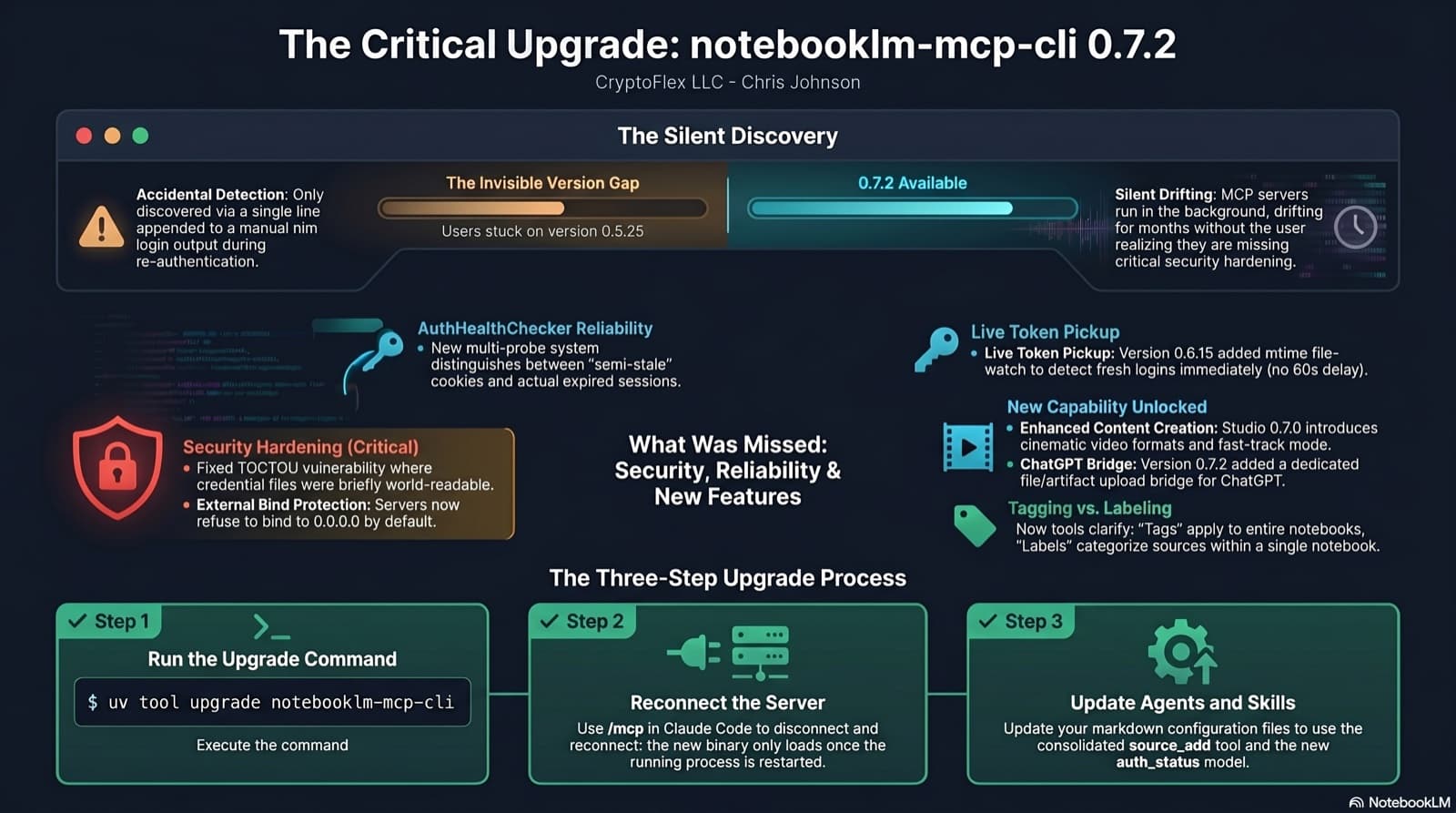
I was two minor versions behind on notebooklm-mcp-cli and had no idea until a re-auth banner interrupted a session. The gap was 0.5.25 to 0.7.2. Security fixes, auth reliability improvements, and new features I was missing the whole time. Here is the three-part upgrade that most people stop after step one.
My Gmail assistant ran clean for two months, then quietly died for a full week before I noticed. The bridge daemon that drove it had pinned itself to a stale Claude CLI version, every scheduled fire failed within seconds, and no transcript was ever written. This post walks through why I migrated the agent off Claude Routines and onto the Claude Agent SDK, what the new stack looks like on launchd, and the parity gate that has to pass before the old agent gets decommissioned.
Comments
Subscribers only — enter your subscriber email to comment