
AI-Powered Newsletter Intros with Claude Haiku
How I made each weekly digest newsletter unique by using Claude Haiku to generate two-paragraph intros with historical tech facts, holiday callouts, and graceful fallback when the API fails.
I have a confession: my weekly digest newsletter sent the same intro paragraph every Monday. Subscribers got the same "Thanks for being a subscriber!" text week after week, followed by a list of new blog posts. It worked, but it felt mechanical. Every newsletter looked identical except for the post titles.
I wanted each week to feel unique. A fun historical tech fact. A nod to upcoming holidays. An excited summary of the posts written as if I'd personally crafted it that morning. But I wasn't going to write a custom intro manually every week. That's the kind of recurring task that AI should handle automatically.
So I built a feature that calls Claude Haiku to generate a two-paragraph intro for each digest. It runs server-side when the Vercel Cron job sends the newsletter, costs about a tenth of a cent per generation, and includes a graceful fallback to static text if the API key is missing or the call fails. The newsletter always sends, even if the AI is down.
This is the story of building that feature: the architecture, the prompt engineering, the XSS sanitization, the model ID bug that broke it in production, and the testing infrastructure that caught everything except the one thing that mattered.
Why Static Intros Are Boring#
Here's what the original weekly digest looked like:
This Week at CryptoFlex
Thanks for being a subscriber. It means a lot! Every week I share what I've been learning about cybersecurity, infrastructure, AI-assisted development, and the projects I'm building.
Here's what I learned and wrote about this week:
- Building Custom Analytics with Claude Code
- Security Hardening the Analytics Dashboard
Same greeting every week. Same transition sentence. Only the post list changed. It was functional but generic. If you got three weeks of digests in a row, you'd notice the repetition immediately.
Repetition Breeds Unsubscribes
Email fatigue is real. When subscribers see identical intros week after week, they start pattern-matching and stop reading. The newsletter becomes background noise. Adding variability keeps engagement high, even if the core structure stays the same.
I wanted each intro to feel handcrafted. Reference the date. Acknowledge holidays or tech anniversaries happening that week. Tease the blog posts with excitement. But writing a custom intro every Monday morning would take 10 minutes of mental energy I didn't want to spend.
The solution: automate it with AI, but make the automation reliable enough that it never blocks the newsletter from sending.
The Architecture: Graceful AI with a Safety Net#
The core design principle: the newsletter must always send, even if the AI fails. No API key? Send the static text. API timeout? Send the static text. Empty response? Send the static text. The AI is an enhancement, not a dependency.
Here's the function signature:
export interface DigestIntro {
  greeting: string;
  contentIntro: string;
  fromAi: boolean;
}

export async function generateDigestIntro(
  posts: PostInfo[],
  sendDate: Date
): Promise<DigestIntro>
It takes an array of post metadata (title, description, tags) and the send date, and returns two paragraphs: a greeting and a content intro. The fromAi flag lets the route log whether the AI generation succeeded, which is critical for monitoring in production.
Monitor AI Features with Boolean Flags
When you add AI to a production feature, include a boolean flag in your response or logs indicating whether the AI succeeded. This gives you visibility into success rates without needing separate error tracking. A sudden drop from 95% AI success to 0% tells you immediately that something broke.
The fallback is defined as constants at the top of the module:
const STATIC_GREETING =
  "Thanks for being a subscriber — it means a lot! Every week I share what I've been learning about cybersecurity, infrastructure, AI-assisted development, and the projects I'm building.";

const STATIC_CONTENT_INTRO =
  "Here's what I learned and wrote about this week:";
Every error path returns these. No API key configured? Fallback. API throws a network error? Fallback. Response is empty? Fallback. The code uses early returns to handle each failure case immediately:
if (!process.env.ANTHROPIC_API_KEY) {
  return { greeting: STATIC_GREETING, contentIntro: STATIC_CONTENT_INTRO, fromAi: false };
}

try {
  const client = new Anthropic({ timeout: 10_000 });
  const response = await client.messages.create({ /* ... */ });

  if (!text.trim()) {
    console.error("Newsletter intro: empty AI response, using fallback");
    return { greeting: STATIC_GREETING, contentIntro: STATIC_CONTENT_INTRO, fromAi: false };
  }

  // Success path
  return { greeting, contentIntro, fromAi: true };
} catch (error) {
  console.error("Newsletter intro generation failed:", error);
  return { greeting: STATIC_GREETING, contentIntro: STATIC_CONTENT_INTRO, fromAi: false };
}
The 10-second timeout on the Anthropic client prevents the cron job from hanging. Vercel cron routes have a 30-second execution limit (configurable with maxDuration), and the newsletter send loop needs time to deliver emails to all subscribers. A stuck API call would kill the entire job.
Prompt Engineering for Email#
Writing a prompt for email content is different from writing a prompt for web content. You can't use Markdown. You need HTML entities for special characters. No bold, no headers, no bullet points. Just plain text paragraphs that will be injected into an HTML template.
Here's the system prompt:
const systemPrompt = [
  "You are Chris, the founder of CryptoFlex LLC. You write in first person with a warm, enthusiastic, tech-loving tone.",
  "Write exactly TWO paragraphs separated by a blank line.",
  "Paragraph 1: Open with a fun historical tech fact tied to the week of " + weekOf + ". If there are notable holidays or observances this week, weave them in naturally.",
  "Paragraph 2: Give an excited, brief summary of the blog posts included this week. Mention each post by name and hint at what readers will learn.",
  "Rules:",
  "- NEVER use em dashes. Use commas, periods, colons, or parentheses instead.",
  "- Do NOT use markdown formatting (no **, no #, no bullet points).",
  "- Do NOT include a greeting like 'Hey' or 'Hi' at the start.",
  "- Do NOT include a sign-off like 'Cheers' or 'Best' at the end.",
  "- Use HTML entities for special characters: ’ for apostrophes, & for ampersands.",
  "- Keep each paragraph to 2-3 sentences.",
  "- Write in plain text suitable for an HTML email (no tags).",
].join("\n");
The key constraints:
- Exactly two paragraphs: One for the historical fact and holidays, one for the post summary. Separated by a blank line so I can split on
\n\s*\n. - No em dashes: This is a personal style rule from my coding guidelines. Rewrite sentences to flow naturally without them.
- No Markdown: AI models love to output
**bold**and# headers. Explicitly forbidding Markdown prevents cleanup work later. - HTML entities: The email template uses HTML entities (
’,—), so the AI should too. Consistency in encoding. - No greeting or sign-off: Those are handled by the email template itself. The AI just writes the body paragraphs.
Why Historical Tech Facts?
I wanted the intro to feel educational and fun, not just "here are this week's posts." A fact like "This week in 1971, the first email was sent" or "February 14th is also the anniversary of YouTube's launch" gives the newsletter personality. It positions the digest as part of a larger tech history narrative, not just a content dump.
The user prompt is dead simple:
const userPrompt = `Week of: ${weekOf}\n\nBlog posts this week:\n${postList}`;
Where postList is a bulleted list of post titles, descriptions, and tags. The AI uses this to craft the second paragraph's post summary.
Protecting Against Yourself: Sanitizing AI Output#
AI-generated content injected into HTML is an XSS vector. Even if the AI is trustworthy, a prompt injection attack (via a malicious post title in the database) could make it output <script>alert('XSS')</script>. The sanitization layer is non-negotiable.
Here's the sanitizer:
function sanitizeAiText(str: string): string {
return str.replace(/<[^>]*>/g, "").replace(/"/g, """);
}
It strips all HTML tags and encodes double quotes. The regex /<[^>]*>/g matches any <tag> and removes it completely. Quote encoding prevents breaking out of HTML attributes if the text is ever used in an attribute context.
Every paragraph from the AI passes through this before being returned:
const paragraphs = text
  .split(/\n\s*\n/)
  .map((p) => p.trim())
  .filter(Boolean);

const greeting = sanitizeAiText(paragraphs[0] ?? STATIC_GREETING);
const contentIntro = sanitizeAiText(paragraphs[1] ?? STATIC_CONTENT_INTRO);
Trust No AI Output in Production
Treat AI-generated text like user input. Sanitize it before injecting into HTML, SQL, or shell commands. Even if your prompt says "never output HTML," a determined attacker can craft inputs that override your instructions. Defense in depth means sanitizing at the boundary, not trusting the AI to follow rules.
The newsletter route then injects these sanitized strings directly into the HTML template:
<p style="font-size:16px;line-height:1.6;color:#d4d4d4;margin:0 0 20px">
  ${intro?.greeting ?? "Thanks for being a subscriber..."}
</p>
No additional escaping needed. The sanitizer already handled it.
The Model ID Bug: Debugging in Production#
I deployed the feature to production, triggered the cron job manually with ?testEmail=chris.johnson@cryptoflexllc.com, and checked the response JSON:
{
  "ok": true,
  "sent": 1,
  "posts": 2,
  "aiIntro": false
}
The aiIntro flag was false. The AI didn't run. But I had the API key configured. The route logs showed no errors. What was happening?
I added debug output to the /api/cron/weekly-digest route to capture the actual error:
let debugError: string | undefined;
if (hasNewPosts) {
  try {
    intro = await generateDigestIntro(recentPosts, new Date());
  } catch (err) {
    debugError = err instanceof Error ? err.message : String(err);
    console.error("Newsletter intro failed:", debugError);
  }
}

return NextResponse.json({
  ok: true,
  sent,
  posts: recentPosts.length,
  aiIntro: intro?.fromAi ?? false,
  debugError,  // Added this line
});
I redeployed and hit the test endpoint again. This time the response included:
{
  "ok": true,
  "sent": 1,
  "posts": 2,
  "aiIntro": false,
  "debugError": "404 - model not found"
}
A 404. The model didn't exist. I checked the code:
const response = await client.messages.create({
  model: "claude-haiku-4-5-latest",
  max_tokens: 400,
  // ...
});
The model ID claude-haiku-4-5-latest doesn't exist. The correct ID is claude-haiku-4-5-20251001 (the specific release date version). I'd been using an incorrect alias that looked plausible but wasn't real.
Always Use Exact Model IDs in Production
Anthropic's API requires exact model IDs with release date suffixes like claude-haiku-4-5-20251001. Aliases like claude-haiku-4-5-latest don't exist and return 404 errors. Check the official API documentation for the current model ID before deploying. This mistake cost me 20 minutes of debugging.
I fixed the model ID, redeployed, and tested again:
{
  "ok": true,
  "sent": 1,
  "posts": 2,
  "aiIntro": true
}
Success. The AI intro worked. The email had a unique opening paragraph about the week of February 14th and Valentine's Day tech trivia.
The ironic part: my unit tests all passed because they mocked the Anthropic SDK. The tests never hit the real API, so they never caught the invalid model ID. Integration testing would have caught it, but I only tested against the fallback path in production initially.
Testing Without Spamming Subscribers#
Building a newsletter feature creates a testing problem: how do you test email delivery without sending test emails to all 100+ subscribers every time you iterate?
I added a testEmail query parameter to the cron route:
const testEmail = request.nextUrl.searchParams.get("testEmail");
let recipients: { email: string }[];

if (testEmail) {
  recipients = [{ email: testEmail }];
} else {
  const sql = getDb();
  const rows = await sql`SELECT email FROM subscribers WHERE active = TRUE`;
  recipients = rows.map((r) => ({ email: r.email as string }));
}
When you call /api/cron/weekly-digest?testEmail=chris@example.com, it sends the digest to only that address. Still requires CRON_SECRET auth, so random internet users can't trigger it. But now I can test the full email template, AI generation, and SMTP delivery without spamming my subscriber list.
Use Query Params for Test Overrides
Adding test parameters to production routes lets you test real behavior in production without side effects. ?testEmail= for newsletters, ?dryRun=true for billing operations, ?debugMode=true for verbose logging. Gate them behind the same auth as the production route and document them in your internal wiki.
This made iteration fast. Change the prompt, redeploy, hit the test URL, check the email. No waiting for the Monday cron schedule. No setting up local email servers.
The Test Suite: Unit Tests for the Intro Module#
I wrote 7 unit tests for the newsletter-intro.ts module using vitest. The challenge: how do you test code that calls an external API without actually calling it?
The answer: mock the Anthropic SDK using a class-based factory mock:
const mockCreate = vi.fn();

vi.mock("@anthropic-ai/sdk", () => ({
  default: class MockAnthropic {
    messages = { create: mockCreate };
  },
}));
This replaces the real Anthropic class with a mock version where messages.create is a spy function. Each test configures what mockCreate returns:
it("should return AI-generated two-paragraph intro on success", async () => {
  mockCreate.mockResolvedValueOnce({
    content: [
      {
        type: "text",
        text: "This week marks the anniversary of the first email.\n\nI'm excited to share two posts with you.",
      },
    ],
  });

  const { generateDigestIntro } = await import("./newsletter-intro");
  const result = await generateDigestIntro(testPosts, testDate);

  expect(result.fromAi).toBe(true);
  expect(result.greeting).toBe("This week marks the anniversary of the first email.");
  expect(result.contentIntro).toBe("I'm excited to share two posts with you.");
});
The test suite covers:
- Successful AI response with two paragraphs
- Missing
ANTHROPIC_API_KEYreturns static fallback - API call throws an error returns static fallback
- Single-paragraph response gracefully uses static for second paragraph
- Empty AI response returns static fallback
- Correct model ID and params passed to the API
- Post data included in the prompt
All 7 tests passed before deployment. But they didn't catch the model ID bug because the mock never validated the model name. That's the limitation of unit testing: you test the logic, not the external dependencies.
Unit Tests Can't Catch API Contract Bugs
Mocking external APIs in unit tests verifies your code's logic, not whether the API works as expected. The model ID bug slipped through because the mock accepted any model string. To catch contract violations, you need integration tests that hit the real API (or a staging environment that mirrors it).
The integration tests for the full cron route add another 15 tests, bringing the total to 22. Coverage for the newsletter feature sits at 98% statement coverage according to vitest.
The Numbers#
Here's the cost and effort breakdown:
| Metric | Value |
|---|---|
| API calls per newsletter | 1 |
| Cost per API call (Haiku) | ~$0.001 |
| Newsletters per year | 52 |
| Annual AI cost | ~$0.05 |
| Lines of code (intro module) | 107 |
| Lines of code (tests) | 154 |
| Unit tests | 7 |
| Integration tests | 15 |
| Total test coverage | 98% |
| Deployment bugs | 1 (model ID) |
The economics are absurd. For five cents a year, every newsletter gets a unique, contextually relevant intro that references the date, holidays, and post content. That's cheaper than a single piece of penny candy.
The development cost was about 90 minutes: 30 minutes building the feature, 30 minutes writing tests, 30 minutes debugging the production model ID issue. The ongoing maintenance cost is zero unless the API contract changes.
What's Next#
The feature works, but there are opportunities to make it better:
Seasonal theming: Pass the current season or major upcoming holiday as context to the prompt. Valentine's Day week gets romantic tech history, Halloween week gets spooky bugs and vulnerabilities, December focuses on year-in-review.
Subscriber personalization: If I ever track subscriber preferences (security-focused vs. AI-focused readers), I could tailor the post summary paragraph to emphasize relevant posts for each cohort. This requires segmenting the subscriber list and generating multiple intros per send, which increases cost but improves engagement.
A/B testing: Send 50% of subscribers the AI intro and 50% the static intro, then track open rates and click-through rates. Does uniqueness actually improve engagement, or is it just a nice-to-have?
Fallback quality tiers: Right now the fallback is fully static. I could add a middle tier that uses template strings with dynamic date injection but no AI. So even if Haiku is down, the intro at least says "Happy February 14th!" instead of generic text.
For now, though, the feature does exactly what I wanted: makes each newsletter feel unique without adding manual work to my Monday mornings. And at five cents a year, it's one of the best ROI features I've ever built.
Written by Chris Johnson and edited by Claude Code (Opus 4.6). The website source is at github.com/chris2ao/cryptoflexllc. This post is part of a series about AI-assisted development. Previous: Going Agentic-First: Restructuring Claude Code for Parallel Intelligence. Next: Will LLM Agents Replace Pentesters? I Ran a 4-Agent Security Sprint to Find Out.
Weekly Digest
Get a weekly email with what I learned, summaries of new posts, and direct links. No spam, unsubscribe anytime.

Related Posts
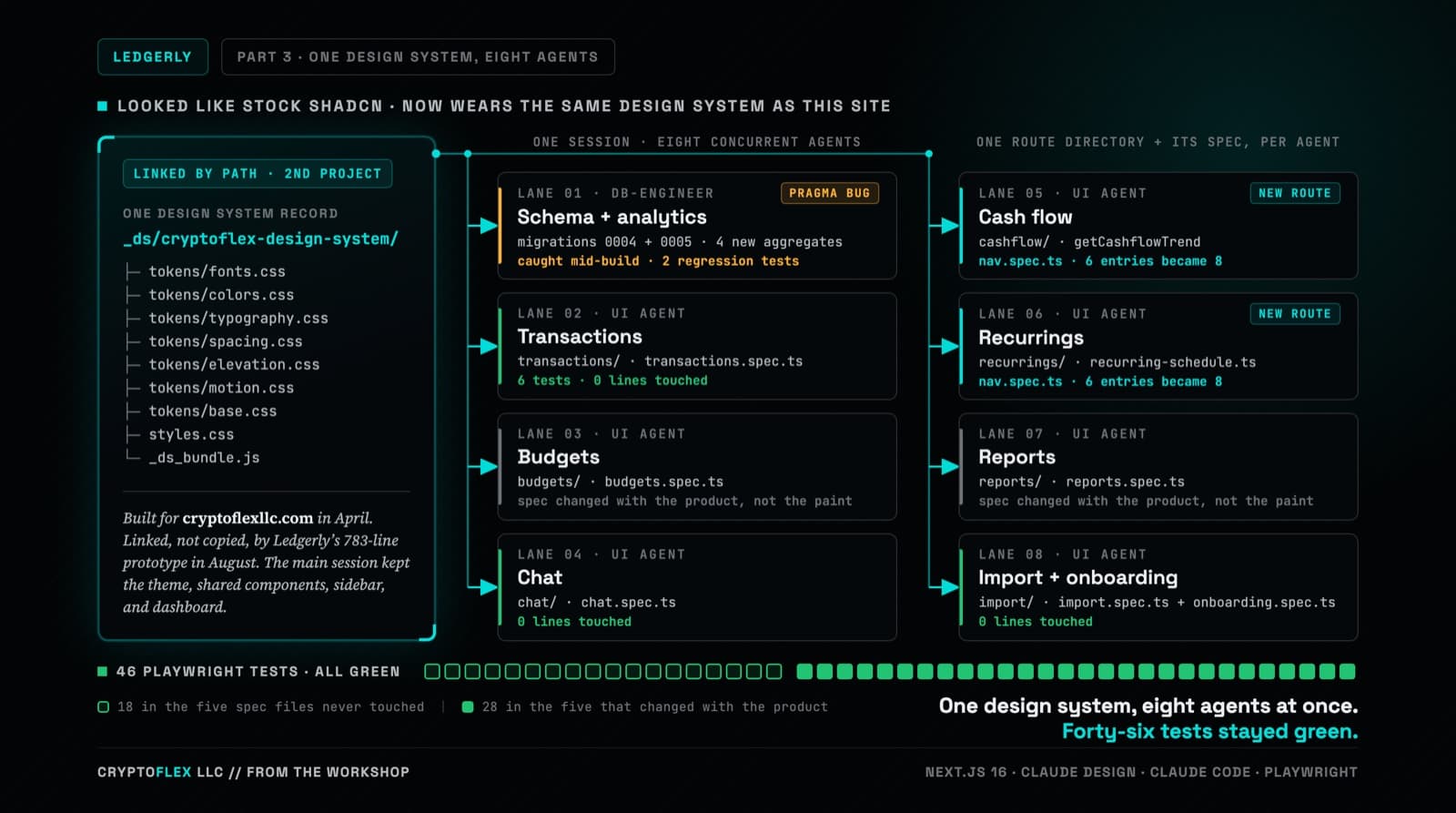
Ledgerly's UI still worked but looked like stock shadcn, so the whole thing went through Claude Design and came back wearing CryptoFlex's Cyber Editorial system, the same one from April's site rebuild. Eight parallel agents rebuilt every screen against real backend constraints while 46 Playwright tests stayed green, one of them written to prove a SQLite migration bug on purpose.
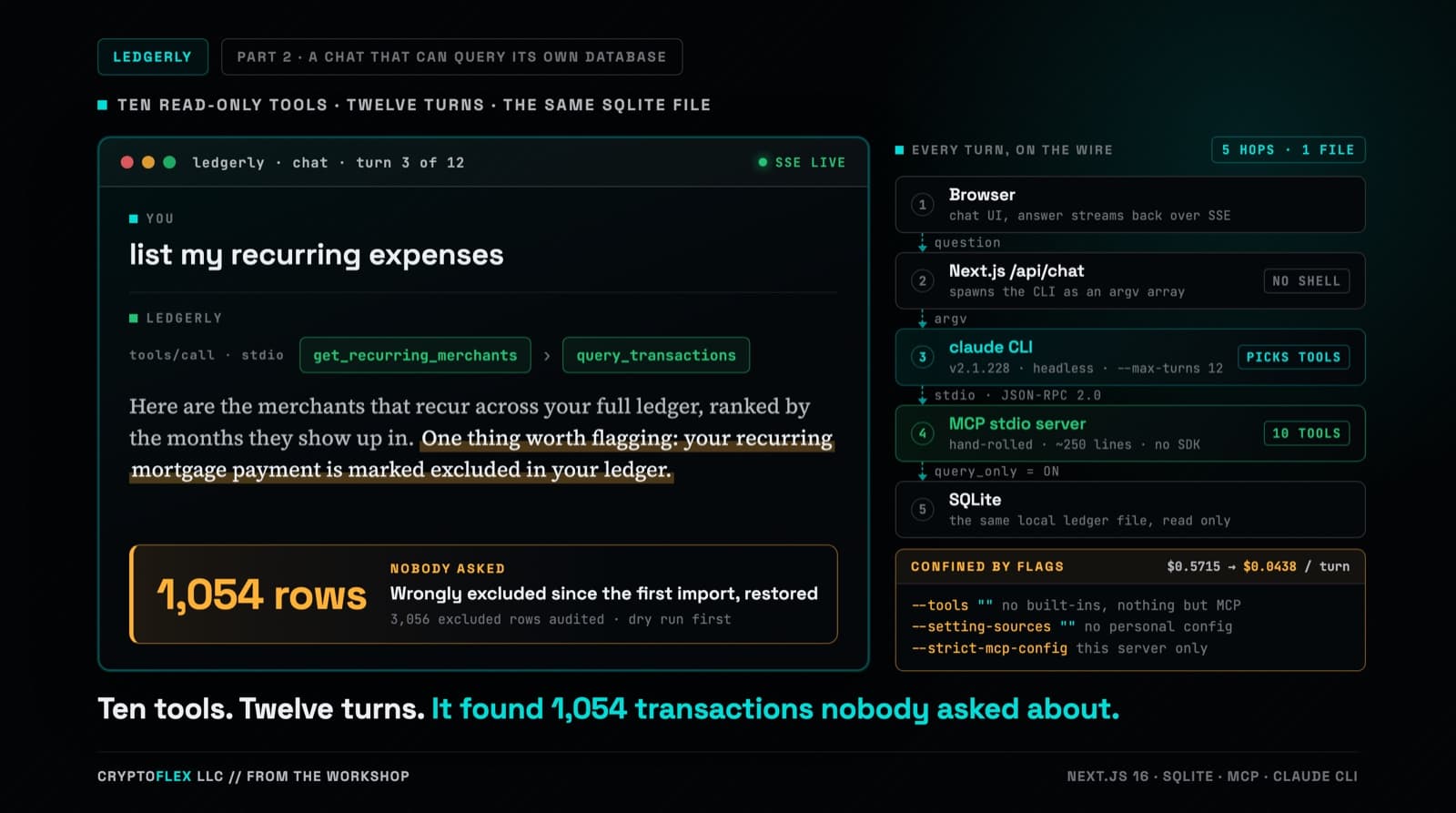
Part one's chat answered from two months of category totals stuffed into a single-turn prompt, and it could not run one query against the database sitting right there. Part two replaces that with a hand-rolled MCP server, ten read-only tools, and multi-turn tool calling confined by CLI flags a de-risking spike worked out against the real claude CLI. Three review passes ran before the commit, and one confirmed finding was a tool-name mismatch that every unit test passed and only a captured NDJSON fixture caught. The same work also turned up a data problem that had nothing to do with any of it: 1,054 real transactions wrongly marked excluded since the original import in part one.
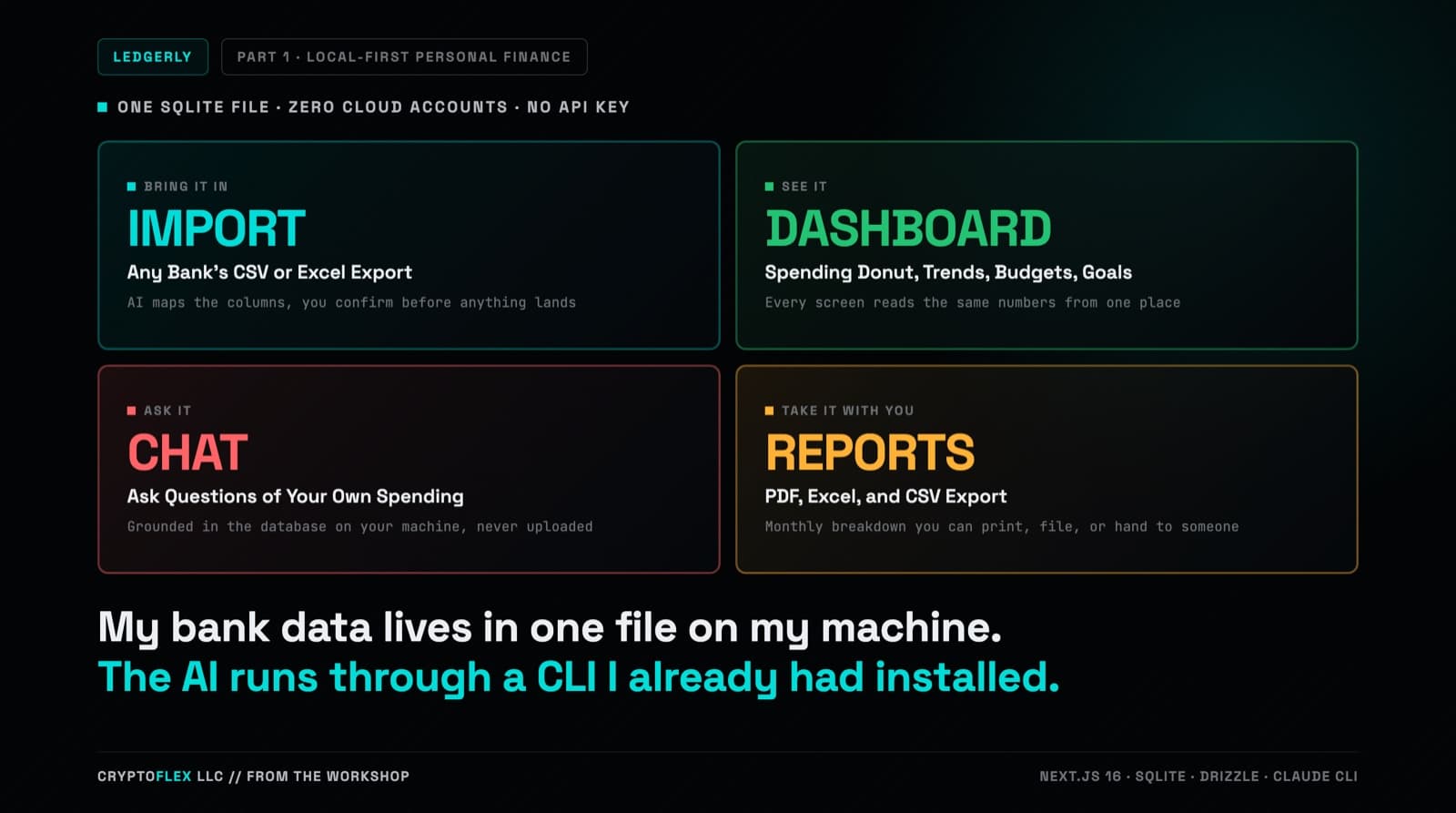
I wanted a personal finance app that molds to how I actually track money: any bank's CSV or Excel export, real categorization, budgets and goals, and an AI I can ask questions of my own spending. Ledgerly is what I built: local-first, one SQLite file on my machine, no cloud, and AI that runs through the Claude CLI I already have installed. This is part one of the series, covering the use case, the build, and two bugs a layman QA gate caught before I started running v1 against my real money.
Comments
Subscribers only — enter your subscriber email to comment