
Claude Code Workflow
20 posts in this series
How I built a 12-step /wrap-up slash command that automates end-of-session documentation across multiple repos - pulling latest, extracting learned skills, cleaning global state, updating changelogs, committing in Hulk Hogan's voice, and pushing. A step-by-step breakdown of every function and why it exists.
A technical deep dive into notification hooks, terminal bell protocols, and why playing a simple sound required understanding BEL characters, OSC sequences, and Windows API calls.
A comprehensive configuration overhaul that transformed my Claude Code workflow from serial execution to parallel agent orchestration. 7 custom agents, 9 rules reorganized, file protection hooks, and the philosophy of why every AI-assisted developer should go agentic-first.
A 5-agent team chewed through a week of Claude Code session logs and surfaced patterns I never would have found manually. Including the revelation that my worst day wasn't actually that bad.
From 70K tokens per session to 7K. A 7-agent audit, 23 evaluation documents, 11 component scorecards, 5 optimization patterns, and an 8-agent implementation team. This is the full story of cutting context consumption by 90%.
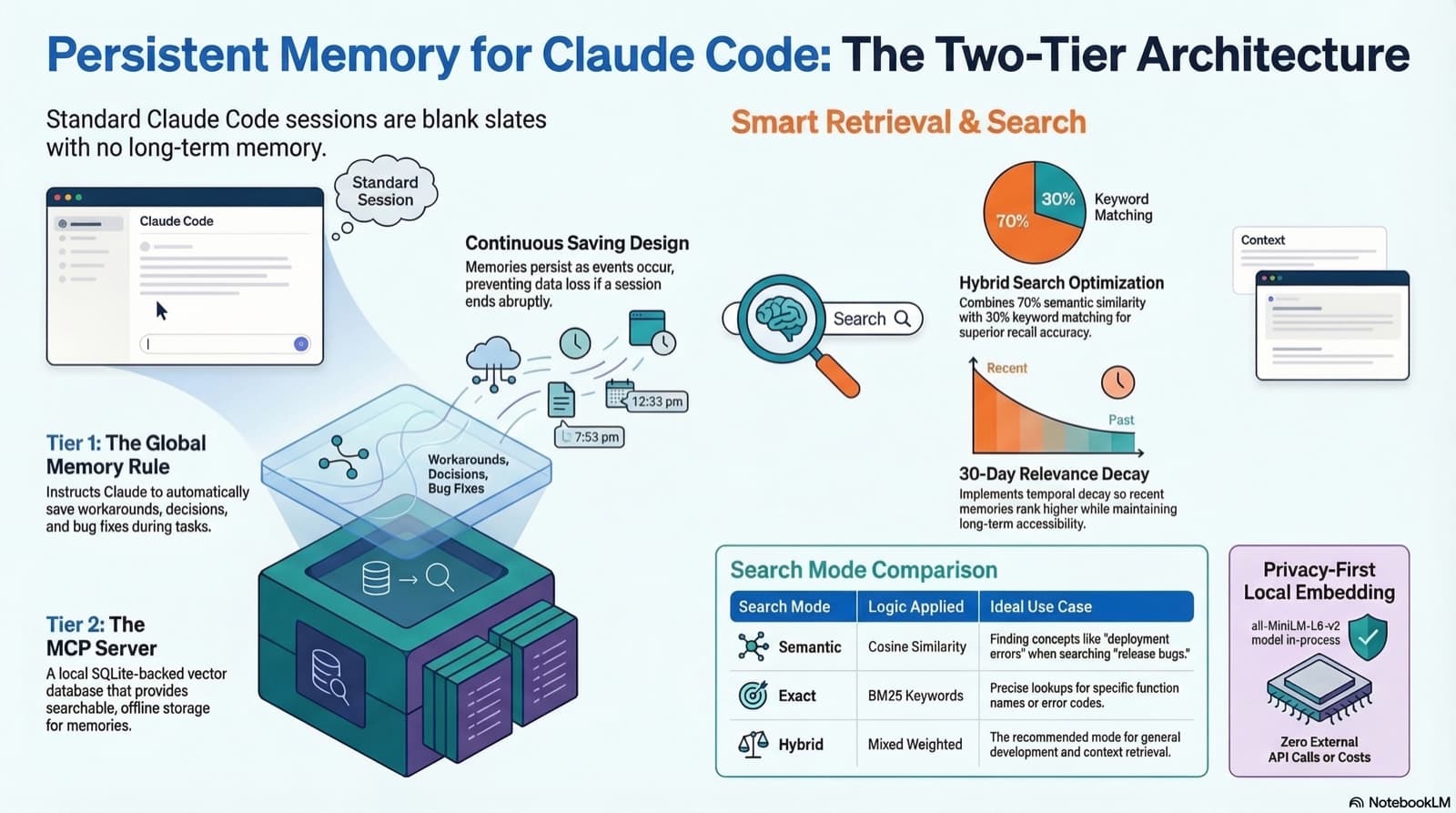
How to give Claude Code real persistent memory using a global rule file and a vector database MCP server, so context survives across sessions without any manual effort.
A practical walkthrough of the 5 Node.js MCP servers I run with Claude Code: sequential-thinking, memory, context7, github, and project-tools. What they do, how to configure them on Windows, and what I learned testing each one.
How I replaced three separate Google Workspace MCP integrations with a single gws CLI skill, why CLI beats MCP for large API surfaces, and the four-tier safety system that keeps destructive operations from running without confirmation.
Three ways to run Claude Code remotely. I tried Dispatch, Channels, and Remote Control. Here's what broke, what worked, and why I landed on Remote Control with Warp terminal on my always-on Mac Mini.
I set up the Claude Code iMessage plugin as a proof of concept, debugged two real bugs, and discovered a fundamental security flaw that made me tear the whole thing down. Here's the full story.
Claude Code's /compact command frees up context but destroys in-progress session state. Smart-compact is a custom skill that saves everything before you compact, so you can pick up exactly where you left off.
I ran a routine audit on my Gmail agent and discovered the knowledge graph had been completely empty for months, the memory nudge hook had five blind spots, and nothing was catching either problem. Here's what I built to fix it.
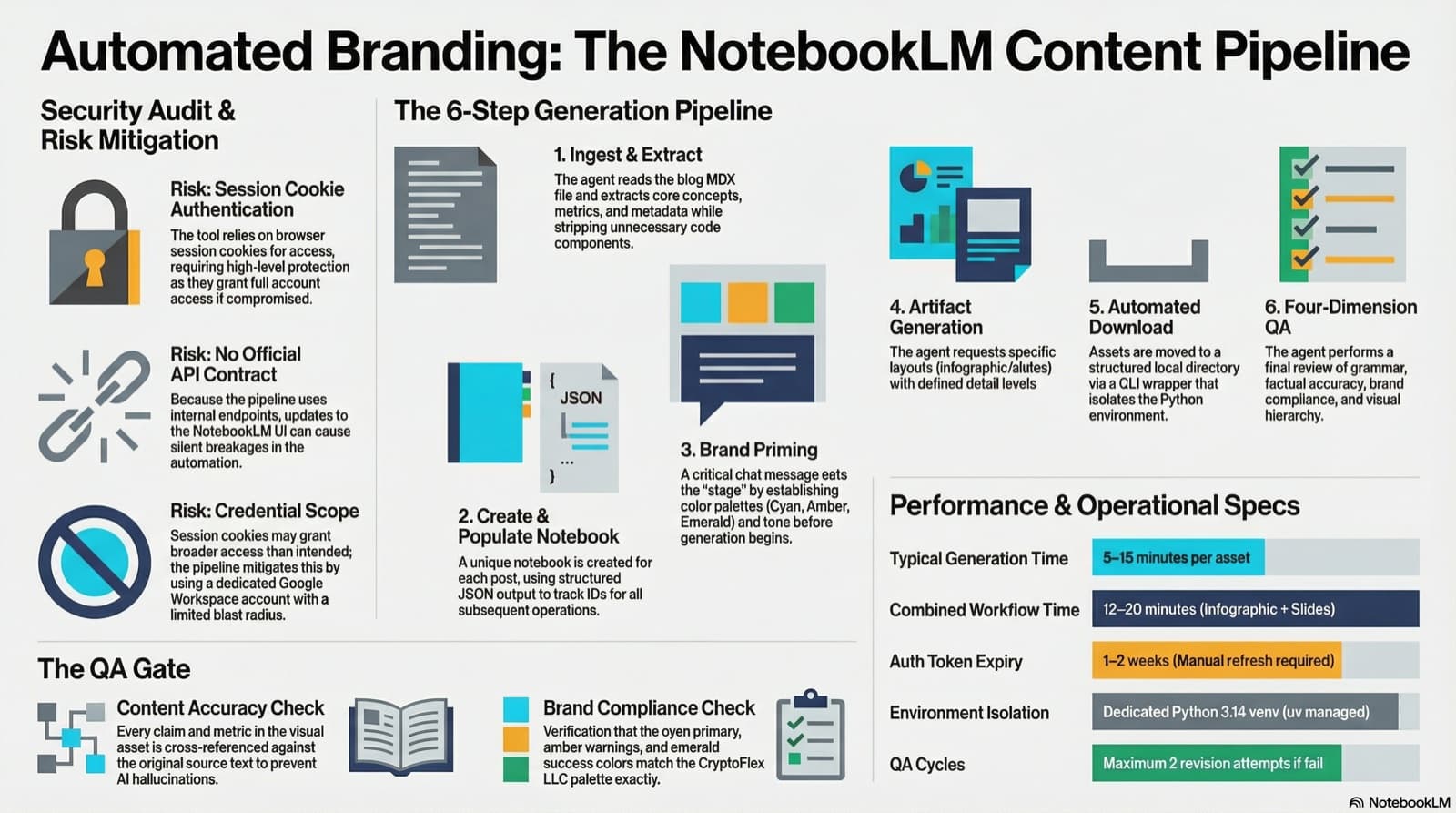
I set up notebooklm-py as a programmatic content creation pipeline for CryptoFlex LLC, building a custom agent and skill that turns blog posts into branded infographics and slide decks with automated QA. Here is how the security review went, what the pipeline looks like, and what I learned about trusting reverse-engineered APIs.
A beginner-friendly guide to the features that make Claude Code powerful: CLAUDE.md, directory structure, permissions, plan mode, checkpoints, skills, hooks, MCP, plugins, context, slash commands, compaction, agents, and rules. Everything you need to know to get started successfully.
35 MCP tools, 7 implementation tasks, 2 platforms, 1 session. How I used the superpowers brainstorming, writing-plans, and subagent-driven-development pipeline to integrate NotebookLM into Claude Code as a first-class MCP server.
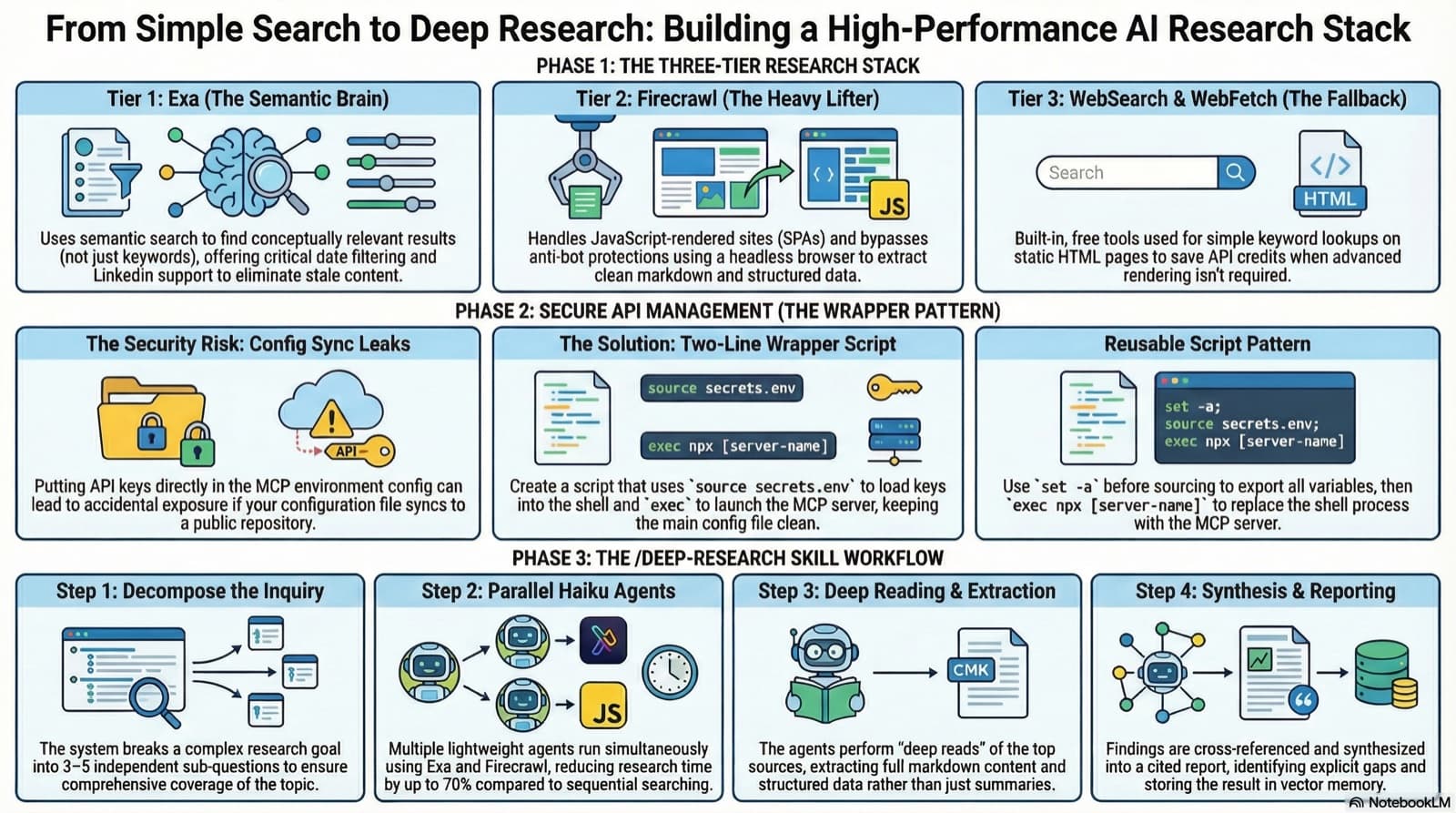
3 test sessions, 2 MCP servers, 1 wrapper script fix. How I added Exa and Firecrawl to Claude Code for semantic search, JS-rendered scraping, and proper deep research capability.
My Gmail assistant ran clean for two months, then quietly died for a full week before I noticed. The bridge daemon that drove it had pinned itself to a stale Claude CLI version, every scheduled fire failed within seconds, and no transcript was ever written. This post walks through why I migrated the agent off Claude Routines and onto the Claude Agent SDK, what the new stack looks like on launchd, and the parity gate that has to pass before the old agent gets decommissioned.
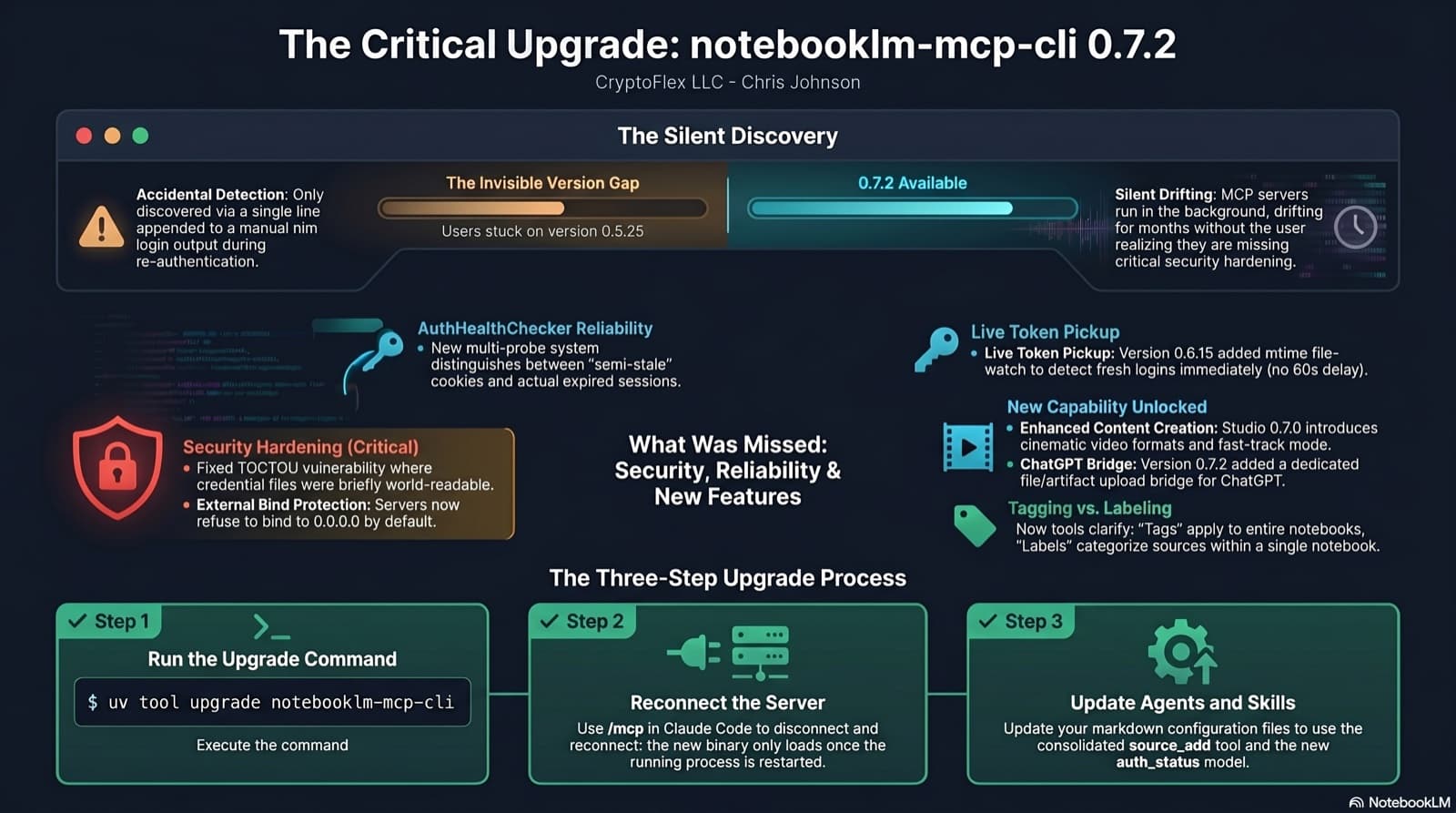
I was two minor versions behind on notebooklm-mcp-cli and had no idea until a re-auth banner interrupted a session. The gap was 0.5.25 to 0.7.2. Security fixes, auth reliability improvements, and new features I was missing the whole time. Here is the three-part upgrade that most people stop after step one.
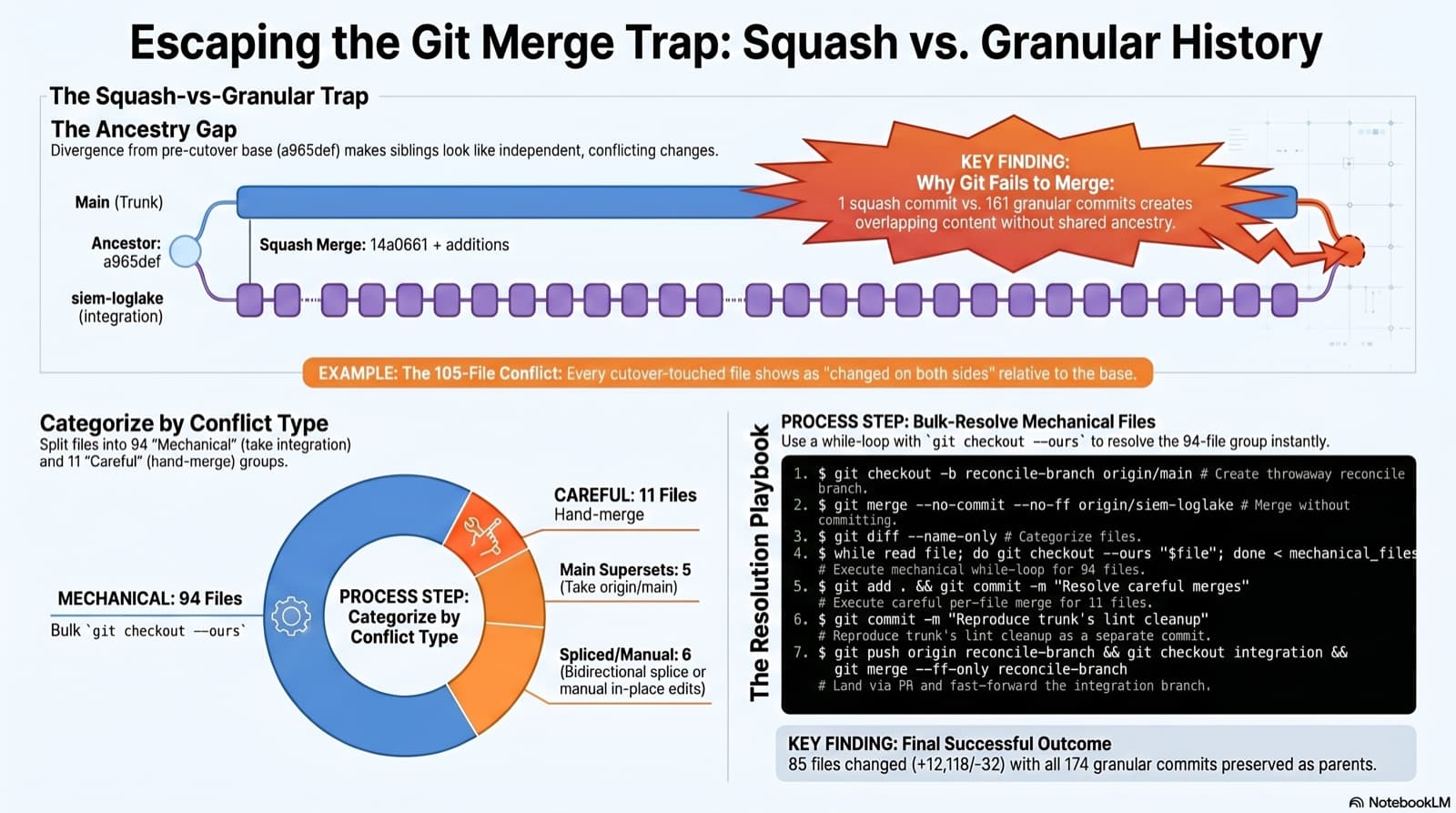
A long-lived integration branch went unmergeable two months after the trunk took its first big slice as a squash merge. Plain git merge spat 105 conflicted files. This post walks the playbook that landed it: how to spot the trap, how to categorize the conflicts, the exact commands that resolved 94 of them mechanically, and the three subtleties that bite you when you reach for `git checkout --ours`.
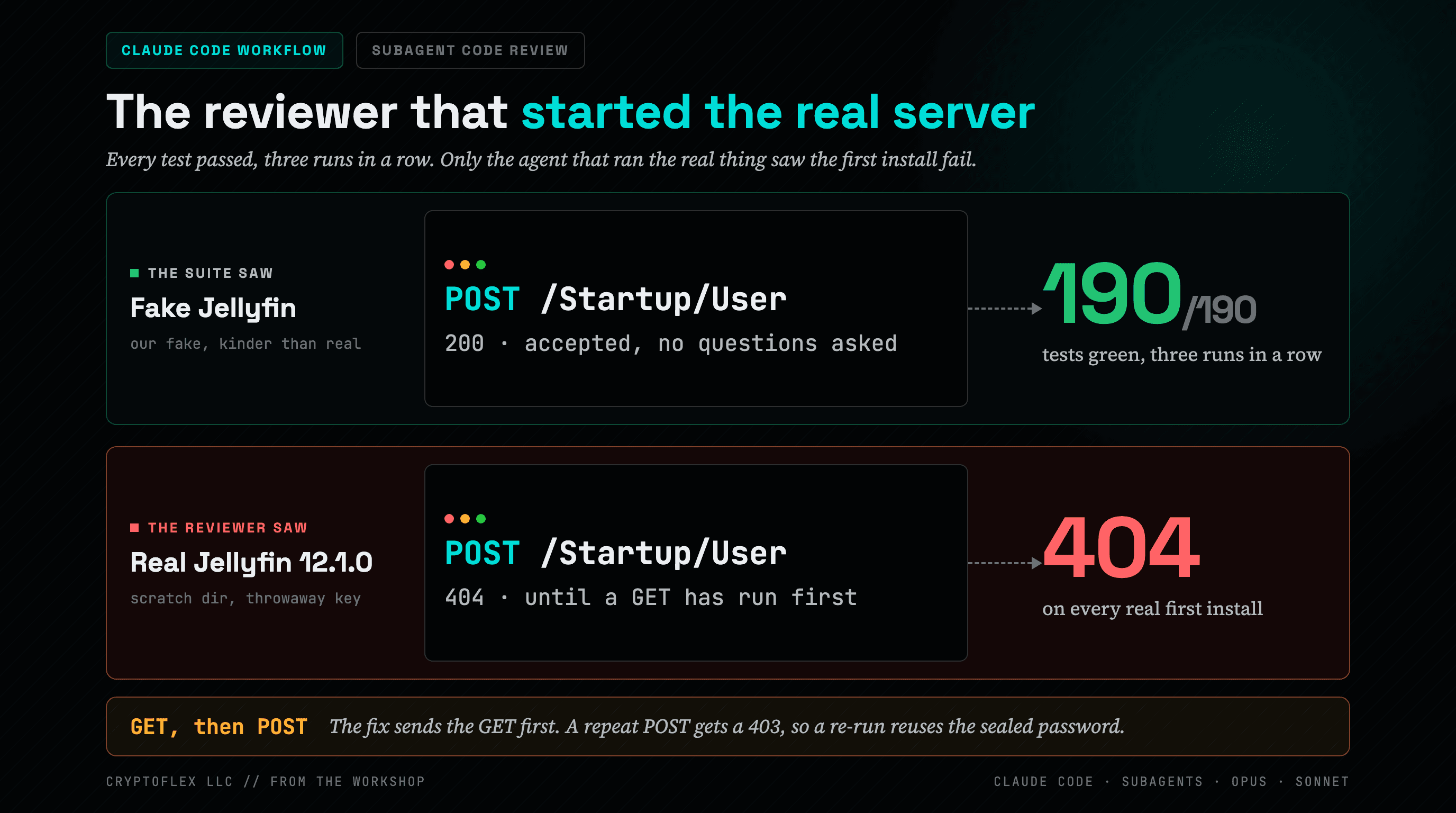
One Claude Code session ran a six-day build through 202 subagents, and the reviewers that started real servers instead of reading diffs are why it was safe to ship.