
From WebSearch to Deep Research: Adding Exa and Firecrawl to Claude Code
3 test sessions, 2 MCP servers, 1 wrapper script fix. How I added Exa and Firecrawl to Claude Code for semantic search, JS-rendered scraping, and proper deep research capability.
3 test sessions before everything worked. That's how long it took to get Exa and Firecrawl running as MCP servers inside Claude Code. The tools themselves are excellent. The problem was getting API keys into MCP subprocesses without leaking them into a config file that syncs to a public repo.
Here's the full story: what Claude Code's built-in search tools can and can't do, why I needed something better, and the debugging journey that ended with a two-line wrapper script.
Series Context
This is part of the Claude Code Workflow series. The previous post covered the NotebookLM MCP integration. This one adds two more MCP servers to the stack for web research.
The Limitation#
Claude Code ships with two built-in web tools: WebSearch and WebFetch. They work fine for basic lookups. Need to find the current version of a library? WebSearch handles it. Need to grab the contents of a static HTML page? WebFetch does the job.
But I was trying to do actual research. Multi-source, cross-referenced, properly cited research. And that's where the built-in tools fell apart.
WebSearch does keyword matching only. There's no semantic search, no date filtering, and no way to scope results to specific domains. Search for "MCP adoption trends 2026" and you get whatever Google's keyword algorithm surfaces. No control over recency, no way to exclude noise.
WebFetch can't render JavaScript. Try to fetch a page from a modern SPA and you get an empty <div id="root"></div>. LinkedIn blocks it entirely. So does a growing list of sites with bot detection.
For the kind of research I wanted to do (investigating AI memory architectures across 22 sources, for example), these tools weren't enough.
Built-in Tools Have Real Limits
WebSearch returns keyword results without date or domain filtering. WebFetch returns raw HTML without JavaScript rendering. If your research target is a modern web app, a LinkedIn post, or anything behind bot detection, these tools return nothing useful.
The Solution: A Three-Tier Tool Stack#
The fix was adding two MCP servers that handle what the built-in tools can't, then layering all four tools into a priority system.
Swipe to see the full diagram · Tap to enlarge
Tier 1: Exa (Semantic Search)#
Exa is the primary research tool. Unlike WebSearch, it does semantic search: you describe what you're looking for in natural language, and it returns conceptually relevant results. Not just keyword matches.
Three tools come with the Exa MCP server:
web_search_exa: Semantic web search with date filtering, domain scoping, and content highlighting. You can search for "how teams are adopting MCP servers in production" and get articles that discuss the concept even if they don't use those exact words.crawling_exa: Fetches and extracts content from specific URLs as clean markdown.get_code_context_exa: Searches code repositories, Stack Overflow, and documentation. Useful for finding implementation examples.
The killer features are date filtering and LinkedIn search. I can search for results published in the last 30 days, which eliminates stale content entirely. And Exa can actually return LinkedIn posts, which WebFetch can't touch.
Exa's Free Tier Is Generous
1,000 requests per month on the free plan. For personal research use, that's more than enough. I've been averaging around 50 requests per research session, so one session per week stays well within limits.
Tier 2: Firecrawl (JS-Rendered Scraping)#
Firecrawl handles everything that requires JavaScript rendering. Modern documentation sites, SPAs, pages behind Cloudflare bot detection. It uses a headless browser to render the page fully before extracting content as structured markdown.
The MCP server exposes 12 tools, but the most important ones are:
firecrawl_scrape: Renders a single page with full JS execution and returns clean markdown with metadata.firecrawl_crawl: Crawls an entire site, following links and extracting content page by page.firecrawl_search: Keyword search with content extraction.firecrawl_extract: Structured data extraction using a JSON schema. Point it at a page and tell it what fields to pull out.
I used Firecrawl to scrape modelcontextprotocol.io during testing. WebFetch would have returned a shell of React hydration markers. Firecrawl returned the full page content as markdown with metadata. One credit per scrape.
What Is Firecrawl?
Firecrawl is a web scraping service that renders pages in a real browser before extracting content. This means it can handle Single Page Applications (SPAs), JavaScript-rendered content, and pages that detect and block simple HTTP fetchers. It also includes stealth proxy capabilities for sites with aggressive bot detection.
Tier 3: WebSearch + WebFetch (Fallback)#
The built-in tools still have their place. They're free, they're always available, and they work fine for static pages. If an MCP server is down or a page doesn't need JS rendering, the built-in tools handle it without spending API credits.
The Capability Comparison#
Here's how all four tools compare across the capabilities that matter for research:
| Capability | WebSearch | WebFetch | Exa | Firecrawl |
|---|---|---|---|---|
| Search type | Keyword | N/A | Semantic | Keyword + content |
| Date filtering | No | N/A | Yes | No |
| Domain scoping | No | N/A | Yes | No |
| LinkedIn search | No | Blocked | Yes | Yes |
| JS rendering | N/A | No | N/A | Yes |
| Full page content | N/A | Basic HTML | Markdown extract | Full markdown |
| Site crawling | No | No | No | Yes |
| Structured extraction | No | No | No | Yes (JSON schema) |
| Code/docs search | No | No | Yes (GitHub, SO) | No |
| Anti-bot bypass | No | No | No | Yes (stealth proxy) |
| Cost | Free | Free | 1000 req/mo free | 500 credits free |
The table makes the trade-offs clear. Exa and Firecrawl don't replace the built-in tools. They fill the gaps that the built-in tools can't reach.
The Setup Journey#
This is where things got interesting. Adding MCP servers to Claude Code is straightforward in theory: add the config to ~/.claude.json, provide the API keys, restart. In practice, it took three sessions to get right.
Attempt One: Shell Inheritance (Failed)#
Both Exa and Firecrawl are available as npx packages, which makes the MCP config simple:
{
  "mcpServers": {
    "exa": {
      "command": "npx",
      "args": ["-y", "exa-mcp-server"],
      "env": {}
    },
    "firecrawl": {
      "command": "npx",
      "args": ["-y", "firecrawl-mcp"],
      "env": {}
    }
  }
}
My API keys were already set in ~/.claude/secrets/secrets.env, which gets sourced from my .zshrc. So shell environment variables should be available to child processes, right?
Wrong. Exa returned a 401 on every request. Firecrawl didn't even start properly.
env: {} Passes Nothing
An empty env object in MCP config does not mean "inherit from shell." It means "pass an empty environment." Your .zshrc exports are not available to MCP child processes. This is not a bug. MCP servers run as isolated subprocesses, and the config controls exactly what they receive.
Attempt Two: Explicit Keys in Config (Security Risk)#
The obvious fix was putting the keys directly in the config:
{
  "env": {
    "EXA_API_KEY": "exa-abc123...",
    "FIRECRAWL_API_KEY": "fc-def456..."
  }
}
This worked immediately. Both servers started, authenticated, and returned results.
But there's a problem. My ~/.claude.json syncs to the claude-code-config public repo. Committing API keys to a public repository is exactly the kind of thing that gets flagged in security audits and costs you money when someone scrapes your keys.
I reverted after about ten minutes.
Never Commit API Keys to Config
If your Claude Code config syncs to any repository (public or private), putting API keys in env blocks means those keys end up in version control. Use wrapper scripts or environment injection instead. The convenience is not worth the exposure.
Attempt Three: Wrapper Scripts (The Fix)#
The solution was wrapper scripts that source the secrets file before launching the MCP server. Two files, each about four lines:
~/.claude/scripts/exa-wrapper.sh:
#!/usr/bin/env bash
set -a
source "$HOME/.claude/secrets/secrets.env"
set +a
exec npx -y exa-mcp-server
~/.claude/scripts/firecrawl-wrapper.sh:
#!/usr/bin/env bash
set -a
source "$HOME/.claude/secrets/secrets.env"
set +a
exec npx -y firecrawl-mcp
The set -a flag tells bash to export every variable that gets set, so source loads the keys and immediately exports them. The exec replaces the shell process with the MCP server, keeping the process tree clean.
Then the MCP config points to the wrappers:
{
  "mcpServers": {
    "exa": {
      "command": "bash",
      "args": ["/Users/you/.claude/scripts/exa-wrapper.sh"],
      "env": {}
    },
    "firecrawl": {
      "command": "bash",
      "args": ["/Users/you/.claude/scripts/firecrawl-wrapper.sh"],
      "env": {}
    }
  }
}
This pattern is reusable. Any MCP server that needs environment variables can use the same wrapper approach. The keys live in secrets.env (which is gitignored), the config stays clean, and the MCP server gets everything it needs at startup.
Reusable Pattern for Any MCP Server
The wrapper script approach works for any MCP server that needs API keys or environment variables. Create a wrapper that sources your secrets file, then exec the actual server command. The keys never appear in ~/.claude.json, and the pattern scales to as many MCP servers as you need.
Root Cause Summary#
The root cause was straightforward once I understood it. MCP servers run as child processes spawned by the Claude Code runtime. The env field in the MCP config is the complete environment for that process. Setting it to {} means the process starts with no environment variables at all. Shell exports from .zshrc don't propagate because the Claude Code runtime doesn't spawn MCP servers through a login shell.
The /deep-research Skill#
With both MCP servers working, I built a skill that orchestrates them into a structured research workflow:
- Understand the goal: What question needs answering? What constitutes a complete answer?
- Decompose: Break the research question into 3-5 sub-questions that can be investigated independently.
- Parallel research: Launch haiku-model agents in parallel, each investigating a sub-question using Exa as the primary tool and Firecrawl for JS-heavy sources.
- Deep read: For the most relevant sources, use
crawling_exaorfirecrawl_scrapeto get the full content. - Synthesize: Compile findings into a report with proper citations, cross-referenced claims, and explicit gaps.
- Save: Write the report to
docs/research/and store a summary to vector memory.
The quality rules are simple: every claim needs a source, prefer recent sources over old ones, cross-reference when possible, and always acknowledge what the research didn't cover.
Parallel Agents Save Real Time
Each sub-question runs as its own haiku agent. A 5-question research session that would take 15 minutes sequentially finishes in about 4 minutes with parallel execution. The cost difference is negligible since haiku is the cheapest model.
The Smoke Test#
After wiring everything up, I ran two targeted tests to verify both tools were working correctly.
Exa Test#
Search: "MCP Model Context Protocol adoption 2026"
Filter: published after 2026-01-01
Result: 3 relevant articles with dates, highlights, and source URLs. The semantic matching pulled in articles that discussed MCP adoption patterns even when they used different terminology. Date filtering eliminated everything older than three months.
Firecrawl Test#
Scrape: https://modelcontextprotocol.io
Result: Full page content as markdown, including sections that are rendered dynamically via JavaScript. Metadata included title, description, and status code. One credit consumed.
Both tools returning real data after the wrapper script fix confirmed the setup was complete.
A Gotcha Worth Noting#
During testing, I discovered that crawling_exa expects the urls parameter as an array, not a single string. Passing "urls": "https://example.com" silently fails. It needs "urls": ["https://example.com"]. Small thing, but it cost me a few minutes of confusion.
crawling_exa Expects an Array
The urls parameter for crawling_exa must be an array, even for a single URL. Passing a string instead of an array produces a silent failure with no error message.
What Changed#
Before this setup, research tasks in Claude Code meant WebSearch keyword queries and hoping WebFetch could render the target page. It worked for simple lookups but fell apart for anything requiring depth.
Now the research stack looks like this:
- Need to find conceptually relevant sources? Exa handles it with semantic search and date filtering.
- Need to read a JavaScript-rendered page? Firecrawl renders it in a real browser and returns clean markdown.
- Need to search code examples or Stack Overflow? Exa's code context tool covers it.
- Simple static page? WebFetch still works fine, and it's free.
The /deep-research skill ties all of this together into a workflow that produces cited reports with proper attribution. The first real use was investigating AI memory systems across 22 sources, which I'll cover in the next post.
What's Next
The next post in this series covers the first production use of /deep-research: a 22-source investigation into AI memory architectures that informed the design of the vector memory tuning system. That's where the three-tier stack proved its value.
Lessons Learned#
Semantic Search Changes How You Research
Keyword search finds pages that use specific words. Semantic search finds pages that discuss specific concepts. Once you have both, you stop thinking about search terms and start thinking about questions.
The Wrapper Pattern Scales
The source secrets.env && exec server pattern works for every MCP server that needs credentials. I now use it for Exa, Firecrawl, and any future MCP server that requires API keys. One pattern, consistent security, zero keys in version control.
You can find the full Claude Code configuration (minus the API keys) in the claude-code-config public repo.
Weekly Digest
Get a weekly email with what I learned, summaries of new posts, and direct links. No spam, unsubscribe anytime.

Related Posts
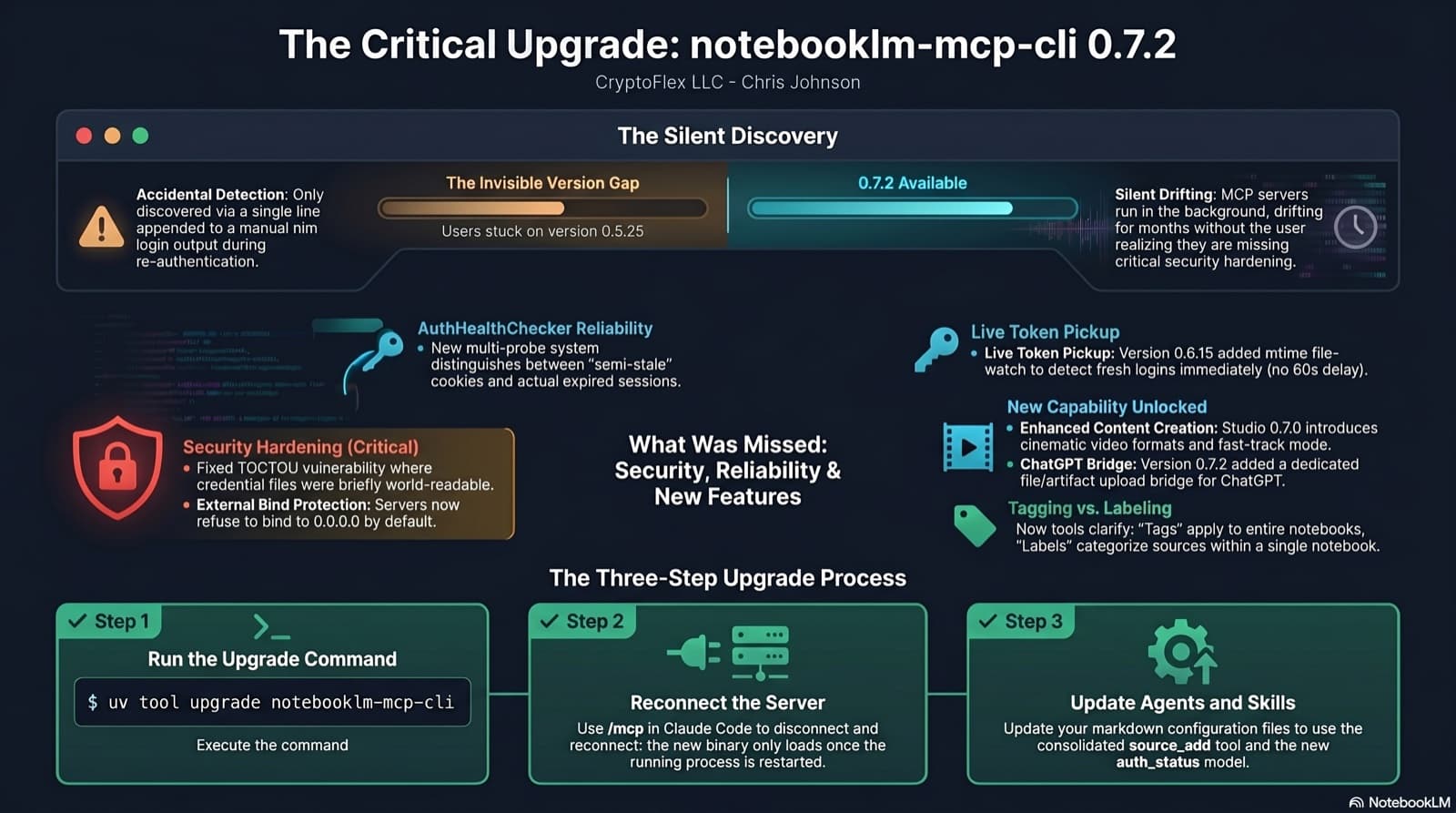
I was two minor versions behind on notebooklm-mcp-cli and had no idea until a re-auth banner interrupted a session. The gap was 0.5.25 to 0.7.2. Security fixes, auth reliability improvements, and new features I was missing the whole time. Here is the three-part upgrade that most people stop after step one.
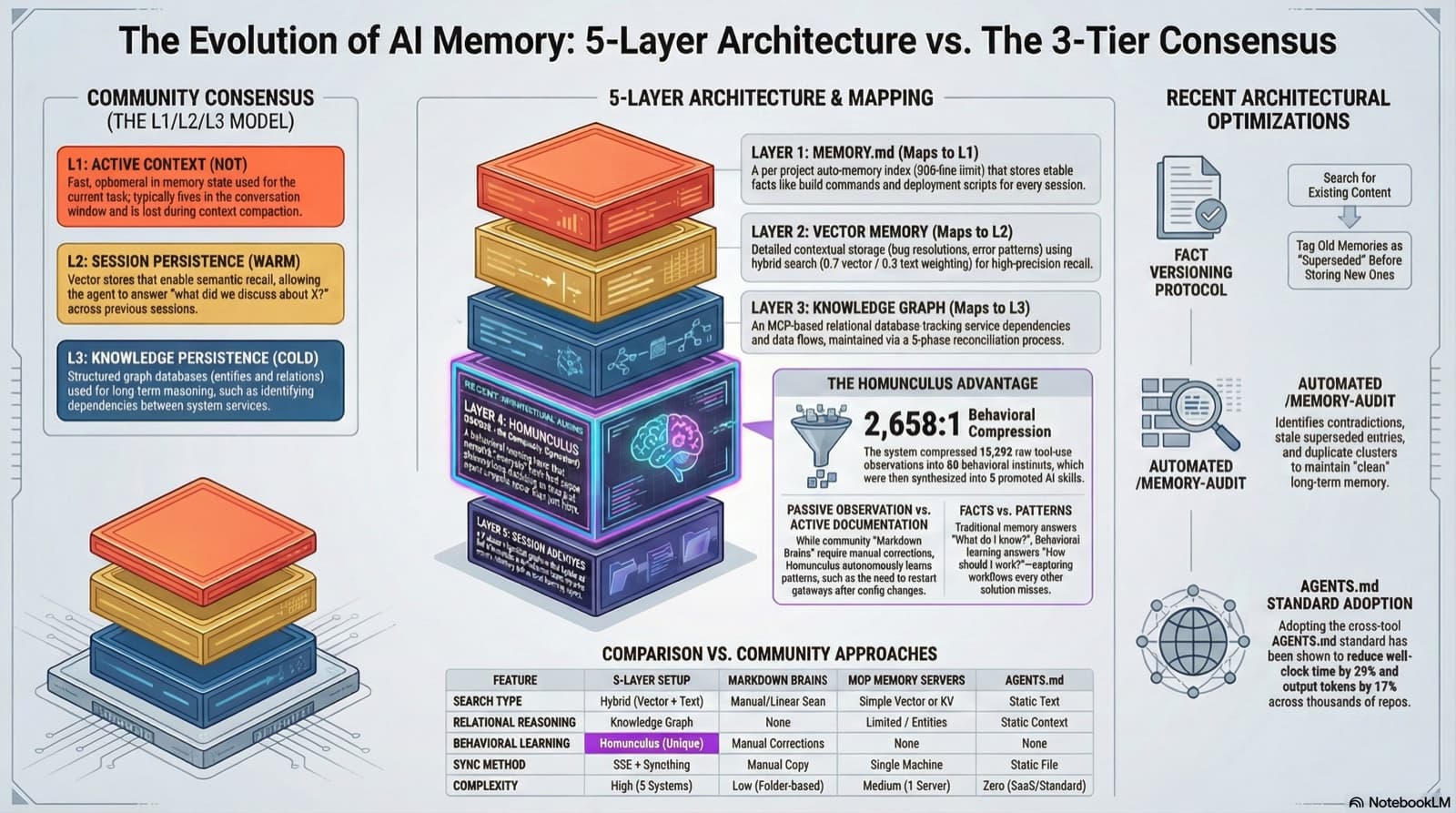
22 sources, 3 parallel research agents, 18 search queries. I pointed my deep research skill at the question every Claude Code power user asks: what's the best way to give an AI persistent memory? Here's what the community is doing, how my setup compares, and the 3 improvements I shipped the same day.
35 MCP tools, 7 implementation tasks, 2 platforms, 1 session. How I used the superpowers brainstorming, writing-plans, and subagent-driven-development pipeline to integrate NotebookLM into Claude Code as a first-class MCP server.
Comments
Subscribers only — enter your subscriber email to comment