
Home Network Mission Control, Phase 2: Cyberpunk Skin, 18 Findings, Two Future Tabs
Part 2 of the home network dashboard build with Claude Code. One persona-team session ported a cyberpunk redesign onto Phase 1, surfaced 18 actionable findings across four reviewer dispatches, fixed every one in the same session, and produced fully phased plans for two future features (DNS click-throughs and a Threat Intelligence tab) on the way out. 519 backend tests, 135 Vitest, 15 Playwright, all green at merge. The through-line is the reviewer-only persona team, not the skin.
18 actionable findings across 4 reviewer dispatches. 5 in-session fixes the persona team caught before merge. 2 fully-scoped future features, plans written end-to-end the same afternoon. 519 backend tests passing, 135 Vitest, 15 Playwright, all four CI jobs green. One PR, merged the same day, same persona-team pattern Phase 1 used in its enrichment waves.
That's Phase 2 of the Home Network Mission Control Dashboard, the second post in this thread on using Claude Code to build a real home network mission control. If you've read Phase 1, you already know the system: Mac mini in a closet, UDM Pro, Pi-hole v6, UniFi Protect, a single pane of glass that's read-only by design with a feature-flagged path to mutations and an agent. Phase 2 isn't new capability. It's a cyberpunk re-skin of the Overview tab plus a session-team pattern that surfaced more real bugs in two hours than my own dog-fooding caught in three days.
Series Context
This is part 2 of an ongoing thread inside Building in Public about using Claude Code to build a home network mission control dashboard. The prior posts that this one builds on directly:
- Phase 1: the chassis, the mode-phasing, the four enrichment waves, the eight security signals, and the launchd setup this re-skin layers on top of.
- An Editorial Redesign, Handed Off From claude.ai/design to Claude Code: the design-handoff pipeline that produced the cyberpunk reference prototype consumed in this post.
- Building a 5-Agent Design Team: the captain-and-specialists pattern this Phase tightens into a reviewer-only persona team.
- Building a Custom UniFi MCP and Consolidating Three Pi-hole MCPs: the MCPs every backend route ultimately reaches through.
Read those if you want the full backstory. Phase 2 stands on its own as "what changes when reviewers stop writing code and start producing findings only."
This post is about three threads that braided together in one session: the redesign that shipped, the fixes the persona reviewers caught, and the forward plans for two features that're now ready to execute. The through-line that makes them one story is the team pattern itself.
What Actually Shipped: A Cyber Skin That's Additive, Not Replacing#
The handoff was an HTML/JSX/CSS reference prototype at design_handoff_mission_control/: cyberpunk palette, scanline-style borders, animated count-ups on stat cards, a left rail with numbered nav entries. Same shape as the editorial redesign handoff: a designed prototype dropped on disk, the implementation team's job is to absorb it without disturbing what's already in production. Nice to look at, easy to over-implement. The trap with a re-skin is to rip out the existing tokens and start over, which would've meant a week of regression testing on every component Phase 1 already shipped.
So I didn't. Cyber tokens layer behind [data-theme="cyber"] in frontend/src/styles/tokens.css, with a separate cyber-base.css for the cyber-only animation primitives. The OKLCH tokens Phase 1 shipped under stay intact. Both render in the same app. Flip the data-theme attribute on <html> and the same component subtree paints with either palette. There's no parallel stylesheet, no conditional bundle, no theme provider plumbing.
Theme-as-attribute, not theme-as-rewrite
If you're porting a redesign onto a working app, gate the new tokens behind a [data-theme="..."] selector in the same CSS file as the originals, not a parallel stylesheet you load conditionally. The CSS cascade does the right thing for free, the bundler doesn't care, and you can A/B between palettes by toggling one attribute. The cost is one wrapper selector. The benefit is no regression risk on the components you didn't touch.
The new components live under frontend/src/components/cyber/: SideNav, TopBar, StatCard, ThreatVectorPanel, WanProbePanel, NoisyEndpointsPanel, PageHeader. The shell got replaced. The Overview tab got rebuilt. Every other tab still uses Phase 1's components, lifted onto the cyber tokens by the theme attribute alone.
The locked tabs were a small choice that earned its weight. NETWORK, WI-FI/RF, PROTECT, and ADMIN are visible in the SideNav at 0.3 opacity with LOCK badges. They're not navigable yet. The point is to telegraph "this is coming" without faking it, and to keep the layout stable when those tabs do land. Hiding them entirely would've meant the SideNav reflowed every time I built a tab; greying them at 30% means the visual cadence is right today and it'll be right when the locks come off.
Why the locked tabs are visible at all
Phase 1 hid future capability behind a feature flag. Phase 2 surfaces it as a layout placeholder. Both decisions point at the same thing: lying about what the product is or will be is more expensive than telling the truth and grouting around the gap. If a tab is going to exist in v1.1, the user's eye should already know where it goes.
The animated stat cards are gated under prefers-reduced-motion: reduce via cyber-base.css. If your OS has reduced motion on, the count-ups become static numbers. That detail mattered for the Playwright parity screenshot, but more on that when we get to the rAF race.
The Persona Team, Second Time Around#
Phase 1's enrichment waves used a Captain plus three specialists pattern, the same shape as the /ui-ux 5-agent design team and the /homenet-document writer pipeline. Phase 2 kept the pattern and tightened it in a way that turned out to matter more than the cyberpunk palette. One orchestrator (me, in the Senior Web/DB engineer chair). Three parallel reviewers running as background agents: Network engineer, Security engineer, UX/UI designer. A fourth reviewer (Senior Threat Intel Analyst) joined for the Feature 2 design pass.
The reviewers don't write code. They produce findings. The orchestrator integrates the findings before the next wave. That's the load-bearing distinction. When four agents all implement in parallel, you spend the next hour merging conflicts. When three agents review in parallel and one orchestrator integrates, you spend ten minutes reading findings and the rest of the hour fixing what they found.
The reviewer-only constraint is the load-bearing part
Parallel agents that all edit code converge on conflicts and fan-out coordination overhead. Parallel agents that produce findings only converge on a shared review surface, which the orchestrator integrates serially. The win is bigger than it sounds: every reviewer reads the full diff with no lock contention, and the orchestrator gets three parallel critiques of one piece of work in the time it takes to read three short reports.
Four dispatches happened in the cyber port. Each dispatch was a numbered review checklist, file paths the reviewer needed to read, and an output template (verdicts table, blocking findings, recommended fixes, defer-to-v2). Total findings across the four dispatches: 18. Five of them were blocking enough to fix in the same session before merge. The rest landed in docs/plans/2026-04-26-cyber-redesign-followups.md for the next slice to pick up.
Five Fixes the Reviewers Caught (And Why Each Mattered)#
The five same-session fixes are the meat of the post. Each one is a kind of bug that wouldn't have been caught by any test I had on disk, because each one is about meaning, not behavior.
Severity Unknown Defaults to Amber, Not Green#
The Network engineer's first dispatch asked one question I hadn't thought to ask: what color does an event with severity: unknown render in?
I'd defaulted to green on the theory that "no severity assigned" is "no problem reported." That's wrong, and the Network engineer pushed back hard:
An event arrived but its severity could not be classified. That makes it of uncertain risk, not no risk. Greening it hides it from triage. Default to amber so the operator's eye lands on it.
That's the right call and I should've known it. The whole point of a severity column is to direct attention. Defaulting unknowns to green is a silent way to filter them out of view. Defaulting to amber says "someone needs to look at this and assign a severity." One-line fix in the threat-vector panel. The CountBox for the amber bucket now includes severity_unknown in its count.
Unknown is not none
When a categorization step can't classify an input, the safe default is to escalate, not to suppress. A green sentinel for "couldn't classify" is the same shape of bug as a null field rendered as an empty string. Both quietly remove information from the operator's view. Default unknowns to whatever color says "look at me," not whatever color says "ignore me."
Threat Counts Are About Posture, Not Volume#
The Security engineer caught a bigger one. The cyberpunk handoff's ThreatVectorPanel showed three counts: green, amber, red. My first port wired those counts to RecentEvent event volume from the security poller. Number of events in the last 24 hours, bucketed by severity. It looks fine in a screenshot.
The Security engineer's review:
Events answer "how many things happened." Signal evals answer "what is my current posture." The Overview panel must answer the latter. If five red events happened yesterday and were all resolved, the posture today is green. Showing five red on the Overview tab will train the operator to ignore the Overview tab.
Phase 1 already built the right primitive: SecuritySignalEval. Each row is a per-signal latest status. There're eight signals, each evaluated periodically, each carrying status: ok | warn | bad | unknown. The right Overview count is the count of signal evals at each status, not the count of recent events. Posture, not volume.
The fix was a one-router rewrite (backend/src/homenet_dashboard/routers/overview.py) and a frontend type swap. The CountBoxes now show "8 green / 0 amber / 2 red" reflecting the eight signals' current state, not "73 green / 4 amber / 1 red" reflecting yesterday's noise.
Events answer 'what happened'; signals answer 'where am I'
A security dashboard's top-level posture indicator should reflect current state, not a rolling event count. Events are inputs to signals; signals are the synthesized state. Wire your hero counters to whichever primitive answers the question the panel is labeled with. If the panel is "Threat Vector," the question is "what's my current threat posture," and that's a signal-eval count. Use events on the page that's literally titled "Recent Events."
Explicit Breakpoints Beat Auto-Fit#
The UX/UI designer's review was the longest. Most of it was nice-to-have polish. One finding was blocking: my CSS grids used repeat(auto-fit, minmax(220px, 1fr)) for the stat-card row and the panels row. It looks reasonable. It also reflows on every viewport size between mobile and 4K, which means no two screenshots taken at different widths will have the same layout.
The handoff design spec's grid is explicit: stat cards at 5 columns / 3 columns / 2 columns at three breakpoints, panel grid at 3 columns / 1 column at two breakpoints. The auto-fit grid happened to approximate those breakpoints on a 1440px display, which is why it passed the eye test. It wouldn't approximate them on a 1280px laptop or a 2560px iMac.
The fix was replacing every auto-fit minmax(...) with explicit lg:grid-cols-5 md:grid-cols-3 grid-cols-2 Tailwind classes. The cyber-themed grid now lays out predictably at every breakpoint and matches the design spec without a tape measure.
auto-fit is a tool, not a default
grid-template-columns: repeat(auto-fit, minmax(N, 1fr)) is great when the number of items is variable and the breakpoints don't matter. It's the wrong tool when you have a design spec with named breakpoints. Use auto-fit for "show as many cards as fit"; use explicit breakpoints when "show 5 here, 3 here, 2 here" is the contract. The two patterns optimize for different things.
The rAF Race That Produced All-Zero Screenshots#
I added a useTicker rAF count-up hook so the stat cards animate from 0 to their target value when the page loads. It looks great in a browser. It fails interestingly under tests.
The first parity screenshot Playwright captured showed every stat card rendering 0. Every. Single. One. It took me longer than I'd like to admit to figure out: jsdom's requestAnimationFrame is unreliable, the screenshot fired before the animation reached the final frame, and Vitest's render assertions were trying to read getByText("12") on a card that was actually rendering 7 mid-animation when the test's microtask queue caught up.
Two fixes. For Playwright, await page.emulateMedia({ reducedMotion: "reduce" }) before the parity capture, which trips the prefers-reduced-motion gate and renders the final value statically. For Vitest, an escape hatch on the hook itself: a data-target-value={value ?? ""} attribute on every animated number element. Tests read the attribute, not the rendered text. The animation can be midway through and the assertion still reads the right number. It's not pretty but it's correct.
// frontend/src/hooks/useTicker.ts (excerpt)
return (
  <span
    data-target-value={target ?? ""}
    aria-label={target?.toString()}
  >
    {displayValue}
  </span>
);
rAF and jsdom is a footgun, not a bug
jsdom does not run a real animation frame loop. Any test that asserts on the output of a rAF-driven component is racing the test runner's microtask queue. The fix is not "wait longer"; the fix is to expose the source-of-truth value via an attribute the test can read directly. Animations are for humans; tests should assert against the underlying intent. data-target-value is fifteen characters of cost and saves an afternoon of flake.
The Empty Mode-A Subsection That Trains the Wrong Habit#
The last in-session fix was the most subtle. The cyberpunk handoff included a RECENT MUTATIONS subsection on the Overview tab. In mode A there're no mutations, by design. So the subsection was rendering an empty state with copy along the lines of "No recent mutations."
The Security engineer flagged it:
If the operator opens the dashboard for a week and that subsection is always empty, they will learn to skip it. When mode B ships and the subsection starts rendering real mutation data, they will keep skipping it. You will have trained your operator to ignore a security-relevant surface before it ever turned on.
That's a real cost. The fix was to hide the subsection entirely when MISSION_CONTROL_MODE=A. When mode B ships, the subsection unhides and the operator sees it for the first time, with content, and reads it. The empty state never existed in their mental model. It's the kind of thing you can't unsee once a security reviewer points it out.
Empty states train operator habits
A subsection that is permanently empty in your current mode is not a placeholder; it's a habit-forming reveal that you will pay for later. Either populate it with current-mode-relevant content or hide it entirely until the mode flip. There is no third option that doesn't compromise the surface when it finally has data to show.
Five Findings, One Pattern#
Look at the five findings together. Severity unknown defaulting to green. Counts wired to events instead of signals. Auto-fit grids approximating a spec. Animated tickers passing through tests as zero. An empty subsection training the wrong habit.
None of them are bugs in the way Phase 1's enrichment caught bugs. Phase 1 caught wrong API responses, wrong subnet detection, wrong DNS poller logic. Phase 2 caught wrong meanings for things that worked correctly. Each finding was a mismatch between what a primitive did and what a panel labeled it as. The reviewers caught them because each reviewer brought a different lens: the Network engineer reads "an event arrived" as "uncertain risk," the Security engineer reads "Threat Vector" as "current posture," and the UX/UI designer reads auto-fit as "design-spec-violating."
A general-purpose agent reading the same diff would've caught maybe one of the five. A persona-typed reviewer dispatched against the diff with explicit non-overlap scope caught all five and twelve more.
Two Features Designed in the Same Session#
Once the five fixes landed and CI was green, the same persona team rolled into design mode for the next two features. Both designs are now phased plans that any future session can pick up and execute end-to-end. The point isn't that I shipped them. The point is that the persona-team pattern produced execution-ready specs as a downstream effect of the same review session.
Feature 1: DNS Query Log Click-Throughs#
Today the DNS Query Log is a flat 5-column table. You can read what happened. You can't investigate it. Feature 1 turns each row into an entry point. It's the gap I keep hitting when I open the dashboard with a real triage question.
Four phases, scoped in docs/plans/2026-04-26-cyber-redesign-followups.md:
- Query Log column upgrades. Add a Client IP column. Render timestamps as
HH:mm:ss.SSS America/New_Yorkso eye-triage is faster. Make Client / Domain / IP cells clickable. - Per-client detail page. A full cyber-themed page at
/clients/:mac: current state, identity, health, top domains, top apps, total traffic over 24h/7d/30d, network history (a newclient_network_historytable fed by the inventory poller detecting SSID/VLAN/IP deltas), and a written intelligence summary panel. - Per-domain detail drawer. Click a domain, drawer slides in: category (with
category_sourcediscriminator: fallback table, Pi-hole gravity, or feed match), totals over 1h/24h/7d, ranked clients querying it. New endpointGET /api/dns/domain/{etld1}with eTLD+1 normalization. - An adhoc Claude Code skill.
~/.claude/skills/homenet-client-profile.md. The "Refresh profile" button on a per-client page invokes it. The skill queries UniFi MCP and Pi-hole MCP read-only, composes a 5-8-sentence written profile, and writes it to a newclient_profile_overridestable the dashboard'scompose_intelligence_summary()prefers when present.
The skill is the interesting part. It's the first time the dashboard's data flow includes an LLM-generated artifact, and it's deliberately scoped read-only against the upstreams. The only thing the skill writes is a row in a local override table the dashboard controls. The MCP threat surface stays at zero outbound writes. That's not a side effect of the design; it's the boundary the design's drawn around.
LLM-generated content with a local override boundary
When you want LLM output to influence a UI but you can't grant the model write access to your data sources, write the output to a local override table the UI prefers when present. The model never touches the upstream. The dashboard's compose step reads the override first, falls back to deterministic templates if missing or stale. You get the qualitative win without expanding the threat surface, and you can A/B template-vs-agent because the summary_source field is already a discriminator.
Feature 2: A Threat Intelligence Tab#
Phase 1's Security tab showed signal evals: posture across the network. Feature 2's Threat Intel tab shows ranked anomalies: what you should look at first.
The deep design lives at docs/plans/2026-04-26-threat-intel-tab-design.md. The summary: at 2am with a noisy network, the operator wants to know "what should I look at first?" Forty-five thousand daily DNS queries become a ranked list of maybe 5 to 20 anomalies with severity scores 1-10. You read five rows, not five thousand.
Free feeds only. No paid threat intel:
- URLhaus (abuse.ch), CC0: known malware/C2 domains. ~150K rows. 6h scheduled bulk reload.
- Hagezi Pro DNS Blocklist, MIT: curated tracking/scam/ad-fraud. ~400K rows. 24h scheduled, staging-table swap (not 400K UPSERTs; a senior-DB-review pattern carried forward from Phase 1).
- RDAP/IANA, public: domain age, registrar, country. On-demand only, 7-day TTL per eTLD+1.
- IPinfo.io free tier (50K/month): ASN, ASN org, country for resolved IP. On-demand, 24-hour TTL per IP.
Six classical heuristics, ranked by false-positive risk. The Threat Intel analyst (the fourth persona, joined for this design pass) rated each one before the design merged:
| ID | Rule | Score | False-positive risk |
|---|---|---|---|
| H6 | Feed-match while Pi-hole answered allowed | +9 | Lowest. Triage-must-look. |
| H4 | DNS tunnel (TXT/NULL burst from one client) | +8 | Very low. |
| H1 | Newly Observed Domain in last 4h | +6 (+8 if also feed match) | Low. |
| H2 | Beaconing (CV < 0.15, n >= 8) | +7 | Medium. |
| H3 | High-entropy subdomain (DGA fingerprint) | +5 | Higher. Tune before default-on. |
| H5 | Single-client query burst > 5x own 7-day baseline | +4 | Higher. Tune before default-on. |
H6 and H4 are the highest-confidence, lowest-noise signals. H3 and H5 ship behind a tune_mode=true flag for the first two weeks of operation, on the explicit guidance that DGA fingerprinting and per-client burst detection are noisy until they're baselined against the operator's own traffic.
Tune the noisy heuristics before defaulting them on
Heuristic H3 (high-entropy subdomain) and H5 (per-client query burst) are valuable signals on a real attacker but generate false positives on legitimate traffic patterns: CDN-issued random subdomains, OS update bursts, mDNS chatter. Default-on means an operator wakes up to ten amber rows in their first week and learns to dismiss them. Default-off-with-tune-mode means the operator gets to set thresholds against their own baseline before the signal influences the score. The cost is a feature flag. The benefit is the signal is trusted when it does fire.
The five-phase implementation lives in the deep doc: data foundation (Phase 2.1), anomaly engine (2.2), UI tab (2.3), on-demand enrichment skill (2.4), tuning and retention (2.5). The exit gate at Phase 2.2 is "fewer than 20 false positives per day on the operator's real historical 7-day window." That's the kind of gate you can write down because the dataset already exists in client_dns_queries. You can't tune a heuristic against synthetic data; you'd just be tuning the synthesis.
What the Persona Pattern Actually Buys You#
The meta-thread, the through-line, is that one persona-team session produced three artifacts that would normally take three sessions: a shipped redesign, a list of 18 reviewer findings with five same-session fixes, and two end-to-end phased designs for the next features. Each was downstream of the same dispatch pattern.
What the pattern actually buys, concretely:
- Different lenses produce different findings. The Network engineer caught the severity-unknown default. The Security engineer caught the events-vs-posture mismatch. The UX/UI designer caught the auto-fit grid. None of these would've surfaced from a single general-purpose review pass on the same diff.
- Reviewers running in parallel cost the same as one reviewer. Three background agents reviewing the same surface complete in roughly the wall time of one. The orchestrator's read time for three short reports is shorter than it'd be for one long report.
- Non-overlap scopes mean the orchestrator integrates, doesn't merge. Network engineer scoped to backend timeseries semantics; Security engineer scoped to threat-count semantics and PII; UX/UI scoped to visual fidelity and accessibility. Their findings touched non-overlapping files. Integration is reading a checklist, not resolving a merge.
- The pattern carries forward into design. The same four reviewers brought the same lenses to the Feature 1 and Feature 2 design passes. The Threat Intel analyst joined as a fourth lens for Feature 2. The deep design at
docs/plans/2026-04-26-threat-intel-tab-design.mdincludes scoring rationale, false-positive risk per heuristic, and SQL for each rule, because the analyst was reviewing the design as it's being written rather than after it'd landed.
Persona reviewers + orchestrator-only writes is the 80/20
If you take one pattern from this post, take this one. Three or four reviewer agents with explicit personas (Security, Network, UX/UI, plus a domain specialist when the work warrants), running in parallel, producing findings only. One orchestrator integrates. Reviewers don't write code. The orchestrator does the implementation pass and, after each wave, dispatches the reviewers against the diff. It scales from a 200-line redesign to a multi-feature design pass without changing the protocol.
The Numbers At Merge#
For the record, here's where the world stood when the cyber port merged:
- Backend: 519 pytest passing (it'd been 497 before the change). New tests covered the Overview router rewrite, the signal-eval count helper, and the mode-gated
RECENT MUTATIONShide path. Coverage stayed above 80%. - Frontend: 135 Vitest passing (it'd been 132). New tests covered
useTicker'sdata-target-valueattribute, the explicit-breakpoint grid layouts, and the cyberSideNav's locked-tab rendering. - Playwright: 15 happy paths green. The new
cyber-shell-smokespec asserts the cyber shell renders with locked tabs at 0.3 opacity and the parity screenshot completes under reduced-motion emulation. - CI: four jobs green. Two CI fixes after the initial push (one
ruff formaton the overview router, oneprettier --writeon the cyber components). Merge shab208f50.
The persona team is now part of the project's pattern library. The two future-feature plans in docs/plans/ are the artifacts of that team. Any future session that picks up Slice E (Feature 1) or Slice F (Feature 2) will find a phased plan with reviewer dispatch points already named.
Patterns Worth Carrying Forward (Phase 2 Edition)#
- Theme-as-attribute, not theme-as-rewrite. Layer new tokens behind
[data-theme="..."]in the same file as the originals. Both palettes coexist; the cascade does the right thing. - Reviewer-only personas, orchestrator-only writes. Three or four parallel reviewers with distinct lenses produce findings; one orchestrator integrates. Reviewers don't edit code.
- Unknown is not none. Default unclassified items to whatever color says "look at me," not whatever color says "ignore me."
- Events answer 'what happened'; signals answer 'where am I'. Wire hero counters to whichever primitive matches the panel's label.
- Explicit breakpoints when the spec is explicit. Reach for
auto-fitonly when item count is variable and breakpoints don't matter; otherwise use named breakpoints that match the design. - Expose source-of-truth values via attributes when animations cross test boundaries.
data-target-valueis fifteen characters of cost and saves an afternoon of jsdom rAF flake. - Empty subsections train the wrong habits. Hide mode-gated subsections in the modes where they're empty; let the operator meet them populated for the first time.
- Tune noisy heuristics before defaulting them on. Lower-confidence detection rules ship behind a
tune_modeflag until they're baselined against the operator's own data.
What's Next: The Roadmap From Here#
The next slice is up to whichever Sunday afternoon I've got free. Both Phase 2-designed features and the originally-roadmapped phases from Phase 1 are still on the board:
| Phase | What ships | Status |
|---|---|---|
| Slice E | Feature 1: DNS click-throughs, per-client detail page, per-domain drawer, homenet-client-profile skill | Phased plan written; one prompt away from running |
| Slice F | Feature 2: Threat Intelligence tab, free-feeds-only enrichment (URLhaus + Hagezi + RDAP + IPinfo), six classical heuristics | Phased plan written; H6 and H4 default-on, H3 and H5 behind tune_mode for the first two weeks |
| Phase 1.1 | Wi-Fi + RF tab: signal-strength heatmap, channel usage, client distribution per band | Needs the UniFi session-auth follow-up first; placeholder visible-but-locked in the cyber SideNav |
| Phase B (A → B) | Mutation unlock: preview-then-confirm, audit log, confirm-modal UI, security review on the new write surface | RECENT MUTATIONS subsection unhides on flip; same preview/confirm pattern as chris2ao-unifi-mcp's Tier 2/3 tools |
| Phase C (B → C) | Agent unlocked in read-only posture: chat UI polish, streaming, conversation persistence | All Phase 1 plumbing already in place |
| Phase D (C → D) | Agent drafts mutations, human approves them | The end state of the four-mode flag |
The cyber port didn't move them. It did make the layout placeholder for them more honest: NETWORK and WI-FI/RF are now visible-but-locked tabs in the SideNav, so when those slices ship, the user's eye already knows where they go.
Phase 2 didn't make the dashboard do anything new. It made the dashboard say what it does more truthfully, and it produced two future-feature plans as a downstream effect of the same review pattern. Both of those are wins I want to keep on the board, because both are exactly the kind of thing that doesn't show up in a changelog and would've been invisible to a single-agent review.
If you've followed this thread from the UniFi MCP, Pi-hole MCP, and /homenet-document posts through to Phase 1 and now this one, the pattern is hard to miss: every post in the series has been Claude Code stacking one more reusable primitive on top of the last, and the dashboard is the place those primitives finally meet a user. Phase 2 is the post where the primitives review each other. The next post is the one where they start drafting writes for me to approve.
Go run a persona team against your own next PR. Make the reviewers read-only. Make the orchestrator integrate. You'll find more in two hours than you'd find in two days of dog-fooding alone. I'm convinced of it now in a way I wasn't on Sunday morning.
Weekly Digest
Get a weekly email with what I learned, summaries of new posts, and direct links. No spam, unsubscribe anytime.

Related Posts
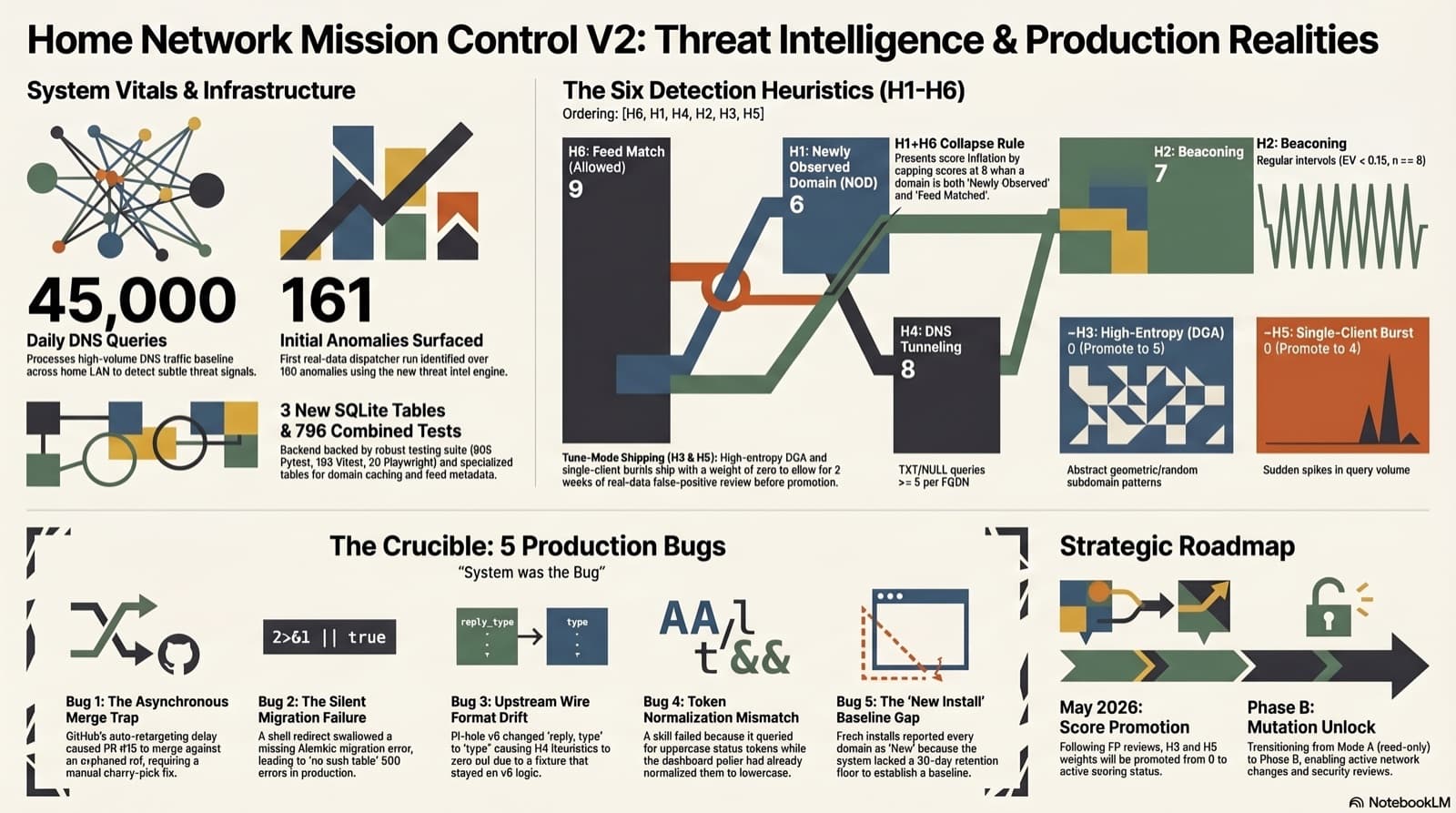
Part 4 of the home network dashboard build. V2 ships a Threat Intelligence tab with 6 in-house heuristics, two free public feeds (URLhaus + Hagezi), and an on-demand RDAP/IPinfo enrichment skill. 161 anomalies surfaced from 45,000 daily DNS queries on the dispatcher's first real-data run. Seven PRs, 603 backend tests, 163 Vitest, 20 Playwright at merge. The marquee story is not the feature, it is the post-merge audit: five bugs that all four CI jobs missed, all five caught only after the dashboard hit production. The gap between "tests pass" and "production works" has a shape and a price, and this post itemizes both.
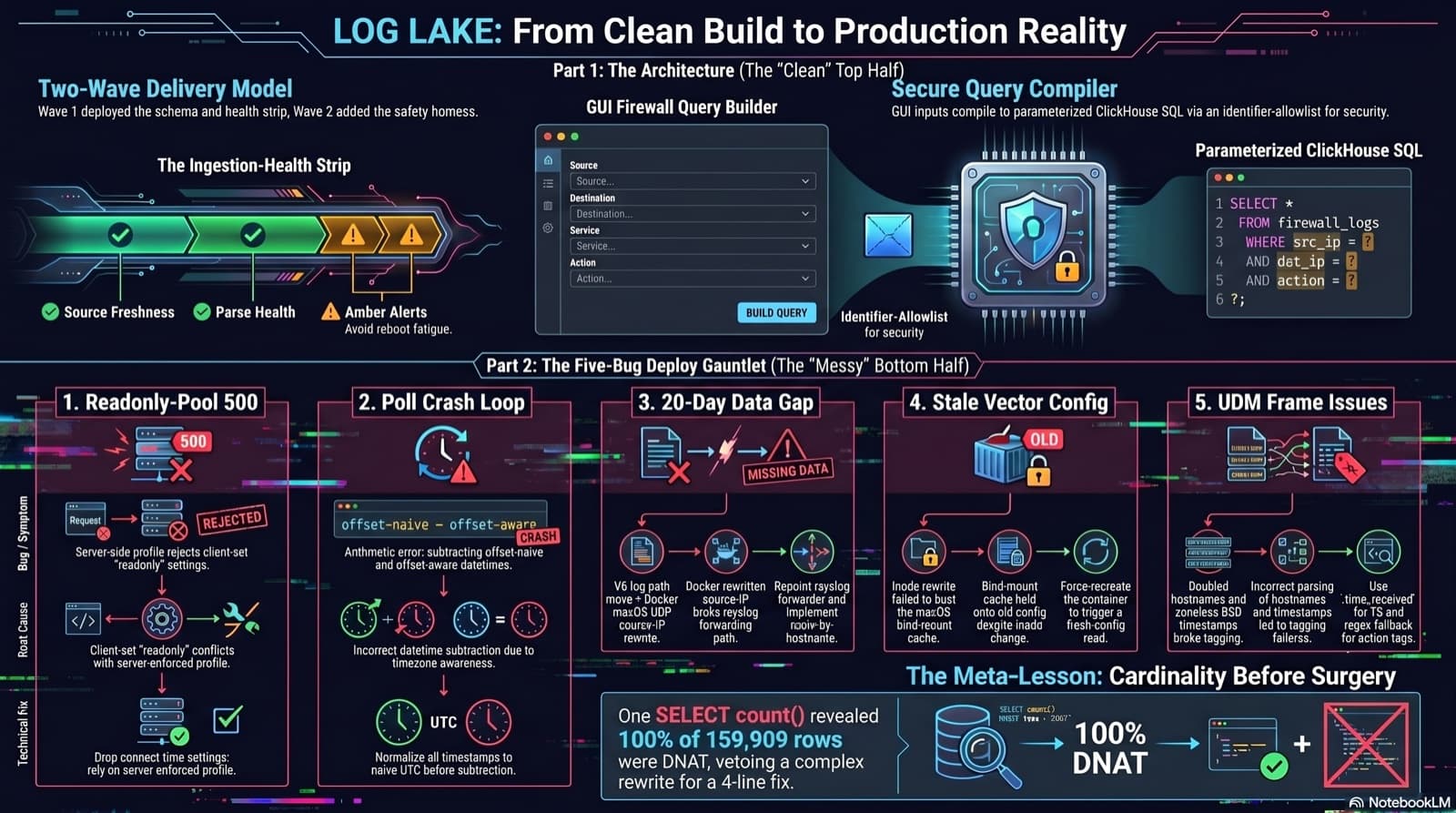
Home Network Mission Control: The LOG LAKE Panel, Five Deploy Bugs, and a Vetoed Bytes-Codec Rewrite
Part 6 of the home network dashboard build. The LOG LAKE panel ships a SIEM ingestion-health strip and a GUI firewall query builder that compiles to parameterized ClickHouse under the hood. One PR, two waves, 1193 backend tests at merge. Then deploy day on the live Mac mini produced five production-only bugs in a single afternoon: a readonly-pool 500, a timezone-mixed poll crash that had been firing every five minutes for hours, a 20-day-silent Pi-hole pipeline (two layers stacked), a Vector container reading a stale bind-mounted config, and a UDM doubled-hostname frame that silently broke action derivation for 159,909 rows. The meta-lesson is that the proposed fix for the last one was an invasive Vector source rewrite that the persona team vetoed in favor of an operator toggle and a four-line MV recreation.
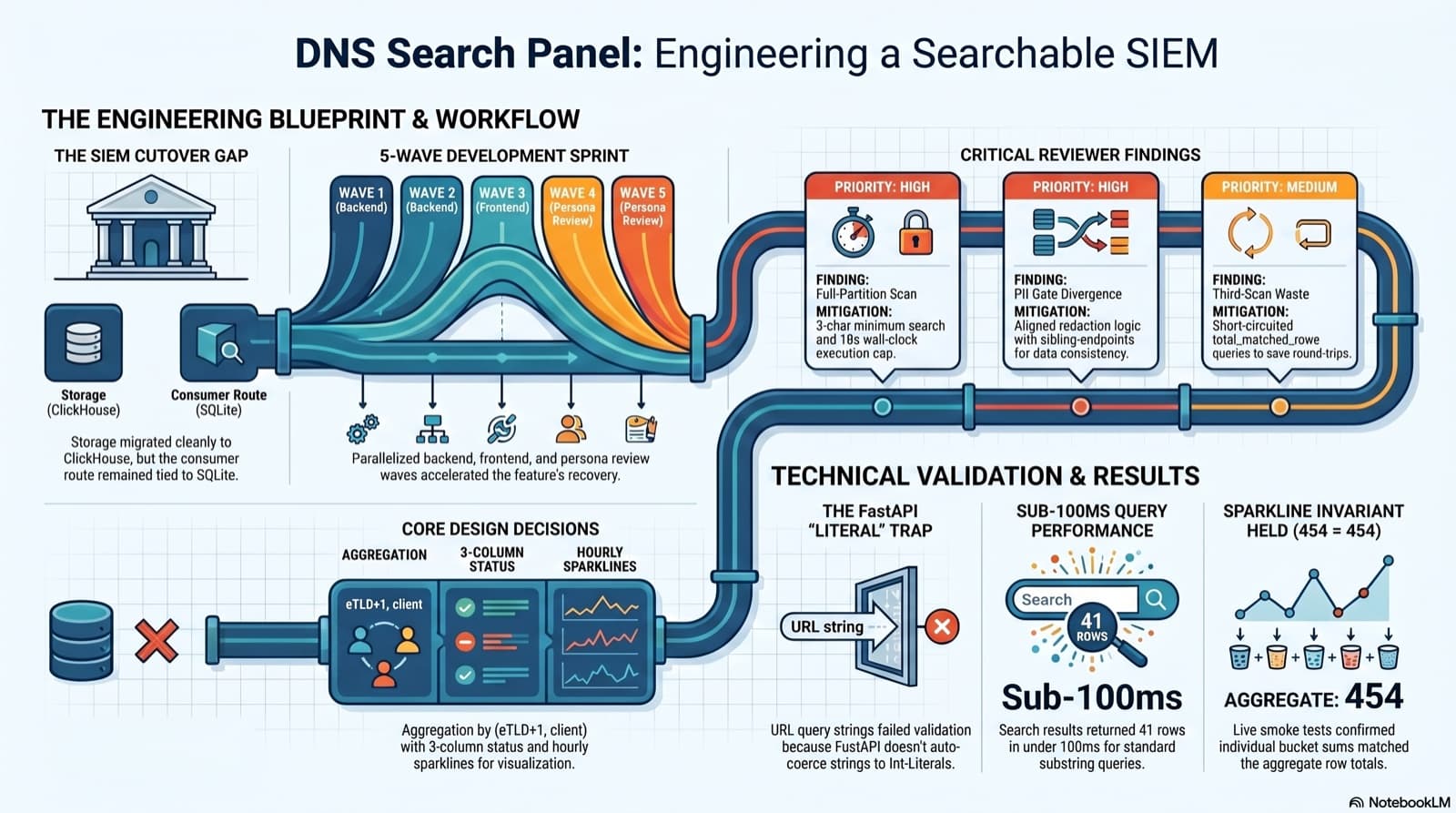
Part 6 of the home network dashboard build. The SIEM cutover dropped the DNS search endpoint without replacing it, and the only reason I caught it was clicking into the live dashboard and seeing "Failed to load DNS query log." This post walks the session that put search back: the diagnosis, the brainstorming workflow that pinned down five contested design choices, the five-wave persona dispatch, the parallel reviews that caught a third-scan query and a PII gate divergence, the FastAPI int-Literal gotcha that ate an hour, and a live smoke at 41 results in under 100ms with the sparkline-sum-equals-aggregate-total invariant holding 454 = 454 on the first row.
Comments
Subscribers only — enter your subscriber email to comment