
Home Network Mission Control: Per-Client Traffic Totals, an Empty DPI Source, and the UniFi Over-Reporting Twist
The Clients page showed "--" for traffic and "DPI not available for this device" for applications. The investigation found that per-app DPI is genuinely dead on this firmware, but per-client hourly byte buckets are alive and well in a different endpoint the dashboard was never reading. Fix the source, accumulate in ClickHouse, reconstruct Top Applications from Pi-hole DNS, and then discover that some clients are reporting physically impossible volumes. One afternoon, one commit (e07a8ac, 27 files), three confessional asides, and a plausibility cap that became load-bearing.
The Clients page showed two hyphens where the Traffic 24h and 7d totals should have been, on every one of the 61 clients online, with a banner underneath each that read "DPI not available for this device." No error card, no zeros, just nothing, sixty-one times over. Given the logs and the tooling already built for this project, could I get real traffic numbers onto that page, and if DPI was genuinely out, what would a Top Applications breakdown even mean?
Series Context
This is part 8 of the Home Network Mission Control series. Direct prerequisites:
- Phase 1: the chassis, mode-A read-only design, APScheduler polling.
- Phase 2: the cyberpunk re-skin.
- Phase 4 (V2): Threat Intel tab and the SIEM foundation.
- DNS Search Panel: Pi-hole data in ClickHouse, the DNS layer this build leans on.
- LOG LAKE: firewall query builder, deploy-day bugs, the production smoke pattern.
The chris2ao/unifi-mcp server, referenced throughout, was the subject of two earlier posts: Building a Custom UniFi MCP: 103 Tools (2026-04-17) and Dogfooding the UniFi MCP (2026-04-18). The /deep-research skill's background is covered in From WebSearch to Deep Research (2026-04-07).
Three Tools Before Any Code#
The chris2ao/unifi-mcp server probes the live UDM Pro read-only, mid-conversation. /deep-research fans out parallel sub-agents over a Firecrawl plus Exa plus WebSearch stack to map what the community has tried, what the vendor documents, and what the firmware actually exposes today. /sequential-thinking serializes the decision tree and breaks ties when two sources disagree, which they did here: the vendor docs and the live gateway told two different stories about what DPI data the UDM Pro exposes, and I needed live evidence to know which one to believe.
I've been growing all three in my Claude Code harness for months. Together they turned what would normally be two days of forum archaeology and failed curl commands into a few hours of directed work.
The Research Phase: Two Questions, One Conflict#
The /deep-research invocation fanned out across two questions in parallel.
The first: how to extract per-application DPI data off a UDM Pro on current firmware. Candidates enumerated by the research agents: direct access to the on-box MongoDB instance on port 27117 (session-cookie auth, documented in older UniFi forum threads); on-box conntrack accounting via SSH; native NetFlow or IPFIX export; and a packet-inspection sidecar running Zeek or ntopng on the Mac mini connected to a UDM mirror port.
The second: what open datasets exist to map domain names to application categories. Candidates: nDPI host lists, Disconnect.me tracker lists, WhoTracks.me, DuckDuckGo Tracker Radar, and a hand-curated approach.
One research sub-agent came back with a confident recommendation: "Use the UniFi REST stat/stadpi endpoint. It's production-grade and returns per-app DPI aggregates by MAC." It cited a UniFi community post from 2023, quoted what looked like a real response schema, and was convincingly specific about the field names. The endpoint name was right. The claim it was production-grade on this firmware was not. The live MCP probe, which I ran before acting on the research output, flatly contradicted it. When the research agents and the live gateway disagree, the live gateway is correct. /sequential-thinking made this explicit in its reasoning chain, which is why I didn't accidentally trust the confident-but-wrong agent because it happened to be more articulate than "it returned an empty list."
There's a confessional aside here. One of the deep-research sub-agents, partway through the landscape scan, made an autonomous git commit to the main branch. Not staged changes, not a suggestion: an actual commit, a doc stub it had written to capture its interim findings. I did a git reset HEAD~1 and didn't lose anything important, but the incident's worth logging. Background agents with write access to the repository will use that access when they decide it's appropriate, and they're not always right about when it's appropriate. The research phase for this project is specifically set up as read-only for external sources and read-write only for the vector memory store. The agent that committed to main was outside that boundary.
The Pivot: What the Live Gateway Actually Said#
Probing the live UDM Pro through the unifi-mcp server produced a clear picture in about four minutes.
get_dpi_by_app hits POST /proxy/network/api/s/{site}/stat/stadpi {"type":"by_app","macs":[mac]}. It returned an empty list on every MAC I tested. Not a permissions error, not a timeout: an empty list. get_dpi_stats returned an empty object. get_top_talkers and list_traffic_flows returned:
PRODUCT_UNAVAILABLE: Per-flow traffic data is not exposed via the API-key
Integration API on this Network firmware. Use list_clients for per-client
tx_bytes / rx_bytes aggregates.
So DPI is gated off the API-key path. It's not a misconfiguration, it's a product boundary: the API-key integration exposes a subset of what the session-cookie integration does, and per-flow DPI is on the wrong side of that line on current firmware.
get_client_history was the other half of the answer. It hits POST /proxy/network/api/s/{site}/stat/report/hourly.user (or daily.user) and returns per-client byte buckets with rx_bytes, tx_bytes, and, for wired clients, wired-rx_bytes and wired-tx_bytes as separate fields. It covers wired and wireless, goes back roughly seven days, and has real data for every active client on the network.
The punchline was immediate: the dashboard had a dpi_snapshot table that was empty. Every traffic total on the Clients page was reading from that empty table. The "--" was not a missing-data problem. It was a wrong-source bug. The byte data existed in UniFi the entire time. The dashboard was reading the one endpoint where it wasn't.
Wired Clients Hide Their Bytes in a Different Field
The UniFi API has a wired-vs-wireless split on per-client byte accounting. A wired client carries its actual volume in wired-tx_bytes and wired-rx_bytes, not in tx_bytes and rx_bytes. On a wired client, tx_bytes and rx_bytes may be zero or absent. The MCP fork in v0.5.0 explicitly surfaces both field sets; the dashboard now picks the appropriate one depending on which is populated. Getting this wrong means a wired desktop with 600 GB/day reports 0 GB/day.
Two more details worth noting about get_client_history that required a fork fix in unifi-mcp v0.5.0: the controller omits timestamps from per-client history rows unless you explicitly request the "time" attribute in the report body, and the start/end/interval parameters had not been wired up in the original implementation. The dashboard pins v0.5.0 for these fixes.
Four Candidates That Got Ruled Out#
The /deep-research scan surfaced four ways to get richer-than-REST traffic data. They all got ruled out, and the time spent ruling each one out is worth accounting for honestly, because two of them looked viable right up until they didn't.
The On-Box SSH Routes#
Two of the candidates lived inside the gateway. The richest was the on-box MongoDB instance on port 27117. The forum threads on this go back to 2019 and the procedure hasn't changed: SSH in, authenticate with a session cookie (not an API key), query ace.dpi for per-app flow data. The data exists and it's richer than anything the REST API exposes. On-box conntrack accounting via SSH is the same shape, marginally different data.
I rejected both for one reason: accessing the gateway over SSH is not a zero-risk operation, and the UDM Pro is the single point of failure for all network connectivity on this LAN. An inadvertent schema mutation, a memory-exhausting query, or a crash triggered by an unexpected access pattern would take down every device on the network, including the Mac mini running the dashboard itself. The MISSION_CONTROL_MODE=A read-only design constraint for v1 already anticipates this. SSH into the gateway is a mode-C operation at minimum, and I wasn't willing to make mode-C the dependency for a widget that shows how much a Roku downloaded.
NetFlow or IPFIX export sits in the same risk bucket from a different angle. The UDM Pro can export to a collector, but standing it up means a mode-B UI mutation to configure the export target, a local IPFIX collector running on the Mac mini (ntopng, Elastiflow, or equivalent), and a whole new ingestion pipeline. The complexity-to-payoff ratio is off: I already have Pi-hole DNS and per-client byte buckets. NetFlow would give me more granularity on individual flows, but the question was "can I show traffic totals and a Top Applications guess," not "can I reconstruct individual TCP sessions."
The Sidecar That Almost Made Sense#
The Zeek or ntopng sidecar took the most research to rule out. The approach: tap a UDM mirror port, run a sniffer on the Mac mini, classify traffic via Zeek's protocol analysis or ntopng's nDPI engine. The obstacles stacked until it was untenable on this hardware. macOS is libpcap-only, with no AF_PACKET and no hardware offload. Docker Desktop on Mac can't sniff the host network interface. UDM port mirroring is a 1:1 session, so I'd burn the one mirror destination I occasionally want for actual debugging. And encrypted SNI gets you roughly what Pi-hole DNS already gives you for free. For the protocol-classification goal, the DNS layer is close enough, and I'm not standing up a network sniffer to confirm what DNS already tells me.
None of these are wrong approaches in general. For a production SIEM on a managed network, some of them are exactly right. For a single-operator Mac mini dashboard where the gateway is also the only path to the internet, the constraint is "zero risk to the UDM."
The Constraint That Simplifies the Investigation
Having an explicit constraint ("zero risk to the UDM Pro") collapsed four candidate approaches into one. The mode-A read-only posture is not just a security decision; it's a scope decision. Every option that required SSH access, a UI mutation, or a sidecar running on the gateway fell off the list the moment I checked against the constraint. The /sequential-thinking pass made the constraint explicit before the research fan-out, which is why the research results mapped cleanly to viable vs. not-viable.
The Build (Intentionally Short)#
The implementation doesn't need a long treatment. The source was wrong; the source was fixable; the rest followed.
The new poller is poll_client_traffic, running on a 1h cadence. It calls get_client_history for each active client with a 24h window using the hourly interval, accumulates the byte buckets into two ClickHouse tables: client_traffic_hourly (migration 0018, ReplacingMergeTree(ingested_at), TTL 730 days) and client_traffic_daily (migration 0019, same engine). The daily table accumulates historical totals over time, which matters because UniFi's own history retention is roughly seven days. After about a month of polling, the dashboard will have 30d totals that the controller has already discarded. That's the point.
Top Applications is reconstructed from Pi-hole DNS data, not from DPI. The mechanism: a 304-entry domain_service_map.json file maps eTLD+1 domains to human-readable service names. For each client, query client_dns_query (already in ClickHouse from the DNS Search Panel build) to get per-domain query counts, join against the map, bucket by service, and estimate bytes as total_bytes * (service_query_count / total_queries). The source field on every row is "dns_inferred", not "dpi", and the panel label says "Inferred from Pi-hole DNS (UniFi does not expose per-app DPI on this firmware)." It's honest about what it is.
Top Domains was widened from 24h to 7d. Quiet devices send so few DNS queries in a single day that their top domains were either empty or contained only Apple push notification servers. The 7d window gives even a mostly-idle client something coherent to show.
304 Entries in domain_service_map.json Is Not Small
The map lives at backend/src/homenet_dashboard/data/domain_service_map.json. Writing 304 entries manually would take a day. Instead, I handed the task to a parallel research agent with the nDPI host list, the WhoTracks.me dataset, and the DuckDuckGo Tracker Radar as inputs, with instructions to produce a curated subset covering the domains that actually appeared in my Pi-hole query log over the past 30 days. The result classifies roughly 66% of query volume for the most active clients; the remainder falls through to "Other." Good enough for a home lab where the interesting signal is "this device talks to Steam a lot" not "this device sends 1.2 kB every 11 minutes to an undocumented CDN."
One commit: e07a8ac feat(clients): real per-client traffic totals + DNS-inferred Top Applications (27 files, 1687 insertions, 94 deletions).
The Money Shot Arrived With a Twist#
After the build deployed, I opened the Clients page and clicked into the 2025MainDesktop entry. That machine backs up to Backblaze constantly, and it has a 2.5GbE port. The traffic row read: 559.2 GB (24h) / 1.1 TB (7d) / 4.4 TB (30d), with a sparkline showing the expected sawtooth of nightly heavy-transfer periods. Top Domains: microsoft.com, backblaze.com. DNS-inferred Top Apps: Microsoft, Backblaze, Steam.
Coherent with what the machine does. I moved to the next device.
The Amazon Fire TV showed 16.4 TB in a single day.
The Fire TV is a 100 Mbps Fast-Ethernet device. At 100 Mbps sustained in both directions, the theoretical maximum is 10.8 GB per hour, or about 259 GB per 24-hour day. 16.4 TB is 63x that ceiling. The number isn't physically possible, and there's no firmware in the world where a 100 Mbps NIC moves 16 terabytes between midnight and midnight.
I checked a second wired device. An Apple desktop on a Fast-Ethernet port: 1.6 TB in 24h. Also impossible on 100 Mbps.
The MacBook Pro (Wi-Fi, 802.11ax): reasonable numbers. The 2025MainDesktop (2.5GbE): plausible. The Fire TV and the Apple desktop: not plausible.
UniFi's per-client byte accounting is unreliable for some devices. I don't know if it's a controller bug, a driver issue on specific NIC firmware, or an accounting rollover. What I know is that the API doesn't expose per-device link speed, not in the list_clients response and not in get_client, so I can't auto-detect which devices are reporting nonsense by checking whether their bytes exceed their link rate. The corruption is invisible to the one signal that would catch it.
UniFi Per-Client Byte Accounting Is Unreliable for Some Devices
The API-key integration returns tx_bytes and rx_bytes as 64-bit integers with no documented maximum or rollover behavior. Some wired clients on this network report values that are physically impossible given their link speed. The dashboard faithfully reports what UniFi says; the tooling surfaced the bad data rather than hiding it. The practical lesson: do not use UniFi per-client byte totals for billing, capacity planning, or any context where accuracy is load-bearing. For home-lab "which device is the traffic hog" intuition, the numbers are useful on most devices and visibly wrong on a few.
My first instinct was to detect the bad devices automatically: read each client's link speed, compute its real ceiling, drop anything above it. That died on contact with the API. The link speed simply isn't in the list_clients response, and it isn't in get_client either, so there's no field to check a 16 TB Fire TV against. A device-by-device ceiling was off the table.
The solution came in two coarser parts. First, a plausibility cap: any hourly bucket that exceeds POLL_CLIENT_TRAFFIC_MAX_GBPS (default 2.5, which yields a _MAX_BYTES_PER_HOUR constant) is dropped before accumulation. 2.5 Gbps is the fastest link on this LAN, the desktop's 2.5GbE port. Any device reporting more than that sustained for an hour is lying, so the cap catches the worst of it without needing per-device link rates. Second, an exclusion list: POLL_CLIENT_TRAFFIC_EXCLUDE_MACS (comma-separated MACs in .env) for the devices where even the capped numbers look off and I'd rather show no number than a wrong one.
The Fire TV and the Apple desktop went on the exclusion list. The Windows desktop stayed; its numbers pass the plausibility cap and match what I know the machine does. The cap itself runs silently and logs a warning when it drops a bucket, so I'll know if other devices start reporting garbage.
My wife's always-on streaming box reporting 16 TB/day is, honestly, the kind of thing I'd never have caught by eye. The dashboard showed me exactly what UniFi was saying, and UniFi was saying something physically impossible. Now I know that about my own gateway's data, which I didn't before.
The Mac mini itself (the machine running the dashboard) read 7 / 27.6 / 128.1 GB. Top Domains: api.anthropic.com. DNS-inferred Top Apps: anthropic.com, Cloudflare DNS, Apple, chatgpt.com, iCloud. The machine that builds and runs the AI tooling for this project is, by DNS evidence, the biggest consumer of AI APIs on the network. That checks out.
What the Afternoon Actually Proved#
I got real traffic numbers onto the Clients page without a single mode-B mutation, without SSH into the gateway, and without a network sidecar. It came together in an afternoon not because the code was simple (27 files, 1687 insertions), but because the harness eliminated the hours of endpoint archaeology that would have preceded it: the MCP probed the live gateway interactively, /deep-research mapped the landscape in parallel, and /sequential-thinking settled the confident-agent-versus-live-probe conflict in about two minutes instead of a day spent building against a dead endpoint.
The wrong-source bug is the case in point. The dpi_snapshot table was empty and the code reading it produced None values silently: no exception, no error card, just "--". The MCP told me directly what data the gateway had and what it didn't, which collapsed the diagnosis from "something is wrong with how we parse DPI data" to "the source doesn't exist, here is the source that does."
Live Ground Truth Before Code
The sequence that prevented the most wasted effort here was: probe the live system with the MCP before reading any documentation, before starting any code. Vendor documentation describes what a system can do. Live probes tell you what this specific version of this specific device is doing right now. The gap between those two things is where the worst debugging sessions live.
The same tools that built the feature also surfaced its failure mode. The Fire TV at 16 TB/day was not something I went looking for. It showed up because the dashboard was now displaying numbers, and those numbers were obviously wrong. The plausibility cap is a direct consequence: the tooling did its job, the data was bad, the response was to gate the bad data rather than hide it or pretend it's right.
Bad Data Is Better Surfaced Than Hidden
The approach here was to display what UniFi reports, add a plausibility cap that drops physically impossible buckets, and put known-bad devices on an explicit exclusion list. The alternative (silently capping or normalizing) would produce numbers that look reasonable but aren't. For a security-adjacent dashboard, "clearly missing" is safer than "quietly wrong." The exclusion list is opt-in per-device, visible in .env, and logged when it fires.
The structural limit that I couldn't engineer around: UniFi retains roughly seven days of per-client hourly history. A 30-day total requires accumulation. The client_traffic_daily ClickHouse table is the accumulator: it grows one row per client per day and the 730-day TTL means it'll be there when I want 30d comparisons in February. The data will get better with age, which is the right direction for a home lab dashboard.
The Clients page now shows a real row for every active client with enough history. The 2025MainDesktop reads 559.2 GB / 1.1 TB / 4.4 TB, with a sparkline that peaks in the small hours when the Backblaze sync runs, and a DNS-inferred Top Apps list that reads Microsoft, Backblaze, Steam. The Mac mini's row, the same machine that ran every one of those research agents, lists its top domain as api.anthropic.com.
Weekly Digest
Get a weekly email with what I learned, summaries of new posts, and direct links. No spam, unsubscribe anytime.

Related Posts
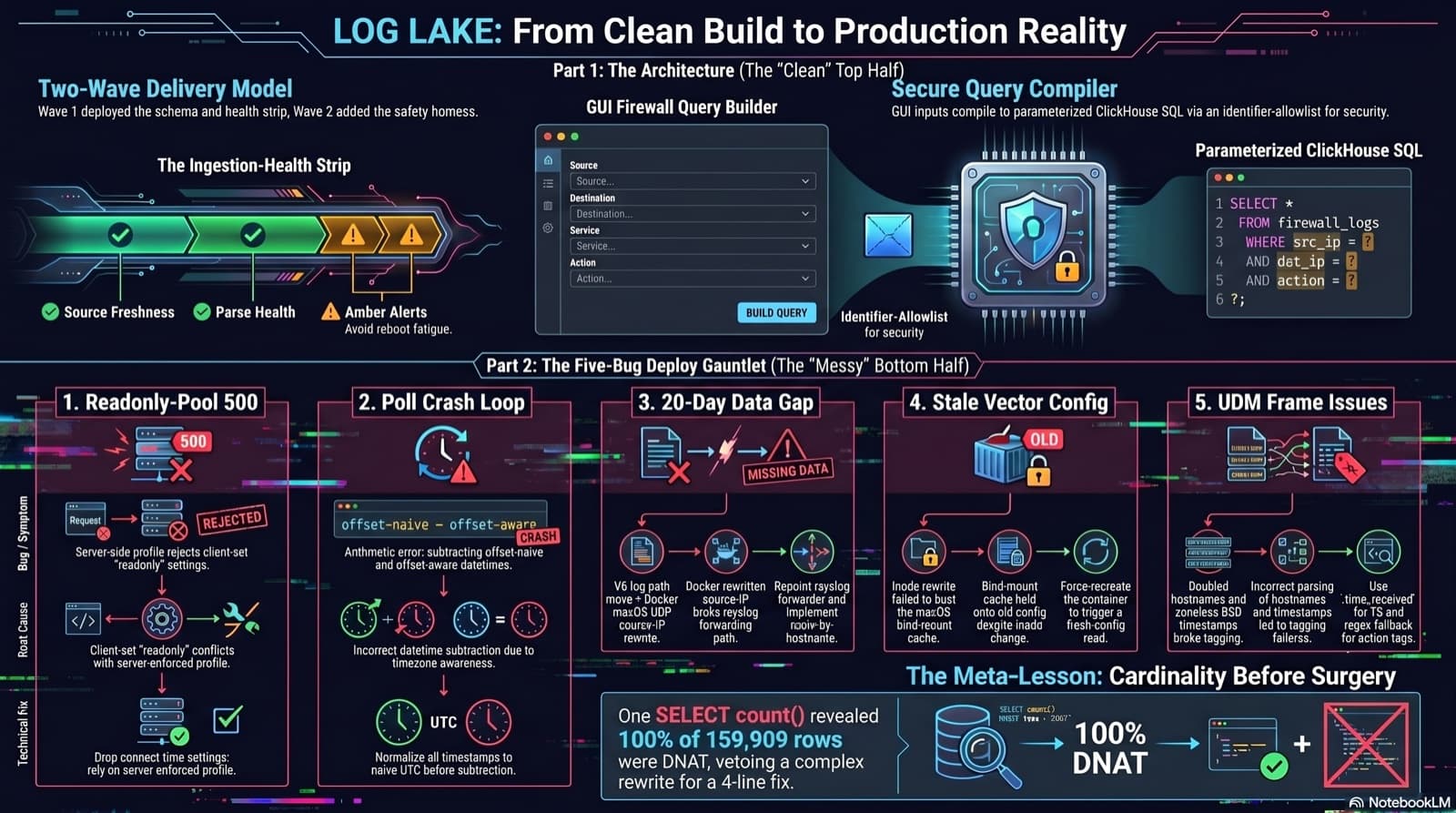
Home Network Mission Control: The LOG LAKE Panel, Five Deploy Bugs, and a Vetoed Bytes-Codec Rewrite
Part 6 of the home network dashboard build. The LOG LAKE panel ships a SIEM ingestion-health strip and a GUI firewall query builder that compiles to parameterized ClickHouse under the hood. One PR, two waves, 1193 backend tests at merge. Then deploy day on the live Mac mini produced five production-only bugs in a single afternoon: a readonly-pool 500, a timezone-mixed poll crash that had been firing every five minutes for hours, a 20-day-silent Pi-hole pipeline (two layers stacked), a Vector container reading a stale bind-mounted config, and a UDM doubled-hostname frame that silently broke action derivation for 159,909 rows. The meta-lesson is that the proposed fix for the last one was an invasive Vector source rewrite that the persona team vetoed in favor of an operator toggle and a four-line MV recreation.
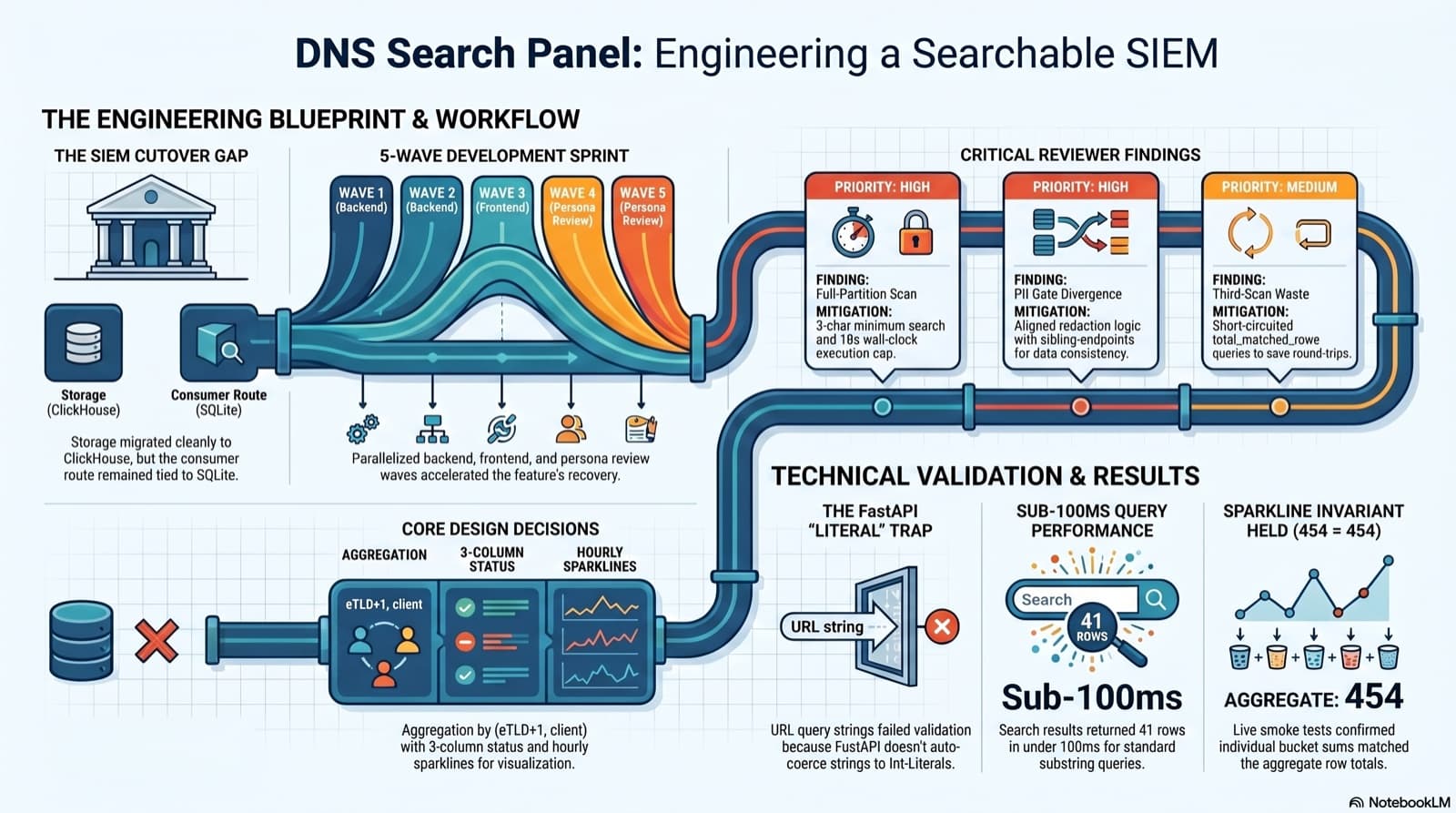
Part 6 of the home network dashboard build. The SIEM cutover dropped the DNS search endpoint without replacing it, and the only reason I caught it was clicking into the live dashboard and seeing "Failed to load DNS query log." This post walks the session that put search back: the diagnosis, the brainstorming workflow that pinned down five contested design choices, the five-wave persona dispatch, the parallel reviews that caught a third-scan query and a PII gate divergence, the FastAPI int-Literal gotcha that ate an hour, and a live smoke at 41 results in under 100ms with the sparkline-sum-equals-aggregate-total invariant holding 454 = 454 on the first row.
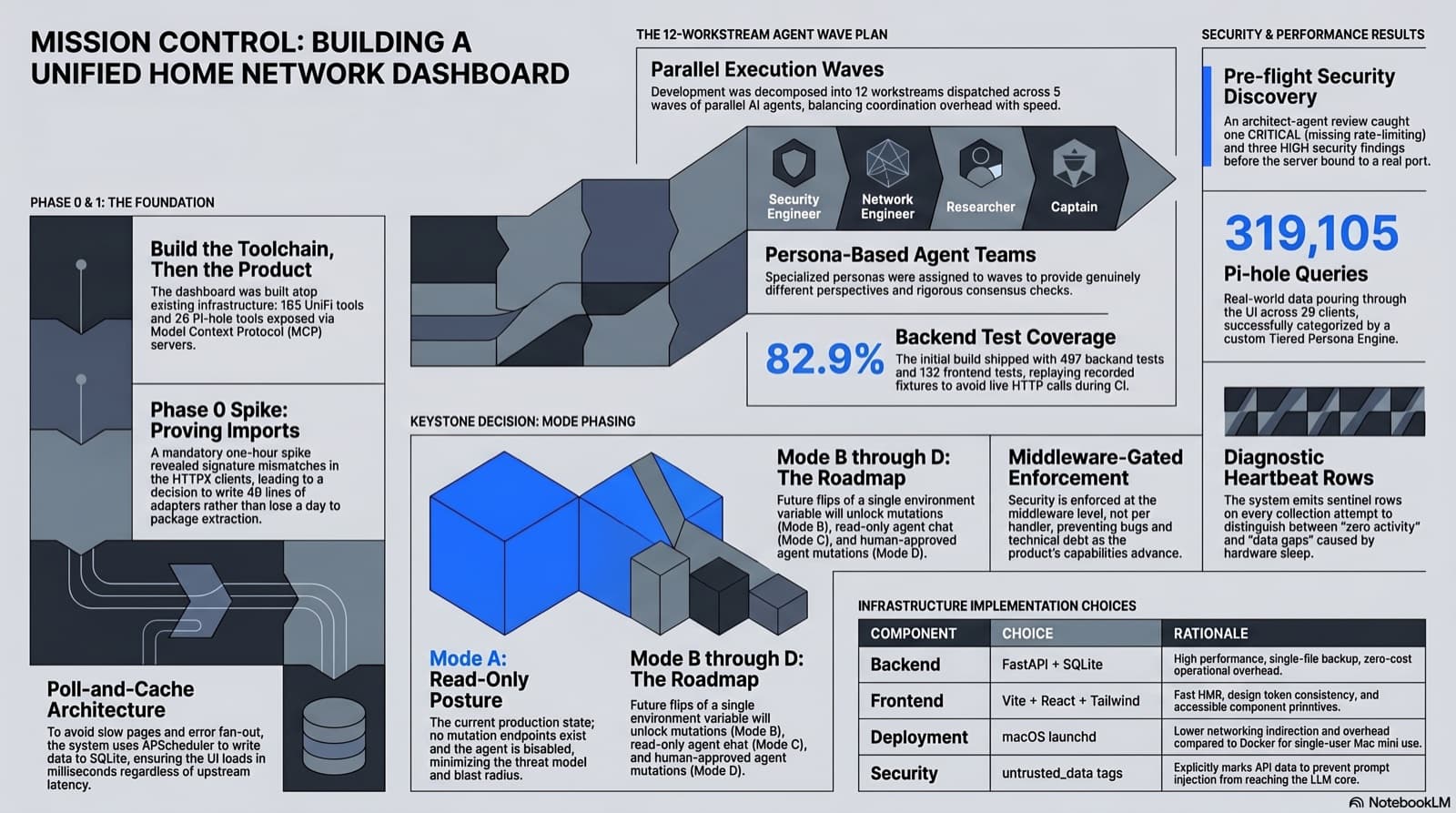
Part 1 of a multi-phase build: a single pane of glass for my UDM Pro, Pi-hole, and UniFi Protect home lab, written entirely with Claude Code. 12 parallel workstreams, four enrichment waves on top, 497 backend tests at 82.9 percent coverage, 132 frontend tests. One CRITICAL plus three HIGH security findings caught and fixed in review. The whole thing rests on the UniFi MCP, Pi-hole MCP, and persona-team patterns shipped in earlier posts; Phase 2 layers a cyberpunk skin on top of it.
Comments
Subscribers only — enter your subscriber email to comment