
Building a Custom UniFi MCP: 103 Tools, 208 Tests, Three Days
Two open-source UniFi MCP servers existed. Neither did what I wanted. So I built a third that combines their strengths, lazy-loads per product, and ships as a Claude Code plugin you can install with two slash commands.
103 tools. 208 unit tests. 12 hours across three days.
That's what it took to build a custom UniFi MCP server for Claude Code, release it publicly under MIT, and package it as a plugin that installs with two slash commands. The finished product lives at github.com/chris2ao/unifi-mcp and you can install it in about thirty seconds:
/plugin marketplace add chris2ao/unifi-mcp
/plugin install unifi-mcp@chris2ao
This post is the story of how it got there. Two open-source servers existed. Neither quite did what I wanted. So I composed a third server from the patterns that worked in both, discovered that half the endpoints I planned to call didn't exist on my firmware, and learned to read HTTP status codes as a navigation system. The punch line is a FastMCP closure trick that every MCP author will eventually want.
What is MCP?
MCP stands for Model Context Protocol. Think of it as "USB for AI assistants." An MCP server is a small program that exposes tools (read a file, query a database, call an API) through a standard protocol. When Claude Code launches, it starts those servers as child processes and registers their tools. The tools become available inside your session alongside the built-in ones. A single MCP server can expose dozens or hundreds of capabilities to any MCP-compatible client.
What is a UniFi console?
UniFi is Ubiquiti's family of networking products: routers, switches, access points, security cameras, door locks. A UniFi console is the on-prem controller that manages all of them. Mine is a UDM Pro sitting in a closet, running UniFi OS 5.0.16, UniFi Network 10.2.105, and UniFi Protect 7.0.104. It exposes three product surfaces through HTTPS APIs: Network, Protect (cameras and NVRs), and Access (door locks, not installed on my console).
The Use Case: Claude Code at Layer 2#
I wanted Claude Code to manage my home network the way it manages my code. Not a chat assistant that happens to know networking, but an agent that can list my clients, block a noisy IoT device, rename a camera, take a snapshot for the family vacation photo wall, and investigate why a VLAN suddenly lost DHCP. The same way I would say "show me the last 10 analytics events" to an agent and get a result, I wanted to say "list my cameras and tell me which one captured motion in the last hour."
This is a perfectly reasonable thing to want. UniFi has a well-documented API. Claude Code has MCP. The plumbing exists.
So my first move wasn't to write code. It was to see what other people had already built.
The /deep-research Phase#
I have a skill called /deep-research that orchestrates Exa semantic search, Firecrawl JS-rendered scraping, and WebSearch fallback into a single cited research pass. I wrote about it in the From WebSearch to Deep Research post. Right tool for this job.
I kicked off a survey of existing UniFi MCP servers. Two real contenders came back:
sirkirby/unifi-mcp(MIT licensed). FastMCP-based, broad product coverage. It touches Network, Protect, and Access in a single server. Strong safety model with a preview/confirm flow for destructive operations.enuno/unifi-mcp-server(Apache 2.0). Deeper on advanced Network features: Zone-Based Firewall, traffic flows, topology graphs, RADIUS profiles, PoE port profiles. Uses httpx directly with API-key auth, which is the right pattern for UniFi OS 4.0+.
Both were good. Neither was enough on its own.
The gap between the two
sirkirby had Protect and Access but missed the modern Network 9.x additions like Zone-Based Firewall. enuno nailed the firewall and topology surface but had no Protect at all. And both defaulted to cookie authentication patterns that date from the pre-API-key era.
The obvious move was to fork one and bolt on the other's surface. I considered it for about ten minutes. Forking either library would mean inheriting a design I didn't fully understand and carrying two sets of opinions forward. Worse, it'd marry me to whichever parent's release cadence I picked.
A cleaner move: start fresh, design for my console, compose the good patterns from both servers into a single new design, and give it API-key auth from the first commit. The result would be a server with Protect, Access, and modern Network features, all lazy-loaded per product, all authenticated through a single header.
Compose, do not clone
When two open-source libraries almost solve your problem, the answer is rarely "fork one and hack on it." Composition means reading both, extracting the patterns that work (FastMCP tool registration from one, httpx + API-key from the other, lazy per-product loading from a third design), and writing something new that respects both of their license attributions. The attribution block in the README is four lines. The freedom is worth it.
Phase 1: The MVP (2026-04-14)#
Day one was pure throughput. By the time I stopped I had:
- 85 tools registered: 80 Network tools plus 5 utility tools
- 183 unit tests passing
- 89.5% line coverage on the infrastructure modules
- 22 git commits
The stack: Python 3.12, FastMCP for the tool surface, httpx for async HTTP, Pydantic v2 for settings, uv for dependency management. The Claude Code integration was a wrapper script at ~/.claude/scripts/unifi-wrapper.sh that sourced my secrets.env and then exec'd uv run python -m unifi_mcp.
What is FastMCP?
FastMCP is a Python library that makes writing an MCP server look like writing ordinary decorated Python functions. You annotate a function with @mcp.tool(), FastMCP introspects the signature, builds a JSON schema, and wires it into the MCP protocol automatically. Any MCP-compatible client (Claude Code, Claude Desktop, several open-source agents) can then call your function as a tool.
The design was a three-loader architecture. On startup, only five tools are available: load_network_tools, load_protect_tools, load_access_tools, get_server_info, and get_auth_report. Calling a loader probes the console for that product and, on success, imports and registers the rest of the product's tools. This keeps the startup context small, avoids loading 100+ tools that will not be used, and makes it obvious which products are installed.
The safety model was wired but untested against live state. Every mutating tool was classified into a tier: Tier 1 for cosmetic writes (rename, alias), Tier 2 for standard mutations that need preview and confirm (create VLAN, block client), Tier 3 for destructive operations (delete network, restart device, forget client). The preview/confirm flow was in place but only exercised by unit tests.
Two bootstrap bugs hit me on the way up. The first was a missing __main__.py that made python -m unifi_mcp fail. Classic oversight, one-line fix. The second was subtler: Claude Code doesn't inherit the user's shell environment when it launches MCP child processes. I'd exported UNIFI_API_KEY in my zshrc, but the MCP server never saw it. The fix was the wrapper script, which sources my secrets file and then exec's uv. Users of the finished plugin avoid this entirely because of a different pattern I'll get to later.
The local-console API key gotcha
UniFi exposes two different kinds of API keys. The one at unifi.ui.com (the Site Manager cloud portal) looks identical to the console-local key. It is not. The cloud key returns 401 against every /proxy/network/* path on my UDM Pro. The working key must be generated on the console's local web UI at UDM Pro pill > Settings > Control Plane > Integrations. That distinction cost me an afternoon of "why is everything unauthorized" before the diagnostic penny dropped.
Swipe to see the full diagram · Tap to enlarge
Phase 1 Audit: Finding What Actually Works#
Day two morning. The MVP compiled, the tests passed, but I hadn't verified the tools against the live console yet. So I wrote a discovery sweep at /tmp/unifi_full_audit.py that called every read-only tool and collected the response or error. Three blockers surfaced in the first ten minutes.
Blocker 1: FastMCP cannot serialize UnifiClient#
Every tool in the project looked roughly like this:
async def list_cameras(client: UnifiClient) -> list[dict]:
    response = await client.get("/proxy/protect/integration/v1/cameras")
    return [_summarize(c) for c in response]
```python

That `client: UnifiClient` first parameter is the entire problem. FastMCP introspects the function signature to build a JSON Schema for the MCP protocol, and Pydantic blew up trying to serialize a custom HTTP-client class. The traceback was a three-page Pydantic-core schema error.

The fix is a closure wrapper that pre-binds the client and hides it from the public signature:

```python
def _bind_client(tool_fn):
    """Return a wrapper with `client` pre-bound and removed from the public signature."""
    original_sig = inspect.signature(tool_fn)
    public_params = [p for n, p in original_sig.parameters.items() if n != "client"]
    public_sig = original_sig.replace(parameters=public_params)

    @functools.wraps(tool_fn)
    async def wrapper(*args, **kwargs):
        return await tool_fn(client, *args, **kwargs)

    wrapper.__signature__ = public_sig
    wrapper.__annotations__ = {
        n: a for n, a in tool_fn.__annotations__.items() if n != "client"
    }
    return wrapper
Every registration runs through mcp.tool()(_bind_client(tool_fn)) instead of mcp.tool()(tool_fn). From Claude Code's perspective the tool signature becomes list_cameras() with no parameters. From inside the tool, client is available as if it were still in the signature.
This is a generally useful pattern for any FastMCP server where tools share infrastructure dependencies like an HTTP client, a database pool, a cache, or a logger. I'd bet half the FastMCP authors on GitHub will eventually hit this exact problem.
The FastMCP closure pattern
If your MCP tools share infrastructure, do not put the infrastructure argument in the public signature. Wrap tools in a closure that pre-binds the dependency and rewrites __signature__ and __annotations__ so FastMCP sees a clean function. Fifteen lines, works forever.
Blocker 2: Access probe crashed mid-scan#
load_access_tools was crashing with Expecting value: line 1 column 1 (char 0). The culprit was UniFi OS behavior: when you hit a product endpoint that isn't installed, the reverse proxy returns a 200 response with an HTML landing page, not JSON. The probe called response.json() and blew up.
The fix lives in the HTTP client. Any response whose content-type isn't application/json now raises a structured UNEXPECTED_RESPONSE error instead of tripping the JSON parser. It's the classic "fail at the boundary" pattern: trust nothing about content-types from a multi-tenant proxy.
Blocker 3: Protect probe hit the wrong endpoint#
load_protect_tools was reporting "not installed" on a console that clearly had Protect running. The legacy probe was /proxy/protect/api/bootstrap. With API-key auth, that path returns 500 because the legacy /proxy/protect/api/* surface still requires cookie auth. The Integration API (the API-key-friendly surface) has its own discovery endpoint at /proxy/protect/integration/v1/meta/info. Swapping the probe path fixed Protect loading immediately.
With those three blockers fixed, the audit ran to completion and exposed six smaller defects, which I wrote up in a remediation plan and tackled that evening.
Phase 1 Audit: The Remaining Six Defects#
Events, webhooks, and traffic flows had moved or disappeared#
Network 9.x reorganized several endpoints. get_events was hitting the legacy stat/event endpoint, which returns 404 because it was removed. list_webhooks was hitting /v2/api/site/{site}/webhooks, which had relocated to a unified notifications surface. Four traffic_flows tools were hitting an Integration API path that simply does not exist on this firmware.
Finding the new homes for events and webhooks meant probing the console directly with curl. The events case is a textbook example of reading status codes as a navigation system:
GET  /v2/api/site/default/system-log/events    -> 404
GET  /v2/api/site/default/system-log/triggers  -> 405 Method Not Allowed
POST /v2/api/site/default/system-log/triggers  -> 200 {"data": [], ...}
POST /v2/api/site/default/system-log/threats   -> 200 {"data": [], ...}
The 405 was the giveaway. The endpoint existed; it just wanted POST with an empty body plus pageNumber and pageSize query params. I repointed get_events to POST system-log/{category} with triggers as the default and threats available for IDS/IPS.
Probe by status code, not just 200
404 means "nothing here, try another path." 405 means "right path, wrong method." 400 means "right path, probably wrong args." 401 means "right path, bad auth." Every non-200 status code is directional information. Ignoring them and re-curling the same URL in hope is the search-engine equivalent of trying the same door over and over.
Swipe to see the full diagram · Tap to enlarge
For the traffic flows case, the Integration API simply doesn't expose per-flow data on this firmware. I could have synthesized fake flows from client stats, but that would have been lying. Instead all four traffic-flow tools now return a structured PRODUCT_UNAVAILABLE envelope pointing callers to list_clients for per-client byte counts. If a future firmware exposes the Integration API flow endpoints, those tools flip to real implementations without changing their signatures.
The list-versus-dict envelope bug#
Three tools raised AttributeError: 'list' object has no attribute 'get'. The V2 API isn't consistent about whether a collection endpoint returns a bare list or a {data: [...]} envelope. The fix was a small _unwrap helper that handles both shapes. It's the sort of bug you only catch against a live console, because hand-written test fixtures always match whatever shape the developer guessed first.
The site-UUID resolver#
The biggest architectural fix came from list_zbf_zones failing with HTTP 400. The Integration API addresses sites by UUID:
/proxy/network/integration/v1/sites/00000000-0000-0000-0000-000000000000/firewall/zones
The legacy /api/s/{site}/* and V2 /v2/api/site/{site}/* surfaces address the same site by its short name, default on my console. Having two identifier systems in the same client is exactly the kind of design choice that'll trip up integrations.
The solution was a lazy async resolver inside the HTTP client. Tools that need a UUID declare {site_id} in their path template. Tools that use the legacy or V2 surfaces continue to declare {site}. The client resolves both on every request, fetching the site list once and caching the UUID for the lifetime of the client:
async def _resolve_path(self, path: str) -> str:
    resolved = path.replace("{site}", self.config.unifi_site)
    if "{site_id}" in resolved:
        site_id = await self._ensure_site_id()
        resolved = resolved.replace("{site_id}", site_id)
    return resolved

async def _ensure_site_id(self) -> str:
    if self._site_id is not None:
        return self._site_id
    response = await self._request("GET", "/proxy/network/integration/v1/sites")
    site_list = response if isinstance(response, list) else response.get("data", [])
    for site in site_list:
        if site.get("internalReference") == self.config.unifi_site:
            self._site_id = site["id"]
            return self._site_id
    raise UnifiError(ErrorCategory.NOT_FOUND, "site not found")
```python

One extra HTTP call per client lifetime, transparent to every tool, future-proof for every new Integration API endpoint I ever want to add. Making `_resolve_path` async cascaded through `get`, `post`, `put`, `patch`, and `delete`, which was unpleasant but straightforward.

## Phase 2 Read-Only: Eight Protect Tools, Minus Two

With Network working end-to-end, I turned to Protect. The original plan called for eight read-only tools. Before writing any of them I curled every proposed endpoint against my live Protect 7.0.104. The results:
GET /protect/integration/v1/meta/info -> 200 (applicationVersion 7.0.104) GET /protect/integration/v1/cameras -> 200 (3 cameras) GET /protect/integration/v1/cameras/ -> 200 (full record) GET /protect/integration/v1/cameras//snapshot -> 200 image/jpeg ~700KB GET /protect/integration/v1/nvrs -> 200 (single object, not a list) GET /protect/integration/v1/liveviews -> 200 (1 liveview) GET /protect/integration/v1/sensors -> 200 [] GET /protect/integration/v1/events?types=motion -> 404 GET /protect/integration/v1/subscribe/events -> 404 GET /protect/integration/v1/cameras//recordings -> 404
Six tools shipped functional. Two tools (motion events and smart detections) landed as `PRODUCT_UNAVAILABLE` stubs documenting their probe paths. Same pattern as traffic flows.

The snapshot tool needed a new `get_binary` method on the HTTP client because the existing request path would have rejected the JPEG response as non-JSON (the earlier boundary fix). The new method returns `(bytes, content_type)` and the tool base64-encodes the image. A 700KB JPEG becomes ~930KB of base64.

<Warning title="Binary payloads blow up your context">
MCP tool responses travel back to Claude through the conversation. A base64 JPEG of that size consumes a lot of context, fast. In practice I use `get_camera_snapshot` rarely, and only when image content is the actual point. For most camera work, `get_camera` and `list_cameras` are enough.
</Warning>

I also captured live response fixtures from the real cameras into `tests/fixtures/protect/`. Hand-written test fixtures are fine for shape you already know. For a new integration against actual hardware, real captures catch regressions that invented dictionaries will always miss.

Test suite went from 183 passed to 200 passed, 15 skipped. Live verification showed `list_cameras` returning three real cameras (a G5 PTZ, a G5 Dome Ultra, a G6 Turret), `list_nvrs` returning the UDM Pro, and `list_liveviews` returning the one default layout.

## Phase 2 Control: The Plan Said Four, The API Said One

Day three was supposed to be the easy day. The plan listed four Protect control tools: `update_camera_name` (Tier 1 cosmetic), `set_camera_recording_mode` (Tier 3 destructive), `reboot_camera` (Tier 3), and `ptz_camera` (Tier 3). Wire them up, write the tests, move on.

Before writing any code I did another round of curl probing against my G5 PTZ, because my confidence in "the plan said so" was shot after Phase 1. The results were not great.

| Tool | Probe | Result |
|------|-------|--------|
| `update_camera_name` | `PATCH /cameras/{id}` with `{"name": "..."}` | 200, name changes |
| `set_camera_recording_mode` | PATCH with `mode`, `recording`, `recordingMode`, `recordingSettings.mode`, `settings.recordingMode` | 400 AJV_PARSE_ERROR on every shape |
| `reboot_camera` | POST and PUT against `reboot`, `restart`, and NVR reboot variants | all 404 |
| `ptz_camera` | GET and POST against `ptz`, `ptz/position`, `ptz/presets`, `goto`, `patrol`, pan/tilt/zoom, PATCH activePatrolSlot | all 404 or schema reject |

The AJV_PARSE_ERROR responses turned out to be the most useful. JSON Schema validation on the API side is a feature-discovery tool in disguise. Send every plausible recording-mode shape, read the rejection message, conclude with high confidence that the field doesn't exist on this firmware. That's faster than waiting for documentation and more accurate than guessing.

<Tip title="AJV_PARSE_ERROR as a negative-space signal">
A strict JSON schema on the server side tells you not just whether your request was valid, but which specific properties were allowed. Send requests with plausible-but-wrong keys, read the rejection, and you have mapped the accepted shape without ever getting a successful response. Negative results are still results.
</Tip>

So only one of the four planned tools existed on this firmware. `update_camera_name` shipped with the full preview-then-confirm pattern for safety, calling `PATCH /cameras/{id}` and invalidating the camera cache on success. The other three shipped as `PRODUCT_UNAVAILABLE` stubs, each naming the exact probes that failed. Here's what that looks like in code:

```python
_PTZ_UNAVAILABLE = {
    "error": True,
    "category": "PRODUCT_UNAVAILABLE",
    "message": (
        "PTZ control is not exposed on this firmware via the API-key "
        "Integration API. /cameras/{id}/ptz, /ptz/position, /ptz/presets all "
        "return 404 and PATCH rejects activePatrolSlot. Use the Protect "
        "web/mobile UI for PTZ movement and patrols."
    ),
}
I considered three alternatives and rejected them all:
- Wire up the preview/confirm flow with real POST calls. Would look functional, would always fail at
confirm=True, would leave dead code to delete later. - Return a terser "not available" error. Loses the future-me context about which probes failed and which shapes the schema rejected.
- Drop the stubs entirely. Callers would not discover the unavailability until they looked for tools, which is worse than surfacing them with a refusal.
Registering the stubs as first-class tools that cheerfully refuse turned out to be the right answer. The tool name shows up in load_protect_tools's count, in README listings, and in Claude's auto-complete. Callers discover the limitation the moment they look, not three steps into a broken workflow.
The thing about unavailable features is that pretending they exist is strictly worse than admitting they don't.
PRODUCT_UNAVAILABLE over fake data
When an endpoint genuinely does not exist, return a structured error naming the probes that failed. Do not synthesize fake data. Do not hide the tool. Register it, make it refuse, and document the probes. When UniFi ships the missing endpoint, the "no network call" unit test will fail and prompt proper implementation.
The tests on these stubs use a respx.mock pattern that asserts no HTTP call is made, even when confirm=True is passed. That assertion will fail the moment any of those endpoints ship on a future Protect firmware, which is the right time to flip the stub to a real implementation with the Tier 3 preview/confirm flow.
Test count went from 200 passed to 208 passed. The control commit landed on main and I closed the laptop feeling like the project was finally ready to be seen.
Swipe to see the full diagram · Tap to enlarge
Documentation Overhaul and the Claude Code Plugin Bundle#
The public face of the repo still looked like a Phase 1 project. README claimed "80 network tools." API.md had no Protect section. Security review predated the UUID resolver. I spent the rest of the afternoon fixing all of that in one pass, then turned the server into a Claude Code plugin.
The plugin bundle#
Up to this point, installing the server meant cloning the repo, running uv sync, hand-editing ~/.claude.json, and remembering to source the secrets file. That's too many steps for something that's supposed to feel like "add to Claude Code and go."
A Claude Code plugin fixes that. Three files land under .claude-plugin/:
.claude-plugin/
  plugin.json         # name, description, mcpServers inlined
  marketplace.json    # single-plugin marketplace pointing at source: "."
  README.md           # plugin-level docs
The marketplace pattern is the piece I hadn't seen before. You don't need a separate repo to publish a marketplace. A marketplace.json with source: "." makes the repo itself a single-plugin marketplace. Users add the marketplace and install the plugin in two commands:
/plugin marketplace add chris2ao/unifi-mcp
/plugin install unifi-mcp@chris2ao
Marketplace of one
If your plugin is not part of a larger family, the marketplace can live in the same repo as the plugin. One URL, one install command, zero additional maintenance. The marketplace.json file is five lines.
The plugin.json inlines the MCP server config. The key bit is env: {}, which is intentionally empty:
{
  "mcpServers": {
    "unifi": {
      "command": "uv",
      "args": ["run", "--directory", "${CLAUDE_PLUGIN_ROOT}", "python", "-m", "unifi_mcp"],
      "env": {}
    }
  }
}
```json

Two things matter here. `${CLAUDE_PLUGIN_ROOT}` resolves at runtime to wherever Claude Code cached the plugin files, so uv finds the project without the user knowing the cache path. And the empty `env` block tells Claude Code to pass the launching shell's environment through to the child process. That means `UNIFI_HOST` and `UNIFI_API_KEY` come from the user's shell, not from a JSON file on disk. The plugin never stores, sees, or asks for the API key. That's the kind of plumbing I'd rather not have to think about ever again.

<Security title="The env-block-as-secret-channel pattern">
Empty `env: {}` in an MCP server config is the cleanest secrets story I have seen in Claude Code. Your shell exports the variables. The MCP server inherits them. Nothing sensitive lives in tracked config files or plugin metadata. Users rotate keys by re-exporting, no plugin reinstall required.
</Security>

### Parallel documentation work

Once the plugin bundle was in, I had four pieces of documentation that all needed to change to reflect the new state. I parallelized them through four subagents:

- **README rewrite** (441 lines, sonnet): prerequisites section calling out the local-console vs cloud-key gotcha, API key walkthrough with the exact click path, three Mermaid diagrams (architecture, lazy loading, safety state machine), plugin install path documented first with manual install as fallback, corrected tool inventory.
- **docs/API.md** (+148 lines, sonnet): appended a Protect section covering all 12 tools including the 5 stubs, each stub listing its failed probes.
- **docs/SECURITY_REVIEW.md** (+addendum, haiku): Phase 2 addendum noting that `update_camera_name` lands at Tier 1 cosmetic and the 5 stubs have zero security surface.
- **Integration sweep** (haiku): gated behind `INTEGRATION=1` so pytest alone cannot accidentally hit a live console, expanded from 14 to 18 parametrized tools, fixed three stale function names.

Four agents finished in roughly the time one sequential pass would have taken. The sonnet agents each got a detailed brief with absolute facts to encode (tool counts, endpoint paths, the exact click path for the API key) to prevent drift. This is the same captain-and-specialists pattern I wrote about in [The Agent Captain Pattern](/blog/the-agent-captain-pattern-when-agents-orchestrate-agents).

## Public Release: Scrubbing Identifiers

Before the last push, I ran a security scan across everything I was about to make public. No CRITICAL findings. A handful of HIGH findings, all of them the same category: real identifiers that should not be in a public repo.

- Three camera MAC addresses
- Three Protect camera IDs (24-character hex strings)
- My console's site UUID
- My console's LAN IP

None of those are credentials. None of them grant access. But they're my network, and putting them in a public repo is the kind of thing I'd never do on purpose. So I made a choice: keep the private dev repo with full history, and create a separate public repo ([github.com/chris2ao/unifi-mcp](https://github.com/chris2ao/unifi-mcp)) scrubbed of every personal identifier.

The scrub rules:

- Camera MACs replaced with `AABBCC000001` / `...02` / `...03`
- Protect camera IDs replaced with 24 zeros plus an index
- Site UUID replaced with `00000000-0000-0000-0000-000000000000`
- Console IP replaced with the universal home-lab example `192.168.1.1`

Test fixtures got the same treatment. Docs got the same treatment. Every `rg` hit for the real values came up clean on the final pass.
$ uv run pytest 208 passed, 15 skipped in 0.46s
Tag `v0.2.0`, push to GitHub, flip the repo to public.

<Info title="Why two repos">
The private repo is a daily build log. It has messy debug notes, real network topology, session transcripts, test fixtures from my actual cameras. The public repo is what a user needs: clean code, scrubbed fixtures, documentation they can follow on their own hardware. Separating them keeps both honest. The blog post you're reading now was scrubbed the same way, so the placeholders you see above (`AABBCC000001`, all-zeros UUID) are the public values.
</Info>

## The Install Experience

If you have a UDM Pro, UDR, UDW, UCG, or Cloud Key on UniFi OS 4.0+, you can install this today. Two steps:

**Create a local-console API key** (not a cloud key). On your console's web UI, go to the console pill in the top-left, then Settings, then Control Plane, then Integrations. Create an API key. Copy it.

**Export the environment variables and install the plugin:**

```bash
export UNIFI_HOST="https://YOUR.CONSOLE.IP"
export UNIFI_API_KEY="<your-api-key>"
Then inside Claude Code:
/plugin marketplace add chris2ao/unifi-mcp
/plugin install unifi-mcp@chris2ao
Restart Claude Code so the MCP server inherits the fresh environment. Inside the new session:
call load_network_tools
call load_protect_tools
Each loader probes the console and registers its tools. After both calls the session has 103 tools available on a UDM Pro with Protect installed. A fresh UDR without Protect will have 91 (5 utility + 86 Network + 0 Protect).
If you get 401 on every call
You are using a cloud key instead of a local-console key. Delete it, go to the console's local UI, and create one at Settings > Control Plane > Integrations. The console-local key is what the X-API-Key header expects.
What the Numbers Say#
Phase totals from the git log:
| Metric | Phase 1 | Phase 2 read-only | Phase 2 control | Phase 3 release |
|---|---|---|---|---|
| Tools added | 85 | +8 | +4 | 0 |
| Tests | 183 | 200 | 208 | 208 |
| Test coverage | 89.5% | 89.5% | 89.5% | 89.5% |
| Commits on the day | 22 | 4 | 3 | 6 |
Tool surface at the finish line: 5 utility + 86 Network + 12 Protect = 103 tools on a UDM Pro. All 103 show up in load_* tool output. The 5 stubs refuse cheerfully with probe paths documented.
Patterns Worth Carrying Forward#
Twelve patterns came out of this build. These are the ones I expect to reuse.
- Compose, do not clone. Two good servers existed. The answer was combining their strengths with a fresh architecture, not forking either.
- The FastMCP closure trick. Wrap shared infrastructure out of public signatures. Every FastMCP author hits this eventually.
- Probe by status code, not just 200. 404 means gone. 405 means wrong method. 400 means wrong args. 401 means bad auth. Every non-200 is directional information.
- AJV_PARSE_ERROR as a negative-space signal. Strict schema validation tells you which properties are allowed by which it rejects. Feature discovery through targeted failure.
- PRODUCT_UNAVAILABLE over fake data. When an endpoint does not exist, return a structured error with probe paths. Better than synthesizing fake responses.
- Register the stubs, do not hide them. A refusing tool is more useful than a missing tool. Auto-complete works. Limitations become obvious.
- Marketplace of one. A single plugin can be its own marketplace with
marketplace.jsonandsource: ".". - Empty
env: {}for secret hygiene. Let the shell handle secrets. The plugin never touches the API key. - Lazy async resolvers. Cheap to add, invisible to callers, handle multi-identifier systems transparently.
- Fail at the boundary. Non-JSON content-types become errors at the HTTP client, not at the tool. List-versus-dict envelopes get unwrapped once in a helper, not in every tool.
- Live fixtures over invented ones. A 90-second curl capture pays back ten-fold in test reliability on a hardware integration.
- Parallel docs at the end. Four agents finishing in one agent's wall clock is a good trade when the facts are knowable up front.
What's Next#
The MCP is fully MIT-licensed and open source at github.com/chris2ao/unifi-mcp. Install in two slash commands:
/plugin marketplace add chris2ao/unifi-mcp
/plugin install unifi-mcp@chris2ao
The next three work items are queued:
Phase 2 download and clip tools. Deferred until /cameras/{id}/recordings and /subscribe/events ship on a future Protect firmware. The stubs are ready to promote the moment either endpoint responds 200.
Phase 3 Access. Still blocked on having a console with Access installed. My UDM Pro doesn't run it. The module stubs exist and the loader path is correct.
Phase 4 PyPI publish. Packaging unchanged. Waiting for Phase 2 to stabilize before tagging the first PyPI release, at which point uvx unifi-mcp becomes an alternative to the plugin for users who prefer standalone CLI workflows.
The re-probe pattern is the interesting forward-looking piece. Every stub in the codebase has a unit test that asserts no HTTP call is made. The moment UniFi ships any of those endpoints, the respx.mock assertion will fail on the next firmware test run. That failure is the trigger to flip the stub to a real implementation with the Tier 3 preview/confirm flow. The test is both documentation and a future-self alarm clock.
I'll take the alarm clock I didn't know I needed over a pile of dead code every time.
Three days, three HTTP-status lessons, 103 tools and 208 tests, one open-source MCP that you can install right now. If you build your own, the closure trick and the env: {} pattern are probably the two things worth stealing first.
Go break something on your network.
Weekly Digest
Get a weekly email with what I learned, summaries of new posts, and direct links. No spam, unsubscribe anytime.

Related Posts
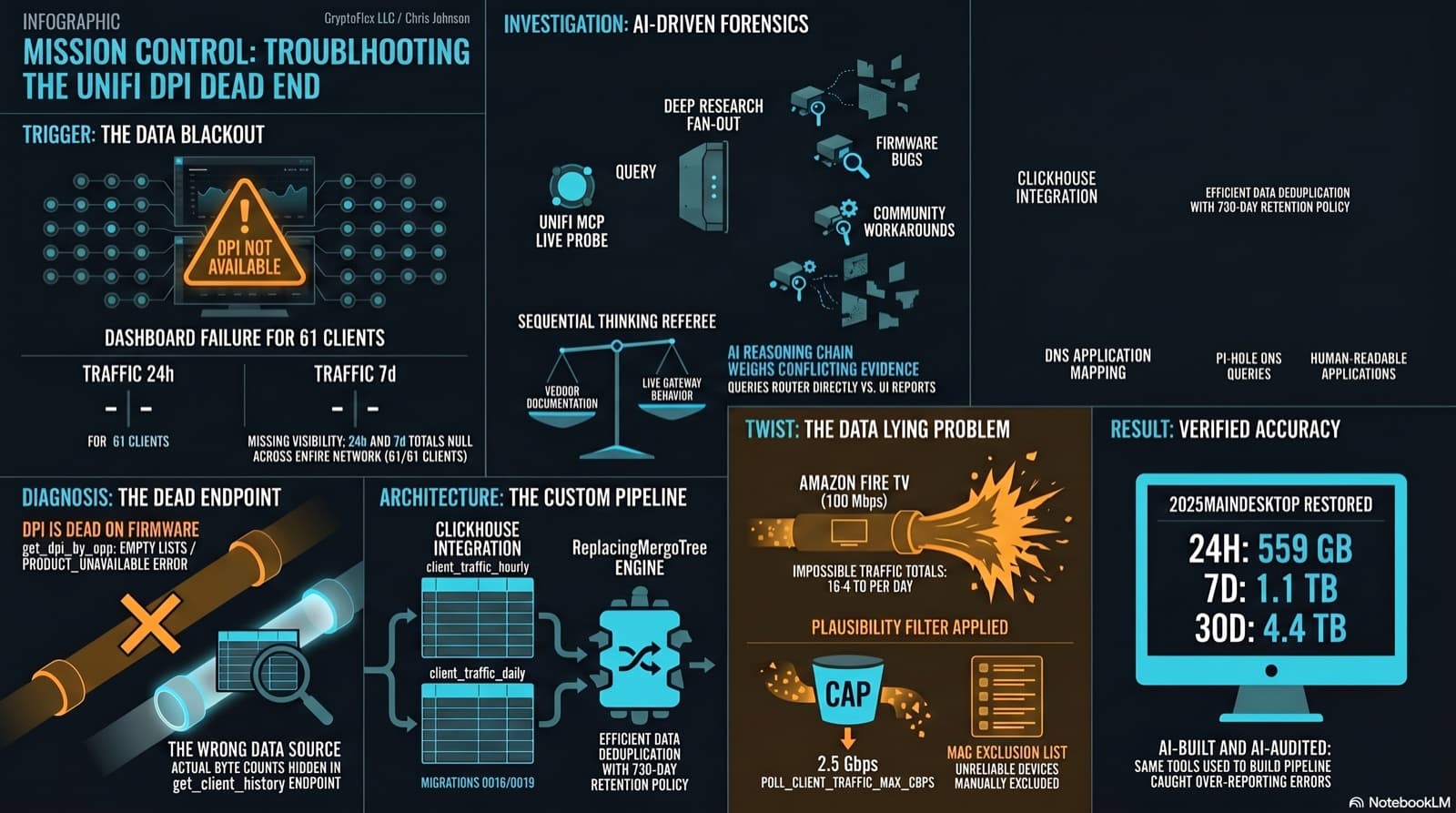
The Clients page showed "--" for traffic and "DPI not available for this device" for applications. The investigation found that per-app DPI is genuinely dead on this firmware, but per-client hourly byte buckets are alive and well in a different endpoint the dashboard was never reading. Fix the source, accumulate in ClickHouse, reconstruct Top Applications from Pi-hole DNS, and then discover that some clients are reporting physically impossible volumes. One afternoon, one commit (e07a8ac, 27 files), three confessional asides, and a plausibility cap that became load-bearing.
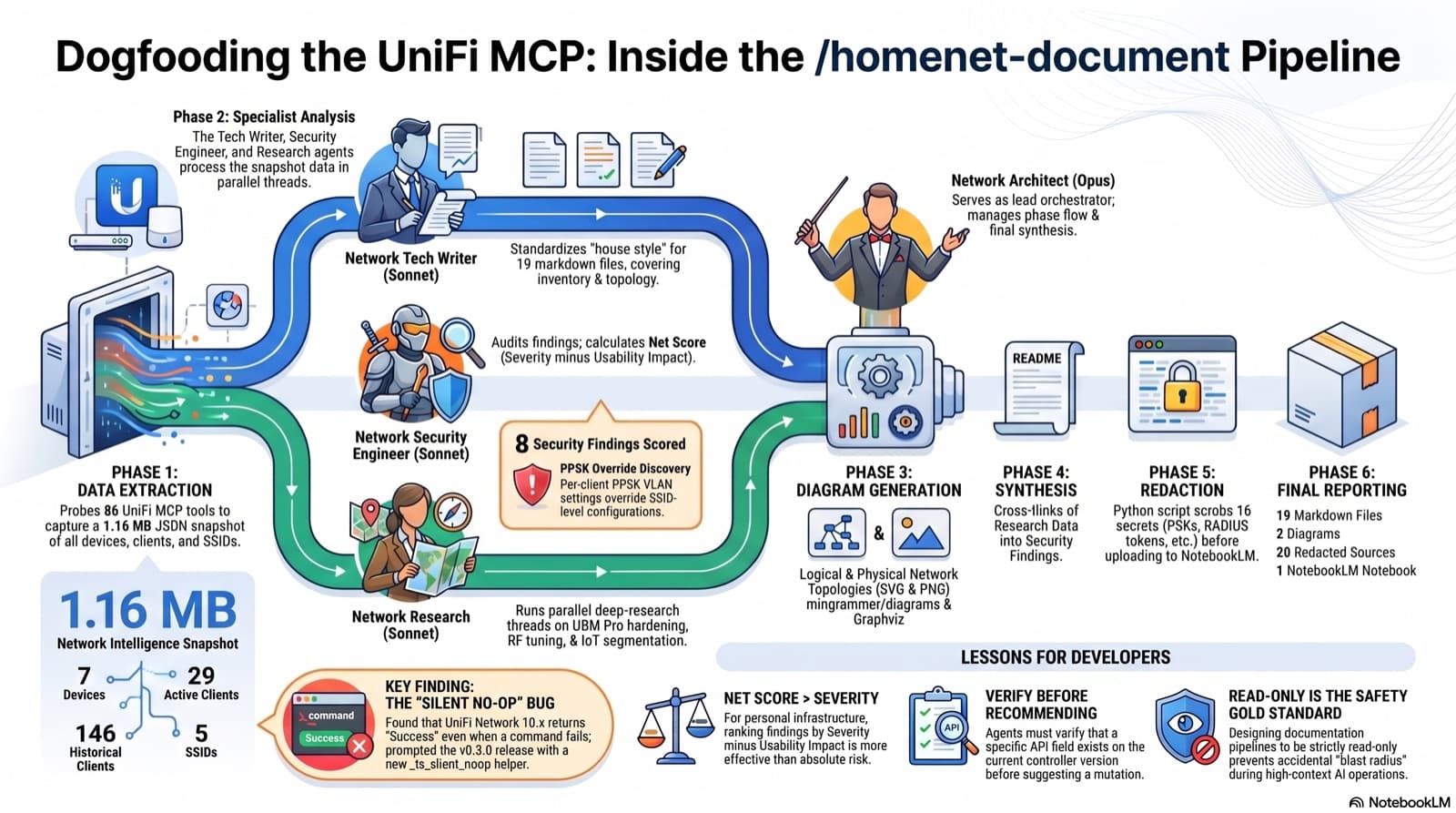
4 agents, 6 phases, 19 markdown files, 2 diagrams, 20 NotebookLM sources, 1 false positive caught, 1 silent UniFi bug surfaced and shipped as v0.3.0 in the same session.
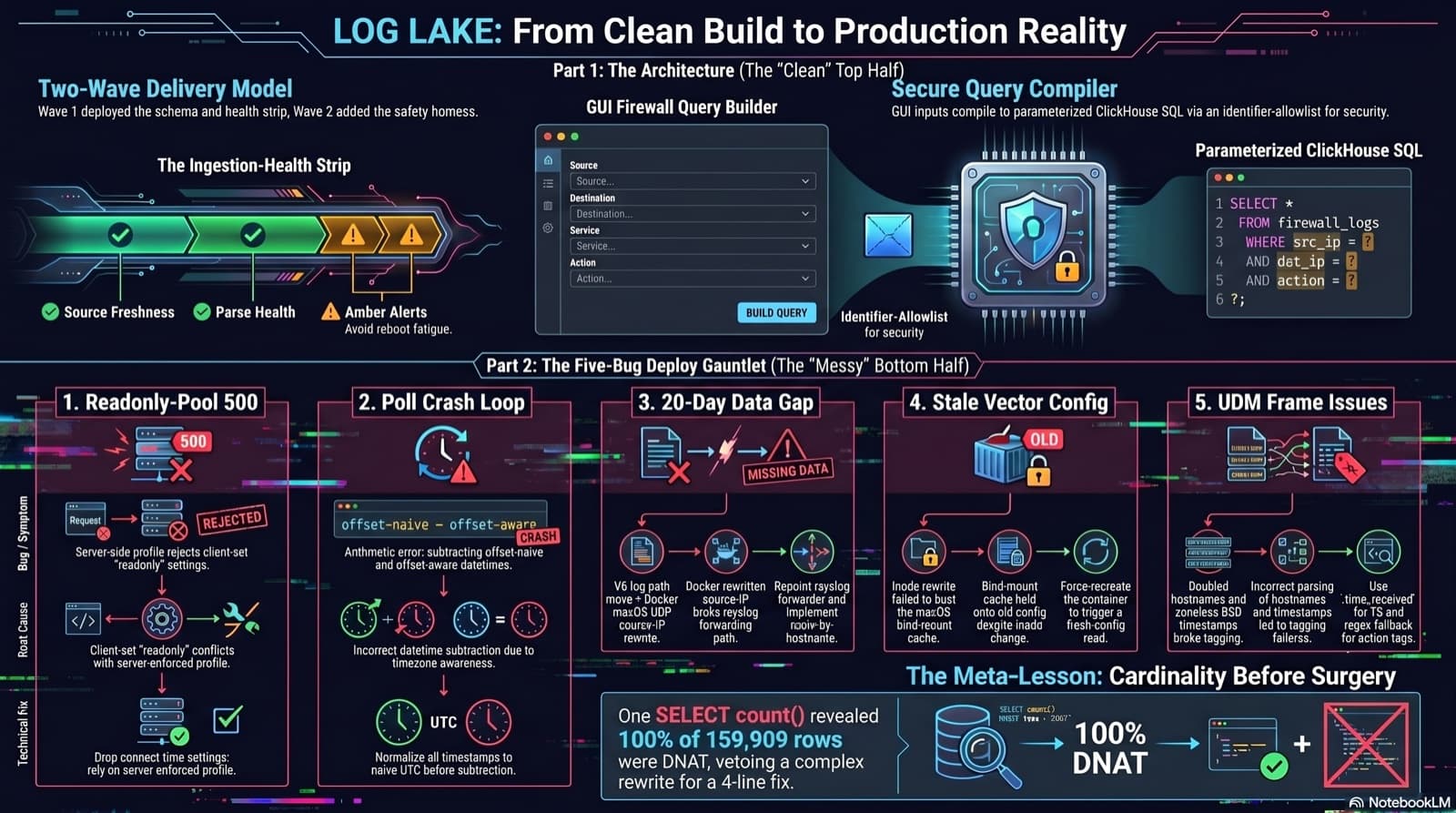
Home Network Mission Control: The LOG LAKE Panel, Five Deploy Bugs, and a Vetoed Bytes-Codec Rewrite
Part 6 of the home network dashboard build. The LOG LAKE panel ships a SIEM ingestion-health strip and a GUI firewall query builder that compiles to parameterized ClickHouse under the hood. One PR, two waves, 1193 backend tests at merge. Then deploy day on the live Mac mini produced five production-only bugs in a single afternoon: a readonly-pool 500, a timezone-mixed poll crash that had been firing every five minutes for hours, a 20-day-silent Pi-hole pipeline (two layers stacked), a Vector container reading a stale bind-mounted config, and a UDM doubled-hostname frame that silently broke action derivation for 159,909 rows. The meta-lesson is that the proposed fix for the last one was an invasive Vector source rewrite that the persona team vetoed in favor of an operator toggle and a four-line MV recreation.
Comments
Subscribers only — enter your subscriber email to comment