
Configuring Claude Code: Rules, Hooks, MCP Servers, and Plugins
A deep dive into configuring Claude Code for real-world use - from modular rules and session logging hooks to MCP servers and the everything-claude-code plugin ecosystem.
Out of the box, Claude Code works fine. But after using it for a while, you start wanting more: persistent memory across sessions, automatic logging, guardrails to prevent bad habits, and shortcuts for common workflows. This post documents how I configured Claude Code from scratch - including the things that didn't work on the first try.
The Two-Tier Config System#
Claude Code has two levels of configuration:
Project-level (./CLAUDE.md, .claude/settings.local.json) - applies only to the current project. This is where you put project-specific instructions, hook scripts, and permissions. Checked into git, shared with collaborators.
User-level (~/.claude/rules/, ~/.claude.json, ~/.claude/settings.json) - applies to every project. This is where you put universal standards like coding style, security rules, and MCP servers. Personal to your machine.
No Duplication
This separation means you write project instructions once in CLAUDE.md and universal standards once in ~/.claude/rules/. No duplication between layers.
Setting Up Rules#
Rules are markdown files in ~/.claude/rules/ that Claude reads at the start of every session. Think of them as persistent instructions - "always do X, never do Y."
I started with the rules from everything-claude-code, a community configuration repo with 41,000+ stars. Then I trimmed them significantly.
Why Trim?#
Context Window Cost
Every line in a rule file costs context window tokens. Rationale paragraphs, examples, and checklists that restate things Claude already knows are pure overhead. A rule like "always create new objects, never mutate existing ones" is enough - you don't need three paragraphs explaining why immutability matters.
After trimming ~40% of the original content, I ended up with 8 concise rule files:
| File | What It Enforces |
|---|---|
coding-style.md | Immutability, small files (200-400 lines), functions under 50 lines |
git-workflow.md | Conventional commits (feat:, fix:, refactor:, etc.) |
testing.md | TDD mandatory, 80% coverage minimum |
security.md | No hardcoded secrets, validated inputs, OWASP Top 10 |
performance.md | Model selection strategy (Opus for planning, Sonnet for coding) |
patterns.md | Repository pattern, consistent API response format |
hooks.md | Hook types and permission management |
agents.md | Agent orchestration (requires the everything-claude-code plugin) |
Key Lesson#
Rules Should Work Standalone
My first versions referenced agents and commands that require a specific plugin. If someone copies just the rules without the plugin, those references are broken. I stripped agent-specific instructions from 6 of 8 files so they work for anyone.
Building a Session Logging System with Hooks#
This is where things got interesting - and where I made my biggest mistake before finding the right approach.
The Wrong Way: Building a Rust Binary#
Wrong Architecture
My first idea was to build a standalone Rust program that would intercept Claude Code conversations and save them. I wrote hundreds of lines of Rust, YAML configuration files, Python test scripts, and extensive documentation. The fundamental problem: a standalone binary cannot access Claude Code's internal conversation data. It has no API, no socket, no shared memory. It was the wrong architecture entirely.
The Right Way: Hooks#
Claude Code has a hooks system - shell commands that run automatically when events happen. Hooks receive JSON data on stdin with real session context.
I wrote two PowerShell scripts:
log-activity.ps1 - runs after every tool use (PostToolUse hook). Logs every file edit, command execution, and write operation to activity_log.txt with timestamps.
save-session.ps1 - runs when a session ends (SessionEnd hook). Copies the full conversation transcript to .claude/session_archive/ with a human-readable summary.
Configuration in .claude/settings.local.json:
{
  "hooks": {
    "PostToolUse": [{
      "matcher": "Bash|Edit|Write|NotebookEdit",
      "hooks": [{
        "type": "command",
        "command": "powershell -NoProfile -Command \". 'path/to/log-activity.ps1'\"",
        "async": true
      }]
    }],
    "SessionEnd": [{
      "matcher": "",
      "hooks": [{
        "type": "command",
        "command": "powershell -NoProfile -Command \". 'path/to/save-session.ps1'\""
      }]
    }]
  }
}
Windows/PowerShell Gotchas#
Three Traps on Windows
If you're on Windows, there are three traps I fell into:
-
Stdin reading: PowerShell's
$inputvariable does NOT work when the script is invoked viapowershell -File. You must use[Console]::In.ReadToEnd()AND invoke via-Command ". 'script.ps1'"(dot-sourcing) instead of-File. -
Path computation:
.claude/hooks/is 2 levels below the project root, not 3. I had an off-by-one error in mySplit-Pathnesting that silently wrote log files to the wrong directory. -
Error handling: Hooks should NEVER crash Claude Code. Set
$ErrorActionPreference = "SilentlyContinue"so errors are swallowed gracefully.
These are exactly the kind of gotchas that waste hours because there are no error messages - everything just silently doesn't work.
MCP Servers: Extending Claude Code's Capabilities#
MCP (Model Context Protocol) servers are background processes that give Claude new tools. I initially installed five, then trimmed to two.
The Two I Kept#
Memory server (@modelcontextprotocol/server-memory) - maintains a persistent knowledge graph across sessions. Claude can store entities, relationships, and observations that survive between conversations. Nothing built into Claude Code does this.
Context7 (@upstash/context7-mcp) - fetches live, up-to-date documentation for any library or framework. Instead of relying on training data (which has a knowledge cutoff), Claude gets the current docs on demand.
The Three I Dropped (Initially)#
Lesson in Minimalism
I initially dropped sequential-thinking, filesystem, and github MCP servers because they seemed redundant with built-in capabilities. Later, I re-added them as their unique strengths became clear in practice. The lesson: start minimal, but don't be afraid to re-evaluate as your workflow evolves.
| Server | Why I Initially Dropped It | Why It's Useful |
|---|---|---|
| sequential-thinking | Claude's built-in extended thinking seemed sufficient | Structured multi-step reasoning for complex debugging |
| filesystem | Built-in Read/Write/Edit/Glob/Grep tools exist | Better for batch file operations and directory trees |
| github | The gh CLI via Bash covers most operations | Richer PR/issue interaction without CLI syntax |
The lesson: Every MCP server adds startup overhead and context cost. Only keep servers that provide capabilities Claude Code genuinely lacks. But re-evaluate periodically, because your needs change as your workflow matures.
The Config File Trap#
Wrong File!
Here's the gotcha that cost me the most time: ~/.claude/mcp-servers.json is for Claude Desktop, not Claude Code. Claude Code ignores that file entirely. I carefully configured all five servers in ~/.claude/mcp-servers.json, restarted Claude Code, and... nothing. Running /mcp showed "No MCP servers configured."
The correct location for Claude Code MCP servers is ~/.claude.json under the "mcpServers" key. The easiest way to add them:
claude mcp add --scope user memory -- npx -y @modelcontextprotocol/server-memory
claude mcp add --scope user context7 -- npx -y @upstash/context7-mcp
This writes to the correct file automatically. Use claude mcp list to verify they're connected.
The everything-claude-code Plugin#
The everything-claude-code repo is available as a Claude Code plugin. One install gives you 13 specialized agents, 30+ slash commands, and 30+ skills.
Installing#
In ~/.claude/settings.json:
{
  "extraKnownMarketplaces": {
    "everything-claude-code": {
      "source": { "source": "github", "repo": "affaan-m/everything-claude-code" }
    }
  },
  "enabledPlugins": {
    "everything-claude-code@everything-claude-code": true
  }
}
Restart Claude Code and the plugin loads automatically.
The Missing Frontmatter Bug#
Silent Failure
After installing, I noticed that more than half the slash commands weren't appearing. Investigation revealed that 18 of 31 command files in the commands/ directory were missing YAML frontmatter - the ---\ndescription: ...\n--- block at the top of each .md file.
Claude Code requires this frontmatter to register commands. Without it, the files are silently ignored. No error, no warning - the commands just don't exist.
I fixed all 18 files manually by adding frontmatter. But since these edits are in the plugin cache (~/.claude/plugins/cache/...), they'll be overwritten on plugin updates. This is an upstream bug in v1.2.0.
Commands Worth Knowing#
| Command | What It Does |
|---|---|
/plan | Structured planning before implementation - analyzes requirements, waits for approval |
/verify | 6-phase check: build, types, lint, tests, security, git status |
/learn | Extracts reusable patterns from your session and saves them as skills |
/tdd | Enforces test-driven development: write test → make it pass → refactor |
/code-review | Runs a specialized code review agent on your recent changes |
Backing Up Your Config#
All of this configuration lives in ~/.claude/, which is outside any project repo. If your machine dies, it's gone. I set up a dedicated GitHub repo to version-control the valuable parts (github.com/chris2ao/claude-code-config):
cd ~/.claude
git init
# .gitignore uses ignore-everything-then-whitelist pattern
gh repo create <your-username>/<your-config-repo> --private --source=. --push
The .gitignore whitelists only the files worth tracking: rules/, skills/learned/, .gitignore, and README.md. Everything else (sessions, cache, settings with tokens) is excluded.
Portable Config
This config is portable. Clone it on a new machine, drop it into ~/.claude/, and your full environment (rules, skills, learned patterns) is replicated instantly.
What I'd Do Differently#
1. Start with hooks
I wasted time on the Rust binary. If I'd read the Claude Code docs more carefully, I would have found hooks immediately.
2. Trim rules from the start
Don't copy verbose rules wholesale - read them, understand what they enforce, then write concise versions.
3. Install MCP servers one at a time
Installing five at once made it hard to tell which ones were actually useful.
4. Back up config early
I should have set up the GitHub repo before spending hours configuring things, not after.
The Full Stack#
Here's what my Claude Code environment looks like now:
~/.claude/
├── rules/              # 8 rule files (coding, git, testing, security, etc.)
├── skills/learned/     # 14 extracted patterns from past sessions
├── commands/           # Custom slash commands (/wrap-up, /blog-post)
├── settings.json       # Plugin config
├── .gitignore          # Whitelist-based (only tracks rules + skills)
└── README.md           # Documents what's tracked

~/.claude.json          # MCP servers (memory, context7, + others)

project/.claude/
├── hooks/              # PowerShell scripts for logging + notifications
├── session_archive/    # Archived transcripts (git-ignored)
└── settings.local.json # Hook config + permissions

project/CLAUDE.md       # Project-specific instructions
Two tiers, each with a clear purpose. No duplication between layers. The whole thing is version-controlled and portable.
Written by Chris Johnson and edited by Claude Code (Opus 4.6). The website source is at github.com/chris2ao/cryptoflexllc. This post is part of a series about AI-assisted development. Previous: Getting Started with Claude Code. Next: How I Built This Site.
Weekly Digest
Get a weekly email with what I learned, summaries of new posts, and direct links. No spam, unsubscribe anytime.

Related Posts
How I replaced three separate Google Workspace MCP integrations with a single gws CLI skill, why CLI beats MCP for large API surfaces, and the four-tier safety system that keeps destructive operations from running without confirmation.
A practical walkthrough of the 5 Node.js MCP servers I run with Claude Code: sequential-thinking, memory, context7, github, and project-tools. What they do, how to configure them on Windows, and what I learned testing each one.
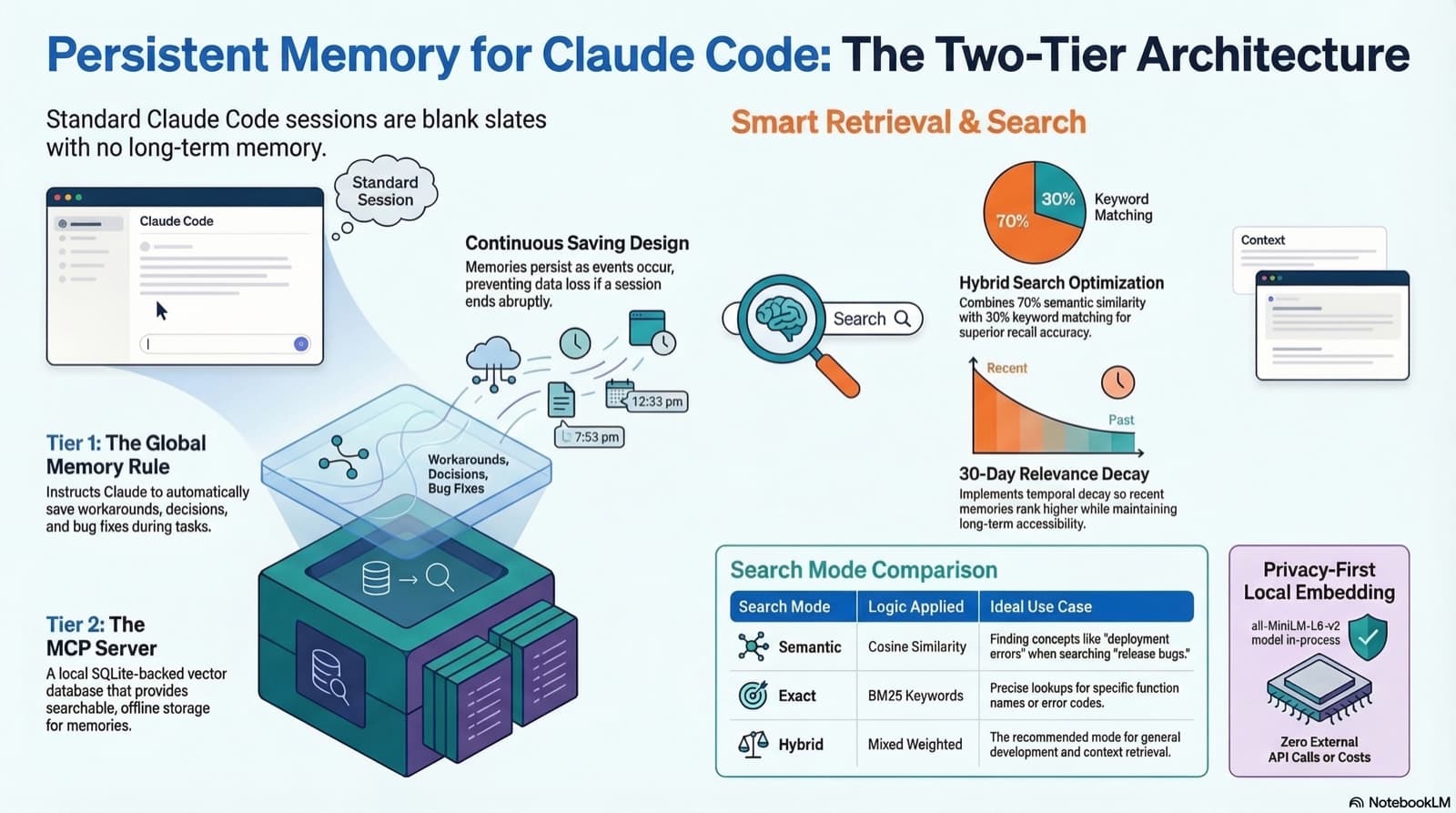
How to give Claude Code real persistent memory using a global rule file and a vector database MCP server, so context survives across sessions without any manual effort.
Comments
Subscribers only — enter your subscriber email to comment