
Dogfooding the UniFi MCP: /homenet-document and the Bug It Found
4 agents, 6 phases, 19 markdown files, 2 diagrams, 20 NotebookLM sources, 1 false positive caught, 1 silent UniFi bug surfaced and shipped as v0.3.0 in the same session.
19 markdown files. 8 security findings. 20 redacted sources. 1 silent UniFi bug found and shipped in the same session.
That is the result of the first real use of chris2ao/unifi-mcp, the open-source UniFi MCP server I built last week. I covered the construction of that server in Building a Custom UniFi MCP. The tests passed. The plugin installed. But I had not actually pointed it at anything substantial. Time to dogfood.
This is the story of what happened when I did.
Series Context
This is the third post in the Under the Hood series. The first covered the Homunculus Evolution Layer, which synthesizes behavioral patterns into reusable skills. The second covered the 5-Agent Design Team behind the /ui-ux skill system. This one is what happens when a freshly built MCP server meets its first real workload.
The Plan: A Read-Only Documentation Pipeline#
I already had a /homenet-* skill family. Seven of them, all mutation-focused: allow a MAC, deny a MAC, add a PPSK, remove a PPSK, toggle the MAC filter, snapshot the wlanconf, review the allowlist against actual clients. Each one is a precise scalpel.
What I did not have was a single skill that just looked at the network and wrote down what it saw. No mutations. No edits. Just an honest, refreshable description of every device, SSID, VLAN, firewall zone, port forward, and Protect camera I own, organized into markdown files I could git diff over time.
So I designed /homenet-document to fill that gap. The plan was a four-agent team:
- network-architect (Opus): orchestrator, runs Phase 1, 3, 4, 5, and 6, owns diagram generation and NotebookLM publication.
- network-tech-writer (Sonnet): rewrites every HomeNetwork/ markdown file in house style.
- network-security-engineer (Sonnet): scores findings by Severity minus Usability Impact, writes only fixes the MCP can actually execute.
- network-research (Sonnet): runs three parallel
/deep-researchthreads on UDM Pro hardening, U7 Pro RF tuning, and zone-based-firewall IoT segmentation.
Every agent runs read-only against the UniFi MCP. The output is a refreshed HomeNetwork/ directory, two rendered network diagrams, a security recommendations file with MCP-ready commands, and a redacted notebook published to NotebookLM for offline study.
Swipe to see the full diagram · Tap to enlarge
The Build#
The build itself was uneventful. One session. Four project-local agents in .claude/agents/, totaling roughly 600 lines of agent specs. One user-invocable skill at ~/.claude/skills/homenet-document/SKILL.md. Two Python scripts: homenet-render-diagrams.py (mingrammer/diagrams plus Graphviz) and homenet-redact.py (regex-based scrubber for PSKs, PPSK passwords, RADIUS shared secrets, API keys, and bearer tokens).
I matched the existing /homenet-* skill family pattern so the new skill felt native: same naming, same preview-then-apply default for any mutation paths, same auto-snapshot before destructive ops. Read-only skills do not need the snapshot guard, but they share the same skill-front-matter and Markdown layout.
Match the family
When you add a new skill to an existing family, copy the conventions of its siblings. Same naming prefix, same options, same output style. Users do not want to learn a new contract for every skill. If /homenet-allow-mac defaults to preview and uses --apply to commit, then /homenet-document defaults to a dry-friendly read-only mode and uses --no-notebooklm to opt out of cloud upload. Predictable beats clever.
The First Run#
I ran /homenet-document against my UDM Pro for the first time. The architect captured a 1.16 MB JSON snapshot covering 10 categories pulled from 86 UniFi tools. Seven devices, 29 active clients, 146 historical clients, five SSIDs, four LAN networks, three Protect cameras.
The tech writer drafted 19 markdown files: a refreshed README with an executive summary, an inventory with tiered known/transient client tables, a topology document with IP plan and SSID/VLAN segmentation, an investigations log, six device-category profiles, five configuration documents, and three research files generated by the research agent in parallel.
The security engineer scored 8 findings with Severity, Usability Impact, and Net Score columns. The architect generated the logical and physical diagrams (SVG and PNG each), then ran the redaction script. 16 secrets were caught and replaced before upload. The redacted parallel tree was published as 20 sources to a "Johnson Home Network" notebook on NotebookLM.
Total wall time was on the order of an hour, most of it spent in the research agent's three deep-research threads. The mechanical work (snapshot, draft, redact, upload) was minutes.
Why redact for NotebookLM but not for the repo?
NotebookLM is Google-hosted. My private repo (where the unredacted HomeNetwork/ docs live) sits behind the pre-commit secret scanner I deployed across all my GitHub repos after the April 18 PSK leak remediation. Different threat models, different hygiene. The redaction script is the right tool for moving content from the private side to the cloud side; the secret scanner is the right tool for keeping the private side from accidentally going public.
The Bug It Surfaced#
Here is where dogfooding earned its keep.
Buried in my devices was a Livingroom Unifi Switch, an old US8P60, MAC b4:fb:e4:d1:d5:9d. I had replaced it months ago with a USW Flex 2.5G 8 PoE in the same room. The old switch was still listed in the controller as adopted but offline. It was the reason my /stat/health endpoint kept reporting the LAN subsystem as error. The security engineer correctly flagged it as Finding #2 with a forget_device recommendation.
I tried to run the recommendation:
forget_device(mac="b4:fb:e4:d1:d5:9d", confirm=True)
The MCP returned meta.rc: ok with data: []. A clean success. The device stayed in the controller. The LAN health stayed error. I tried twice more. Same response. Same no-op.
That is the worst possible failure mode. No error code. No 4xx. No exception. Just a confident-sounding success that did absolutely nothing.
The silent-no-op pattern
On UniFi Network 10.x, meta.rc: ok paired with data: [] is the controller's signature for "I accepted your request, processed nothing, and will not tell you why." This is distinct from a real success, which returns data: [<the affected object>]. Any MCP that mutates UniFi state and trusts meta.rc alone is shipping silent failures.
Two Bugs, One Fix#
I dug in. The first bug was a typo. My MCP was sending cmd: "delete" to the device manager, but UniFi's actual command name is delete-device. Network 10.x silently ignores the unknown command and returns meta.rc: ok to be polite about it.
The second bug was deeper. Even with the right command name, /cmd/devmgr requires the device to be reachable so the controller can send it an unadopt instruction. For an offline device, the Web UI's "Forget" button does not use that endpoint at all. It uses /cmd/sitemgr, which purges the controller-side record without contacting the device.
So forget_device had two failure modes stacked on each other: wrong cmd name on a wrong endpoint for offline devices. The fix had to handle both.
I shipped v0.3.0 in the same session. The new forget_device probes the device's state via /stat/device/<mac> first. Online devices route to /cmd/devmgr with the corrected delete-device command. Offline or unknown-state devices route directly to /cmd/sitemgr.
There is also a defensive fallback. If the devmgr path returns the silent-no-op pattern (rc: ok with empty data), the tool retries on sitemgr. The probe might say a device is online when the controller's adoption channel is actually broken; the fallback catches that case without forcing the user to retry by hand.
Codify the failure signature, not just the fix
The most useful thing to come out of this fix was not the routing logic. It was a generic helper called _is_silent_noop that any future mutation tool can call to detect the same pattern. The MCP now treats rc: ok + data: [] as suspect by default. The next mutation tool that hits this signature will get the same defensive treatment without rediscovering the gotcha from scratch.
The new response shape includes three new fields so callers can confirm which path executed: endpoint, device_state, and retried_on_sitemgr. PR #2 (fix: forget_device routes offline devices to /cmd/sitemgr) merged the same day. The release lives at v0.3.0. Tests went from 211 passing to 215 passing: four new tests covering online routing, offline routing, devmgr-silent-fallback, and unknown-state defaults, plus an updated existing test that now mocks the state probe.
After the fix, I retried the original retire command. The device left the controller. LAN health flipped from error to ok. num_adopted dropped from 6 to 5. The thing that mattered most was that the response now confirmed it: endpoint: "sitemgr", device_state: "offline", retried_on_sitemgr: false. No more guessing.
The False Positive#
The DPI finding was the security engineer's miss.
The agent recommended enabling DPI on the Default network via update_network with lan_dpi_enabled: True. Sounded reasonable. The site DPI stats were empty, after all. Except lan_dpi_enabled does not exist as a field on Network 10.2.105. I confirmed by reading the full Default network JSON: zero DPI-related keys. The site-level DPI setting is already enabled. The empty stats are a known UDM Pro engine bug that toggling does not fix.
The agent had recommended a fix that referenced a field name from older UniFi documentation. The current API surface does not include it. Toggling site DPI off and on (which I tried, just to be thorough) returned rc: ok with data: [<the full setting>], confirming the mutation actually landed. The stats stayed empty. Engine bug, not config gap.
Verify field existence before recommending a fix
Agents that read documentation and propose mutations need a "verify field exists" rule. The security engineer can read the API reference and see lan_dpi_enabled mentioned in old release notes. It cannot tell whether that field still exists on the controller version in front of it without checking. I updated the security-engineer agent spec to add this rule: before recommending a update_* call, fetch the current object and confirm the target field is present. Belief is not evidence.
The PPSK Override Discovery#
The security engineer's top finding (Net Score +3) was that my LAN Solo SSID was bound to the Default network instead of the RoamingQuarantine VLAN 3 it was designed for. Looked legit. Quarantine SSIDs that drop clients onto the trust LAN are not quarantines.
I tried to fix it. PUT /rest/wlanconf/<id> with {networkconf_id: "<RoamingQuarantine>"} returned rc: ok with data: []. Field did not change. Same result with a full-object PUT. The v2 endpoint at /v2/api/site/default/wlan/<id> returned 404. Classic UniFi: the controller silently rejects the change, the API shape differs from what its own list endpoint suggests, and the Web UI must be doing some multi-call sequence the REST API does not expose.
That is when I noticed the PPSK overrides.
Every PPSK entry on LAN Solo has its own networkconf_id set to RoamingQuarantine. UniFi applies the per-PPSK network at association time, overriding the SSID-level field. Combined with passphrase_autogenerated: true (the SSID-level PSK is hidden and unusable, so every connection has to come through a real PPSK), no client can actually land on Default through this SSID. The quarantine works as designed.
The SSID-level field is cosmetic. The finding was real but the impact was zero. I downgraded it from +3 to +1 and added a defense-in-depth note to the /homenet-ppsk-add skill: every new PPSK entry must have its networkconf_id set explicitly. The skill already enforces this, so the residual risk window is essentially the time it takes to add a PPSK manually outside the skill, which I do not do.
Net Score, not severity alone
The security engineer ranks findings by Severity minus Usability Impact. Severity 4 with a Usability Impact of 5 is a Net Score of -1 and gets a "do not recommend" verdict. Severity 1 with a Usability Impact of 0 (a one-line API call with no user disruption) is +1 and gets a green light. This is the right ranking for a one-person home network where my time is the constraint, not absolute risk reduction. Different threat models will tune the function differently.
The Parallelism Loss#
One meta-finding I did not love: my Phase 2 was supposed to be parallel.
The architect's design called for spawning the three specialists simultaneously via the Agent tool, gathering their results, and moving on. In practice, backgrounded subagents spawned via the Agent tool do not inherit the Agent tool themselves. So when the architect tried to fan out to three specialists in parallel, the orchestrator-of-orchestrators pattern collapsed: the architect ended up running the specialist roles inline, sequentially, in its own context.
The work still happened. The output was correct. But I lost the parallelism the design intended. Three Sonnet agents working in parallel is significantly faster than one Opus agent doing all three jobs sequentially while burning context on each role's worth of system prompt.
Subagents inherit your tools, not the Agent tool
If your orchestration design depends on subagents fanning out to their own subagents, verify the harness actually allows it before you build the architecture around the assumption. The Agent-tool gap is a hard constraint right now, not a soft one. Worked-around in this case: the architect ran roles inline. For the next version I will flatten the design so the captain spawns all four agents directly and merges their outputs at the top level.
The Takeaway#
The thing about dogfooding is that it finds bugs synthetic tests miss. Not because the tests are bad. Because the tests were written by the same brain that wrote the code, looking for the same problems. Real workloads bring different priors. The forget_device test suite had 8 cases covering every documented branch. None of them caught the wrong cmd name, because the code looked correct against the documentation. A live retire of an offline switch caught it in seconds.
The 215th test in the public repo's suite exists because of that exact case. The next person to call forget_device against an offline UniFi device on Network 10.x will get a clean success and an honest response object that tells them which endpoint did the work. The silent-no-op pattern is now codified as a reusable helper for any future mutation tool. The security-engineer agent spec has a new "verify field exists" rule that will save the next round of recommendations from referencing fields that no longer exist on the running controller.
19 markdown files. 8 security findings. 20 redacted sources. 1 false positive caught. 1 real bug shipped. The MCP is a little tougher today than it was this morning.
I will run /homenet-document again next month. The maintenance log will have a new entry. The diagrams will have whatever changed since today. And the bug count will, with luck, be one again. Just a different one.
Lessons Learned#
Ship the failure-signature helper, not just the fix
When you discover a platform-specific failure pattern (here: rc: ok + data: []), extract a reusable detector before you move on. The cost is one helper function. The benefit is that every future mutation tool gets the same defensive treatment for free.
Read-only is the right default for documentation skills
The /homenet-document skill has zero mutation paths. That meant zero blast radius during the first run. Every interesting bug it surfaced came from the user (me) running a recommended command separately, not from the skill itself. Documentation pipelines should never mutate.
Net Score beats severity for personal infrastructure
Ranking findings by Severity minus Usability Impact surfaces what is worth doing today versus what should be deferred or accepted. A high-severity finding with a 5-out-of-5 disruption cost gets correctly demoted; a low-severity finding with a one-line painless fix gets promoted.
Verify field existence before recommending a mutation
Agents that read API documentation and propose update_* calls should fetch the current object first to confirm the target field still exists on the running version. The DPI false positive cost me 30 minutes; the rule that prevents it cost two lines in the agent spec.
Weekly Digest
Get a weekly email with what I learned, summaries of new posts, and direct links. No spam, unsubscribe anytime.

Related Posts
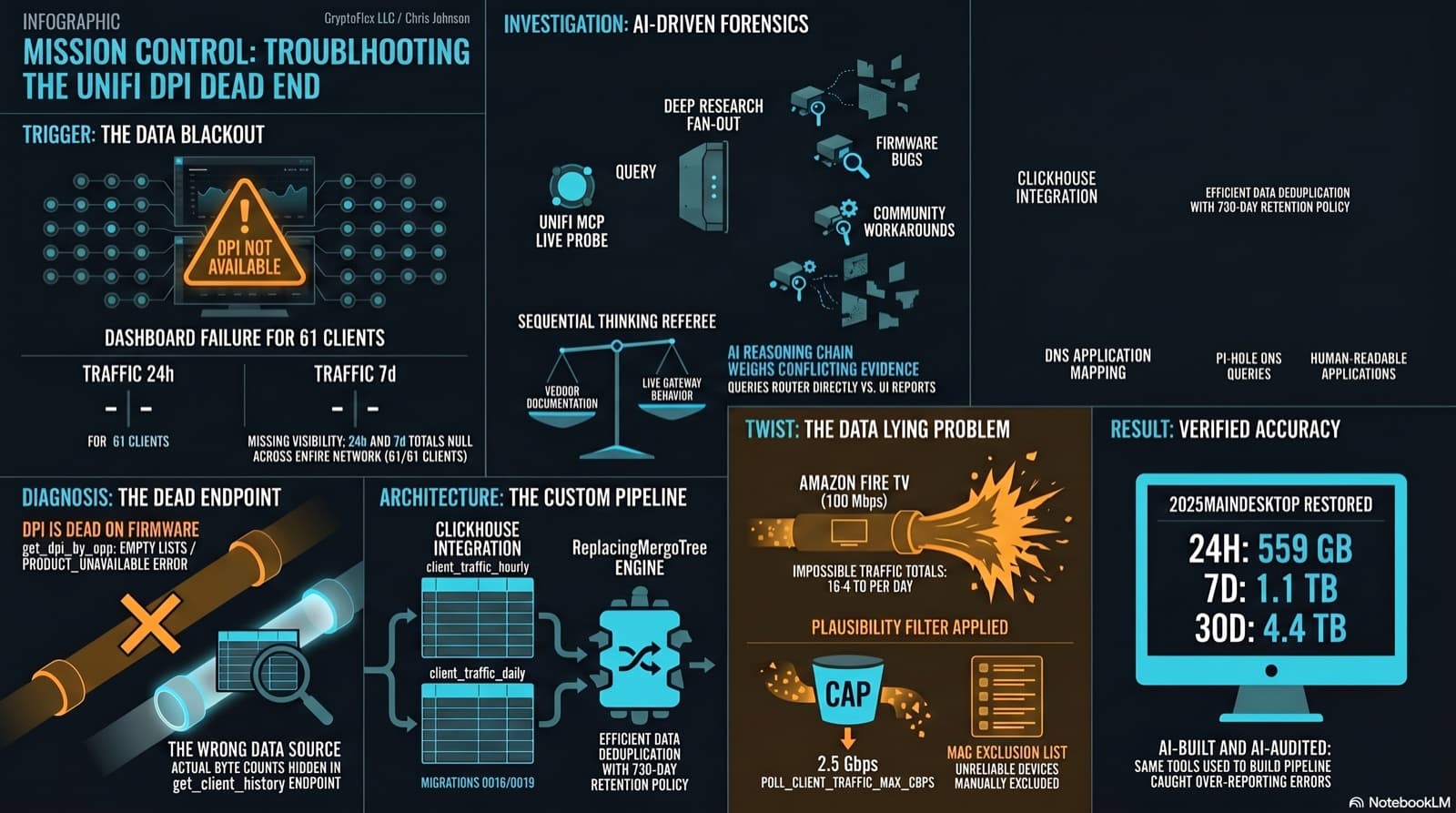
The Clients page showed "--" for traffic and "DPI not available for this device" for applications. The investigation found that per-app DPI is genuinely dead on this firmware, but per-client hourly byte buckets are alive and well in a different endpoint the dashboard was never reading. Fix the source, accumulate in ClickHouse, reconstruct Top Applications from Pi-hole DNS, and then discover that some clients are reporting physically impossible volumes. One afternoon, one commit (e07a8ac, 27 files), three confessional asides, and a plausibility cap that became load-bearing.
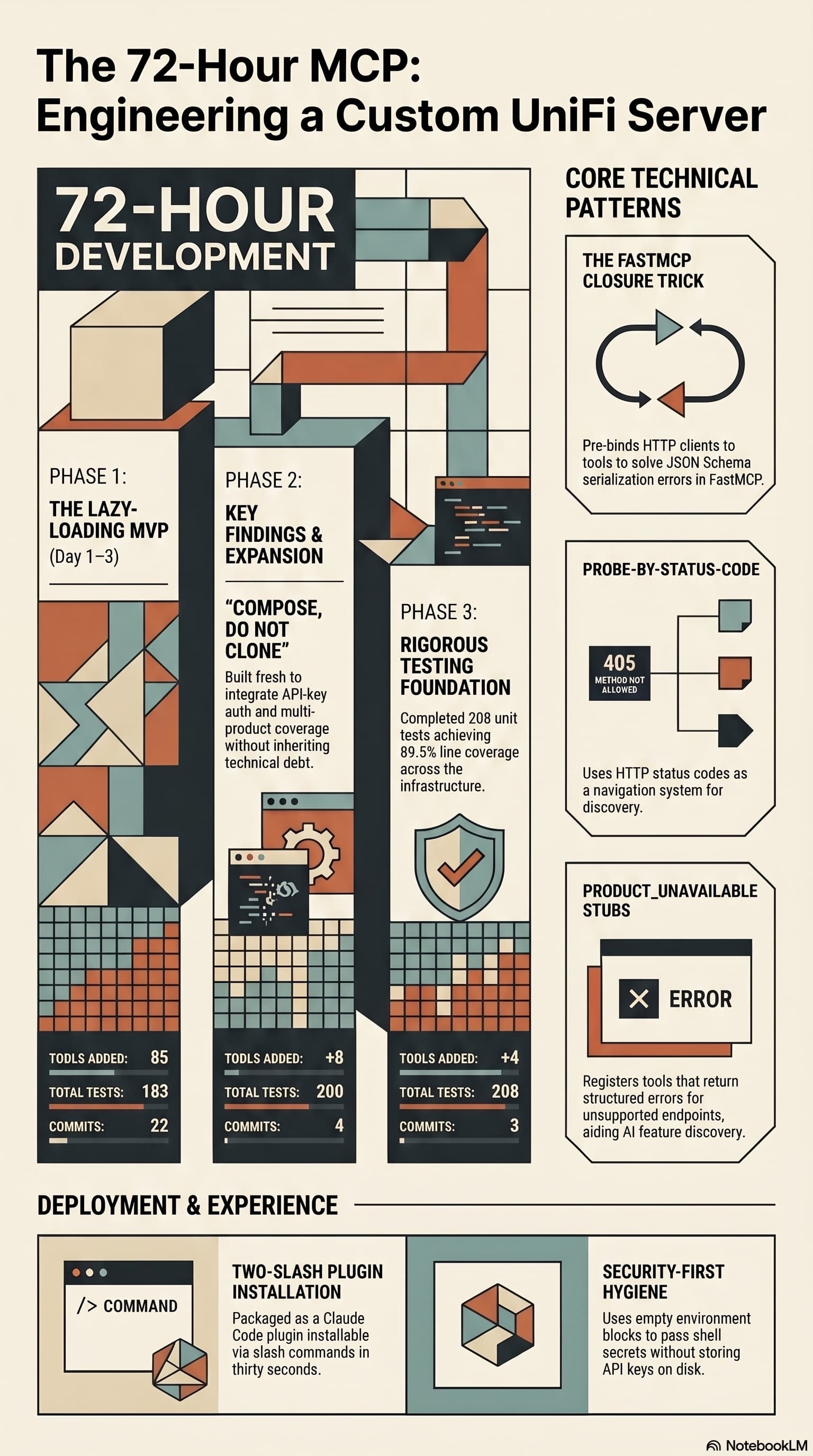
Two open-source UniFi MCP servers existed. Neither did what I wanted. So I built a third that combines their strengths, lazy-loads per product, and ships as a Claude Code plugin you can install with two slash commands.
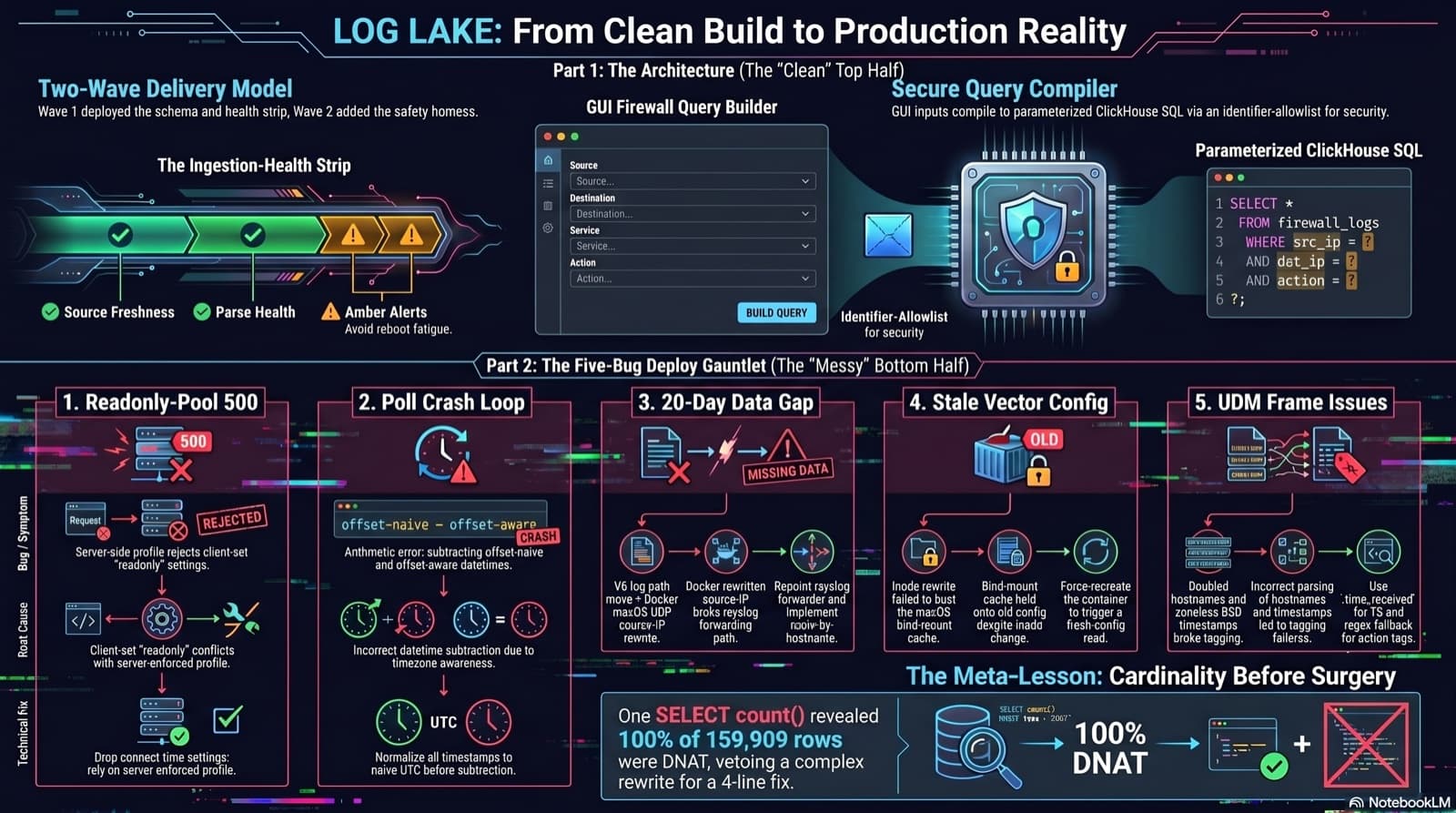
Home Network Mission Control: The LOG LAKE Panel, Five Deploy Bugs, and a Vetoed Bytes-Codec Rewrite
Part 6 of the home network dashboard build. The LOG LAKE panel ships a SIEM ingestion-health strip and a GUI firewall query builder that compiles to parameterized ClickHouse under the hood. One PR, two waves, 1193 backend tests at merge. Then deploy day on the live Mac mini produced five production-only bugs in a single afternoon: a readonly-pool 500, a timezone-mixed poll crash that had been firing every five minutes for hours, a 20-day-silent Pi-hole pipeline (two layers stacked), a Vector container reading a stale bind-mounted config, and a UDM doubled-hostname frame that silently broke action derivation for 159,909 rows. The meta-lesson is that the proposed fix for the last one was an invasive Vector source rewrite that the persona team vetoed in favor of an operator toggle and a four-line MV recreation.
Comments
Subscribers only — enter your subscriber email to comment