
Consolidating Three Pi-hole MCPs into One: chris2ao/pihole-mcp
5 existing Pi-hole MCPs. 1 actively maintained. 10 real gap items. I used /deep-research to scan the landscape, then consolidated 28 tools from three upstream repos into one Python FastMCP server that matches my UniFi MCP stack, and shipped it public with CI, issue templates, and branch protection.
5 existing Pi-hole MCP servers. 1 actively maintained. 10 real gaps I cared about. 28 tools consolidated into one Python server. Shipped public in a single session.
That is the arc of chris2ao/pihole-mcp, the second MCP server I have built and open-sourced in two weeks. The first was chris2ao/unifi-mcp, covered in Building a Custom UniFi MCP and dogfooded in the previous post in this series. This one is about what happens when you already have a battle-tested toolchain and need a second integration that matches it.
The short version: I did not build from zero, and I did not just install someone else's. I used /deep-research to scan the landscape first, then made a deliberate build decision based on what the research found.
Series Context
This is the fourth post in the Under the Hood series. Earlier entries covered the Homunculus Evolution Layer, the 5-Agent Design Team, and dogfooding the UniFi MCP. This one is about consolidating three upstream Pi-hole MCPs into a single opinionated server that matches an existing stack.
The Setup#
A quick glossary so the rest of this post makes sense.
What is Pi-hole?
Pi-hole is a network-wide ad and tracker blocker. It runs as a local DNS server on your LAN. Every device on the network asks Pi-hole to resolve domain names; Pi-hole answers legitimate queries from upstream DNS and returns a null response for any domain on its blocklist ("gravity"). The effect is that ads and trackers that resolve to known bad domains never load, because their DNS lookup never returns a usable IP. I run it on a Raspberry Pi behind a Ubiquiti UDM Pro.
What is MCP?
MCP (Model Context Protocol) is Anthropic's open standard for connecting Claude and other LLM clients to external tools. An MCP server exposes a set of named tools (get_stats, enable_blocking, etc.). Claude Code sees those tools in its context and can call them on your behalf. For my setup, MCP is the glue that lets me say "what are the top blocked domains this hour?" and have the model reach through to Pi-hole, pull the numbers, and answer, all without me leaving the chat window.
The existing state of my home lab, before this work:
- Pi-hole runs as the LAN DNS resolver behind the UDM Pro, handling every client DNS query and providing per-hostname blocking that the UDM itself does not.
- UniFi DPI classifies traffic for me at the gateway using TLS SNI inspection, not DNS responses.
- chris2ao/unifi-mcp exposes 103 UniFi tools to Claude Code via FastMCP + httpx + Pydantic v2.
What was missing: Claude Code had no read path into Pi-hole. If I wanted to check "which devices are generating the most blocked queries right now?" I had to curl the Pi-hole v6 API by hand. That got annoying fast.
Two Research Questions Before Any Code#
The first move was not to build. It was to use /deep-research to answer two questions in parallel.
When /deep-research is the right first move
Before a non-trivial build or architectural decision, spend one research round. Tool landscape scans and "does this integration break that one" questions are textbook use cases. The cost is minutes. The benefit is that you are not building against outdated assumptions. I have had three separate cases now where deep research changed a build decision in a way that saved days. More on what /deep-research actually does in From WebSearch to Deep Research.
Question A: Does Pi-hole as LAN DNS Degrade UniFi DPI?#
This one I had quietly worried about for months. If my UDM's DPI classifies application traffic partly from DNS, and all my client DNS now terminates at Pi-hole, does DPI accuracy suffer?
The research agent searched Ubiquiti community threads, the Pi-hole discourse, r/Ubiquiti, r/pihole, r/homelab, and vendor docs. The answer was clear: no. UniFi DPI on a UDM Pro is driven by:
- TLS ClientHello SNI extraction. The hostname in the TLS handshake is plaintext. UniFi reads it there to classify encrypted flows.
- A proprietary application and IP signature database in
/usr/share/dpi/. App IDs, category maps, IP ranges, behavioral fingerprints. - Device fingerprinting via DHCP hostname, mDNS, passive OS fingerprinting, and admin-configured local DNS, independent of outbound DNS responses.
DNS is not a primary input to DPI classification. What UniFi loses when Pi-hole sits in front of it: visibility into Pi-hole's upstream queries (the UDM still sees the client-to-Pi-hole flows, but cannot attribute the Pi-hole-to-upstream queries back to the originating client). This does not materially affect SNI-based classification.
Zero community reports of DPI accuracy degradation from running Pi-hole. Multiple converging sources. Question A closed with high confidence.
The forward-looking concern (not Pi-hole related)
Encrypted ClientHello (ECH) will eventually hide SNI from all DPI engines (UniFi, Fortinet, Palo Alto, all of them). When that rolls out broadly, SNI-based classification loses a lot of its signal. This is the real reason to run Pi-hole: not as an ad blocker, but as a complementary visibility source. Pi-hole logs tell you what hostnames were queried; UniFi DPI tells you what SNIs and app categories traversed. Together they cover more surface than either alone.
Question B: What Pi-hole MCPs Already Exist?#
The second query scanned GitHub, npm, PyPI, and Docker Hub for Pi-hole MCP servers. Five turned up:
| MCP | Language | Tools | Auth | Maintenance |
|---|---|---|---|---|
| aplaceforallmystuff/mcp-pihole | TypeScript | 14 | app password, v6 | Active (Feb 2026) |
| sbarbett/pihole-mcp-server | Python | 8 | admin password, v6 | Active (Jul 2025) |
| brettbergin/pihole-mcp-server | Python | 6 | API key + password, v5+v6 | Stale (Jul 2025) |
| cwdcwd/mcp-server-pihole | TypeScript | 16 | password + API key, v5+v6 | Stale (Jul 2025) |
| sebszczec/pihole-mcp | Python | 4 | app password, v6 | Stale (Jan 2026) |
Only one was actively maintained in 2026. The combined tool surface across all five still left 10 meaningful gaps: adlist CRUD, group management, client-to-group policy, DHCP, regex filter CRUD, Teleporter backup, per-VLAN analytics, CNAME CRUD (only sbarbett had this), webhook subscriptions, top-level config.
The Decision: Consolidate, Don't Adopt and Don't Extend#
With both research threads done, I had a three-way choice.
Option 1: Adopt the active upstream. Install aplaceforallmystuff/mcp-pihole, use its 14 tools, live with the gaps.
Option 2: Fork and extend. Take the active upstream, add local DNS records from sbarbett and log tools from cwdcwd, PR back upstream if the maintainer accepts.
Option 3: Consolidate. Start a new repo that cherry-picks the useful tools from all three upstreams and matches my existing Python stack.
Swipe to see the full diagram · Tap to enlarge
I chose option 3 for one reason: toolchain uniformity. My UniFi MCP is Python + FastMCP + httpx + Pydantic v2 + pytest + respx + uv + hatchling. Every secret lives in ~/.claude/secrets/secrets.env. Every wrapper lives in ~/.claude/scripts/. Every registration is the same shape in ~/.claude.json.
If I adopted a TypeScript upstream, I would now be maintaining two separate stacks for two MCP servers that do conceptually identical work: wrap a REST API and expose it as tools. Two lockfiles. Two test frameworks. Two sets of lint rules. Two deployment paths.
Consolidation was a one-day cost to avoid a forever tax.
Toolchain uniformity pays compound interest
The first time you pick a stack for a new integration, the cost of matching your existing one is higher than picking whatever is trendy. The second time, a third time, and every time you ever need to debug two servers side by side, uniformity pays you back. Treat your second MCP server as an extension of the first, not a fresh decision. This is true for MCPs, for skills, for hooks, for anything you build more than once.
The other reason: the three actively-worth-copying tool sets were split across three repos. aplaceforallmystuff had the best general-purpose surface (stats, blocking, domain lists). sbarbett had the richest query-log filters and the only local DNS record support. cwdcwd had the log-tail and forward-destination tools. No single upstream gave me all three. Extending one of them would pull in roughly as much foreign code as starting fresh.
What Got Built: 28 Tools Across 6 Modules#
The result is a single Python 3.12+ package, pihole_mcp, registered with FastMCP as the pihole server.
src/pihole_mcp/
├── __init__.py
├── __main__.py          # python -m pihole_mcp entry
├── server.py            # FastMCP instance, tool registration
├── config.py            # PiholeConfig via pydantic-settings
├── client.py            # PiholeClient: auth, session, request
├── errors.py            # PiholeAuthError, PiholeAPIError
└── tools/
    ├── stats.py         # 8 tools
    ├── queries.py       # 2 tools
    ├── blocking.py      # 3 tools
    ├── domains.py       # 6 tools
    ├── local_dns.py     # 5 tools
    └── maintenance.py   # 4 tools
Every tool module exposes a single register(mcp, client) -> int function that decorates tools with @mcp.tool() and returns the count it registered. server.py sums the counts into _tool_count for health checks. Total: 28 tools, plus a meta server_info().
| Module | Representative tools | Backing endpoints |
|---|---|---|
| stats (8) | get_stats, get_top_blocked, get_top_clients, get_query_types, get_forward_destinations, get_history | /stats/*, /history |
| queries (2) | get_query_log, get_query_suggestions | /queries, /queries/suggestions |
| blocking (3) | get_blocking_status, enable_blocking, disable_blocking | /dns/blocking |
| domains (6) | get_whitelist, add_to_blacklist, remove_from_whitelist | /domains/allow/exact, /domains/deny/exact |
| local_dns (5) | list_local_dns, add_local_a_record, add_local_cname_record | /config/dns (PATCH) |
| maintenance (4) | update_gravity, flush_cache, flush_logs, get_tail_log | /action/*, /logs/* |
Full per-tool endpoint mapping lives in docs/plans/consolidated-tool-map.md in the repo.
Example: get_query_log Filters#
This is one of the richer tools. It composes straight onto Pi-hole's /queries endpoint.
@mcp.tool()
async def get_query_log(
    length: int = 100,
    from_ts: int | None = None,
    until_ts: int | None = None,
    domain: str | None = None,
    client_ip: str | None = None,
    upstream: str | None = None,
    cursor: str | None = None,
) -> dict:
    """Return recent query log entries with optional filters."""
    params = {"length": length}
    if from_ts is not None: params["from"] = from_ts
    if until_ts is not None: params["until"] = until_ts
    if domain is not None: params["domain"] = domain
    if client_ip is not None: params["client"] = client_ip
    if upstream is not None: params["upstream"] = upstream
    if cursor is not None: params["cursor"] = cursor
    return await client.get("/queries", params=params)
In practice the shape looks like this when Claude Code calls it:
get_query_log(length=200, client_ip="192.168.1.50", domain="*.doubleclick.net")
And the response arrives as the raw Pi-hole JSON, ready for the model to summarize into prose.
The Pi-hole v6 Session Auth Pattern#
The auth model is the part of this that was worth getting right. Pi-hole 6 (Feb 2025 and later) moved from basic auth to a session-based scheme. Every client has to do this:
POST /api/authwith{"password": "<app-password>"}. The response is{session: {sid, valid, csrf}}.- Every subsequent call carries
X-FTL-SID: <sid>as a header. - If a call returns 401, the session is gone. Re-auth and retry.
- On shutdown,
DELETE /api/authreleases the session slot server-side.
What is an app password?
Pi-hole v6 distinguishes the human web-admin password from application passwords. The web UI has a dedicated "Application password" generator (Settings -> Web Interface). Clicking Generate returns a one-time string that becomes your API credential. The benefit is that you can rotate the API password without affecting your web login, and vice versa. This is also the only password you should ever put in a config file. The human password should stay human-only.
Swipe to see the full diagram · Tap to enlarge
The tricky part is the 401 retry and the near-expiry pre-auth. Here is what the client does, stripped down:
class PiholeClient:
    _REFRESH_BUFFER_SECONDS = 60

    async def _ensure_session(self) -> str:
        now = time.time()
        if not self._sid or now >= (self._sid_expires_at - self._REFRESH_BUFFER_SECONDS):
            await self._authenticate()
        return self._sid

    async def request(self, method, path, *, params=None, json=None):
        sid = await self._ensure_session()
        resp = await self._http.request(
            method, path, params=params, json=json,
            headers={"X-FTL-SID": sid},
        )
        if resp.status_code == 401:
            self._sid = None
            sid = await self._ensure_session()
            resp = await self._http.request(
                method, path, params=params, json=json,
                headers={"X-FTL-SID": sid},
            )
        if resp.status_code >= 400:
            raise PiholeAPIError(resp.status_code, f"{method} {path} failed", ...)
        return resp.json()
Three things matter here:
- The 60-second buffer pre-empts race conditions around server-side expiry. If my local clock says "40 seconds left" but the server has already garbage-collected the session, I'd hit 401 on every request until the retry. Refreshing at 60 seconds before the local expiry eliminates that window for typical clock skew.
- The 401 retry is bounded to one attempt. A genuinely wrong password raises immediately instead of looping. A genuinely expired session re-auths and recovers. A persistently broken Pi-hole raises after the retry.
- Shutdown is best-effort.
close()triesDELETE /api/authbut swallows any exception. The session will expire server-side anyway. No reason to fail shutdown on a best-effort cleanup.
The session-auth pattern is reusable
Any auth-gated REST API that uses short-lived session tokens benefits from the same three patterns: pre-expiry refresh buffer, bounded 401 retry, best-effort release on shutdown. I used this shape first for the UniFi MCP (with cookies instead of headers). I used it again for Pi-hole. The next REST-auth integration will get the same treatment. Extract the pattern into a reusable client base class when you hit the third one.
The Local DNS Read-Modify-Write Quirk#
Pi-hole v6 exposes local DNS records via /api/config/dns. The shape is unusual: hosts is a string array like ["192.168.1.1 router", "192.168.1.50 printer"], and cnameRecords is a string array like ["router.lan,router,300"]. The only way to add or remove an entry is to PATCH the entire array back.
This is a read-modify-write pattern, and it is the only place in the server where a tool does more than one API call. add_local_a_record looks like this:
@mcp.tool()
async def add_local_a_record(host: str, ip: str) -> dict:
    """Add a local A record (host -> IP). Replaces any existing entry for the same host."""
    dns = await _current_dns_config(client)
    hosts = [h for h in dns.get("hosts", []) if not h.endswith(f" {host}")]
    hosts.append(f"{ip} {host}")
    return await _patch_dns(client, {"hosts": hosts})
Two details are worth calling out:
- The filter strips any existing entry for the same host before appending. Duplicates are impossible. This is defensive against earlier versions of the tool that might have left stale entries.
- The PATCH payload only includes
hosts, not the full DNS config. Pi-hole's PATCH is a shallow merge at the dns sub-object level. If Pi-hole 6 adds a new key underdnsin a future release, this tool still works because it never touches keys it does not know about.
Read-modify-write is not atomic
Two clients hitting add_local_a_record simultaneously on the same Pi-hole will race. The second read will see the first's state only after the first's PATCH lands. In practice this is fine for a single-user home lab where I am the only caller. For multi-user scenarios you would add optimistic concurrency (an ETag/If-Match check) or serialize writes through a lock. Know the constraint, do not build around it unless your use case requires it.
Tests: 13 Passing in 0.48s#
I test the HTTP boundary with respx, which mocks httpx transports. This keeps the tests hermetic (no network, no Pi-hole required to run CI) while still exercising the real client code.
$ uv run pytest -q
.............                                                            [100%]
13 passed in 0.48s
Coverage:
test_config.py(3): URL normalization,/adminsuffix stripping, HTTPS preservation.test_client.py(6): auth success, auth failure raisesPiholeAuthError, 401 triggers re-auth + retry, API errors propagate with status code, session is cached across calls (single auth round-trip),close()sendsDELETE /auth.test_tools.py(4):register_allreturns 28, stats summary happy path, local DNS delta patch preserves existing entries, domain removal URL-encodes correctly.
The "local DNS delta patch preserves existing entries" test exists because I specifically wanted to catch the case where a future refactor accidentally ships the full config instead of the delta. Small test, high signal.
Live boot check:
$ PIHOLE_URL=http://placeholder PIHOLE_PASSWORD=placeholder uv run python -c \
    "from pihole_mcp.server import _tool_count; print(_tool_count)"
28
Open-Sourcing: Same Polish, Retrofitted#
Building in a private repo and pushing public are two different tasks. I decided up front that the public repo should look like something I would actually trust as a stranger.
Here is everything that landed in the public ship commit:
| Polish item | What it does |
|---|---|
| Public repo, MIT license | gh repo create --public --license MIT |
| 13 topics | ad-blocking, anthropic, claude-code, dns, fastmcp, home-automation, httpx, mcp, model-context-protocol, pihole, pihole-v6, pydantic, python |
| README badges | test workflow, MIT license, Python 3.12+, MCP compatible, Pi-hole v6 |
| CI workflow | pytest matrix on Python 3.12 and 3.13, uv sync --all-extras, tool-registration verification |
| CONTRIBUTING.md | dev setup, test commands, PR checklist |
| CODE_OF_CONDUCT.md | Contributor Covenant v2.1 |
| Issue templates | bug_report.yml, feature_request.yml, missing_tool.yml |
| Branch protection on main | force-push blocked, deletion blocked, PR required |
The missing_tool.yml template is the one I am most proud of. It asks contributors to fill in: the Pi-hole v6 endpoint, what problem the tool solves, whether it is read-only or destructive, and what they have tested. That template alone will filter the "add a tool for X" issues into actionable form versus vague wishes.
name: Missing tool request
description: Request a new MCP tool for a Pi-hole v6 capability not yet covered
labels: ["enhancement", "tool-request"]
body:
  - type: input
    id: endpoint
    attributes:
      label: Pi-hole v6 endpoint
      description: The /api/* path this tool would wrap
      placeholder: /api/lists
    validations:
      required: true
  - type: dropdown
    id: risk
    attributes:
      label: Risk class
      options:
        - Read-only
        - Mutation (low risk)
        - Destructive
    validations:
      required: true
I also retrofitted the same polish onto the existing chris2ao/unifi-mcp repo (which had shipped public without CI, issue templates, or branch protection). Both repos now present the same contract to a visitor, which matters because they are siblings in the same toolchain.
Ship the hygiene once, apply it everywhere
When you get one public repo's hygiene right (CI, templates, protection, badges, contributing guide), back-port it to every other public repo you own. The marginal cost is minutes. The benefit is that every visitor sees consistent quality across your profile. Sloppy hygiene on one public repo undermines the quality signals on your best one.
Skills versus MCP: The Decision Framework#
This is the pattern question I keep coming back to. Same Pi-hole v6 API, two valid ways to talk to it from Claude Code.
Use an MCP tool when:
- The operation is conversational: "also check if this domain is blocked right now"
- The operation is read-only or low-risk (
get_stats,get_query_log,get_top_blocked) - You want the model to discover and compose the tool in unrelated contexts (UniFi MCP returns client list, Pi-hole MCP returns top clients, model correlates them)
- The audit trail is fine at the tool-call level
Use a skill when:
- The operation is destructive and deserves a preview-then-apply cycle with a diff
- The operation bundles multiple API calls into one named action
- You want pre-action snapshots for rollback
- You want to fail closed on guardrails (e.g., refuse to flush logs if a forensic flag is set)
- The operation should only run on explicit slash-command invocation, never discovered autonomously
What this looks like in practice
I have 7 /homenet-* skills that wrap the UniFi MCP (or curl directly) for destructive, preview-first operations: allow a MAC, deny a MAC, add a PPSK, remove a PPSK, toggle the MAC filter, snapshot the wlanconf, review the allowlist. Each one auto-snapshots before writing and refuses to execute state that would brick the SSID. The UniFi MCP itself has the raw read and low-risk write tools; the skills wrap the destructive ones with guardrails. Same pattern will apply to Pi-hole: the MCP gets conversational access, a future /pihole-* skill family will wrap anything destructive.
The shorthand: conversational read-only goes in the MCP; destructive scripted goes in a skill. If it is in the middle (low-risk write, one-shot), put it in the MCP with a clear name and let the preview-then-apply live in the caller's prompt.
What is Next#
The gap list from the research phase is still the gap list. Future tools worth adding, in roughly priority order:
- Adlist CRUD (
/api/lists). Add and remove adlists, not justupdate_gravityto refresh. - Group management (
/api/groups). Pi-hole 6 supports per-group filtering; useful for kid profiles and guest segmentation. - DHCP (
/api/dhcp). Leases and static assignments. Low priority for me (the UDM is my DHCP server), but a common request. - Teleporter backup (
/api/teleporter). Wraps the config ZIP export into a tool that writes to a backup path. - Per-VLAN analytics. Post-process
get_query_logby client CIDR; surfaces per-VLAN blocking rates that Pi-hole does not natively group.
Each of these is a well-defined endpoint and a clear tool signature, which is what the missing_tool.yml template exists to capture.
I will also add the /pihole-* skill family when the first destructive operation shows up that deserves preview-then-apply semantics. The most likely first candidates are /pihole-onboard-device (add CNAME + whitelist + comment in one action) and /pihole-purge-stale-cnames (bulk cleanup with diff review).
Lessons Learned#
Run /deep-research before a non-trivial build
If the decision could go three different ways (adopt, extend, build), spend one research round first. In this case it cost minutes and changed the build shape materially: I would have extended the wrong upstream if I had picked the first active repo without surveying all five. Deep research is cheap relative to a wrong architectural decision.
Consolidate upstreams when the useful surface is split across multiple repos
Extending a single upstream works when that upstream has 90% of what you need. When the useful 80% is split across three separate repos, consolidating into a new one is lower effort than three forks and three PRs (some to maintainers who are not active). Be honest about which upstream gives you the most; if no single one gives you most, start fresh.
Toolchain uniformity beats best-of-breed for second and third integrations
The first time you pick a stack, go with what fits the task. The second time, match the first unless you have a strong reason not to. The third time, match the first without asking. Two Python FastMCP servers share lockfile discipline, test idioms, and debugging instincts. Two servers in two stacks double the cognitive load forever.
Extract the session-auth shape as a reusable pattern
Pre-expiry refresh buffer, bounded 401 retry, best-effort release on shutdown. The shape transfers to any auth-gated REST API. I used it for UniFi cookies. I used it again for Pi-hole session headers. When you reach the third one, extract a reusable client base class.
Ship open-source hygiene once, apply it to every public repo
CI, issue templates, CONTRIBUTING, CODE_OF_CONDUCT, branch protection, README badges, topics. Define them once as a ship checklist. Retrofit to every older public repo. Visitors who see consistent polish trust the code before they read it.
Conversational read-only goes in the MCP, destructive scripted goes in a skill
The decision framework simplifies to one sentence. Read-only stats and query pulls that a model should discover and compose freely belong in an MCP tool. Destructive operations that deserve preview-then-apply and pre-action snapshots belong in a slash-command skill. Operations in the middle go in the MCP with a clear name.
The chris2ao/pihole-mcp repo is public. The research report that kicked it off lives in the private setup repo alongside the KB article. The next session will be the first real dogfooding run against the live Pi-hole, which is where interesting bugs tend to show up. If last week was any guide, something will fail silently and become a blog post.
Weekly Digest
Get a weekly email with what I learned, summaries of new posts, and direct links. No spam, unsubscribe anytime.

Related Posts
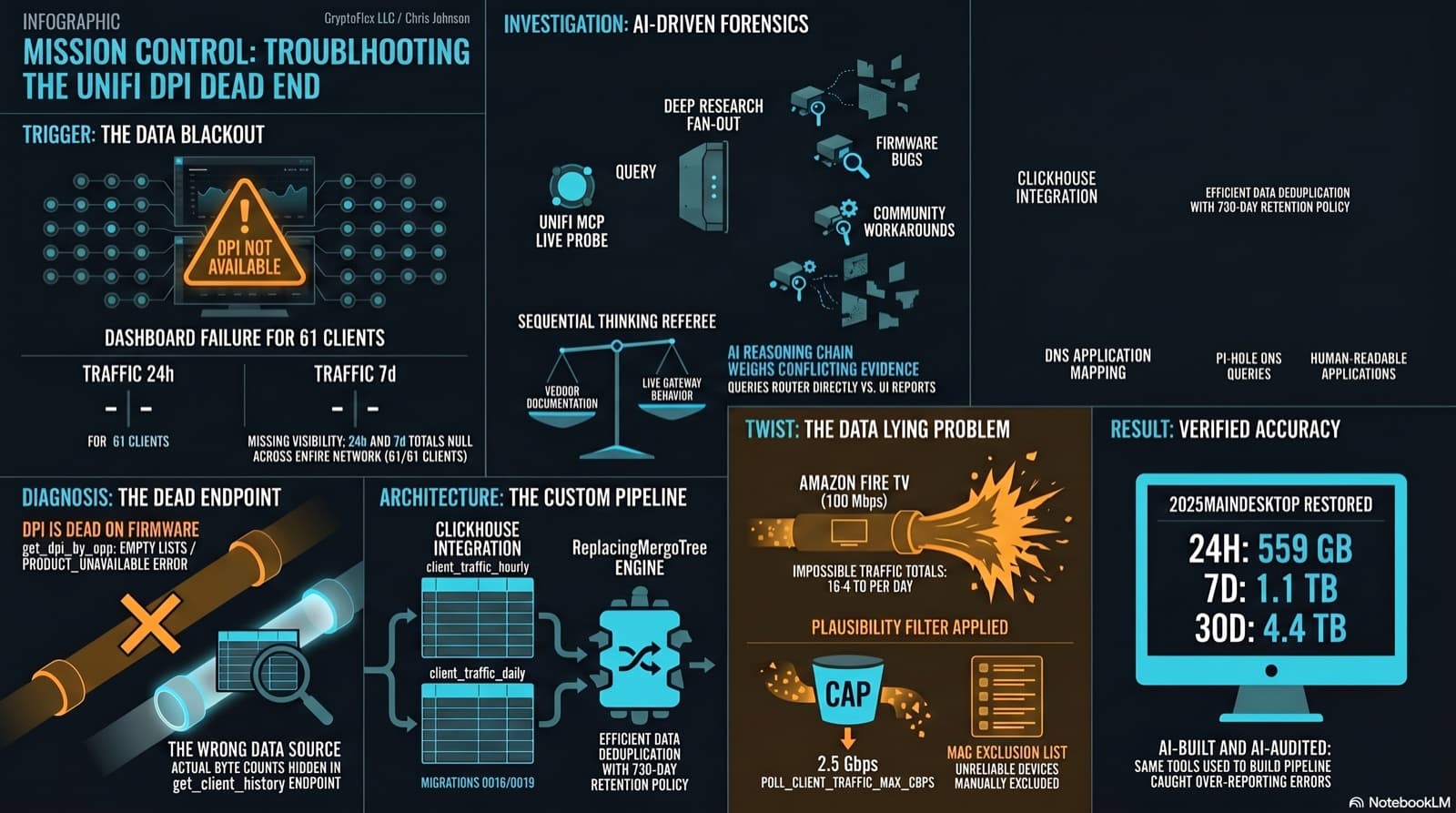
The Clients page showed "--" for traffic and "DPI not available for this device" for applications. The investigation found that per-app DPI is genuinely dead on this firmware, but per-client hourly byte buckets are alive and well in a different endpoint the dashboard was never reading. Fix the source, accumulate in ClickHouse, reconstruct Top Applications from Pi-hole DNS, and then discover that some clients are reporting physically impossible volumes. One afternoon, one commit (e07a8ac, 27 files), three confessional asides, and a plausibility cap that became load-bearing.
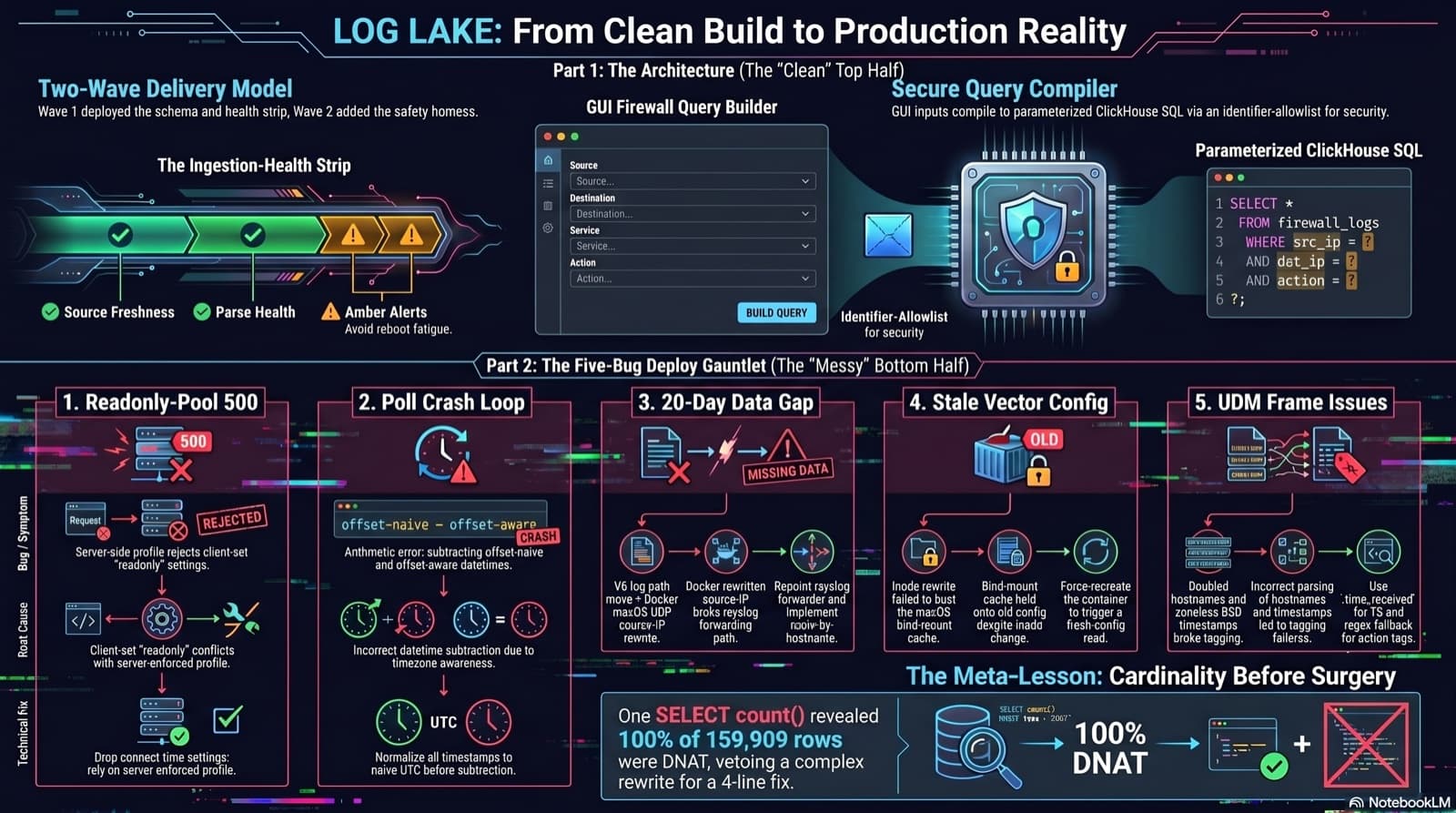
Home Network Mission Control: The LOG LAKE Panel, Five Deploy Bugs, and a Vetoed Bytes-Codec Rewrite
Part 6 of the home network dashboard build. The LOG LAKE panel ships a SIEM ingestion-health strip and a GUI firewall query builder that compiles to parameterized ClickHouse under the hood. One PR, two waves, 1193 backend tests at merge. Then deploy day on the live Mac mini produced five production-only bugs in a single afternoon: a readonly-pool 500, a timezone-mixed poll crash that had been firing every five minutes for hours, a 20-day-silent Pi-hole pipeline (two layers stacked), a Vector container reading a stale bind-mounted config, and a UDM doubled-hostname frame that silently broke action derivation for 159,909 rows. The meta-lesson is that the proposed fix for the last one was an invasive Vector source rewrite that the persona team vetoed in favor of an operator toggle and a four-line MV recreation.
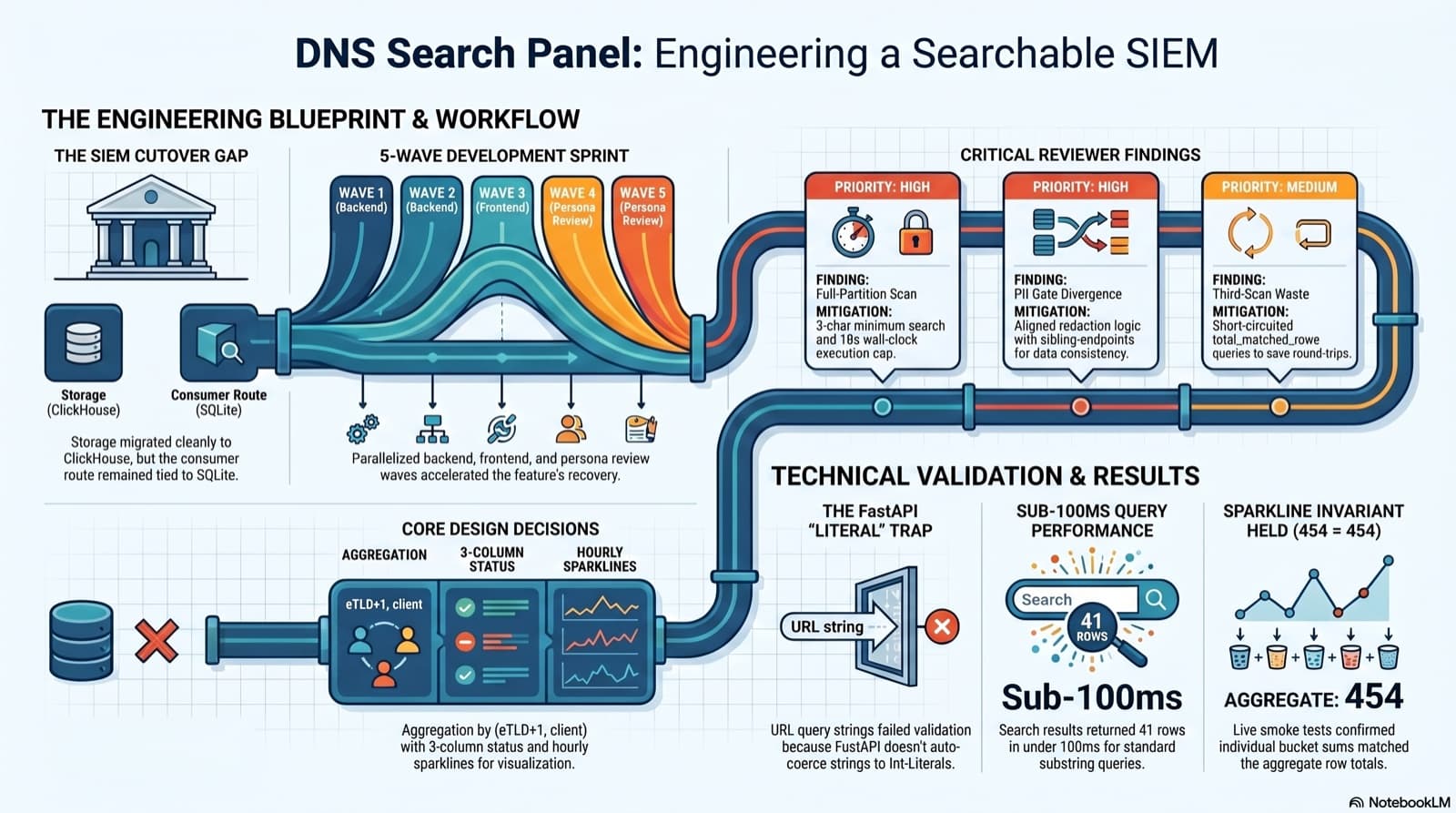
Part 6 of the home network dashboard build. The SIEM cutover dropped the DNS search endpoint without replacing it, and the only reason I caught it was clicking into the live dashboard and seeing "Failed to load DNS query log." This post walks the session that put search back: the diagnosis, the brainstorming workflow that pinned down five contested design choices, the five-wave persona dispatch, the parallel reviews that caught a third-scan query and a PII gate divergence, the FastAPI int-Literal gotcha that ate an hour, and a live smoke at 41 results in under 100ms with the sparkline-sum-equals-aggregate-total invariant holding 454 = 454 on the first row.
Comments
Subscribers only — enter your subscriber email to comment