
Plugging My DNS Leaks: A PoE Raspberry Pi 5, a 10-Year-Old Pi 3, and DNS over HTTPS
My Pi-hole already encrypted its upstream DNS, and an audit still found four places where plaintext queries left the house. Here's how a PoE Raspberry Pi 5 and an old Pi 3B+ closed them.
My Pi-hole, the network-wide DNS ad blocker, was already encrypting its upstream DNS. A packet capture proved it: zero plaintext port 53 packets leaving for the internet across 30 uncached lookups. Then an audit of everything around the Pi-hole found four separate ways the house was still talking DNS in the clear.
What a Pi-hole Actually Does#
Pi-hole is a DNS sinkhole. Every device on your network asks it to turn names into addresses. If the name is on a blocklist (ads, trackers, known malware), Pi-hole answers 0.0.0.0 and the connection never starts. Everything else gets forwarded to an upstream resolver and the answer comes back as normal.
The best part is that it works for devices that can't run an ad blocker. The TV, the phone apps, the thermostat: they all ask the same DNS server, so they all get filtered. The query log doubles as a surprisingly honest list of what every device in the house is talking to.
What is a DNS sinkhole?
DNS is the phone book of the internet. A sinkhole is a phone book that lies on purpose: for names on its blocklist it returns a dead address (0.0.0.0) instead of the real one. The device tries to connect to nowhere and gives up.
I've run a Pi-hole at home for years. Earlier this year three separate Pi-hole MCP servers became one, so Claude Code could query and manage it. That's written up in Consolidating Three Pi-hole MCPs into One. That post was about talking to the Pi-hole. This one is about what happens on the wire after the Pi-hole answers.
Why Encrypted DNS Matters#
Plain DNS is a UDP packet on port 53 with no encryption at all. Anyone on the path between you and the resolver, starting with your ISP, can read every domain your household looks up and can tamper with the answers. It works the same on every device, so your TV broadcasts its viewing habits in exactly the same way your laptop broadcasts its browsing.
DNS over HTTPS (DoH) wraps the same question in an HTTPS request to a resolver, on port 443, encrypted with TLS. To the ISP it looks like any other TLS connection to Cloudflare or Quad9. They can see that you talk to the resolver. They can't see what you asked.
Swipe to see the full diagram · Tap to enlarge
DoH, DoT, and DNSCrypt
DNS over TLS (DoT) does the same job as DoH but on its own port, 853, which makes it easy for a network to spot and block. DNSCrypt is an older encrypted DNS protocol that predates both. All three solve the same problem: the query is no longer readable in transit.
It isn't magic. The resolver at the other end still sees the queries, which is why the config only points at resolvers that promise not to log (more on that below). And the IP address and TLS server name of the site you eventually connect to can still give away where you went. Encrypted ClientHello is the long-term fix for that second part.
So why should a normal person care? Because DNS is a complete browsing history for every device in the house, including the ones you can't configure. Pi-hole plus DoH gives you ad blocking and privacy for all of them in one place. That's the whole reason this project exists.
The Audit: Four Leaks Around a Healthy Pi-hole#
On 2026-10-04 I asked Claude Code to audit DNS encryption end to end. The first finding was good news. The existing Pi-hole had exactly one upstream, cloudflared proxy-dns (v2025.7.0) running on the Pi itself, sending DNS over HTTPS to Cloudflare.
The old Pi had no tcpdump, so Claude Code wrote a raw AF_PACKET sniffer in Python and ran it with sudo over SSH. During 30 uncached queries it saw nothing on port 53 heading for the internet.
The leaks were in the config around it. These are the four from the plan's Background section, with addresses removed:
| Leak | What was wrong | What it meant |
|---|---|---|
| 1 | The Default network's DHCP handed out the Pi-hole plus 9.9.9.9, 1.1.1.1 and 8.8.8.8 | Clients use the public fallbacks in plaintext whenever Pi-hole is slow or down, and some clients round-robin them even when it is healthy |
| 2 | No outbound port 53 block on the Default network | dig @8.8.8.8 from my Mac succeeded, and Google saw the home /24 |
| 3 | The Pi's own /etc/resolv.conf said nameserver 8.8.8.8 | The Pi's own lookups skipped its own encrypted path (it turned out to be a static file from December 2023) |
| 4 | The gateway's WAN DNS was the Pi-hole plus 1.1.1.1 | The gateway's own lookups fell back to plaintext |
Swipe to see the full diagram · Tap to enlarge
Two more problems turned up. In a 2-minute burst on 2026-10-04, all three of cloudflared's upstreams timed out. All three are Cloudflare, so there was no provider diversity to fall back on. And cloudflared proxy-dns is deprecated; newer releases removed it, so the old Pi could never safely upgrade its cloudflared.
How I Got Here#
None of this was negligence, which is the annoying part. The old Pi was a single point of failure for the whole house's DNS. When it went down, nothing resolved. So back in April I deliberately added public resolvers as a fallback, the choice behind Closing the DNS Bypass Finding. It was a sensible resilience decision that quietly traded away encryption.
The plan put the fix in one line: "This plan replaces 'resilience through plaintext public resolvers' with 'resilience through three encrypted resolvers.'"
The Plan: Three Encrypted Tiers#
If the old Pi was the single point of failure, the answer was a second Pi-hole rather than a plaintext safety net. A new Raspberry Pi 5 becomes the primary, the old Pi becomes the backup, and the gateway is the last resort.
| Tier | Resolver | Upstream | Filtering |
|---|---|---|---|
| 1 (primary) | New Raspberry Pi 5: Pi-hole v6 + dnscrypt-proxy | DoH to Cloudflare and Quad9 | Yes |
| 2 (backup) | Old Pi 3B+: Pi-hole v6, cloudflared replaced by dnscrypt-proxy | DoH to Cloudflare and Quad9 | Yes, synced from primary |
| 3 (last resort) | UniFi gateway with Encrypted DNS | DoH/DNSCrypt to Cloudflare and Quad9 | No ad blocking, but encrypted |
On top of that, a firewall block on outbound DNS (port 53) and DNS over TLS (port 853) to the internet, so nothing can quietly fall back to plaintext.
Swipe to see the full diagram · Tap to enlarge
The plan had nine phases, numbered 0 to 8, each with an exit check: backups, build the new Pi, config sync, harden the old Pi, DHCP changes, gateway encrypted DNS, block plaintext egress, failover drills, documentation. The build repo's CLAUDE.md had one ground rule that mattered more than the rest: "The old Pi is the live DNS for the whole house until Phase 4."
That rule shaped how Claude Code worked. Anything outward-facing or hard to reverse (UniFi DHCP and firewall changes, gateway DNS, anything on the old Pi) was shown with its rollback first and needed my approval before it ran. Each phase went into a build log that separated "confirmed on the real device" from "only written."
The order changed mid-build. I asked: "Before phase 3 should I make DHCP changes on Unifi to make the new pihole the primary. I'm not sure if its completely set up yet with DoH encrypted dns before we start making changes on the old one." The answer was yes. The new Pi had passed its exit check, and moving DHCP first meant the old Pi would only be the fallback when it was later reworked. So Phases 4 and 5 ran before Phase 3.
The Hardware: A PoE Pi 5 Behind a Desk#
Where does a headless Pi get its power when there's no power connected where it lives, only PoE? That question decided the hardware. The office has a PoE switch port (a UniFi USW Flex 2.5G), so the requirement was a Raspberry Pi 5 that gets power and network over a single Ethernet cable: no display, no power supply, tucked behind a desk and forgotten.
The case that did it is the GeeekPi P33 M.2 NVMe M-Key PoE+ Hat with Official Pi 5 Active Cooler and Aluminum Case. It cost $49.99 on 2026-10-17. The reason for buying this one: it "came with a heatsink and PoE hat which is what I was most interested in since I don't have power connected just PoE and that makes it conveinient to tuck it behind a desk and forget about."
One purchase covered cooling and power. The listing says "Single cable powers and connects with PoE+", promises an active cooler that "keeps Pi 5 running cool under load," and quotes 5.1V/4.5A output from the hat. Those are the seller's claims. The part that has been tested here is simpler: one cable powers the Pi and carries the network, and it has worked since.
The hat also has an M.2 slot for NVMe SSDs (2230, 2242, 2260 and 2280). It's unused for now. The Pi boots from a 64 GB microSD card, and the plan says to revisit an SSD if the card shows wear.
The Old Pi That Won't Quit#
The original Pi-hole box is a Raspberry Pi 3 Model B+ on Raspbian 11 (bullseye). It is almost 10 years old, has 921 MB of RAM, and was up 57 days when the project started. It has been chugging along serving encrypted DNS queries the whole time. After this project it becomes the encrypted backup, so a decade-old board gets a second career as the failover for its replacement.
I'm calling the new Pi 5 PiHoleMain and the old one PiHoleBackup for the rest of this post. The gateway is a UniFi Dream Machine Pro, and I run two isolated VLANs alongside the Default network. No addresses here, on purpose.
Building the Pi 5#
Claude Code did the typing for this build and I made the calls.
The image was Raspberry Pi OS Lite 64-bit (Debian 13, trixie, release 2026-10-06), flashed to the microSD card with dd after its SHA-256 was checked against Raspberry Pi's published value. A cloud-init user-data file on the boot partition set the user, SSH key and password hashes (only hashes, never plaintext).
First Boot Surprises#
Three small things went sideways. SSH refused the key because the one written to the card didn't match the one on my Mac. Password login still worked, but ssh-copy-id failed from Claude Code's ! shell, which has no TTY to prompt for a password, so it ran from a normal terminal instead. And Raspberry Pi OS trixie's cloud-init runs update_hostname on every boot, which reverted any rename until user-data changed too and got preserve_hostname: true.
The static address deserved more care. Claude Code set it in NetworkManager with a dead-man switch: a detached systemd-run job would revert the Pi to DHCP after 120 seconds unless a file was created from a new SSH session on the new address. If I'd typed the address wrong, the Pi would have fixed itself. The change was confirmed in time, and the journal showed it "keeping" the new address.
Dead-man switches for network changes
When you change the network config of a headless box you can only reach over that network, schedule the rollback before you apply the change. A timer that undoes it unless you check in from the new address costs a few lines and saves a walk to the monitor and keyboard you don't have connected.
After that: apt full-upgrade, and unattended-upgrades enabled for Debian security patches.
dnscrypt-proxy: Checking the Signature Against the Wrong Key#
The DoH client is dnscrypt-proxy 2.1.18. Pi-hole talks to it locally and it talks to Cloudflare and Quad9. It comes from the GitHub release rather than the Debian package, which means verifying the minisign signature by hand. That's where the first real problem showed up.
The release signing key isn't in the release notes, and it isn't in the repo. What is in the repo is the example config's key, which belongs to the resolver lists, a different thing. The first check used that one and got:
Signature key id in dnscrypt-proxy-linux_arm64-2.1.18.tar.gz.minisig is 79833371EA15D7E4 but the key id in the public key is E7620F1842B4E81F
Claude Code then found the right release key (RWTk1xXqcTODeYttYMCMLo0YJHaFEHn7a3akqHlb/7QvIQXHVPxKbjB5) in an upstream GitHub issue and cross-checked it against the maintainer's posts. With it, the result was:
Signature and comment signature verified
Verify where the key came from
A signature only proves the file matches a key. If you grab the key from the same place as the tarball, you've proved nothing. Here the key came from an issue thread plus the maintainer's own posts, which is weaker than I'd like but better than the mismatched one.
The config is short. These are the keys that matter:
listen_addresses = ['127.0.0.1:5053']
server_names = ['cloudflare', 'quad9-doh-ip4-port443-nofilter-pri']
doh_servers = true
dnscrypt_servers = false
require_nolog = true
require_nofilter = true
cache = false
ignore_system_dns = true
bootstrap_resolvers = ['9.9.9.9:53', '1.1.1.1:53']
require_nolog and require_nofilter mean dnscrypt-proxy only uses resolvers that claim not to log or filter, which is the "resolver still sees your queries" problem handled as well as a config file can handle it. The cache is off because Pi-hole already caches.
ignore_system_dns stops it from consulting the machine's own resolver, which would be circular. The bootstrap resolvers are plaintext, and that matters later.
It runs as an unprivileged dnscrypt user with a systemd hardening drop-in (ProtectSystem=strict, NoNewPrivileges). First start:
[quad9-doh-ip4-port443-nofilter-pri] OK (DoH) - rtt: 3ms
[cloudflare] OK (DoH) - rtt: 7ms
live servers: 2
An Address Hint in the Test Results#
This finding applies even if you never build any of this. Through Cloudflare, Akamai's whoami test showed an EDNS client subnet in the ISP's address range. Through Quad9, there was none.
What is EDNS client subnet?
Some resolvers forward a slice of your IP address (usually a /24 network) to the website's DNS servers so they can route you to a nearby server. It's useful for CDNs and it's a small privacy leak. Whether you get it depends on which resolver you choose.
Pi-hole v6#
Pi-hole went in from a git clone of the v6.5 release tag, after reading what the installer fetches over the network, instead of piping curl into bash. The unattended install used dnscrypt-proxy as the only upstream, which gave Core v6.5, Web v6.6.1 and FTL v6.8.
Settings and lists came from a Teleporter backup of the old Pi, imported selectively. The old Pi's /etc/hosts stayed out, since it names the old host and would have made the new one lie about its own name.
I'd asked Claude Code a pointed question: "Do we have an item to make sure the PiHoleMain has the same rss feed blocklists as backup?" The answer was a validation step. Both Pis had the same 33 blocklists and the same 13 allow and deny lists. After gravity ran, the new Pi blocked 1,594,405 unique domains against 1,597,385 on the old one. That's 0.2% apart, which is just list sources changing between downloads. A known ad domain returned 0.0.0.0 on both.
The check also caught something unexpected: the list from osint.digitalside.it was dead on both Pis. The old Pi had been quietly serving a cached copy from April 2025.
The exit check for the phase was a 25-second tcpdump on the new Pi during 31 uncached lookups. It captured zero port 53 packets to the internet, and resolver identity tests showed Quad9 or Cloudflare, never the home IP. On day one, the dashboard listed localhost.lan#5053 as the upstream, which is dnscrypt-proxy.
Log2Ram: Keeping the SD Card Alive#
I call it "ram4log." The tool is Log2Ram, and the requirement was simple: Pi-hole writes logs constantly and SD cards wear out, so keep logs and DNS data in RAM and write them to the card once a day.
Log2Ram (from azlux) goes in before Pi-hole, because upstream says to reboot right after installing it, and that reboot shouldn't land in the middle of a Pi-hole install. There's a trap in Debian 13 here: it ships its own log2ram package with a known bug. An APT pin makes apt prefer the upstream repo. apt-cache policy log2ram confirms it: the candidate is 1.7.2 from packages.azlux.fr at priority 1001, ahead of Debian's 1.7.2+ds-1.
On the Pi 5 the config is SIZE=512M, rsync on, and journald capped at 100M. After the reboot df showed the mount, and a timer syncs it to disk daily at 23:55:
log2ram tmpfs 512M 480K 512M 1% /var/log
Log2Ram only covers /var/log. Pi-hole's long-term query database, /etc/pihole/pihole-FTL.db, isn't in there, and FTL writes it every 60 seconds by default. That would have defeated the point. So the second half of the fix is a Pi-hole setting:
database.DBinterval = 3600
The plan said daily at first, and hourly was my call. The trade-off is written into the plan: a power cut loses up to 24 hours of logs and up to 1 hour of query history. Filtering and DNS answers aren't affected, and the dashboard's 24-hour view comes from memory anyway. For a home network I'll take that deal over wearing out a card.
Swipe to see the full diagram · Tap to enlarge
Keeping Two Pi-holes in Sync#
Two Pi-holes only help if they block the same things. nebula-sync copies lists and DNS settings from the new Pi to the old one every hour.
Why Docker? The plan assumed it, and my question was: "First walk me through phase 2 and why we need docker." The answer was that we didn't. nebula-sync v0.11.2 ships a plain arm64 binary, which was checked against its checksum and runs under systemd as its own user. The decision: "lets not do the docker set up."
The sync is selective, not full. The old Pi keeps its own hostname, query history and web settings.
Two things broke. The first run died with this:
sync teleporters: .../api/teleporter: unexpected status code: 403
The stored credential was a Pi-hole app password, and app passwords can't use the teleporter or change config unless webserver.api.app_sudo is on. I decided to enable it on both Pis. The second break is one I'd have made by hand: Environment=CRON=15 * * * * in the systemd unit, unquoted, split on spaces.
cron job: expected exactly 5 fields, found 1: [15]
Quoting the value fixed it. Gravity after each sync is off too: on the Pi 3B+ it took more than five minutes, and it would rewrite a large database on that SD card every hour.
To test it, a dummy deny entry added on the new Pi appeared on the old Pi after one sync and disappeared after removal. I'll be honest about how much I care about all this: "honestly it's not that critical as its' just my home and not an enterprise so if a pihole goes down I have my unifi gateway and the other pihole as a backup."
Switching the House Over#
Firewall first. The two isolated VLANs had allow rules for DNS to the old Pi only, so the new Pi was added to those rules (UniFi updated the matching return rules itself). Then DHCP on every network got the new Pi, the old Pi, and the gateway, in that order.
The Default network's DHCP settings were mine to enter, and Claude Code read back what UniFi actually saved. That paid off: the gateway had been entered as the network address (the one ending in .0), and 9.9.9.9 was still sitting in a hidden fourth slot. Both got fixed. Reading back what a UI stored is cheap, and it's now a habit.
The gateway's Encrypted DNS was on "Auto" with Cloudflare and Google. My reaction: "Its on auto but I don't trust that, should I define something." It went to Predefined. A later test showed Google forwarding the exact home /24 as the EDNS client subnet, so Google came out. The final list is Cloudflare and Quad9 (the malware-filtering variant of Quad9).
The setting as first saved. Google was removed afterwards, leaving Cloudflare and Quad9.
Auto isn't a policy
"Auto" means the vendor picks the resolvers, and the vendor can change its mind.
To check that the gateway uses its own encrypted resolver rather than quietly asking a Pi, a lookup of a domain both Pis block resolved normally through the gateway. The gateway's own WAN DNS also changed from the Pi plus plaintext 1.1.1.1 to the two Pis, and the failover internet connection, which had been using the ISP's DNS, got the same treatment.
On the Mac, after the lease renewed, the DHCP option showed all three: domain_name_server (ip_mult): {PiHoleMain, PiHoleBackup, gateway}, addresses removed. In the new Pi's last 500 queries, the Mac had sent 266, and other devices had already moved over.
One more stumble: the Pi-hole admin page failed in Chrome with ERR_ADDRESS_UNREACHABLE while curl from the same Mac worked. That's macOS's Local Network permission for Chrome, not the Pi.
Hardening the Old Pi#
Log2Ram on the old Pi turned up a mess: /var/log was 2.1 GB. A 1.9 GB journal made up most of it, plus a 120 MB uncompressed rotated query log (Pi-hole's logrotate uses delaycompress) and 85 MB of stray backups. The journal got capped at 50M, the backups were archived, and delaycompress came out for pihole.log on both Pis. With only 921 MB of RAM, the old Pi gets SIZE=256M. After reboot:
log2ram tmpfs 256M 62M 195M 24% /var/log
Downtime was about 35 seconds.
Leak 3 is closed: /etc/resolv.conf now points at its own Pi-hole. cloudflared was replaced with the 32-bit ARM build of dnscrypt-proxy 2.1.18, same signature check, a byte-identical config to the new Pi. The switch was scripted to roll back automatically if port 5053 didn't answer within 30 seconds. It answered in about 2. cloudflared is disabled, not removed.
The capture afterward showed zero plaintext port 53 packets from the old Pi, with egress through Quad9 and Cloudflare.
Blocking Plaintext DNS, and the Surprise#
With both Pis encrypted, the backstop went in: four firewall rules. Two allow the Pis to reach 9.9.9.9 and 1.1.1.1 on port 53 (dnscrypt-proxy needs that once at startup to find its servers). One blocks port 53 from the Default network to the internet, with logging. One blocks port 853 (DNS over TLS) from the internal zones.
The rules didn't go in cleanly. The allow rule failed first with Missing firewall destination matching target type, an HTTP 400, after the block rules had already been created. New rules land at the end of the list, so the allow had to be moved above the block. The Pis kept working in the meantime because dnscrypt-proxy only needs the bootstrap at startup. If I'd restarted one of them at that moment, I'd have had a less relaxed afternoon.
Port 853 was blocked from the Mac and 443 stayed open, as intended. Then port 53 gave the surprise.
Queries to 8.8.8.8, 9.9.9.9 and OpenDNS still answered. So why does a firewall that blocks port 53 still let 8.8.8.8 answer? Google's and Akamai's resolver-identity tests, which report which resolver actually made the upstream request, showed the same Cloudflare resolver as a query sent to the gateway directly.
The gateway intercepts port 53
With Encrypted DNS on Predefined, the UniFi gateway intercepts every outbound port 53 query and answers it through its own encrypted resolver, before the firewall rule ever sees the packet. No plaintext DNS leaves the house, even from devices with a hardcoded resolver. The block rule stays in place as a backstop.
Swipe to see the full diagram · Tap to enlarge
I'd expected to be fixing a leak. The gateway had already been closing it for devices I'd never have thought to configure. A smart TV with 8.8.8.8 baked in gets encrypted DNS and no ad blocking.
Where It Ended#
The failover drills and the tests from the two VLANs didn't happen, and the risk is real and written down. At the time: "I'm not doing the test from onboarding and roaming as I plan on depricating it. I also will not be doing the failover test and I'm accepting the risk."
There was a process note too. I told Claude Code to skip code-review subagents for the session, because "My ratelimit is running low and we need to be efficient." Twice, Claude Code's auto mode safety classifier blocked UniFi API writes (DHCP and firewall), and both times the writes were approved manually.
Jira has the follow-ups. Pi-hole and dnscrypt-proxy need recurring manual updates, because unattended-upgrades only covers Debian packages, and the old Pi's Pi-hole was already a version behind. The dead blocklist needs replacing. Whether to keep Cloudflare, given the client subnet hint, is still undecided. The last item is a one-day SD card write check to see whether Log2Ram is doing its job, and until that runs, the card's survival is a theory.
Weekly Digest
Get a weekly email with what I learned, summaries of new posts, and direct links. No spam, unsubscribe anytime.

Related Posts
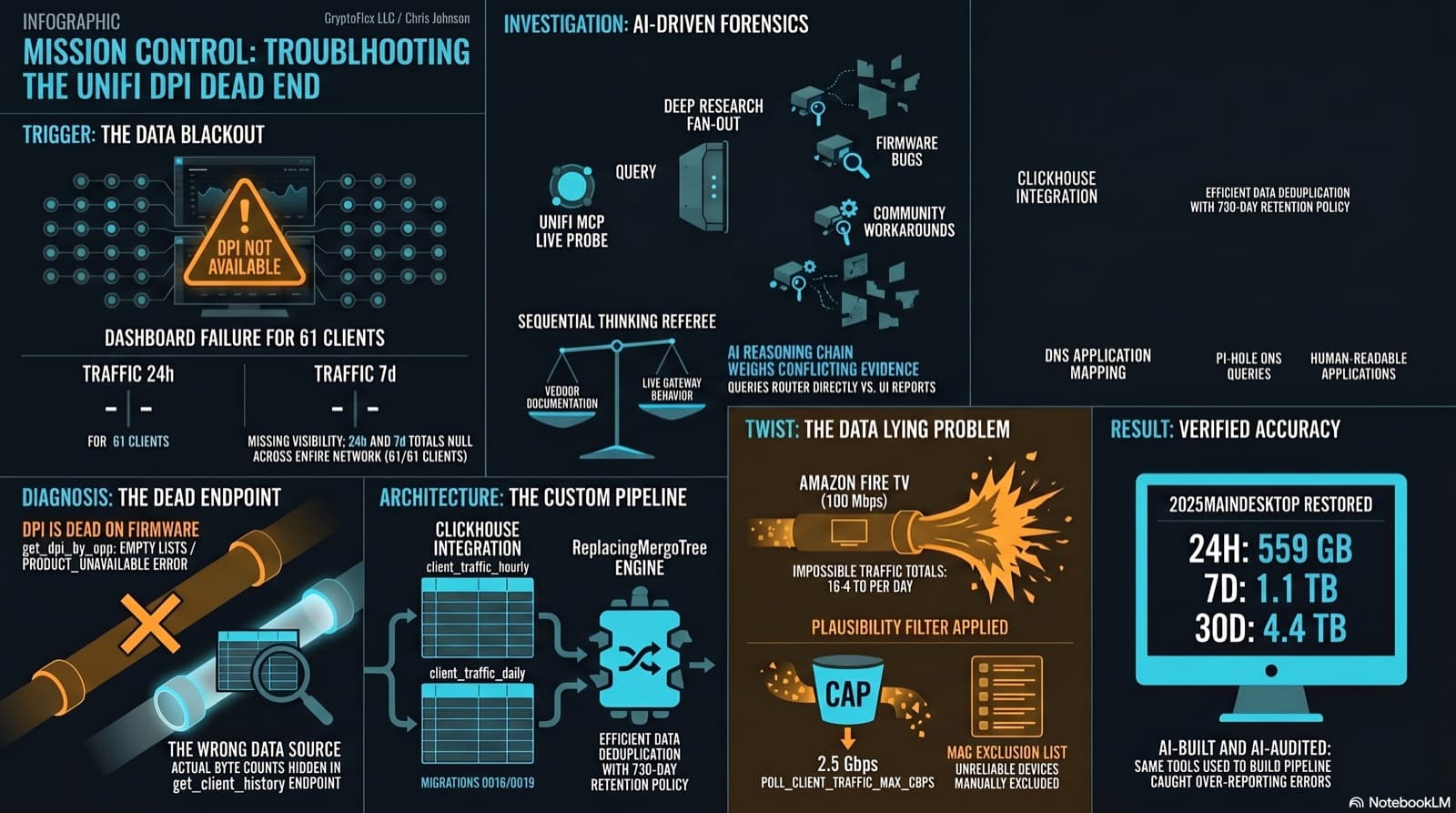
The Clients page showed "--" for traffic and "DPI not available for this device" for applications. The investigation found that per-app DPI is genuinely dead on this firmware, but per-client hourly byte buckets are alive and well in a different endpoint the dashboard was never reading. Fix the source, accumulate in ClickHouse, reconstruct Top Applications from Pi-hole DNS, and then discover that some clients are reporting physically impossible volumes. One afternoon, one commit (e07a8ac, 27 files), three confessional asides, and a plausibility cap that became load-bearing.

Home Network Mission Control: The LOG LAKE Panel, Five Deploy Bugs, and a Vetoed Bytes-Codec Rewrite
Part 6 of the home network dashboard build. The LOG LAKE panel ships a SIEM ingestion-health strip and a GUI firewall query builder that compiles to parameterized ClickHouse under the hood. One PR, two waves, 1193 backend tests at merge. Then deploy day on the live Mac mini produced five production-only bugs in a single afternoon: a readonly-pool 500, a timezone-mixed poll crash that had been firing every five minutes for hours, a 20-day-silent Pi-hole pipeline (two layers stacked), a Vector container reading a stale bind-mounted config, and a UDM doubled-hostname frame that silently broke action derivation for 159,909 rows. The meta-lesson is that the proposed fix for the last one was an invasive Vector source rewrite that the persona team vetoed in favor of an operator toggle and a four-line MV recreation.
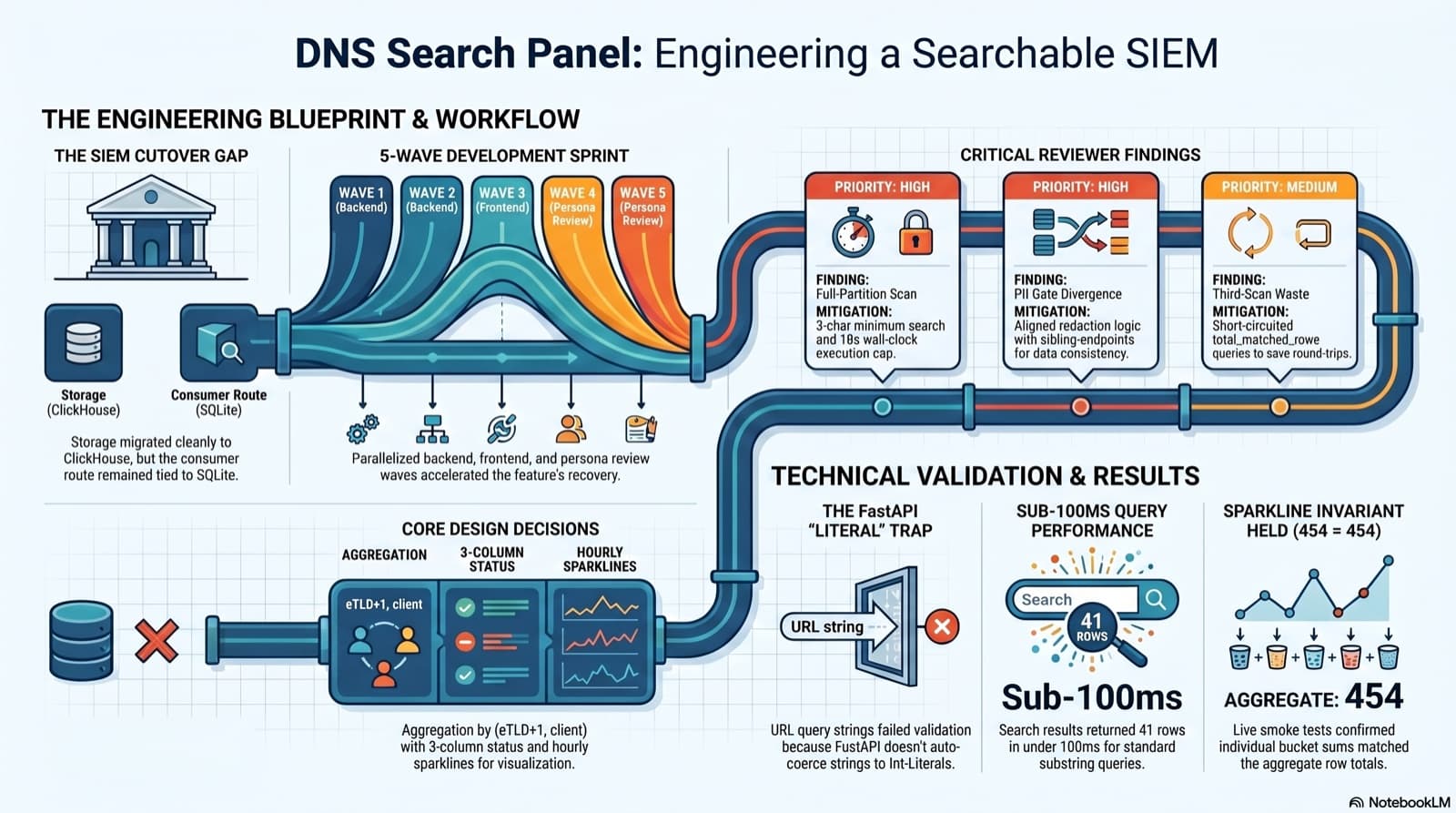
Part 6 of the home network dashboard build. The SIEM cutover dropped the DNS search endpoint without replacing it, and the only reason I caught it was clicking into the live dashboard and seeing "Failed to load DNS query log." This post walks the session that put search back: the diagnosis, the brainstorming workflow that pinned down five contested design choices, the five-wave persona dispatch, the parallel reviews that caught a third-scan query and a PII gate divergence, the FastAPI int-Literal gotcha that ate an hour, and a live smoke at 41 results in under 100ms with the sparkline-sum-equals-aggregate-total invariant holding 454 = 454 on the first row.
Comments
Subscribers only — enter your subscriber email to comment