
Evaluating Free WAFs So You Don't Have To: Cloudflare vs Vercel
I've managed firewalls for years. When it came time to add WAF protection to my own site, I evaluated Cloudflare's free tier against Vercel's built-in WAF. Here's the comparison, the implementation, the config that broke the build, and the curl tests that proved it all works.
I've spent a good chunk of my career behind firewalls. Not the fun kind where you're breaking in. The other kind: writing rules, tuning policies, reviewing logs, and explaining to stakeholders why that one rule they want disabled is the only thing standing between their application and a very bad day.
So when I stood up cryptoflexllc.com, one of the first things on my list was WAF protection. Not because I'm hosting anything particularly sensitive. It's a portfolio site with a blog and a custom analytics dashboard. But I've seen what happens to unprotected sites. Automated scanners find them within hours. WordPress probes, .env file harvesting, SQL injection attempts against paths that don't even exist. The internet is noisy, and anything without a firewall is just absorbing that noise at the application layer.
The question wasn't whether to add a WAF. It was which one.
Evaluating the Options: Cloudflare vs Vercel#
My site runs on Vercel's Hobby plan. The first candidate was the obvious one: Cloudflare. I've configured Cloudflare WAFs for clients more times than I can count. Their free tier includes WAF capabilities, their edge network is massive, and the setup is well-documented. Proxy your DNS through Cloudflare, enable the WAF, move on.
But before committing to any solution, I have a rule from years of firewall management: read the vendor docs from both sides. Not blog posts. Not Stack Overflow. The actual documentation from each vendor about interoperability.
So I checked what Vercel says about putting Cloudflare in front of their platform.
Vercel says: don't do it.
From their official knowledge base: "Using Cloudflare's proxy mode in front of Vercel deployments is not recommended and may cause SSL certificate renewal conflicts, degraded performance (double edge hop), broken bot protection, and cache invalidation issues."
This is the kind of thing you only discover if you read documentation from both sides of the integration. Cloudflare's free WAF requires proxy mode. Vercel explicitly warns against proxy mode. That's not a compatibility concern, that's a fundamental architecture conflict.
The performance issue sealed it. My site already runs on Vercel's edge network, which handles TLS termination, caching, and global distribution. Adding Cloudflare in front means every request traverses two edge networks before reaching origin. In firewall terms, that's like putting a second perimeter firewall in front of the first one with no DMZ between them. You're not adding defense in depth. You're adding latency and failure modes.
Swipe to see the full diagram
Here's how the two free tiers compare:
| Feature | Cloudflare (Free) | Vercel (Hobby) |
|---|---|---|
| WAF Custom Rules | 5 rules | 3 dashboard rules + unlimited vercel.json rules |
| DDoS Mitigation | Included | Included (automatic) |
| Bot Detection | Basic | JS challenge mode |
| SSL/TLS | Included | Included (auto-provisioned) |
| Requires DNS Migration | Yes (proxy mode) | No (already integrated) |
| Proxy Mode Required | Yes | N/A |
| Conflicts with Host Platform | Yes (Vercel warns against it) | No |
| Code-Level Rules | No | Yes (vercel.json with mitigate actions) |
| Attack Challenge Mode | Under Attack Mode | Attack Challenge Mode |
On paper, Cloudflare gives you more custom rules. In practice, the proxy mode requirement makes it a non-starter for Vercel-hosted sites. And the ability to define deny rules directly in vercel.json (version-controlled, deployed with your app) is something Cloudflare's free tier doesn't offer at all.
The Decision
Vercel's native WAF. Zero infrastructure changes. Zero DNS migration. Zero risk of breaking SSL or bot protection. And it was already there, waiting to be configured.
What Vercel's Free WAF Includes#
Here's what comes included on the Hobby plan, no upgrade required:
- DDoS mitigation (automatic, always on, no configuration needed)
- TLS termination with auto-provisioned and auto-renewed certificates
- Edge-level request filtering with custom deny/challenge rules
- Bot detection with JavaScript challenge mode
- IP blocking at the account level (manual deny list)
- Attack Challenge Mode (emergency toggle that challenges all traffic during active attacks)
- Code-level rules in
vercel.jsonwithdenyandchallengeactions
The free tier gives you up to 3 dashboard-configured custom rules, plus unlimited code-level rules in vercel.json. Paid plans (Pro at $20/month) add 40 dashboard rules, WAF-level rate limiting, and managed rulesets (OWASP Core Ruleset, Bot Protection). For a portfolio site, the free tier covers everything I needed.
The Implementation: Two Layers#
Vercel's WAF works in two places: code-level rules in vercel.json, and dashboard rules configured through the Vercel web UI.
Code-level rules are version-controlled, deployed with your application, and apply the same protections across all environments. Dashboard rules are configured per-project and give you a point-and-click interface for common patterns.
Swipe to see the full diagram
I started with code-level rules.
Layer 1: Code-Level Deny Rules#
The first thing I wanted to block was the noise: WordPress admin probes, dotfile access attempts, database admin panel requests, and host header injection attacks. These are the most common automated probes you see in web server logs. Blocking them at the edge means they never reach my application code.
Here's the vercel.json I created:
{
  "$schema": "https://openapi.vercel.sh/vercel.json",
  "routes": [
    {
      "src": "/api/(.*)",
      "has": [{ "type": "header", "key": "x-forwarded-host" }],
      "mitigate": { "action": "deny" }
    },
    {
      "src": "/(\\.(env|git|svn|htaccess|htpasswd|DS_Store).*)",
      "mitigate": { "action": "deny" }
    },
    {
      "src": "/(wp-admin|wp-login\\.php|wp-content|xmlrpc\\.php|wp-includes)(.*)",
      "mitigate": { "action": "deny" }
    },
    {
      "src": "/(phpmyadmin|pma|adminer|mysqladmin)(.*)",
      "mitigate": { "action": "deny" }
    }
  ]
}
What each rule protects against
- Host header injection - Blocks
x-forwarded-hoston API routes. Used in cache poisoning and SSRF attacks. - Dotfile access - Blocks
.env,.git,.svn,.htaccess,.htpasswd,.DS_Store. These contain secrets and server config. - WordPress probes - Blocks
wp-admin,wp-login.php,xmlrpc.php. 100% scanner noise on a non-WordPress site. - Database admin panels - Blocks
phpmyadmin,pma,adminer,mysqladmin. Same logic: if it doesn't exist, block it.
Each rule uses a regular expression in the "src" field to match request paths, and "mitigate": { "action": "deny" } to block matching requests.
The Schema Failure (And The Fix)#
This is where things got interesting.
My first attempt at vercel.json used a different structure. I'd found an example in Vercel's documentation that used "rules" as the top-level key and "route" as a property inside each rule:
{
  "rules": [
    {
      "route": "/api/(.*)",
      "has": [{ "type": "header", "key": "x-forwarded-host" }],
      "mitigate": { "action": "deny" }
    }
  ]
}
This looked right. The syntax made sense. I committed it, pushed to GitHub, and Vercel started building.
The build failed.
Error: vercel.json validation failed
  - should NOT have additional property 'rules'
Schema Mismatch
The actual schema expects "routes", not "rules". And inside each route object, the path goes in "src", not "route". The documentation example was either outdated or wrong. The official schema (referenced via "$schema": "https://openapi.vercel.sh/vercel.json") is the source of truth.
I fixed it:
- Changed
"rules"to"routes" - Changed
"route"to"src" - Kept
"mitigate"exactly the same
Pushed again. Build succeeded.
Tip
Schema validation errors can be cryptic when you're following documentation that's slightly off. Always check the schema directly if a config file has a "$schema" reference. That's your ground truth.
Layer 2: Dashboard Rules#
Code-level rules handle the static patterns: block this path, block this header, always and forever. Dashboard rules give you more flexibility: rate limiting, geo-blocking, User-Agent filtering, and emergency toggles.
I haven't created these yet (they're manual, not version-controlled), but here's what I'll configure when I do:
Rule 1: Protect Analytics API
- If: Request Path starts with
/api/analytics - AND: User Agent matches
sqlmap,nikto,nmap,masscan - Then: Deny
This blocks database scanners and network mapping tools from hitting the analytics endpoints. The analytics system has its own auth (HMAC cookie-based), but there's no reason to let scanners even reach the application layer.
Rule 2: Challenge Suspicious Bots
- If: User Agent matches empty UA,
python-requests,curl,wget,scrapy - AND: Request Path does NOT start with
/api/analytics/track(the browser tracking beacon needs to pass) - Then: Challenge
Legitimate browsers have full User-Agent strings. Scrapers and bots often use generic UAs or none at all. This rule challenges them with a JavaScript challenge. Browsers auto-pass. Bots get blocked.
Rule 3: Geo-Blocking (Optional)
- If: Country is in [high-risk country list]
- Then: Challenge
Only create this if I see targeted traffic from specific regions. Geo-blocking is a blunt instrument. Use it sparingly.
Dashboard Rule Rollout Strategy
Start with Log action for 24-48 hours, monitor what gets matched, then upgrade to Deny or Challenge after confirming the rule doesn't block legitimate traffic. Never go straight to Deny on a new rule.
Testing: Curl Until You Get Blocked#
Theory is great. Testing is better. I wanted to verify that the WAF rules actually worked before calling this done.
The test tool: curl.
Test 1: Dotfile access
curl -I https://cryptoflexllc.com/.env
HTTP/1.1 403 Forbidden
X-Vercel-Mitigated: challenge
Blocked. The .env request hit the WAF, got denied, and returned 403. The X-Vercel-Mitigated: challenge header confirms Vercel's WAF intercepted the request. Browsers would see a JS challenge. curl sees 403.
Test 2: WordPress admin probe
curl -I https://cryptoflexllc.com/wp-admin
HTTP/1.1 403 Forbidden
X-Vercel-Mitigated: challenge
Blocked. Same result.
Test 3: Database admin panel
curl -I https://cryptoflexllc.com/phpmyadmin
HTTP/1.1 403 Forbidden
X-Vercel-Mitigated: challenge
Blocked.
Test 4: Host header injection
curl -I https://cryptoflexllc.com/api/analytics \
  -H "x-forwarded-host: evil.com"
HTTP/1.1 403 Forbidden
X-Vercel-Mitigated: challenge
Blocked.
All four rules worked exactly as expected. The WAF was live, active, and blocking malicious patterns at the edge.
The Persistent Action Kicked In#
Here's where it got fun. After running about a dozen curl tests in quick succession, I tried to load the homepage in my browser. And it challenged me.
Vercel's WAF has persistent action logic. If an IP sends multiple suspicious requests in a short period, the WAF escalates from per-request blocking to IP-level challenges. My test IP (my home connection) had triggered enough deny rules that Vercel started challenging all requests from my IP, even legitimate browser traffic.
I solved the CAPTCHA, and the challenge went away. But the behavior confirmed something important: the WAF adapts. It's not just static regex matching. It's learning patterns and escalating defenses when it sees repeated suspicious activity from the same source.
Adaptive Defense
This is exactly what you want from a WAF. Bots don't solve CAPTCHAs. Humans do. The persistent action feature means repeated malicious probes from the same IP automatically trigger escalated challenges, without any manual rule creation.
What Vercel Provides for Free#
Here's the full list of protections now active on cryptoflexllc.com, all on the Hobby (free) plan:
| Protection | Details |
|---|---|
| DDoS Mitigation | Automatic, always on, blocks suspicious TCP connections at the edge |
| Edge Network | All traffic goes through Vercel's global edge for TLS termination, caching, and threat filtering |
| SSL/TLS | Auto-provisioned certificates with automatic renewal |
| Code-Level Deny Rules | Up to unlimited rules in vercel.json (I use 4) |
| Dashboard Custom Rules | Up to 3 rules configurable via web UI |
| Attack Challenge Mode | Emergency toggle to challenge all traffic during active attacks |
| IP Blocking | Account-level IP deny list (manual) |
| Bot Detection | JS challenges for suspicious User-Agents and traffic patterns |
Everything in that table is free. No credit card upgrade. No usage limits on blocked requests. Blocked traffic doesn't count toward your bandwidth quota.
The paid features (Pro plan at $20/month, Enterprise custom pricing) add managed rulesets, more custom rules (40 on Pro), and WAF-level rate limiting. For a portfolio site, the free tier is more than enough.
What's Still at the Application Layer#
The WAF handles perimeter defense, but it doesn't replace application-level security. These protections are already implemented in my Next.js code and stay there:
- Rate limiting - IP and path deduplication on the analytics tracking endpoint (1-hour window, Postgres-backed)
- Input validation -
pagePathmust be under 500 characters and start with/, days parameter clamped to 1-365 range - SSRF prevention -
isPrivateIp()guard blocks private IP ranges before making external API calls - Error message sanitization - generic client messages, detailed server-side logging only
- Cookie-based authentication - httpOnly HMAC-SHA256 tokens for the analytics dashboard (no query-string secrets)
Swipe to see the full diagram
The WAF and the application-layer protections are complementary. The WAF stops noise at the edge. The application code validates trusted traffic that makes it through.
Lessons Learned#
1. Check what your infrastructure already provides
I almost migrated DNS to Cloudflare for a feature Vercel already had. Reading both vendors' docs saved me a migration and improved performance.
2. Vendor recommendations matter
When Vercel explicitly says "don't proxy through Cloudflare," that's not a suggestion. It's based on real observed issues: SSL conflicts, degraded performance, broken features. Trust the people who built the platform.
3. Schema validation errors are your friend
When a build fails with "should NOT have additional properties," that's the schema telling you the docs are wrong (or outdated). Check the $schema reference for ground truth.
4. Test with the tools attackers use
curl is how bots and scanners interact with your site. If your WAF doesn't block malicious curl requests, it won't block real attacks either. Test with realistic payloads.
5. Persistent action is a feature, not a bug
When the WAF started challenging my browser after I ran too many curl tests, that was exactly the behavior I wanted. Adaptive defenses that escalate when they see patterns are better than static rules.
6. Free doesn't mean weak
Vercel's free WAF is production-grade. DDoS mitigation, bot detection, custom rules, and attack challenge mode are all included. You don't need an enterprise contract to have real perimeter defense.
What's Next#
The WAF is live. The rules are deployed. The edge network is blocking probes.
But security isn't a checkbox. It's a posture. Future work includes:
- Creating the 3 dashboard rules (Protect Analytics API, Challenge Suspicious Bots, optional Geo-Blocking)
- Monitoring Vercel's Security Events dashboard for patterns in blocked traffic
- Adding dependency scanning to catch vulnerable packages before they deploy
- WAF-level rate limiting when the traffic profile justifies upgrading to Pro
The foundation is solid. Every wp-login.php probe, every .env harvester, every phpMyAdmin scanner is now eating a 403 at the edge before it ever touches my application code. That's how a firewall should work.
Written by Chris Johnson and edited by Claude Code (Opus 4.6). The full source code is at github.com/chris2ao/cryptoflexllc. The infrastructure documentation, including the complete WAF setup guide, is in a separate private repo. This post is part of a series about AI-assisted development and security. Previous: Making Claude Code Talk: Terminal Bells and the Stop Hook. Next: SEO for Developers Who'd Rather Write Code Than Meta Tags.
Weekly Digest
Get a weekly email with what I learned, summaries of new posts, and direct links. No spam, unsubscribe anytime.

Related Posts
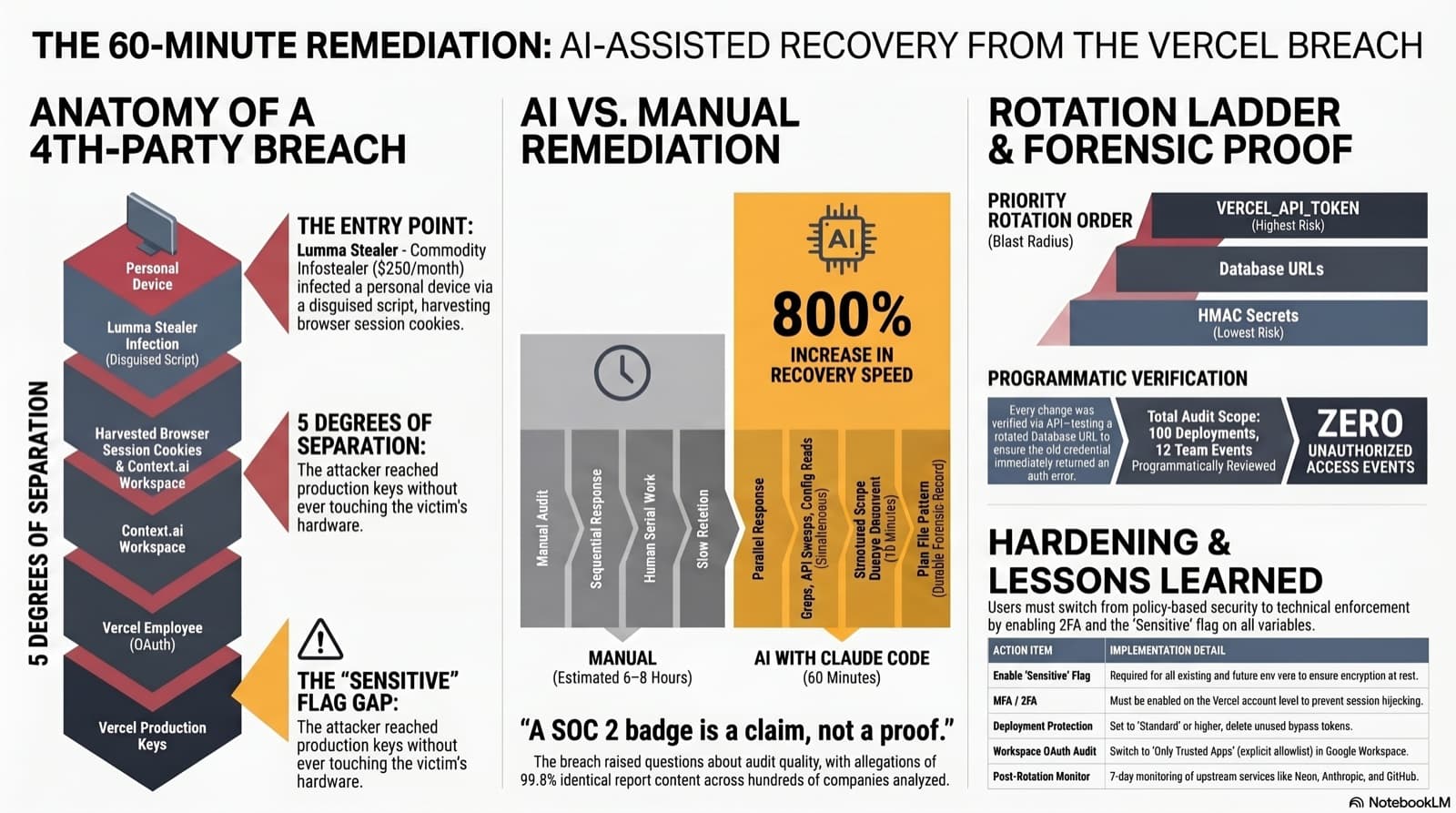
A fourth-party supply-chain breach prompted Vercel to flag nine of my production credentials for rotation out of an abundance of caution. Twenty minutes after reading the disclosure I was rotating keys, and sixty minutes later I had a full audit and a hardened account. Here is how Claude Code turned a day of incident response into an hour, and why the chain that got here should change how you pick vendors.
How I built a subscriber-gated comment system with thumbs up/down reactions, admin moderation, and a one-time welcome email blast, including the PowerShell quirks and Vercel WAF rules that nearly blocked everything.
How I built a full newsletter system for this site with secure subscriptions, HMAC-verified unsubscribes, branded HTML emails, and a Vercel Cron that sends a weekly digest every Monday. Includes the WAF rule that broke everything and the firewall tightening that followed.
Comments
Subscribers only — enter your subscriber email to comment