
Closing a dns_bypass Finding: ZBF Policy Chains, a Resilience Tradeoff, and an Open-Source MCP Tool
A red dns_bypass card on my home dashboard sat at 0.667. Closing it took two ZBF rules, a deliberately incomplete remediation on the Default subnet, and a new traffic_rules surface in the chris2ao/unifi-mcp v0.4.0 release. Here is the full walk.
The Security tab on my home network mission control dashboard had a red dns_bypass card sitting at 0.667. Seventeen of twenty-six active UniFi clients were covered by Pi-hole's top talkers list. Nine were not. The signal was right.
The signal computes covered_unifi_clients / total_unifi_clients against Pi-hole's top-25 client list. Two thirds isn't "noisy alert" territory. That's a real gap. So I sat down to close it, and the work turned into a four-part story: validating the metric, a design tradeoff I'm still going to defend, a ZBF policy chain remediation, and a brand-new tool surface for my open-source UniFi MCP.
The Finding#
The card pulls from a YAML rule set. The signal evaluator is straightforward: pull the active client list from UniFi, pull the top-25 client list from Pi-hole, intersect by MAC, divide. Anything below 0.95 turns the card amber. Anything below 0.7 turns it red. Mine wasn't borderline.
Why a 25-client window?
Pi-hole's getQuerySources API returns a top-N list, not the whole population. Twenty-five is the API default and a fine working set on a residential network. If a device queries Pi-hole at all in the rolling window, it lands on the list. If it never queries Pi-hole, it falls off, and the dashboard counts it as bypassed.
I trust the dashboard, but the first move on any red signal is "verify the metric is real, not an artifact." So I went back to the source data.
Validating the Metric#
I pulled the active UniFi client list (twenty-six entries) and cross-referenced against Pi-hole's top-25 client list. Seventeen MACs intersected. Nine didn't. That works out to 17/26 = 0.654, which lines up cleanly with the dashboard's 0.667 within polling jitter. The signal wasn't lying.
The interesting part was the why. Two distinct root causes, each on a different subnet:
-
Default network was handing out four DNS servers. DHCP option 6 carried
10.0.0.227(Pi-hole),9.9.9.9(Quad9),1.1.1.1(Cloudflare), and8.8.8.8(Google). Clients round-robin across the list, so roughly three out of four queries skipped Pi-hole entirely and went straight to a public resolver. -
VLAN 2 (OnboardNetwork) and VLAN 3 (RoamingQuarantine) couldn't reach Pi-hole at all. Both networks had
dhcpd_dns_enabled: falseandnetwork_isolation_enabled: true. The first meant the controller never advertised a resolver via DHCP. The second meant UniFi auto-generated anIsolated NetworksZBF BLOCK rule at index 30000 that dropped any traffic from those VLANs to other internal networks, including 10.0.0.227. Even if a client guessed the right DNS server, the firewall would've killed the query.
Two failures, two profiles
The Default-subnet clients were happily resolving DNS, just not through Pi-hole. The VLAN 2 / VLAN 3 clients couldn't resolve at all unless they were configured with an external resolver out-of-band. The same red card was hiding two completely different failure modes.
That distinction mattered for the remediation plan, because the fixes are not symmetric.
The Design Tradeoff#
Here's where the post gets philosophical for a minute.
The clean answer is "remove the public resolvers from Default's DHCP option 6, point everything at Pi-hole, watch the card turn green." That's what the metric wants. It's also a worse network for me to live on.
If Pi-hole goes down, every device on the Default subnet loses DNS. No retry, no graceful fall-through. My laptops, my phones, my smart speakers, my partner's work machine: all dark until I notice and intervene. For a residential network where the operator's also the only on-call engineer, that's a poor failure mode.
The DNS option 6 list is a graceful-degradation mechanism. Most clients honor the order, hit Pi-hole first, and fall through to Quad9 only if Pi-hole stops responding. It costs me dashboard coverage, but it buys me an uptime guarantee on the most important service in the house.
So the call I made was deliberately asymmetric:
- Default subnet: keep the public DNS fallbacks. Accept that this part of the
dns_bypasssignal'll stay non-green. The dashboard isn't wrong, it just doesn't model resilience tradeoffs, and that's a feature ask for the dashboard, not a fix to deploy at the network layer. - VLAN 2 and VLAN 3: close them fully. Both are isolated trust tiers (onboarding for new devices, quarantine for roaming clients). Resilience matters less, observability matters more. Every query on those VLANs should hit Pi-hole.
The shape of the tradeoff
Security signals are easier to reason about when they assume a single failure mode. Real networks have multiple. A red card that says "you have DNS bypass" is correct. A red card that says "you're choosing operational resilience over signal coverage on this specific subnet" is correct and useful. The dashboard will get there. The remediation plan doesn't have to wait.
This is the pivot point in the post: I'm not going to chase a green card. I'm going to close VLAN 2 and VLAN 3, document the Default-subnet decision, and move on.
Phase A: Snapshot Before Touching Anything#
Before changing any network or firewall config I snapshotted the current state to a JSON file. The path was ~/.claude/state/homenet-snapshots/dns-bypass-pre-20260428T032316Z.json. Networks, ZBF zones, ZBF policies, DHCP option 6 contents, the works. It wasn't glamorous, but it was the rollback contract: if anything broke, I had a one-shot path back to "before."
Snapshot is non-negotiable
A network change that involves both DHCP and firewall policies has at least four moving parts: client cache TTL, resolver reachability, ZBF index ordering, and isolation-policy auto-generation. If any one of those misbehaves, you want the original state in JSON form, not in your memory. The snapshot took six seconds. The peace of mind paid for itself.
Phase C: ZBF Allow Exceptions for VLAN 2 and VLAN 3#
This is where the work started. The goal: let VLAN 2 and VLAN 3 clients reach 10.0.0.227:53 even though network_isolation_enabled: true on both networks generates a blanket BLOCK to other internal subnets.
ZBF policies in UniFi evaluate in ascending index order. First match wins. The auto-generated Isolated Networks rule sits at index 30000. So an ALLOW rule placed at any index lower than 30000 carves a hole through the isolation policy, but only for the source / destination / port tuple specified.
I added two ALLOW rules, one per VLAN, both at index 10000:
Allow OnboardNetwork DNS to Pi-hole: src VLAN 2, dst10.0.0.227, dst port 53 (UDP+TCP)Allow RoamingQuarantine DNS to Pi-hole: src VLAN 3, dst10.0.0.227, dst port 53 (UDP+TCP)
Both rules used the existing chris2ao/unifi-mcp create_zbf_policy tool. The tool wraps /v2/api/site/{site}/firewall-policies and is the right surface for port-level filtering. (Foreshadowing.)
After the ALLOW rules went in, I confirmed VLAN 2 and VLAN 3 clients could resolve through Pi-hole. The isolation guarantee for everything else, lateral movement to the Default subnet, the IoT VLAN, the camera VLAN, was untouched. ZBF first-match-wins semantics did exactly what I'd asked for.
Phase D: DHCP Now Points at Pi-hole#
With the firewall holes carved, I flipped DHCP on the same two VLANs:
dhcpd_dns_enabled: truedhcpd_dns_1: 10.0.0.227
This was a one-line change per VLAN through the UniFi MCP update_network tool. New leases get Pi-hole as the resolver immediately. Existing leases will refresh on lease renewal (default 24h on this controller), or sooner if a client reconnects. Within ten minutes of the change, the next-hop test from a VLAN 3 client showed Pi-hole answering.
Why ALLOW before DHCP
The order matters. If I'd switched DHCP first, every client on those VLANs would've lost DNS at lease renewal because the firewall was still dropping the queries. ALLOW first, DHCP second. Reverse the order and I get a self-inflicted outage with my own change as the root cause.
Phase E2: Block the Public-DNS Escape Hatch#
ALLOW + DHCP gets me to "VLAN 2 and VLAN 3 use Pi-hole by default." It doesn't stop a sufficiently motivated device from hand-configuring 1.1.1.1 and bypassing Pi-hole anyway. (Smart TVs are notorious for this. Some IoT devices ignore DHCP-supplied DNS entirely.)
So I added two BLOCK rules at index 10001:
Block VLAN2 outbound DNS to internet: src VLAN 2, dst ANY, dst port 53 (UDP+TCP), action DENYBlock VLAN3 outbound DNS to internet: src VLAN 3, dst ANY, dst port 53 (UDP+TCP), action DENY
Index 10001 sits below the index-10000 ALLOW rules. A query to Pi-hole still matches the ALLOW first. Anything else, Quad9, Cloudflare, Google, AdGuard, you name it, doesn't get out.
The full evaluation chain on those two VLANs now looks like this:
| Index | Action | Match | Effect |
|---|---|---|---|
| 10000 | ALLOW | src VLAN2/3, dst 10.0.0.227, port 53 | Pi-hole works |
| 10001 | BLOCK | src VLAN2/3, dst ANY, port 53 | Public DNS blocked |
| 30000 | BLOCK (predefined) | Isolated Networks | Cross-VLAN dropped |
There's one honest caveat: this only blocks classic UDP/TCP port 53. DNS-over-HTTPS rides on TCP 443 and is indistinguishable from any other HTTPS traffic without deeper inspection. A client deliberately using DoH to a public resolver gets through. Closing that gap is a separate piece of work involving SNI-level filtering or a managed device profile, and it isn't on the critical path for the dns_bypass signal.
DoH is a separate problem
If the threat model is "stop a device that's actively trying to evade Pi-hole," the right tool is application-layer inspection or a managed-device policy, not a port-53 firewall rule. The two BLOCK rules at index 10001 close the lazy-bypass case (devices that ignore DHCP) and force any remaining bypass attempt to use DoH or DoT, which are both more expensive to operate as a bypass channel.
The Tooling Gap#
Here is where the post pivots into engineering.
While building the BLOCK rules, my first instinct was to use UniFi Traffic Rules. They sound like the right surface: "rules that block traffic on a network." The Web UI exposes them under Settings, Security, Traffic Rules. They support schedules, bandwidth limits, target devices. The chris2ao/unifi-mcp repo didn't have a wrapper for them yet, so I figured: build the wrapper, use the wrapper, ship it.
That's what I did. And then I discovered Traffic Rules can't block by destination port at all.
Attempt One: Traffic Rules#
I built six tools wrapping the v2 endpoint /proxy/network/v2/api/site/{site}/trafficrules: list_traffic_rules, get_traffic_rule, create_traffic_rule, update_traffic_rule, delete_traffic_rule, toggle_traffic_rule. Thirteen new tests. All green.
Then I tried to construct a BLOCK rule for "src VLAN 2, port 53, action DENY." There's no ports field in the schema. There's no dst_port. There's no service. The closest thing is matching_target, which takes one of INTERNET, DOMAIN, IP, REGION, APP_CATEGORY, or INTERNAL, and none of those let you scope to a single port.
I could build "BLOCK all internet traffic from VLAN 2" (matching_target = INTERNET). I could build "BLOCK traffic to a specific IP" (matching_target = IP). I couldn't build "BLOCK port 53 to internet, allow everything else." That's the rule I needed.
Traffic Rules are application-layer, not port-layer
Traffic Rules in UniFi v2 are designed for "block this app category for this network during these hours" use cases, not classic L4 firewall rules. The schema reflects that. If the rule you want says "TCP/UDP port X," Traffic Rules aren't the surface to use.
The pivot was easy in hindsight: I was already using ZBF firewall-policies for the ALLOW rules at index 10000. ZBF does support port-level filtering. I dropped the Traffic Rules approach for this remediation and used ZBF for the BLOCK rules at index 10001.
But the tools I built weren't wasted. UniFi Traffic Rules are still the right surface for a different class of rule (kid controls, app-category blocks, scheduled outages), and the public MCP didn't have them. So I shipped the wrappers anyway.
v0.4.0: traffic_rules Tools and a DELETE Fix#
The work landed as chris2ao/unifi-mcp v0.4.0. Six new tools, thirteen new tests, all 225 unit tests passing. Public PR is chris2ao/unifi-mcp#4, merged as squash commit 9e5d28f. The release tag is v0.4.0.
The version skipped 0.3.x because tags v0.3.0 and v0.3.1 already existed on the public remote, created from the 0.2.0 / 0.2.1 release branches by mistake. Bumping straight to 0.4.0 sidesteps the collision and resyncs the version with the highest published tag.
There was one subtle bug fix that came out of the Traffic Rules work and is worth flagging. The v2 DELETE /trafficrules/<id> endpoint returns HTTP 200 with no Content-Type header and an empty body. The previous auth.client._request implementation treated empty 2xx as UNEXPECTED_RESPONSE, so calling delete_traffic_rule would surface a delete failure even though the rule had been successfully removed.
The fix was five lines:
# Before
if not response.text:
    return error("UNEXPECTED_RESPONSE", "Empty response body")

# After
if not response.text:
    # UniFi v2 DELETE endpoints sometimes return 200 with empty body;
    # treat as success.
    return {}
Generally useful for any v2 endpoint where the controller decides to skip the body on a successful mutation.
Schema Discoveries#
The Traffic Rules schema had four other gotchas worth documenting publicly. The CHANGELOG carries the canonical list; this post puts them in narrative form because they are real teaching moments.
| What I assumed | What the controller actually does |
|---|---|
Use name for the rule label | Field is description; name is silently dropped on persist |
Block traffic by passing ports: [53] | No ports field exists; use ZBF firewall-policies for port-level filters |
target_devices.exclude: true for "all except this one" | exclude is silently dropped; you cannot anti-target devices |
GET /trafficrules/<id> works | Returns 405; tools fetch the collection and filter locally |
BLOCK ZBF policies just need action: DENY | create_allow_respond must be false, or the controller rejects |
The label field is description, not name. Every other UniFi v1 endpoint I've wrapped uses name. Traffic Rules use description. Pass name and the controller silently drops it on persist. Your rule shows up in the UI with an empty label. The first time I noticed this I assumed I had a serializer bug.
There's no ports field, period. Already covered above. Worth repeating because it's the gotcha that drove the pivot away from Traffic Rules for this whole story.
target_devices doesn't honor an exclude flag. I tried {"exclude": true} to express "all devices on this network except this one." UniFi normalizes the field away on persist. You can target devices, but you can't anti-target them in a single rule.
GET /trafficrules/{id} returns 405. The collection endpoint accepts GET. The single-resource endpoint doesn't. I worked around it in get_traffic_rule and toggle_traffic_rule by fetching the collection and filtering locally, which is cheap because the residential collection size never gets above a couple dozen rules.
For BLOCK ZBF policies specifically, create_allow_respond must be false. This one bit me on the index-10001 BLOCK rules. The controller rejects with api.err.FirewallPolicyCreateRespondTrafficPolicyNotAllowed if you pass true or omit the field on a BLOCK action. ALLOW policies are happy with true. BLOCK policies require false. The error message is at least direct about it.
The schema is the authority
Every one of these gotchas is invisible if you trust the docs and the field names. The only way to discover them is to send the request, watch the controller's response, and update your wrapper to match. Schema-first wrappers around UniFi work as long as you treat "what the controller actually accepts" as the contract, not "what the field names suggest." That's the whole game here.
What Closed and What Didn't#
After Phase E2, I let the network bake for an hour and re-pulled the dashboard.
VLAN 2 clients: all hitting Pi-hole. Top-25 list shows them. covered_unifi_clients for that subnet went from zero to full coverage.
VLAN 3 clients: same.
Default subnet: still partial coverage by design. The Quad9 / Cloudflare / Google entries in DHCP option 6 are still in place. About half of Default-subnet queries land on Pi-hole, the other half land on a public resolver. The dashboard dns_bypass card moved from 0.667 to roughly 0.85, which is amber rather than red. Good enough for a card I'm intentionally leaving non-green.
The honest scorecard
- VLAN 2 and VLAN 3: closed.
- Default subnet: deliberately partial.
- DoH bypass: untouched.
- New tooling: shipped to the public repo.
- Lessons: documented here.
Lessons Learned#
1. Validate every signal before you fix it
A red card on a security dashboard is a hypothesis, not a verdict. Pull the underlying data, recompute the metric by hand, confirm the same number lands. If the numbers do not match, the signal is broken. If they do, you now know exactly what shape the failure has and which subnet to focus on.
2. Resilience and signal coverage are different goals
The cleanest fix isn't always the right fix. A network that perfectly satisfies a single security signal but fails on the operator's actual reliability requirements is a worse network. Document the tradeoff and put it in the post-remediation report. Your future self will thank you when an on-call wakes them up at 2 a.m.
3. Pick the right firewall surface for the rule you actually need
UniFi has at least three filtering surfaces (legacy firewall rules, Traffic Rules, ZBF policies). They aren't interchangeable. Traffic Rules can't do port-level filtering. Legacy rules can't express zones. ZBF can do both, with first-match semantics. Match the surface to the rule.
4. Always snapshot before changing DHCP and firewall together
A combined change touches lease behavior, resolver reachability, and policy ordering. If any one of those interacts wrong, the rollback path needs to be a script, not a memory exercise. Snapshot's six seconds of work. Manual recovery without a snapshot is hours.
5. Document the schema gotchas as you find them
Every schema discovery in this post (the description field, the missing ports, the dropped exclude, the 405 on GET) was a five-to-fifteen minute investigation in isolation. Cumulative time was real. They go in the CHANGELOG, in the tool docstring, and in the post. Anyone else writing wrappers for UniFi v2 trafficrules saves the same time.
6. Build the tooling even when the immediate use case pivots away
I built traffic_rules thinking it was the right hammer for this nail. It wasn't. I shipped it anyway because it was the right hammer for a different nail (kid controls, scheduled outages, app-category blocks), and the public MCP didn't have it. Tools have a longer half-life than the problem that motivated them.
What's Next#
The dashboard is in a state I can defend: VLAN 2 and VLAN 3 fully closed, Default-subnet card amber on purpose, with a documented tradeoff. The public MCP picked up six new tools and one cross-cutting bug fix. The CHANGELOG carries the schema gotchas for the next person.
A few open threads:
- DoH/DoT bypass is the next rung up the threat model. It needs SNI-level inspection or a managed-device profile, neither of which is configured today.
- The dashboard signal would benefit from a "configured fallback" exception list so a deliberate option-6 fallback doesn't look like a bypass. That's a dashboard feature, not a network change.
- The legacy firewall rules on this controller still have a few orphaned entries from earlier experiments. ZBF is the strategic surface; the legacy rules are scheduled for cleanup the next time I'm in there.
The unifi-mcp release notes are at github.com/chris2ao/unifi-mcp/releases/tag/v0.4.0. The PR with the full diff is at chris2ao/unifi-mcp#4. The blog config repo is at github.com/chris2ao/cryptoflexllc.
Resources#
- Diagnostic deep-dive: resolving the DNS bypass signal (infographic): the full one-page walkthrough used in this post.
- Closing a dns_bypass finding (slide deck): twelve-slide narrative version of the same material.
Written by Chris Johnson and edited by Claude Code (Opus 4.7). This post is part of the Security Engineering series. Previous: Will LLM Agents Replace Pentesters? I Ran a 4-Agent Security Sprint to Find Out.
Weekly Digest
Get a weekly email with what I learned, summaries of new posts, and direct links. No spam, unsubscribe anytime.

Related Posts
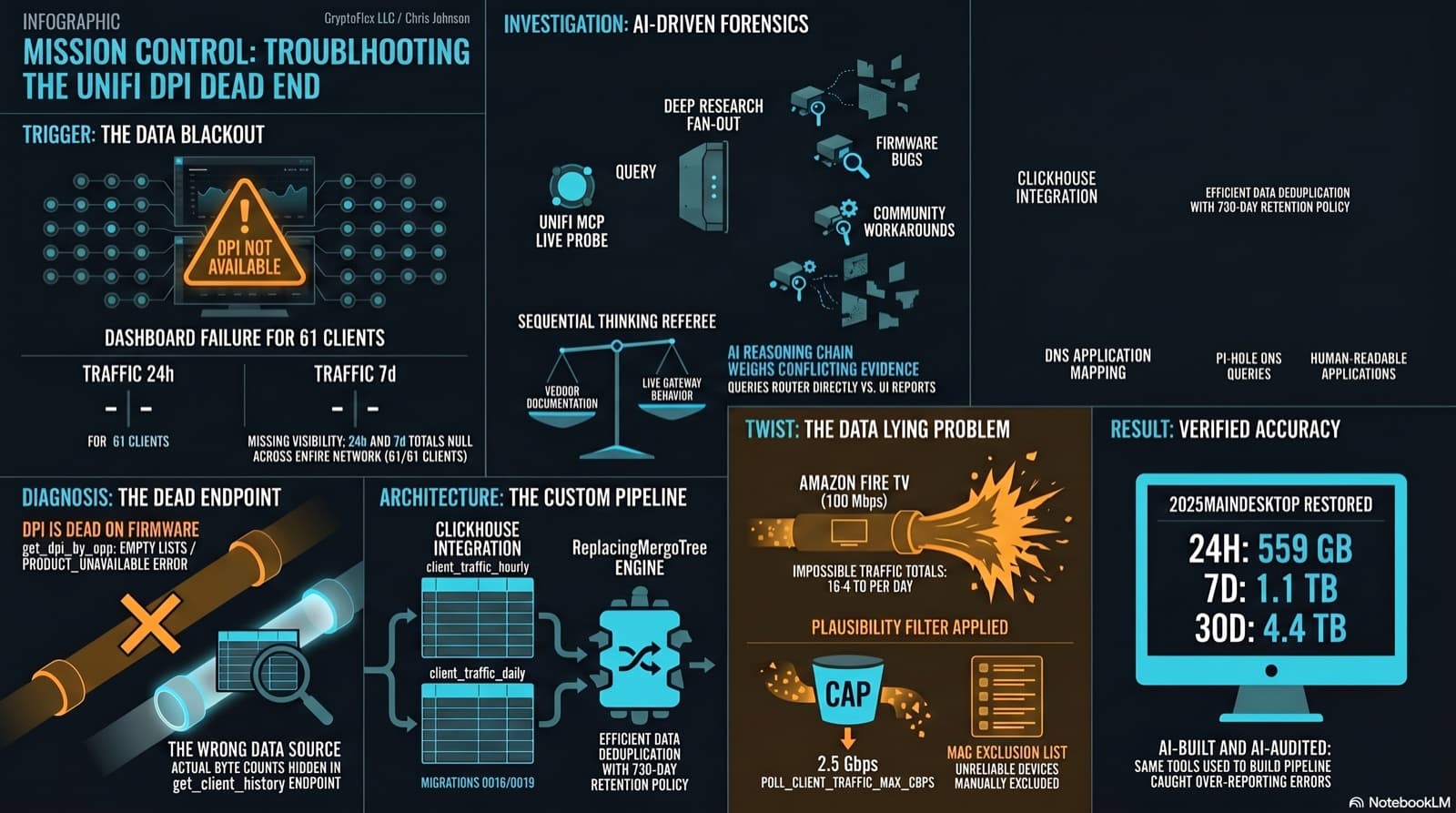
The Clients page showed "--" for traffic and "DPI not available for this device" for applications. The investigation found that per-app DPI is genuinely dead on this firmware, but per-client hourly byte buckets are alive and well in a different endpoint the dashboard was never reading. Fix the source, accumulate in ClickHouse, reconstruct Top Applications from Pi-hole DNS, and then discover that some clients are reporting physically impossible volumes. One afternoon, one commit (e07a8ac, 27 files), three confessional asides, and a plausibility cap that became load-bearing.
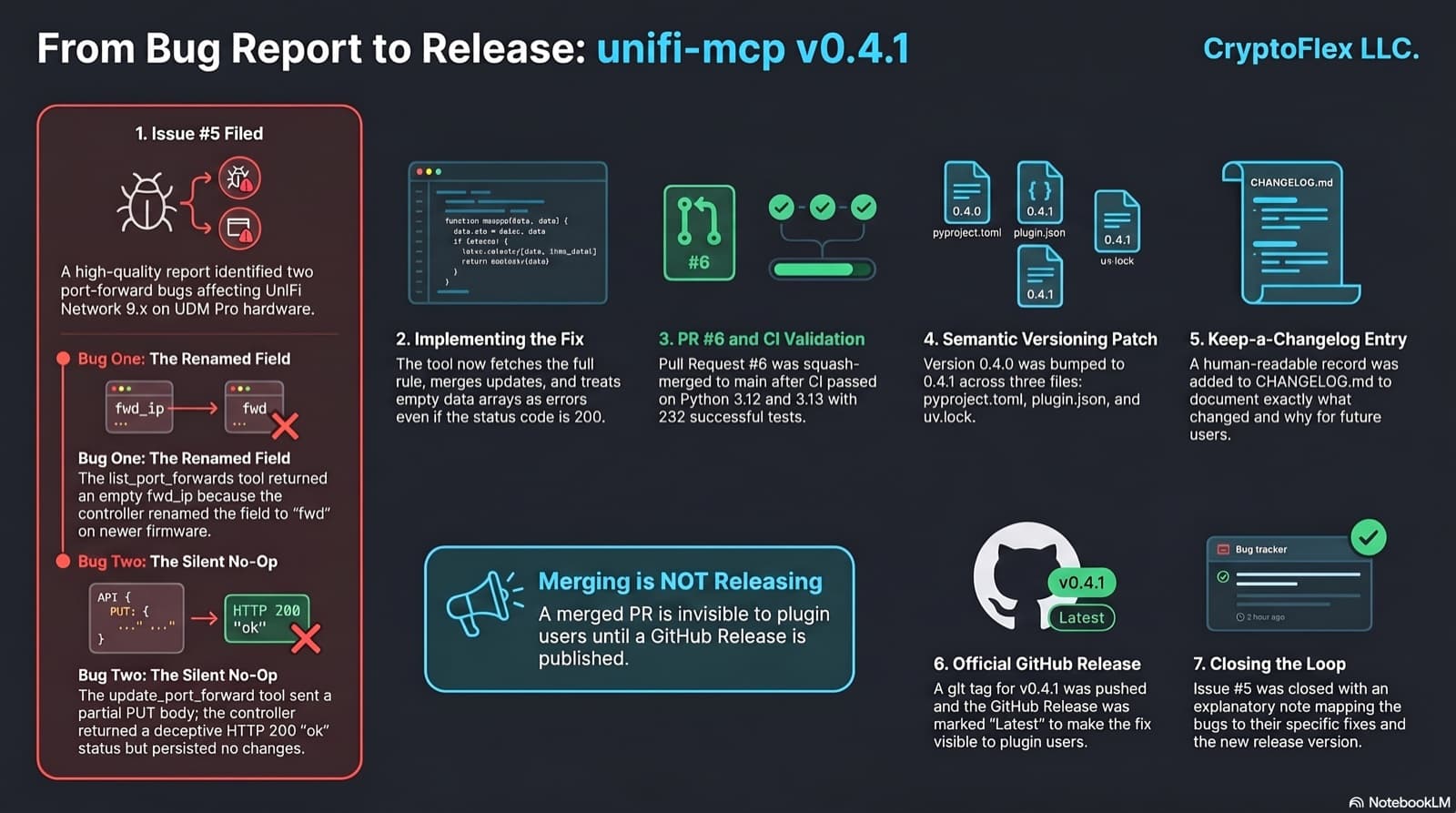
Someone filed issue #5 against my UniFi MCP: two port-forward bugs, one of them a silent no-op that reported success. Here is the whole journey from bug report to a published v0.4.1 release, and the open-source hygiene that makes a merge into something users can actually install.
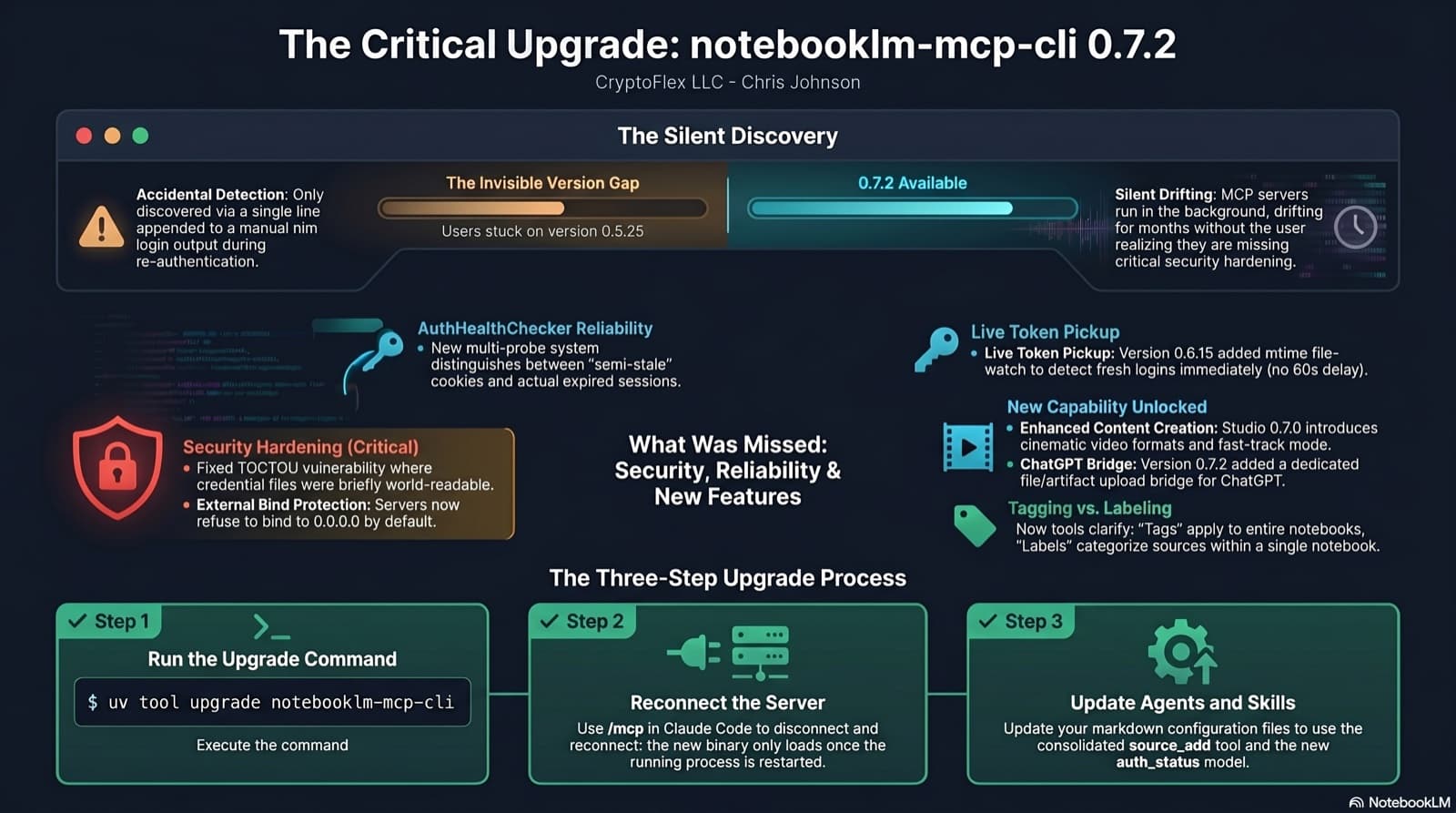
I was two minor versions behind on notebooklm-mcp-cli and had no idea until a re-auth banner interrupted a session. The gap was 0.5.25 to 0.7.2. Security fixes, auth reliability improvements, and new features I was missing the whole time. Here is the three-part upgrade that most people stop after step one.
Comments
Subscribers only — enter your subscriber email to comment