
One Jira Board for Every Home Project (and a Wrap-Up That Keeps It Current)
Deferred work for home projects lived in five places that didn't know about each other. Here's the one Jira board that replaced them, the two dead ends getting there, and the wrap-up step that keeps it honest.
Minutes before I asked for a Jira board, I deferred yet another thing to Claude: "Naw I'll save that until the soak period is [finished] but I will be adding it later." Eight projects were running at once, and the honest answer to "what's waiting on me?" lived in at least five different places. None of them knew about the others.
Where "Later" Lived#
The projects were CryptoFlix (the home media app), CJClaudin_Mac (the Mac Mini's Claude harness and home server setup), CJClaudin_Research, Cann-Cann (the artillery game), the home network, this site, gmail-agent, and Ledgerly (a personal finance app). Each had its own idea of where deferred work should go.
CryptoFlix had a backlog.md and a docs/history/ folder. CJClaudin_Mac kept plans in docs/plans/. Anything said out loud in a session ended up as a "deferred" line in MEMORY.md or a vector memory note, depending on which one I remembered. An older Jira space named Cryptoflix held 17 items across several projects, including an umbrella called "Deferred CryptoFlix features and bug fixes."
That is a filing system only in the sense that a junk drawer is. At 11:18 PM, this is what I typed:
"What I do want to set up is an integration to Jira to keep track of all my projects and backlog items, whats been done and whats in [the] backlog. [...] I just think I have a lot of items for cryptoflix and [CJClaudin_Mac] I need to track."
The design doc Claude wrote from that has a goal that still holds up: track every personal project's work in one Jira space, "showing both what is waiting and what is done," and have Claude sessions keep it current without being asked each time.
Two Dead Ends Before There Was a Board#
The connection was the easy part. The claude.ai Atlassian connector (the official Rovo MCP) signs in once, follows the account to every machine, and leaves no token on disk. The space itself was another story.
Spaces, epics, and components
Atlassian now calls Jira "projects" spaces. An epic is a parent item that groups related work, and a component is a tag-like category that some space types offer.
The first space came from the business "Project management" template. Business spaces have no Epic or Bug types, no components, and no GitHub linking. Fixing it meant deleting the space, purging it from the trash to free the key, and rebuilding it as Software > Kanban (team-managed). The screenshot below is the picker as it went to Claude, captioned "these are the options for templates."
Templates are permanent
A business template can't be converted to software, so pick Software > Kanban before you create anything. Epics, bugs, and GitHub linking all depend on it.
The rebuilt space was going to get one component per project. In the Task work type's field list, I asked Claude "where is component?" It isn't there. Team-managed software spaces on this plan don't offer components, so each project got one long-lived epic instead, and the project epics never move to Done.
The connector also can't create spaces, statuses, or fields. Those were clicks in the Jira UI. That's fine, but it's worth knowing before you promise yourself a fully hands-off setup.
Five Columns and the One That Matters#
Jira's default board has To Do, In Progress, and Done. This one needed five: Backlog, Ready, In Progress, Waiting on me, and Done.
Why a column just for me? "Waiting on me" separates owner-only steps (UI clicks, PC steps, credential rotation, device checks) from work Claude can do alone. A normal backlog mixes those together, and then I'm the bottleneck without knowing it.
Swipe to see the full diagram · Tap to enlarge
Before anything got created, read-only agents swept CryptoFlix, CJClaudin_Mac, and the memory notes into a review doc, and nothing went into Jira until it was approved. One correction came out of that review: the sweep was hunting for Wazuh work, but I had decommissioned Wazuh, so it was recorded as retired instead of imported as open work. Finished work went back two months.
Then five parallel subagents created 211 items. Each carried an Import-ID marker so a rerun couldn't make duplicates, and the counts per epic and status matched the approved list.
A transition that lies
In this space the transition named "To Do" leads to the Backlog status. The rule tells Claude to pick transitions by target status name, never by transition name.
Teaching Claude to File Things#
A board nobody updates is just a nicer junk drawer. The setup lives in ~/.claude/rules/development/jira-tracking.md, and rules in ~/.claude/rules/ load into every Claude Code session on the machine, in every repo.
The rule covers what to file: deferred work, owner-only steps, unfixed findings, and follow-ups. Items move to Done only after verification, with the commit named. Sessions that touch an item put its key in the commit subject, and every change gets announced in one line. Two more lines are guardrails: the Rovo search and graph tools burn Rovo credits, so they're banned, and a Jira outage never blocks work.
The duplicate check was two fresh sessions about 20 seconds apart, given the same idea in different wording. The first got "Filed CLAUD-221 [Ledgerly] Dark mode toggle on the settings page (Backlog)." The second, asked for a "dark theme switch," got this: "I didn't file a new item because this one is already in Jira as CLAUD-221." It left the item unchanged.
Fixing this site's flaky font build went like this:
Filed CLAUD-225 [cryptoflexllc] Intermittent build failures from next/font/google (In Progress).
Filed CLAUD-225 and moved it to Done (commit e2f5eee). Filed CLAUD-226 [cryptoflexllc] Vendor latin-ext subsets for self-hosted fonts (Backlog).
The commit that closed it, in this site's public repo, was fix: CLAUD-225 self-host fonts so builds never depend on Google Fonts.
Put the key in the commit
Writing CLAUD-225 in the commit subject costs nothing today. The GitHub for Jira app isn't installed yet, but the history will link up once it is.
The Wrap-Up Catches What Fell Through#
Rules only help when a session remembers them. /wrap-up is the end-of-session command: it updates docs, saves memory, and commits and pushes every repo. Step 4d, a Jira sync, sweeps up whatever the session missed.
It runs in the main session, because the wrap-up orchestrator agent has no MCP tools. It lists the items touched this session and any jira-pending notes that sessions without Jira access saved to vector memory. It also finds deferred work that never got filed and items left In Progress, and proposes a Done item for any notable finished effort that has none. Then it asks, via AskUserQuestion, whether to apply all, pick, or skip. It never blocks the wrap-up.
Swipe to see the full diagram · Tap to enlarge
Never blocking has a cost. The session that deployed CryptoFlix 9.4.1 had no Jira access, so its Done item was never recorded. The next session, about 25 minutes later, caught it from the release handoff and filed CLAUD-224. The jira-pending notes exist for that case, and the wrap-up is where they get picked up.
The wrap-up's own catch came in a later run, when it asked whether to file the post-deploy checks for 9.5.1, which no session had thought to file. The answer was yes, and CLAUD-263 landed in Waiting on me.
What's Left#
The board still has no GitHub linking, automation rules, dashboards, or sprints.
The old CryptoFlix space is the one loose end. I said I'd hold onto it for a couple of weeks, and that deferral got filed too, as CLAUD-222, due 2026-10-28.
Weekly Digest
Get a weekly email with what I learned, summaries of new posts, and direct links. No spam, unsubscribe anytime.

Related Posts
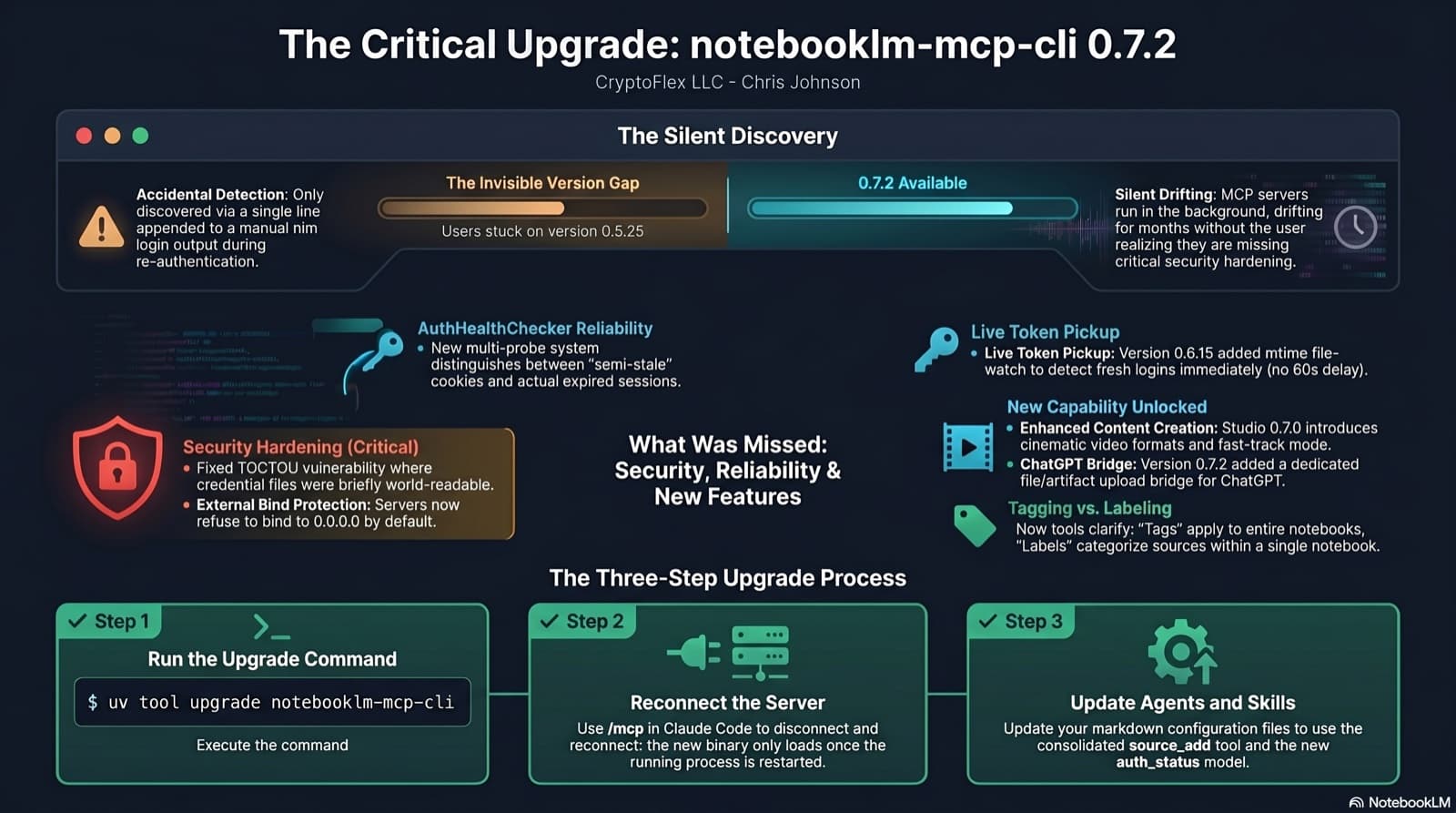
I was two minor versions behind on notebooklm-mcp-cli and had no idea until a re-auth banner interrupted a session. The gap was 0.5.25 to 0.7.2. Security fixes, auth reliability improvements, and new features I was missing the whole time. Here is the three-part upgrade that most people stop after step one.
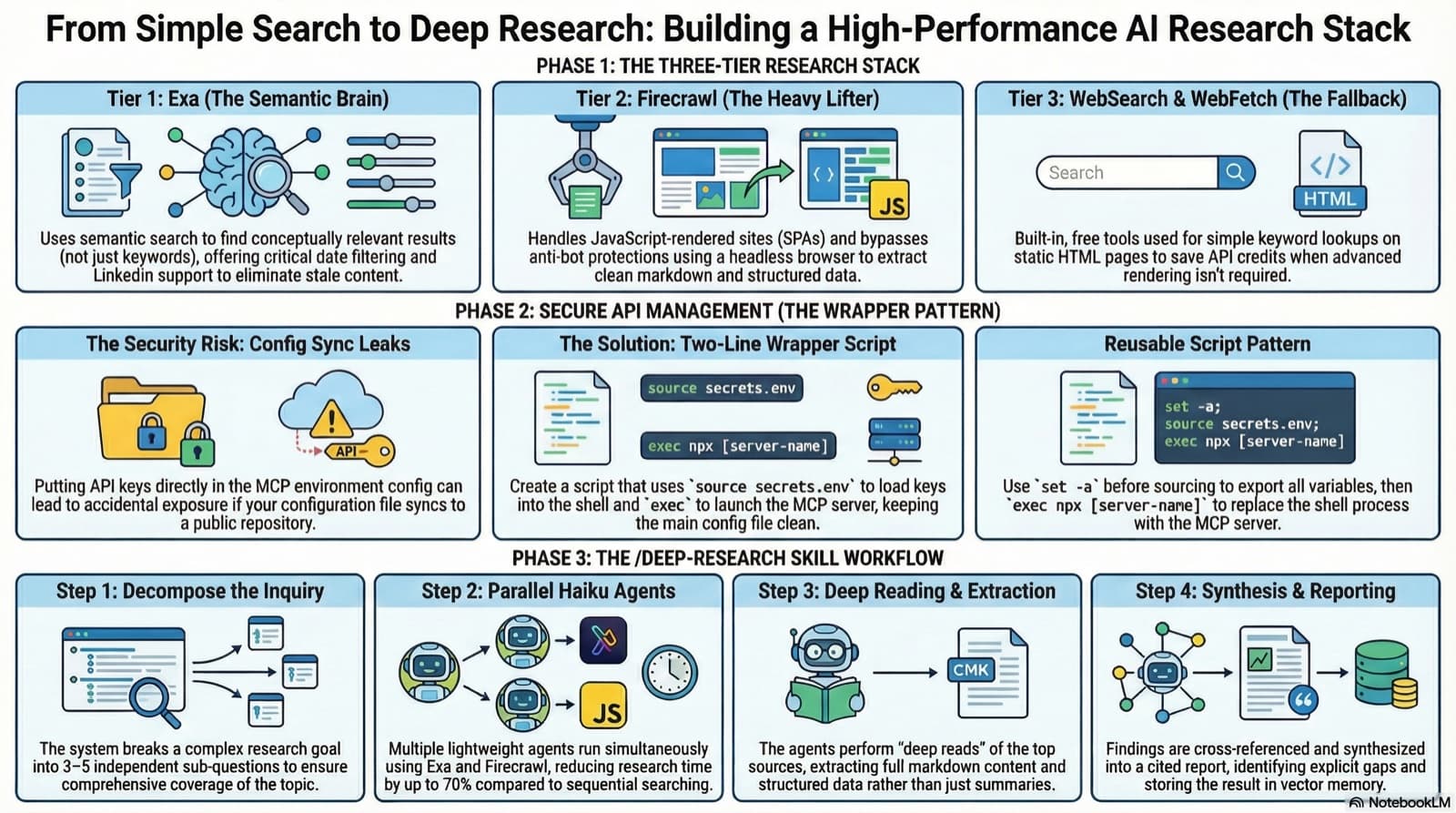
3 test sessions, 2 MCP servers, 1 wrapper script fix. How I added Exa and Firecrawl to Claude Code for semantic search, JS-rendered scraping, and proper deep research capability.
35 MCP tools, 7 implementation tasks, 2 platforms, 1 session. How I used the superpowers brainstorming, writing-plans, and subagent-driven-development pipeline to integrate NotebookLM into Claude Code as a first-class MCP server.
Comments
Subscribers only — enter your subscriber email to comment