
Building a Custom SIEM, Part 1: Why and the Architecture
Part 1 of a 2-part series on replacing the Mission Control Dashboard's SQLite-only event store with a Vector + ClickHouse log-lake on a Mac mini. This post covers the use case, the reasoning behind going custom instead of off-the-shelf, the three ingestion patterns, and the ClickHouse engine choices. Part 2 covers the implementation phases and the gotchas that almost shipped.
My home network had a Mission Control Dashboard that could see clients, DNS queries, firewall events, and security signals firing across 30 or so devices. Every panel was reading from one SQLite file. SQLite was straining to be a log store and a reference store and an ack store at the same time. A long ad-hoc query in one tab would block the APScheduler poll job that fed the next tab. The DNS query log alone was on track to outgrow the file inside six months.
That's where this series starts. Two posts on replacing the SQLite-only event store with a Vector + ClickHouse log-lake, kept inside the same docker-compose stack as the dashboard, sized to fit on a Mac mini M4 that also has to be my dev machine. This post covers the use case, why it exists, and the architecture. Part 2 (drafted next) covers the 13 implementation phases, the launchd watchdog bug that almost shipped, and the persona-rule track record from 137 commits.
Series Context
This is part 1 of the Custom SIEM series. It builds directly on the Home Network Mission Control series:
- Phase 1: the chassis, 12 workstreams, four enrichment waves, mode-A read-only design, 497 backend tests.
- Phase 2: the cyberpunk re-skin and the four-persona reviewer team.
- Phase 3: Feature 1 (DNS click-throughs) on a re-runnable plan doc.
- Phase 4 (V2): the Threat Intel tab, six heuristics, and the post-merge audit.
- Phase 1.1: the Network tab and two bugs past the goal line.
Part 2 of this series will cover the implementation: 14 phases, 137 commits, +31,587 lines, 984 backend tests, and the 68 catches the persona rules logged along the way.
What This SIEM Actually Does#
Before any of the why, here is the what.
The substrate ingests UDP syslog from the UDM Pro at 10.0.0.1, the Pi-hole at 10.0.0.227 (via an rsyslog imfile relay that tails FTL.log), the U7 Pro APs, and the USW-Flex switches. All of it lands on UDP port 5140 of the Mac mini M4 at 10.0.0.187. Vector is the listener. The boundary is "any device on the LAN can push syslog." The LAN is treated as a trusted security boundary in this network, with the mitigation path (a one-line VRL source-IP filter) documented for the day that stops being true.
Once parsed, events are written to ClickHouse running on the same Mac mini, with the data directory on a 300 GB slice of an external SSD at /Volumes/MacExternal. Retention is 180 days with TTL-based eviction. With ZSTD codecs and ClickHouse's columnar compression, the expected steady-state footprint is 30 to 80 GB on a 300 GB cap.
On top of that substrate, the dashboard's existing detection layer keeps doing what it was already doing, just against the new store:
- 10 security signals. New device on LAN, DNS bypass, port scan, PPSK idle, firmware drift, blocklist hit, authfail burst, guest-network persistence, latency spike, WAN drop. Each is a Python evaluator that queries ClickHouse on a cadence and writes findings into a unified
security_findingtable. - 6 threat-intel heuristics. H1 newly-observed-domain, H2 beaconing, H3 high-entropy DGA, H4 TXT/NULL DNS tunnel, H5 single-client query burst, H6 feed-match-while-allowed. The same ones from the V2 Threat Intel tab in Phase 4, retargeted to read from ClickHouse instead of SQLite.
- macOS push notifications for HIGH-severity findings within five minutes, fired via
osascript -e 'display notification ... with title "Mission Control"'. - Daily Gmail digest at 08:00 UTC summarizing unack'd findings from the last 24 hours, sent through the existing Gmail assistant.
- SQL-over-HTTP query surface so Claude Code can investigate via the
mcp__clickhouseMCP server, using a read-onlyclaudeClickHouse role. Every query I run during an investigation is the same shape as the query the detection layer runs every minute.
The cyber-themed React dashboard, the persona system, the security_signals engine, the threat_intel feeds, the Pi-hole client cards: none of those changed shape. Only their data source moved.
Why Custom#
I tried Wazuh on a dedicated HUNSN box first. Three blog posts of planning and deployment work, four agents enrolled across three operating systems, the final state was green. Then the FORESEE 128 GB SSD inside the HUNSN started failing fdatasync with EIO under sustained write pressure, with SMART falsely reporting PASSED the whole way down. The hardware died. The Wazuh code was fine. The fit was the question, and the SSD failure gave me the excuse to ask it.
Here is the actual reason this exists.
The Mission Control Dashboard, as of Phase 4 V2, was using one SQLite file for everything: snapshot tables (clients, devices, networks, WLANs), event tables (DNS queries, WAN probes, DPI samples, firewall events), reference tables (personas, profile overrides, threat-intel feed cache), ack state, and admin state. SQLite is brilliant at almost all of those. It is bad at one of them. A long detection-rule query reading from client_dns_query would lock the file long enough that the APScheduler poll job writing the next batch of inventory rows would queue up behind it. The DNS query log on a 30-client home network averages 45,000 entries per day. At 180 days, that is 8.1 million rows in one file, and the rest of the file is competing with it for the page cache.
Off-the-shelf SIEMs solve part of that and bring their own problem. Wazuh, Splunk Free, Elastic SIEM all bundle ingest plus storage plus detection plus UI together. The dashboard already had a working detection layer in Python that I trusted, a working React UI that took two phases to make look right, and a working notification path. What was missing was the substrate underneath. Adopting Wazuh meant porting all the existing detection logic into Sigma rules and the React dashboard into Kibana panels, neither of which was an upgrade.
The third reason was Claude Code. I wanted my agentic CLI to be able to ask "show me every event for MAC aa:bb:cc:dd:ee:ff in the 30 minutes around 02:14 UTC, joined with persona context" in plain SQL, against a read-only role, without going through a proprietary query language or a vendor MCP. ClickHouse exposes SQL over HTTP. The ClickHouse community MCP server already exists. Two weeks after cutover, every investigation I do can use the same SQL the detection layer uses.
What is a log-lake?
A log-lake is a data lake specifically scoped to log and event data: high write volume, append-only, time-partitioned, queried with SQL, retained on a TTL. It is the substrate underneath what a SIEM normally bundles. Splitting "store the events" from "detect on the events" lets each side get the engine that actually fits.
What I Get From Going Custom#
Four practical wins.
Columnar compression. ClickHouse's MergeTree with ZSTD(3) codecs and LowCardinality(String) for repeated tokens (severity, facility, hostname, source) gets steady-state down to 30 to 80 GB for 180 days of home-network telemetry. The same data in SQLite would already be over the cap.
SQL-native, end to end. Both the dashboard and Claude Code use the same surface. The detection-layer query that fires the DNS_BYPASS signal every minute is a SELECT I can paste into a clickhouse-client shell during an investigation. No vendor query language to learn, no exporter to configure, no second-class debugging surface.
Decoupled writers. Vector handles the syslog push side. The dashboard's existing Python poll jobs handle the REST pull side. Each side fails independently. If Vector hangs for two minutes while I edit vector.yaml, the UniFi inventory poll is unaffected.
Extensible. Onboarding a new log source is a Vector config edit and, optionally, one new ClickHouse migration file. No new orchestration tools, no new daemons. Adding macOS Unified Log next month is a file source plus a VRL transform plus a sink. Adding NetFlow is the same shape.
The Architecture#
Swipe to see the full diagram · Tap to enlarge
The whole stack runs on a single Apple Silicon Mac mini M4 with 24 GB of RAM. The same machine is my primary dev machine; idle footprint for the SIEM stack has to stay under about 1 GB so dev work is unaffected. Under typical dashboard session load (Clients tab plus Security tab open concurrently), expect 1.5 to 3 GB of ClickHouse RSS.
docker-compose.yml declares four services. Two are the new ones, two were already there:
clickhouserunningclickhouse/clickhouse-server:24.11-alpine(arm64 multi-arch verified before the pin). Columnar OLAP store. SQL over HTTP on port 8123, native protocol on 9000. Bound to the docker network plus 127.0.0.1 only. About 500 MB idle.vectorrunningtimberio/vector:0.40.0-debian(arm64). Syslog listener on 5140/udp, VRL transforms, ClickHouse HTTP sinks. About 50 MB idle.backendthe existing FastAPI service, retargeted at ClickHouse for event reads while still talking to SQLite for reference reads.frontendthe existing Vite/React dashboard, with two new health chips:SIEM(ClickHouse up, disk usage chip) andVECTOR(last syslog received within the last 5 minutes).
Total new idle footprint is about 550 MB. One new Python dependency (clickhouse-connect). Everything else is the existing stack with the data layer swapped underneath.
The data lives on the external SSD:
/Volumes/MacExternal/clickhouse/for ClickHouse data and WAL./Volumes/MacExternal/vector-buffer/for the Vector disk buffer (2 GB cap, about four days of home traffic)../data/homenet.db(still on the Mac's internal SSD) for SQLite reference and ack state.
Two small but load-bearing pieces of macOS plumbing make this survive sleep and wake:
pmset -a disksleep 0disables external-drive sleep.- A launchd
WatchPathsagent atlaunchd/com.homenet.siem-remount.plistwatches/Volumes/MacExternal, and on remount runsscripts/siem_remount_recover.sh, which bounces the docker-compose stack. The script ended up needing a stage-3 escalation to a full Docker Desktop daemon restart. That story is in Part 2.
Auth is the boring kind. Two ClickHouse users defined in ~/.claude/state/clickhouse-users.xml outside the repo and bind-mounted into the container: dashboard with read-write on all tables, claude with SELECT-only across the board. Credentials flow in via ${VAR} interpolation in docker-compose.yml. The repo never sees plaintext.
Three Ingestion Patterns#
Swipe to see the full diagram · Tap to enlarge
All event-shaped data lands in ClickHouse via one of three patterns. The boundary between them is "who initiates the network call," which maps cleanly to "who owns the integration."
1. Syslog Push (Vector Owns It)#
The UDM Pro, the Pi-hole, the U7 Pro APs, and the USW-Flex switches all forward syslog over UDP to 10.0.0.187:5140. Vector's syslog source accepts both RFC3164 and RFC5424. A route_by_source VRL transform dispatches by source IP and hostname prefix into one of four parsers:
parse_udmproextracts firewall PREROUTING-DNAT rules, CoreDNS content-filter JSON, and CEF wireless events.parse_piholeparses FTL log lines (forwarded by anrsyslogimfileconfig that tails/var/log/pihole/FTL.log).parse_unifi_devicehandles AP and switch direct syslog. Five shapes: hostapd 802.11 events, hostapd WPA, kernelwlanevents,stahtdJSON STA-tracker events, and PSE flap events from the USW-Flex.- A heartbeat generator fires every 60 seconds into
last_syslog_received, which the dashboard'sVECTORchip reads.
All four parser outputs go into one raw_syslog table. client_mac is promoted from the parsed fields map up to a top-level column so the primary index can seek to a device's events directly. time_received (the Mac's clock at ingest) and ts (the device's reported clock) are both kept; the materialized clock_skew_ms makes drift queryable, which a few of the security signals care about.
2. HTTP-Pulled Snapshots (Python Owns It)#
The UniFi controller REST API and the Pi-hole v6 REST API are pulled, not pushed. The dashboard's existing APScheduler poll jobs in backend/src/homenet_dashboard/poll/jobs/ keep doing the pulling. Each job calls the existing client (clients/unifi.py or clients/pihole.py), gets back Pydantic models, and now writes them to ClickHouse via a new per-table writer in backend/src/homenet_dashboard/clickhouse/writers/ instead of to SQLite via SQLModel.
The original spec routed both syslog AND REST polling through Vector. Operator decision two days into design reversed the REST half. Pi-hole v6 uses session-auth, not API-key headers. The flow is POST /api/auth with the admin password, parse the SID from JSON, send the SID on every request, then DELETE /api/auth to free the seat. Vector's http_client source is one-shot per interval and cannot do a stateful POST then SID then GET then DELETE dance. The dashboard's clients/pihole.py already does it, including seats_exhausted (429) and auth_expired (401/403) failure modes. Reimplementing all of that in VRL was rework with regression risk for no upside.
The boundary that fell out of this
Push-based streams belong to the streaming agent (Vector). Pull-based REST APIs with auth state belong to the application (Python). The boundary is who initiates the network call. That maps cleanly to who owns the integration. Once the boundary is named, every "should this go in Vector or Python" question answers itself.
3. Reference Writes (SQLite, Unchanged)#
client_persona, client_profile_override, security_signal_ack, feature_flag, agent_session, agent_message, audit_log, threat_intel_domain_cache, threat_intel_feed_meta. Slowly-changing reference data, ack state, admin state. ClickHouse is bad at upserts. SQLite is ideal. FastAPI keeps writing these directly to SQLite the way it always did.
Schema: Three Engines, Three Reasons#
Swipe to see the full diagram · Tap to enlarge
ClickHouse has more table engines than I will ever need. The substrate uses three.
MergeTree for Time-Series#
raw_syslog, client_dns_query, wan_probe_sample, dpi_snapshot, pihole_stats, client_history, client_network_history, recent_event. All append-only. All time-series.
CREATE TABLE raw_syslog (
    ts            DateTime64(3, 'UTC')   CODEC(DoubleDelta, ZSTD(3)),
    time_received DateTime64(3, 'UTC')   CODEC(DoubleDelta, ZSTD(3)) DEFAULT now64(3),
    source        LowCardinality(String) CODEC(ZSTD(3)),
    client_mac    LowCardinality(String) CODEC(ZSTD(3)),
    severity      LowCardinality(String) CODEC(ZSTD(3)),
    hostname      LowCardinality(String) CODEC(ZSTD(3)),
    program       LowCardinality(String) CODEC(ZSTD(3)),
    message       String                 CODEC(ZSTD(3)),
    raw           String                 CODEC(ZSTD(3)),
    fields        Map(String, String),
    clock_skew_ms Int64 MATERIALIZED dateDiff('millisecond', ts, time_received),
    INDEX idx_msg message TYPE tokenbf_v1(8192, 3, 0) GRANULARITY 4
) ENGINE = MergeTree
PARTITION BY toYYYYMM(time_received)
ORDER BY (source, client_mac, ts)
TTL time_received + INTERVAL 180 DAY
SETTINGS index_granularity = 8192;
The pattern is the same across every time-series table: PARTITION BY toYYYYMM(ts) for monthly partitions, TTL ts + INTERVAL 180 DAY DELETE for retention, ordered by the natural query keys with client_mac first when present. Codecs are DoubleDelta + ZSTD(3) for DateTime64, T64 + ZSTD(3) for integer counters, ZSTD(3) for strings. Token bloom filter on the message column for substring search.
AggregatingMergeTree + argMaxState for Snapshots#
client, device, network, wlan, firewall_rule, firewall_group, zbf_zone, zbf_policy, port_forward, protect_camera, protect_nvr, topology_node, topology_edge, plus the Pi-hole top-N tables.
The dashboard's pollers re-fetch each device's full state on every cycle, every minute or two. The right answer to "what is the current hostname for this MAC" is "the hostname from the most recent row." The first instinct is ReplacingMergeTree plus FINAL. The team review's database reviewer flagged that pattern as having correctness pitfalls across partition boundaries and a perf cliff under merge backlog. Operator decision: AggregatingMergeTree plus argMaxState is the default snapshot pattern instead.
The shape is unusual until you see it. Each "value" column is wrapped in AggregateFunction(argMax, T, DateTime64), so the table physically stores not the value, but the partial aggregate state of "which value at which timestamp." Reads through a *_latest view call argMaxMerge(col) and get the canonical current value back.
The Python writer never writes the aggregate state directly. It inserts plain rows into a <table>_input Null-engine staging table, and a materialized view <table>_input_to_<table> wraps each column in argMaxState(col, last_seen_ts) on the way into the real AMT table. Plain-typed inserts are easier to validate, version, and replay than aggregate-state blobs, regardless of who is writing them.
CREATE TABLE client (
    mac          String                                        CODEC(ZSTD(3)),
    last_seen_ts SimpleAggregateFunction(max, DateTime64(3, 'UTC'))
                                                               CODEC(DoubleDelta, ZSTD(3)),
    hostname     AggregateFunction(argMax, LowCardinality(String), DateTime64(3, 'UTC')),
    ip           AggregateFunction(argMax, LowCardinality(String), DateTime64(3, 'UTC')),
    vlan         AggregateFunction(argMax, Int32, DateTime64(3, 'UTC')),
    network      AggregateFunction(argMax, LowCardinality(String), DateTime64(3, 'UTC')),
    ssid         AggregateFunction(argMax, LowCardinality(String), DateTime64(3, 'UTC'))
    -- ... rest of cols ...
) ENGINE = AggregatingMergeTree
PARTITION BY tuple()
ORDER BY mac
TTL last_seen_ts + INTERVAL 180 DAY DELETE;
PARTITION BY tuple() (single partition) because these tables are current-state and have low row counts (30 to 200 active rows per table). Single partition avoids the cross-partition pitfalls that took ReplacingMergeTree off the table in the first place. TTL on last_seen_ts evicts devices not seen in 180 days.
ReplacingMergeTree for Findings#
security_finding is the unified output table for both the security_signals evaluator (10 rules) and the threat_intel heuristics (H1 through H6). Acks stay in SQLite, joined on (source, rule_id, client_mac, finding_ts).
CREATE TABLE security_finding (
    finding_ts  DateTime64(3, 'UTC')   CODEC(DoubleDelta, ZSTD(3)),
    last_seen   SimpleAggregateFunction(max, DateTime64(3, 'UTC'))
                                       CODEC(DoubleDelta, ZSTD(3)),
    source      LowCardinality(String) CODEC(ZSTD(3)),  -- 'security_signal' | 'threat_intel'
    rule_id     LowCardinality(String) CODEC(ZSTD(3)),
    client_mac  LowCardinality(String) CODEC(ZSTD(3)),
    severity    LowCardinality(String) CODEC(ZSTD(3)),  -- 'low' | 'medium' | 'high'
    etld1       LowCardinality(String) CODEC(ZSTD(3)),
    score       Int32                  CODEC(T64, ZSTD(3)),
    rules_fired Array(String)          CODEC(ZSTD(3)),
    feed_tags   Array(String)          CODEC(ZSTD(3)),
    enrichment  String                 CODEC(ZSTD(3)),  -- JSON blob
    details     Map(String, String)
) ENGINE = ReplacingMergeTree(last_seen)
PARTITION BY tuple()
ORDER BY (source, rule_id, client_mac, etld1)
TTL last_seen + INTERVAL 180 DAY DELETE;
ReplacingMergeTree(last_seen) keyed on (source, rule_id, client_mac, etld1) means a repeated fire of the same finding (same DNS bypass for the same device on the same day) updates the existing row's last_seen instead of inserting a new one. The Security tab's unack'd-findings query joins this against security_signal_ack in SQLite. The findings table fits in a few thousand rows; FINAL reads are cheap.
ReplacingMergeTree was correct here for two reasons
First: findings legitimately collapse on the same key. Five DNS bypasses for the same MAC against the same eTLD+1 are one finding, not five. Second: findings are small. The whole table is a few thousand rows even at peak. The patterns that make ReplacingMergeTree painful (cross-partition merges, large row counts, query latency under merge backlog) do not apply at this scale.
What Stays in SQLite#
Reference and ack data stays in SQLite. Persona, profile overrides, signal acks, feature flags, agent session and message state, audit log, threat-intel feed cache, threat-intel feed meta. About 18 tables once the cutover is done, down from 41 pre-cutover.
ClickHouse is bad at upserts. SQLite is ideal here. The right architecture in 2026 puts each piece of data on the engine that fits its access pattern, not on the engine you happen to already have running. The migration moved every table that fit ClickHouse's profile (high-write, append-mostly, time-partitioned, queried in scans) and left every table that fit SQLite's (low-write, random-access, transactional, joined heavily in single rows).
What's Next#
That is the why and the architecture. Part 2 of this series picks up where this one ends: the 14-phase implementation plan, the dual-write cutover gate, and the verify-against-existing-clients persona rule that caught 68 architectural misses across 11 phases of work.
| Part 2 sections | Subject |
|---|---|
| The 14 phases | Stack scaffolding through SQLite cleanup |
| Dual-write cutover gate | 24-hour soak with row-count parity SQLite vs CH |
| The launchd watchdog bug | The remount script that did NOT recover production |
| Persona rule track record | 68 catches plus 2 architectural escalations across 11 phases |
| Live verification numbers | 137 commits, +31,587 / -7,747 lines, 984 tests, 6 doctor.sh GREEN samples |
| ClickHouse MCP install | The two-line operator step that closes the Claude Code investigative loop |
Part 2 is being drafted next; check back here. Until then, the substrate is live, the daily digest is firing, and Claude Code can ask the dashboard's data plain SQL questions through a read-only role. The detection layer caught the same things it caught last week, just faster, on a store that fits.
Weekly Digest
Get a weekly email with what I learned, summaries of new posts, and direct links. No spam, unsubscribe anytime.

Related Posts
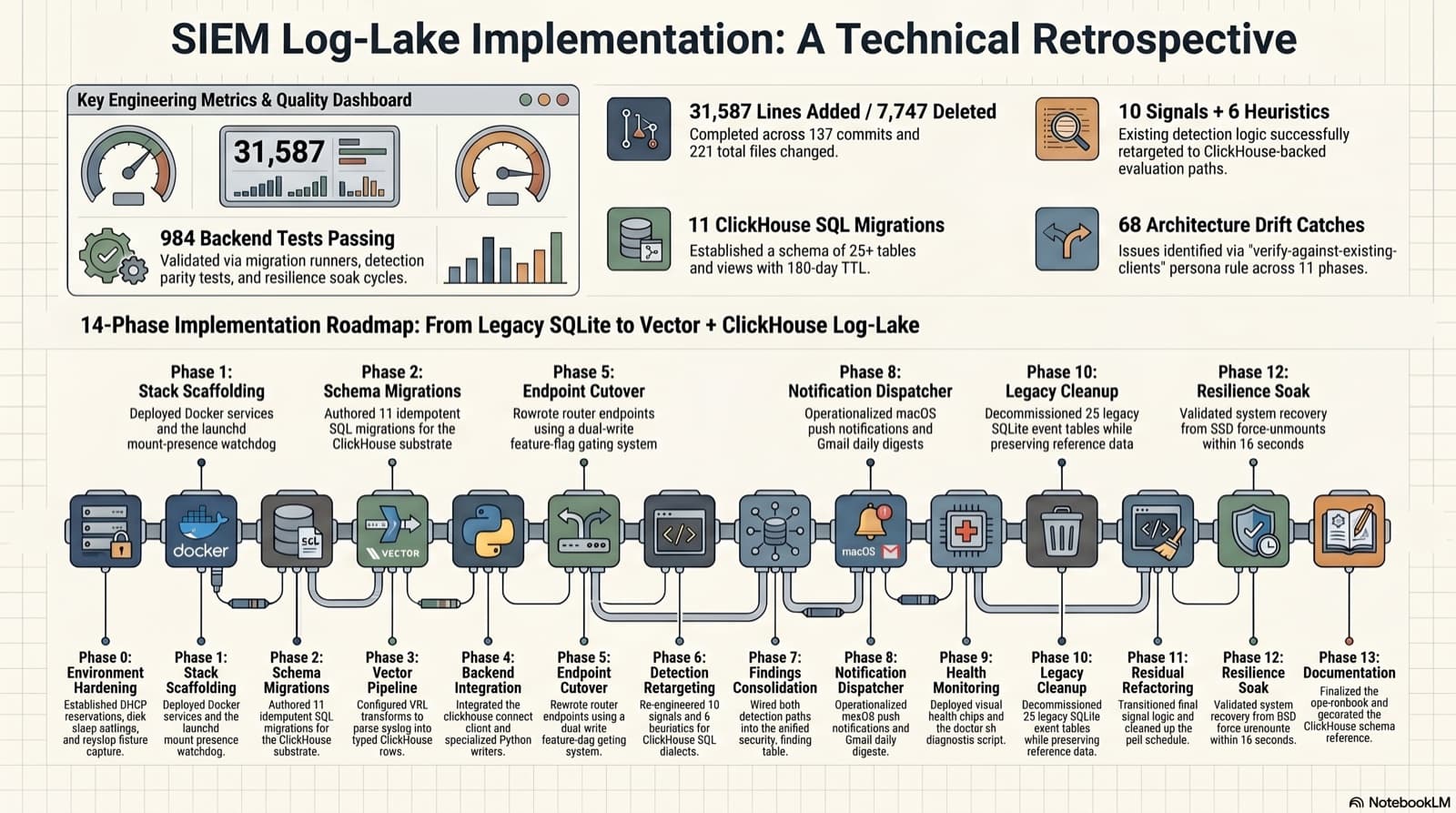
Part 2 of a 2-part series on replacing the Mission Control Dashboard's SQLite-only event store with a Vector + ClickHouse log-lake. This post walks the 14 implementation phases, the cutover gate that caught 19 column-name drifts, the launchd watchdog bug that almost shipped a 7-second outage on every fsevent, and the persona-rule track record from 137 commits.
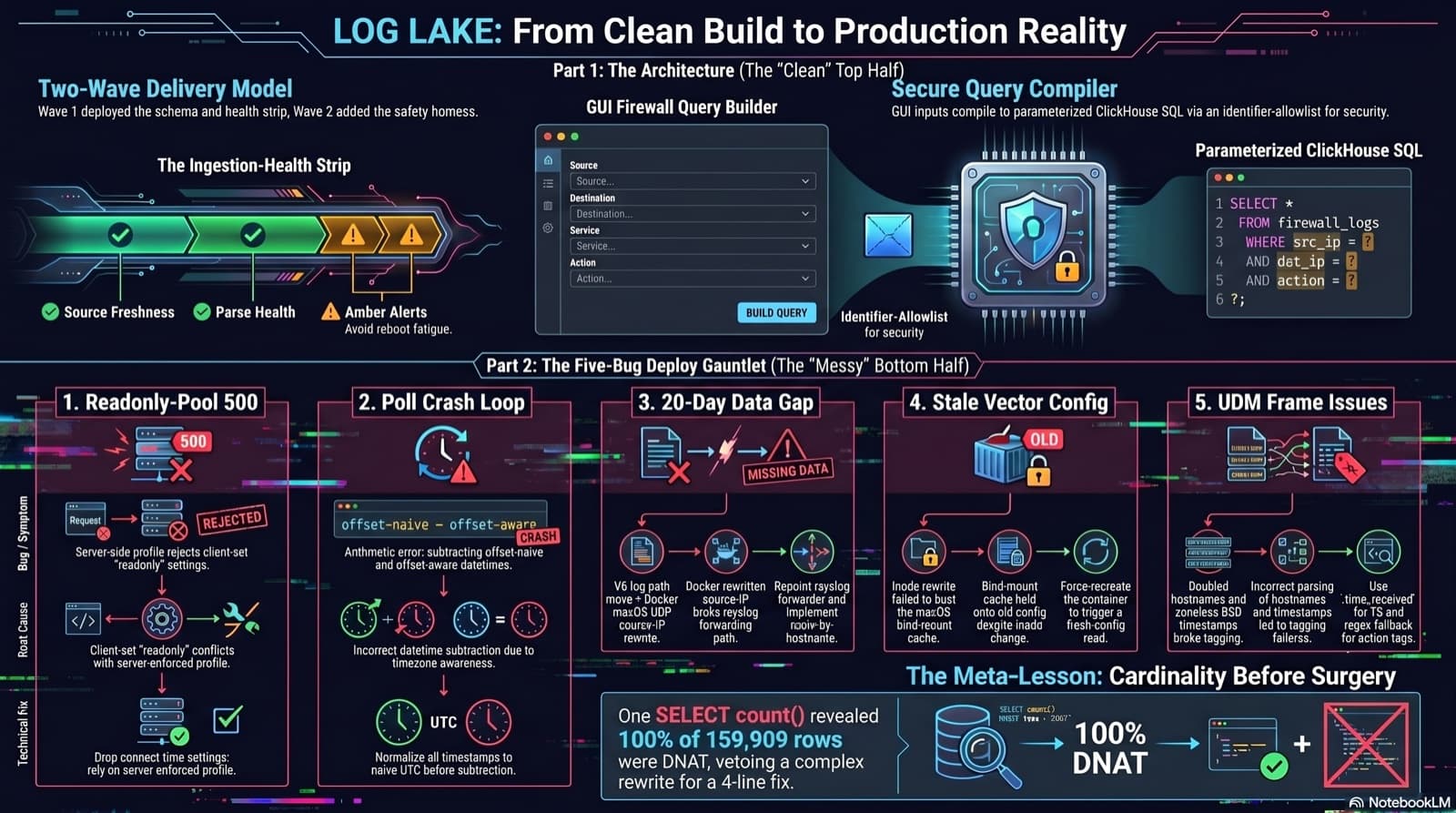
Home Network Mission Control: The LOG LAKE Panel, Five Deploy Bugs, and a Vetoed Bytes-Codec Rewrite
Part 6 of the home network dashboard build. The LOG LAKE panel ships a SIEM ingestion-health strip and a GUI firewall query builder that compiles to parameterized ClickHouse under the hood. One PR, two waves, 1193 backend tests at merge. Then deploy day on the live Mac mini produced five production-only bugs in a single afternoon: a readonly-pool 500, a timezone-mixed poll crash that had been firing every five minutes for hours, a 20-day-silent Pi-hole pipeline (two layers stacked), a Vector container reading a stale bind-mounted config, and a UDM doubled-hostname frame that silently broke action derivation for 159,909 rows. The meta-lesson is that the proposed fix for the last one was an invasive Vector source rewrite that the persona team vetoed in favor of an operator toggle and a four-line MV recreation.
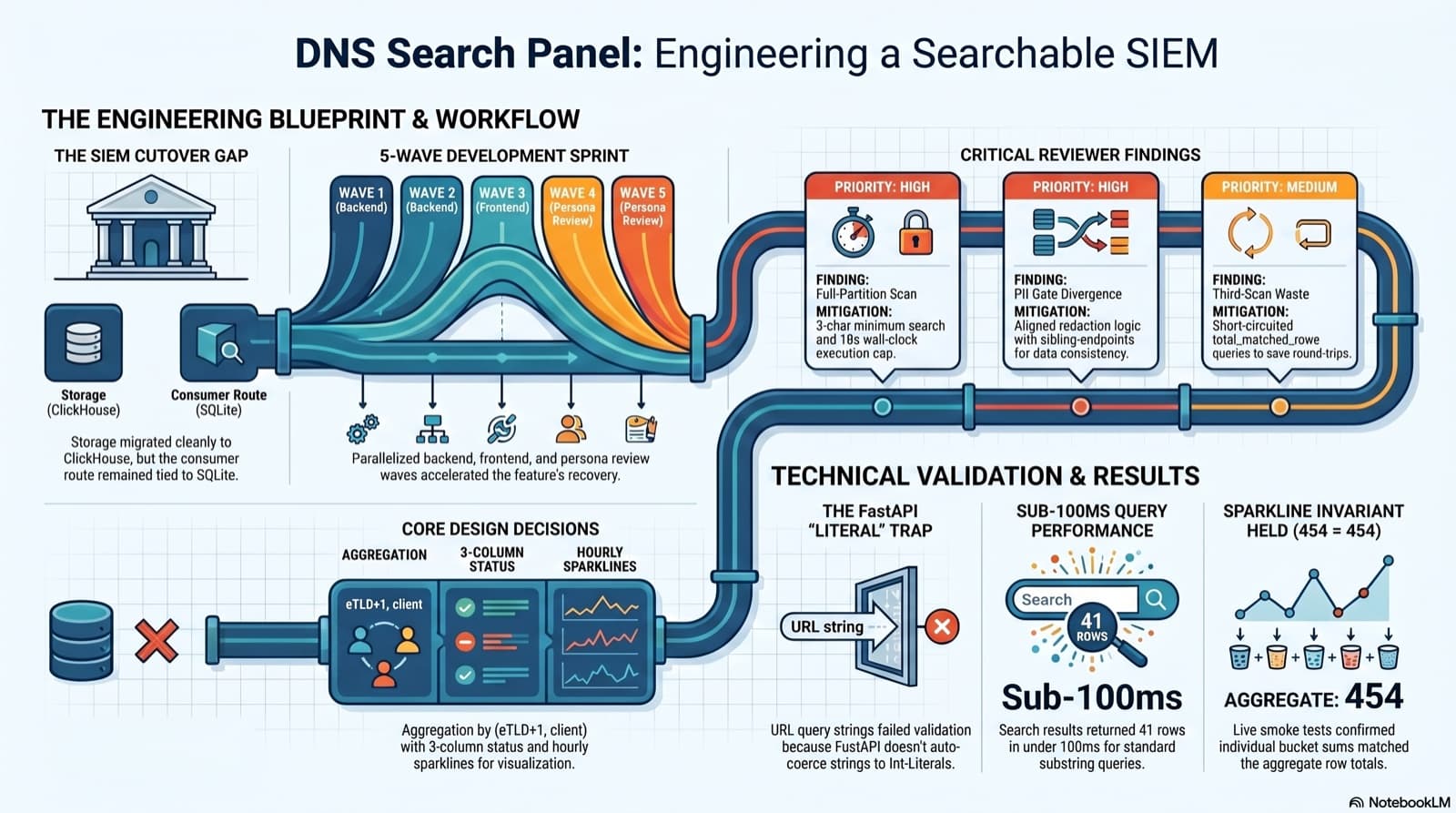
Part 6 of the home network dashboard build. The SIEM cutover dropped the DNS search endpoint without replacing it, and the only reason I caught it was clicking into the live dashboard and seeing "Failed to load DNS query log." This post walks the session that put search back: the diagnosis, the brainstorming workflow that pinned down five contested design choices, the five-wave persona dispatch, the parallel reviews that caught a third-scan query and a PII gate divergence, the FastAPI int-Literal gotcha that ate an hour, and a live smoke at 41 results in under 100ms with the sparkline-sum-equals-aggregate-total invariant holding 454 = 454 on the first row.
Comments
Subscribers only — enter your subscriber email to comment