
Homelab Wazuh, Part 1: Why Wazuh, and the 29-Task Plan Before Any Code
Why a security engineer running a small home network picked Wazuh over Splunk, Elastic, and Graylog, what hardware caught the job, and the 29-task implementation plan that went through 5 patches before a single playbook ran against the target server.
29 tasks. 5 plan patches. 0 commits before the research was complete.
That is how this deployment started. Not with docker compose up. Not with an Ansible playbook. With a spec, a plan, and a pass through the plan where every worker-style defect got patched out before any code ran against the target server.
This is post 1 of a three-post series on standing up a Wazuh SIEM on my home network. The stack is deployed and green today, but before we get to any of that, this post is the story of the decisions and the plan. Posts 2 and 3 will cover the deploy itself and the lessons from live operation. If you want the compressed version: I run a small network, I wanted real security visibility without paying for SaaS, I evaluated four options, I picked Wazuh, I used a single mini-PC I already owned, and I wrote a 29-task plan before I was allowed to touch the server. Then I patched the plan five times. Then I deployed.
Series Context
This is the first post in the Homelab Wazuh Deployment series. Post 2 covers the nine-wave deploy, including the Multipass end-to-end dry run and the live apply to the real box. Post 3 covers day-2 operations: what fires at level 10, what turned out to be noise, and the hardening and enhancement backlog.
The Hook Metric#
My home network is small. One UDM Pro, one Wi-Fi AP, a Pi-hole, a Mac, a handful of IoT things, and the couple of laptops a family would expect to have. Nothing exotic.
Four log sources with genuinely interesting events:
- UDM Pro: firewall, IPS, wireless auth, admin actions.
- Pi-hole: DNS queries and blocks.
- Mac: auth, file integrity, syslog.
- The SIEM host itself: package installs, SSH, UPS events.
Here is the thing. Before this project, I had zero visibility into any of them in one place. The UDM Pro console showed some of its own events. The Pi-hole admin page showed DNS stats. The Mac's logs sat in /var/log/. And if I wanted to answer a question like "did anything new connect last Tuesday and start resolving suspicious domains", I was cross-referencing three UIs and two terminal tabs and mentally joining on MAC addresses.
That got old. More importantly, it was bad. I do security for a living. The idea that my own home network had less observability than a client's production environment was uncomfortable.
So the goal, very simply: SIEM-grade visibility across everything on the LAN. Without paying for SaaS. Without running something half-baked.
What Wazuh Is#
Wazuh is a free, open-source SIEM plus XDR platform. It descends from OSSEC, the reference open-source host-based intrusion detection system from the mid-2000s. Wazuh took the OSSEC agent, modernized it, added a rules engine with better detection coverage, and wrapped the whole thing in an OpenSearch fork for storage and a Kibana fork for the dashboard.
Three components, agent-based:
- Manager: the rules engine. Agents connect to it. It runs decoders (parse raw log lines into structured events) and rules (fire alerts when events match conditions). Detection happens here.
- Indexer: an OpenSearch fork that stores every alert.
- Dashboard: a Kibana fork. Web UI plus admin console.
Agents ship for Linux, Windows, macOS, and the BSDs. Each agent connects to the manager over TCP 1514 (AES-encrypted at the application layer), tails files and runs checks, forwards events.
What does 'SIEM-grade visibility' actually mean?
A SIEM takes log events from lots of sources, parses them into a common shape, runs rules against them, and fires alerts when the rules match. The useful part is correlation. "Five failed SSH attempts followed by a successful login" is a detection a grep cannot do but a rules engine can. Wazuh ships with about 5,000 rules out of the box and lets you write custom decoders and rules for anything else.
Self-hosting is free. The community decoders and rules are maintained in the open. The commercial offering is Wazuh Cloud, which is the same software with a hosted control plane and a support contract. For a homelab, self-hosting is the right answer.
Why Not Splunk, Elastic, or Graylog#
Wazuh was not the obvious pick. It was the picked pick. Four candidates went into the evaluation:
| Platform | Cost (home use) | IDS coverage | Dashboard | Resource footprint | Verdict |
|---|---|---|---|---|---|
| Splunk | Free tier caps at 500 MB/day and strips alerting | Strong (paid SplunkES) | Excellent | Heavy JVM | Cost prohibitive |
| Elastic SIEM | Elastic License 2.0; paid for full SIEM features | Strong, modern detection library | Excellent | Three Java processes | Heavier footprint, shifting licensing |
| Graylog Open | Free | Weak; not a security-first tool | Good for log search, weak for correlation | ~4 GB RAM | Great aggregator, weak IDS |
| OSSEC (alone) | Free | Strong, mature HIDS | None modern (forks are stale) | Very light | No modern dashboard |
| Wazuh | Free for self-host | Strong; OSSEC + community rules | OpenSearch + Kibana fork | ~2.6 GB at rest, 4 GB under load | Picked |
The real tiebreaker
Wazuh is OSSEC plus a modern dashboard plus an actively maintained rules engine. Everything I liked about OSSEC (battle-tested decoders, low agent footprint, strong HIDS) plus everything OSSEC was missing (a dashboard you can hand to someone, an index you can query, an API you can automate against).
Splunk got eliminated first: the free tier has a 500 MB/day cap and strips the alerting I want, and paid Splunk is priced for enterprises. Elastic's free self-host tier is viable, but the licensing changes over the last few years (Apache 2.0 to SSPL to Elastic License 2.0 and back) mean every year I have to re-read the license, and the footprint is heavier. Graylog Open is great at log aggregation and weak at security correlation: you end up writing custom pipelines and custom alerts, and the built-in security rules are thin. OSSEC alone has an excellent agent, but the community web-UI forks are abandoned or stale, and the moment I realized Wazuh was literally OSSEC plus a modern dashboard plus an actively developed rules engine, the decision was done.
The Hardware Was Already Here#
I did not buy anything. The SIEM host is a HUNSN RS34, a fanless Intel-J4125 mini-server I already owned from a previous project. Four cores, 14 GiB RAM, 117 GiB SSD, four NICs but only one currently cabled.
Why not a Raspberry Pi?
Three reasons. First, the Wazuh OCI images are amd64 only as of early 2026. There are community aarch64 builds but not from the Wazuh org. If I wanted Wazuh Cloud Docker images later I would be back on amd64 anyway. Second, memory headroom. The official Wazuh stack wants 4 GiB comfortably, 8 GiB with room to breathe. A 4 GiB Pi 5 technically fits the minimum; a 14 GiB mini-PC is not going to swap. Third, the HUNSN already had a UPS, the right NIC layout, and a place on the shelf.
The CPU is modest (J4125 passmark ~2,900), but the workload is modest too. Pi-hole on a 30-client network generates maybe 1 to 3 DNS events per second. UDM Pro firewall/IPS runs 2 to 20 events per second depending on how much the network is getting poked. At 5 to 50 events per second sustained, the bottleneck is OpenSearch heap, not CPU. The Wazuh performance blog measured their analysisd at 1.5 cores across a 40-agent, 170 EPS workload. I have four agents and at most 50 EPS. The J4125 is fine.
Ubuntu 26.04 LTS on the host. No desktop, minimal install, apt only, no snap apps. Docker Compose for the Wazuh stack. Wazuh agent installed natively (not containerized) for the local tail, because the agent needs root-level access to read host logs and I did not want to argue with container capabilities.
The single-drive risk
One SSD. No RAID. No offsite backup. If the drive fails, I lose my alert history. I accepted that risk up front and documented it in the spec. For a homelab, 30-day retention with accept-loss-of-history is fine; for anything with a real audit requirement, it is not. Know which one you are running.
The Threat Model (Small, On Purpose)#
LAN-only deployment, subnet 10.0.0.0/24. The UDM Pro is the network boundary; nothing on the Wazuh stack is publicly exposed. No Tailscale, no Cloudflare Tunnel, no port forwards. Remote admin uses the UDM Pro's existing WireGuard server: connect to the home VPN, browser at https://10.0.0.210/. One operator. One network. One host.
What I am not defending against: physical access to the house, Wazuh supply-chain compromise via OCI images (I pin versions), offsite disaster recovery (history loss on hardware failure is accepted), compliance certification.
What I am defending against:
- A new device joining the network unnoticed
- Known-bad DNS lookups from anything on the LAN
- Admin-plane abuse on the UDM Pro (failed logins, config changes)
- IPS hits from the UDM Pro (actual detected threats, level 10)
- Host compromise on the SIEM itself (the manager runs an agent on its own host, so it surveils itself)
- UPS events (on battery, low battery, imminent shutdown)
Small threat model, but real. The one thing it buys me over pure Pi-hole plus UDM Pro console is correlation. A new MAC joining plus a burst of DNS to a new domain plus a firewall drop on the way out is three things the individual UIs will never connect. Wazuh can.
The Plan: 29 Tasks, Five Patches#
This is the part of the story I actually want to spend time on. Because it is the part where the AI tooling paid off, and it is the part that most homelab writeups gloss over.
I did not start writing Ansible. I started writing a spec. Then I wrote a plan against the spec. Then I let Claude Code read the plan back to me in plan mode and point out defects before I shipped a line of code.
The Spec Came First#
One markdown file: docs/plans/wazuh-homelab-spec.md. Ten sections. Executive summary, goals, non-goals, design decisions table, architecture diagram, port matrix, host hardening checklist, IaC repo layout, rollout, and operations runbook. About 2,500 words.
The spec answered the questions a plan has no business asking:
- Hot retention target: 30 days, ILM delete after
- Ingest sources: UDM Pro syslog, Pi-hole, Mac, host self
- Port allocation: 22, 443, 514/udp, 1514, 1515, 55000, all LAN-scoped
- Sizing: 2 GiB OpenSearch heap, 14 GiB total, 4-core J4125 comfortably handles 50 EPS
- Decoder strategy: vendor the community UniFi decoders from
mattsimpson/unifi-wazuh, write custom Pi-hole and apcupsd decoders, keep custom rule IDs in the 100100 to 100799 range to stay clear of upstream Wazuh - Rollout: IaC from day one, Ansible plus Docker Compose, secrets in Ansible Vault
Why a spec separate from a plan?
A spec answers "what are we building and why". A plan answers "what order do we do the work in". If you mix them, every task ends up re-arguing the design. Separate them and the plan becomes a linear checklist you can delegate. The spec does not change between tasks. The plan gets crossed off one line at a time.
The 29-Task Plan#
Once the spec locked, I wrote docs/plans/wazuh-homelab-plan.md. Twenty-nine tasks, each with acceptance criteria, each scoped small enough to hand to a worker agent. The index looks like this (abridged):
1. Create repo scaffold and push to GitHub
2. Pre-commit hooks with secret scanner
3. GitHub Actions CI skeleton
4. Makefile with all targets
5. Ansible scaffold: config, inventory, vars
6. Ansible common role + bootstrap playbook
7. Ansible hardening role (UFW, SSH, fail2ban)
8. Ansible docker role
9. Docker Compose manifest for Wazuh single-node
10. Wazuh compose config overrides (heap, bind address)
11. Ansible wazuh-manager role + deploy-wazuh playbook
12. ILM policy: 30-day delete
13. rsyslog receives UDM Pro on UDP 514
14. Local Wazuh agent on HUNSN tails UDM log
15. Pi-hole Wazuh agent + deploy-agent-pihole playbook
16. Vendor UniFi decoders and rules
17. Vendor Pi-hole decoders and rules
... (through 29)
Each task had the same shape: Files (what to create or edit), Steps (numbered, with checkboxes), and Gate (how to verify the task is done). Claude Code's superpowers:executing-plans skill can walk a plan like this task-by-task, but before I let it do that I wanted a second pass on the plan itself.
Plan Mode As A Second Opinion#
Claude Code has a plan mode that lets you put the model in a read-only "propose a plan, do not execute anything" posture. I loaded the plan file, asked "read this end to end and tell me where it breaks", and let three Explore agents fan out in parallel to look for specific classes of defect: implicit dependencies, worker-collision files, and security gaps.
Claude Code plan mode in practice
What the operator sees: the plan file opened in the editor, Claude Code in plan-mode (no Write, no Bash, no commits), and a streaming readout of each concern as the model finds it. The output reads like a senior peer's review comments: "Task 7 hardens SSH to key-only. Task 5 depends on an Ansible Vault. Where does the vault password come from on first run? If the answer is a plaintext file, that is a problem." It took about twelve minutes end to end. It found five things I had missed.
The output was a list of five distinct defects. I patched each one before any live playbook ran. All five patches are in the plan file today under a "Pre-execution Plan Patches" section, with the decision and the rationale captured inline.
The Five Patches#
Patch 1: Vault password lives in macOS Keychain, not in a plaintext file. The plan originally said "store the Ansible vault password in ansible/vault-password, gitignored". Gitignored-plaintext is the kind of thing that ends up checked in by the next contributor (or by me, in six months, at 11 PM). I moved it to the macOS Keychain, with a one-line wrapper at ~/.ansible/vault-pass.sh that runs security find-generic-password -s ansible-vault-wazuh -a "$USER" -w. Ansible's vault_password_file points at the wrapper. No plaintext on disk.
Patch 2: Leave SSH password auth on. The hardening role originally flipped SSH to key-only with PasswordAuthentication no plus AuthenticationMethods publickey. Standard server hardening. On a LAN-only box, I reversed it. The threat model is not "a Russian IP is going to brute my SSH across the internet"; the threat model is "I am going to lock myself out by fat-fingering the key". Password auth on plus fail2ban jail is the right tradeoff for a single-operator LAN-only box.
Patch 3: Move manager-side authd artifacts from Task 14 to Task 11. Task 14 (install the local Wazuh agent and enroll it) had the manager-side artifacts for agent enrollment (authd password file, the :ro volume mount in docker-compose.yml) bundled with it. Which meant the first live run of deploy-wazuh.yml (Task 11) would bring up a manager that could not enroll agents. I moved the manager-side artifacts forward to Task 11. Task 14 stays agent-side only. First deploy is now complete on the first run.
Patch 4: Multipass end-to-end test uses an ephemeral vault. The plan included a Multipass dry-run of the full chain before touching the real box. Originally it used the production vault. If I misconfigured something the E2E test could leak prod secrets into a VM that gets torn down. I changed it to generate a /tmp/e2e-vault-pass (fresh random) and /tmp/e2e-vault.yml (throwaway dummy values), with a sentinel check that refuses to run if the loaded vault contains a known production marker. Prod secrets never reach the VM.
Patch 5: The Task 7 fail2ban wazuh-dashboard jail renders enabled=false until Task 11. Task 7 (hardening) installs fail2ban with a jail for the Wazuh dashboard login page. Task 11 (deploy Wazuh) ships the Jinja filter the jail references. Apply Task 7 before Task 11, fail2ban starts up, fails to load the missing filter. I tried ignore_errors: true first (gross), then landed on a cleaner fix: the jail template renders enabled = false conditional on a wazuh_manager_installed default-false variable. Task 11's deploy passes the variable as true and notifies a restart fail2ban handler after shipping the filter. Circular dependency unwound, no ignore_errors.
Five defects is a lot for 29 tasks
That is 17 percent of my tasks with a non-trivial defect. Every one of them would have bitten me during deploy. A couple (the vault plaintext, the ephemeral vault for E2E) would have been actual security problems. This is the argument for plan mode in one data point: the model is a fast, cheap, second pair of eyes, and it catches things even a careful human misses. I wrote the plan. The plan had five defects. Better to catch them on a Tuesday afternoon in the editor than on a Saturday night while watching a deploy fail.
The Planned Architecture#
Here is what the plan called for, end state. No surprises in this picture: it is a textbook single-host Wazuh deployment, but it is worth seeing because the rest of the series is about making this picture come true.
Swipe to see the full diagram · Tap to enlarge
Four ingest paths, one host, one indexer, one dashboard, one operator. The UDM Pro syslogs UDP 514 into rsyslog on the HUNSN, rsyslog writes to a rotated file, and a local Wazuh agent tails the file. That is the UDM Pro path: no agent on the UDM Pro itself (UniFi OS does not cleanly support third-party agents, so syslog relay is the workaround), just a local agent that reads the relay output. The Pi-hole and Mac paths are more direct: Wazuh agent on each host, forwarding over TCP 1514 with AES-at-the-application-layer. The manager runs in Docker Compose alongside the indexer and dashboard. All three containers, all the agents, and all the syslog traffic live on the LAN.
One other thing worth noting: the indexer binds only to 127.0.0.1:9200. The only way to reach it is through the dashboard (or through the manager's internal connections). That is standard Wazuh hardening, but it is also a nice invariant: the OpenSearch REST API is not a surface I have to worry about.
Why This Matters#
The pre-code phase is the part most homelab posts skip. The writer shows you docker compose up, a screenshot of the dashboard, and a victory lap. What you do not see is the three days of spec plus plan plus plan-review that made the deploy itself boring.
Two reasons it is worth the time.
Debugging a bad plan live is expensive. If I had shipped the original plan without the five patches, every defect would have surfaced during the live deploy. Each round trip (diagnose against a half-configured host, roll back, patch, retry) is tens of minutes. Five rounds is an afternoon.
A plan is a durable artifact. The plan file is in the repo. Future-me can read it. A peer can review it. An LLM agent can execute it task-by-task with superpowers:executing-plans. A chat transcript is not durable. A plan is. The commits reference the task numbers ("Wave 3 compose stack and wazuh_manager role"), so six months from now I can trace from the commit to the plan to the patch rationale.
Plan mode is a cheap safety net
For any deployment that is going to take more than a few hours or touch live infrastructure, write the spec, write the plan, and then have the model read the plan back to you in plan mode with parallel Explore agents. Twelve minutes of plan review caught five patches I would have paid for in live-deploy time. The token cost was trivial. The wall-clock cost was trivial. The downside risk was zero because plan mode cannot write. It is the cheapest insurance in the toolbox.
Lessons Learned (Pre-Deploy Edition)#
The lessons from writing the plan are distinct from the lessons from running the plan. Here are the ones I want to keep.
Separate the spec from the plan
A spec is what and why. A plan is how and in what order. If you mix them, every task ends up re-arguing the design. Keep them in different files; keep the plan linear.
Have the model review its own plan before execution
Plan mode plus parallel Explore agents is a fast, cheap second opinion. Budget twelve minutes on any non-trivial plan. If it finds nothing, you were right. If it finds five things, you just saved yourself an afternoon.
Document decisions next to the code that implements them
Each plan patch has a rationale paragraph in the plan file. When future-me reads the hardening role and wonders why PasswordAuthentication yes is still set, the answer is three lines down in the plan, not buried in a chat transcript.
Accept the boring constraints up front
No public exposure. No offsite backup. 30-day retention. Single-drive accept-loss-of-history. Every time I was tempted to add a second node or Tailscale or an S3 backup, the spec's non-goals section reminded me I had already said no.
What's Next#
The stack is deployed and running today. The UDM Pro is feeding it syslog. The Pi-hole agent is enrolled. The Mac agent is enrolled. Real UniFi IPS threats fire alerts at level 10. All of that is post 2.
Post 2 covers the deploy itself. Nine waves. The Multipass E2E dry-run that caught bugs before the live apply. The live apply against the real HUNSN with a second SSH session open in case fail2ban locked me out. The first-run certificate generation dance. The surprise I hit on the Wazuh dashboard admin password rotation. The wazuh-agent reads /var/log/udm-pro.log fix that needed a file-mode change I did not expect. All the things a plan cannot predict but a careful deploy can absorb.
Post 3 covers day-2. What fires at level 10, what turned out to be noise, what rules I ended up tuning, the hardening-deferred backlog (UFW, password rotations, real TLS), and the enhancements I want next (Wazuh MCP for Claude Code, VirusTotal integration, Mac FIM).
The repo is homelab-wazuh. It is currently private because LAN IPs, port maps, and decoder fixtures can leak network topology even without any secrets in them. When I get around to redacting those, it will go public.
Until then, the pattern stands on its own: spec, then plan, then plan review, then code. The plan mode output paid for itself five times over before I ran a single playbook. Post 2 will be the part where the plan meets the server and some of it breaks anyway.
See you there.
Weekly Digest
Get a weekly email with what I learned, summaries of new posts, and direct links. No spam, unsubscribe anytime.

Related Posts
The climax of the Wazuh homelab series. deploy-wazuh.yml meets reality, eight bugs cascade across two evenings, the UDM Pro starts forwarding live syslog, three agents enroll across Linux, Pi, and Apple Silicon, and the captain pattern that orchestrated all of it gets an honest retrospective.
How a captain-orchestrated, nine-wave Ansible build went from clean repo to bootstrap-applied on a live HUNSN, including a sudo-rs surprise, a vault leak that demanded an immediate panic-rotate, a group_vars file shadowed by a directory of the same name, and a Multipass dry-run that caught two real playbook bugs before they could touch production.
Home Network Mission Control: The LOG LAKE Panel, Five Deploy Bugs, and a Vetoed Bytes-Codec Rewrite
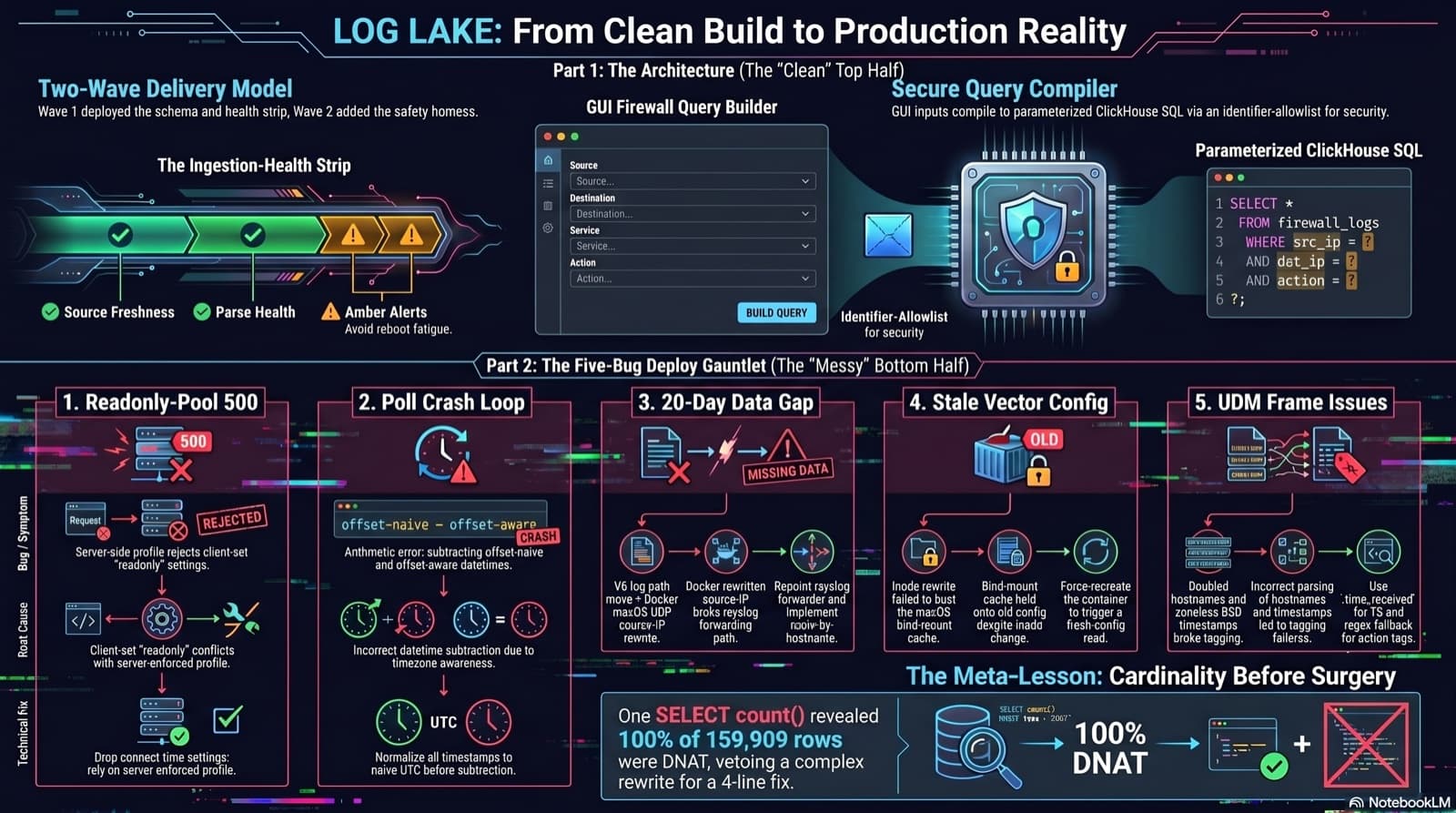
Part 6 of the home network dashboard build. The LOG LAKE panel ships a SIEM ingestion-health strip and a GUI firewall query builder that compiles to parameterized ClickHouse under the hood. One PR, two waves, 1193 backend tests at merge. Then deploy day on the live Mac mini produced five production-only bugs in a single afternoon: a readonly-pool 500, a timezone-mixed poll crash that had been firing every five minutes for hours, a 20-day-silent Pi-hole pipeline (two layers stacked), a Vector container reading a stale bind-mounted config, and a UDM doubled-hostname frame that silently broke action derivation for 159,909 rows. The meta-lesson is that the proposed fix for the last one was an invasive Vector source rewrite that the persona team vetoed in favor of an operator toggle and a four-line MV recreation.
Comments
Subscribers only — enter your subscriber email to comment