
From Context Optimization to Backlog Staging: A Day in the AI Workshop
What happens when you ship 90% context reduction in the morning and build a full backlog staging system by afternoon? A look at a typical day building with Claude Code.
Today was one of those days where you start with a plan, ship it by lunch, and then pivot to something completely different by dinner. If you've ever wondered what a full day of building with AI looks like, this is it.
Morning: Shipping the Big Optimization#
The day started with publishing blog post #20: "90% Less Context: How I Optimized Claude Code (And You Can Too)". This wasn't just a write-up. It was the culmination of three intense sessions where I audited every component of my Claude Code setup, identified the biggest context hogs, and rebuilt them from the ground up.
The numbers:
- From 70,000 tokens per session to 7,000
- 7 parallel agents for the audit
- 23 evaluation documents
- 6 bash scripts for pre-computation
- 4 new orchestrator agents
- 19 total files changed
But here's the thing about shipping a major optimization: you immediately want to use it. The new /blog-post skill I'd just built was sitting there, begging to be tested. So naturally, I used it to write the very blog post documenting its own existence.
Meta level: Maximum.
The post went through the full pipeline:
- Run
/blog-postskill - Pre-computation script surveys all 19 existing posts in 0.2 seconds
- Spawn the blog-post-orchestrator agent with the inventory already loaded
- Agent writes the post using embedded style guide and MDX reference
- Output: 858 lines, 4,280 words, 68 code blocks
Total cost: ~7K tokens instead of the previous 40K.
It worked. Beautifully.
Discovery: The Permission String Gotcha#
But shipping the optimization also revealed a constraint I hadn't anticipated. When I ran /wrap-up for the first time after deploying the new scripts, it failed.
The culprit? Permission string matching in .claude/settings.local.json.
I'd written the script paths using tilde notation (~/.claude/scripts/wrap-up-survey.sh), but the permission entries were using $HOME. Turns out these are treated as completely different strings:
~/.claude/scripts/foo.sh$HOME/.claude/scripts/foo.sh/d/Users/chris_dnlqpqd/.claude/scripts/foo.sh
All three are the same file, but they require three separate permission entries because Claude Code matches them as literal strings without path normalization.
Permission Paths Are Literal Strings
When using !command syntax in skills, the exact form of the command path in your skill file must match the exact form in your allowedTools permission list. Use $HOME everywhere or use absolute paths everywhere, but don't mix them.
Fixed it, added the learning to MEMORY.md, and moved on. This is why you test in production. (Just kidding. Kind of.)
Mid-Morning: Comments Moderation#
With the big optimization shipped, I turned my attention to the analytics dashboard. Section 8 (Newsletter) was feeling lonely, so I decided to add a Comments panel.
The idea was simple:
- Fetch all blog comments from the database
- Display them in a searchable, filterable table
- Add a delete button for moderation
- Show reaction counts (thumbs up/down)
Implementation details:
- New
CommentRowtype inanalytics-types.ts - Fresh
comments-panel.tsxcomponent (142 lines) - Added SQL query to the
Promise.allinpage.tsx - Optimistic UI updates for instant feedback
The table shows:
- Post slug (which post the comment is on)
- Email (so you know who said it)
- Comment text (truncated to keep the table readable)
- Reactions (👍 and 👎 counts)
- Delete button (with confirmation)
Search filters by slug, email, or comment content. Type "blog post #20" and see all comments from that post. Type an email and see all comments from that user.
Commits:
5d199fa- Add comments management panel (142 lines of component code)
The Deep Link Revelation#
Once the comments panel was working, I realized something: I'm looking at comment text in the admin panel, but I can't actually see the comment in context on the blog post without manually navigating there.
So I added deep linking.
The pattern:
- Add
id="comment-{id}"anchors to each comment inblog-comments.tsx - Make the comment text in the admin panel a hyperlink to
https://cryptoflexllc.com/blog/{slug}#comment-{id} - Open in a new tab so you don't lose your place in the dashboard
Click a comment in the admin panel, and boom: you're looking at that exact comment on the production site, with the browser's scroll position landing directly on it.
This pattern felt significant enough that I captured it as a homunculus instinct: "deep-link-admin-to-public."
Homunculus What Now?
Homunculus is my continuous learning system. When I discover a pattern worth remembering (like "always deep-link admin panels to their public-facing content"), I capture it as an instinct in ~/.claude/homunculus/instincts/personal/. Eventually, these instincts will be surfaced automatically via hooks. It's like building a second brain, except it's actually just a directory of markdown files.
Commits:
e2106f3- Link analytics comments to production blog posts (9 lines changed)
Afternoon: The Backlog Staging System#
By mid-afternoon, I'd published blog post #20, fixed the permission string bug, added comments moderation, and implemented deep linking. Productive morning.
But I had a problem: I'd just added a backlog destination option to the /blog-post skill. When a post goes to backlog (src/content/backlog/*.mdx), it's not published. It's a draft, waiting for manual review before it goes live.
Great for writing ahead. Bad for actually publishing.
I needed a way to:
- View backlog posts
- Publish them to
src/content/blog/(which triggers Vercel auto-deploy) - Delete them if they're not worth publishing
The solution: a full backlog staging system with GitHub API integration.
The Architecture#
Key insight: Vercel auto-deploys whenever the main branch changes. If I can create/delete files in src/content/blog/ via the GitHub API, I can trigger deployments without touching git on my local machine.
Components built:
-
src/lib/github-api.ts- GitHub Contents API client (172 lines)createFile()- Create a file in the repodeleteFile()- Delete a file (requires SHA)getFile()- Fetch file metadata (to get SHA for deletion)- All operations are repo-scoped and path-validated
-
src/app/backlog/page.tsx- Backlog listing (149 lines)- Fetches all posts from
src/content/backlog/ - Renders full MDX content server-side
- Auth-gated (uses cookie auth like
/analytics)
- Fetches all posts from
-
src/app/backlog/_components/post-action-bar.tsx- Publish/delete state machine (170 lines)- Publish button → POST to
/api/backlog/publish - Delete button → DELETE to
/api/backlog/[slug] - Client-side state management for UI feedback
- Rate limiting on delete endpoint
- Publish button → POST to
-
src/app/api/backlog/publish/route.ts- Publish endpoint (128 lines)- Reads backlog post content
- Creates file in
src/content/blog/via GitHub API - Returns success/failure
- Defense-in-depth: SSRF prevention, path validation, rate limiting
-
src/app/api/backlog/[slug]/route.ts- Delete endpoint (71 lines)- Deletes backlog post from
src/content/backlog/ - Uses GitHub API to remove the file
- Rate limited to prevent abuse
- Deletes backlog post from
The MDX Server-to-Client Pattern#
One technical challenge: MDXRemote (the library that renders MDX) is async and server-only. But I needed interactivity (publish/delete buttons) in the same UI.
Solution: Server component renders the MDX, client component wraps it with buttons.
// Server component (page.tsx)
export default async function BacklogPage() {
  const posts = await getBacklogPosts();

  return posts.map(post => (
    <BacklogPost key={post.slug}>
      <MDXRemote source={post.content} /> {/* Server-rendered */}
      <PostActionBar slug={post.slug} />  {/* Client-side */}
    </BacklogPost>
  ));
}
The MDX content is rendered on the server and passed as children to the client component wrapper. The wrapper adds the publish/delete buttons with full client-side state management.
This avoids the "can't use async in client components" limitation while still giving you interactive controls.
Cross-Navigation Links#
One more detail: the analytics dashboard and the backlog page now have mutual links.
- From
/analytics: "View backlog drafts →" - From
/backlog: "← Back to Analytics"
This follows the deep-link pattern from earlier. Admin interfaces should be interconnected, not isolated silos.
Commits:
7f13974- Add backlog staging system with GitHub API integration (833 lines across 11 files)
The Learning Pattern#
Looking back at today, there's a clear pattern:
- Ship the optimization (blog post #20 + new
/blog-postskill) - Immediately use it (write the post about the optimization using the optimized system)
- Discover constraints (permission string matching)
- Document learnings (MEMORY.md + learned skills)
- Iterate on related features (comments moderation → deep linking → backlog staging)
This is how building with AI actually works. You don't plan six months ahead. You ship fast, discover what you need, and build it immediately.
The tools get better as you use them. The workflows evolve in real time. The system learns from itself.
What I Learned Today#
GitHub Contents API pattern: Use the REST API for file operations to trigger Vercel auto-deploy directly from an admin UI. No need for separate CI/CD webhooks or manual git operations.
Server-to-client MDX pattern:
MDXRemote is async and server-only. Render it in the server component and pass the rendered JSX as children to a "use client" wrapper that adds interactivity. This lets you have server-rendered markdown with client-side state management.
Defense-in-depth for file operations:
Even when you're the only user, validate repo paths before GitHub API calls, use encodeURIComponent for URL construction, and implement rate limiting on destructive operations. Future you will thank present you.
Permission string matching is path-exact:
!command entries in settings.local.json match strings exactly. ~/.claude/scripts/foo.sh and $HOME/.claude/scripts/foo.sh are different permission entries, even though they're the same file.
Deep linking reduces friction:
When building admin interfaces that reference public content, make the items clickable links to the production pages. Add id anchors if needed. Open in new tabs so users don't lose context.
The Homunculus Instincts#
Today yielded three new personal instincts for the homunculus system:
- deep-link-admin-to-public - Always link admin panels to their public-facing content
- mirror-existing-component-patterns - When adding new features, follow established patterns in the codebase
- catch-on-new-sql-queries - When adding database queries, wrap them in try/catch and sanitize errors before returning to clients
These aren't just notes. They're structured observations that will eventually be surfaced automatically when I'm working on similar problems in the future.
The Meta Moment#
Here's the wild part: I'm writing this post using the exact system I built this morning. The /blog-post skill ran its pre-computation script, surveyed the 20 existing posts, spawned the blog-post-orchestrator agent, and handed it the full inventory plus style guide.
The agent wrote this post in about 90 seconds.
I'm editing it now, adding the human touches, fixing the flow, making sure the voice is right. But the structure, the code blocks, the callouts, the narrative arc? All AI.
And when I'm done, I'll push this to the backlog (src/content/backlog/) instead of publishing it directly. Then I'll open the /backlog page I built this afternoon, review it one more time, and click "Publish."
The publish button will call the GitHub API, create the file in src/content/blog/, Vercel will detect the change, and the post will be live on cryptoflexllc.com within 30 seconds.
This is the workflow now.
Ship fast. Iterate immediately. Use the tools you build to build better tools.
And document everything, because tomorrow's optimization depends on today's observations.
By the Numbers#
Commits today:
- 7 in cryptoflexllc (site features)
- 7 in CJClaude_1 (documentation and session archives)
- 2 in claude-code-config (backlog option + agent assessment artifacts)
Lines changed:
- 833 lines for backlog staging system
- 169 lines for comments moderation
- 9 lines for deep linking
- 4,280 words for blog post #20
Features shipped:
- 90% context optimization (morning)
- Blog post #20 published (morning)
- Comments moderation panel (mid-morning)
- Deep linking to production comments (late morning)
- Backlog staging system with GitHub API (afternoon)
Bugs discovered:
- Permission string path normalization (fixed immediately)
Homunculus instincts captured:
- 3 new personal instincts
Coffee consumed: Too much. Definitely too much.
What's Next?#
The backlog system opens up new workflows. I can now:
- Write posts ahead of time without publishing
- Batch-review drafts before they go live
- Delete ideas that don't pan out
- Publish on a schedule (manually, for now)
The next iteration might add:
- Scheduled publishing (cron job to auto-publish at a set time)
- Version history (track changes to drafts)
- Collaboration (let other people review backlog posts)
But that's a problem for future me.
For now, I'm going to finish editing this post, push it to backlog, and call it a day.
Tomorrow's session will start fresh, probably with something completely different. Maybe I'll finally wire up the homunculus observe.sh hook on Windows. Maybe I'll add more analytics cards. Maybe I'll just write another blog post.
That's the beauty of this workflow: you don't have to decide ahead of time. You just start typing, and the tools adapt.
Try This Yourself
If you're building with Claude Code:
- Measure first - Audit your highest-cost workflows before optimizing
- Ship incrementally - Don't wait for perfection, ship the 80% solution
- Use what you build - The best testing is production use
- Document learnings - Your future self will thank you
- Iterate fast - Discover, build, ship, repeat
The tools get smarter as you use them. But only if you're paying attention.
Weekly Digest
Get a weekly email with what I learned, summaries of new posts, and direct links. No spam, unsubscribe anytime.

Related Posts
From 70K tokens per session to 7K. A 7-agent audit, 23 evaluation documents, 11 component scorecards, 5 optimization patterns, and an 8-agent implementation team. This is the full story of cutting context consumption by 90%.
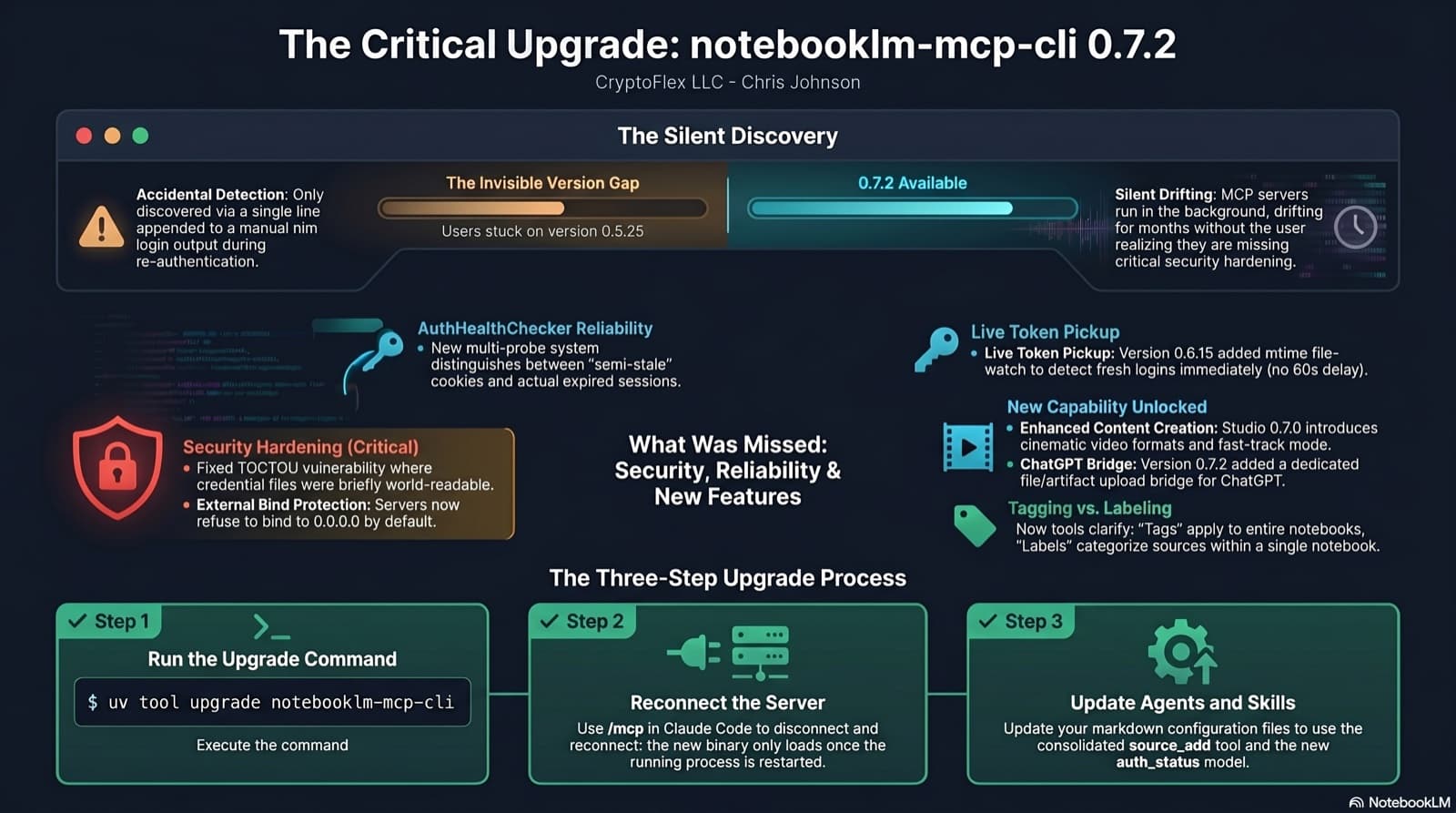
I was two minor versions behind on notebooklm-mcp-cli and had no idea until a re-auth banner interrupted a session. The gap was 0.5.25 to 0.7.2. Security fixes, auth reliability improvements, and new features I was missing the whole time. Here is the three-part upgrade that most people stop after step one.
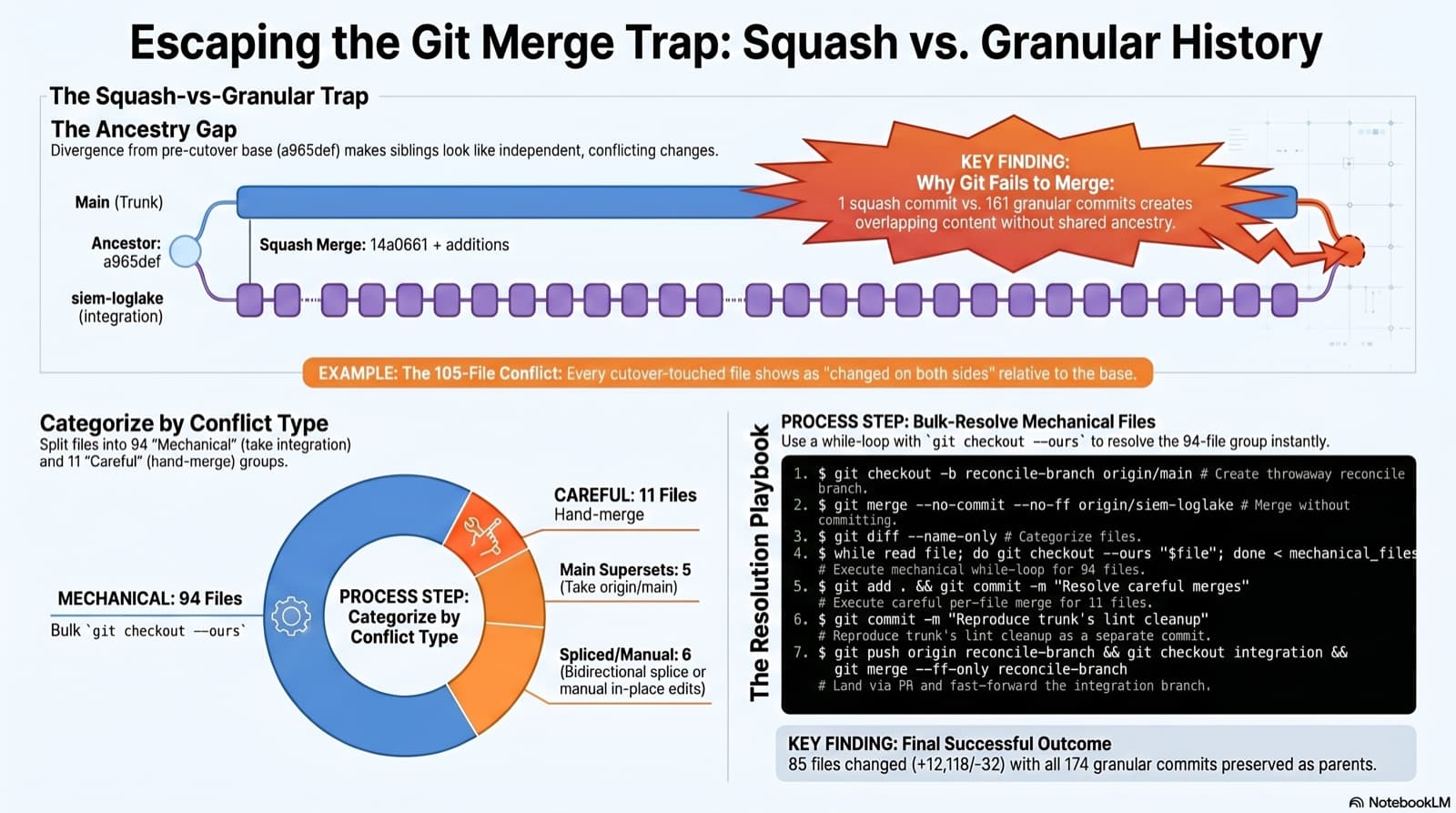
A long-lived integration branch went unmergeable two months after the trunk took its first big slice as a squash merge. Plain git merge spat 105 conflicted files. This post walks the playbook that landed it: how to spot the trap, how to categorize the conflicts, the exact commands that resolved 94 of them mechanically, and the three subtleties that bite you when you reach for `git checkout --ours`.
Comments
Subscribers only — enter your subscriber email to comment