
Ledgerly: A Personal Finance App That Never Sends My Bank Data Anywhere
I wanted a personal finance app that molds to how I actually track money: any bank's CSV or Excel export, real categorization, budgets and goals, and an AI I can ask questions of my own spending. Ledgerly is what I built: local-first, one SQLite file on my machine, no cloud, and AI that runs through the Claude CLI I already have installed. This is part one of the series, covering the use case, the build, and two bugs a layman QA gate caught before I started running v1 against my real money.
Every personal finance app I've tried wants two things before it will categorize a single transaction: my bank login and a subscription.
I built Ledgerly instead: local-first, its database sitting on my own machine, importing whatever CSV or Excel export my bank hands me, and doing its AI work through the claude CLI I already pay for, no API key required.
Why My Money Doesn't Live in Anyone Else's Database#
What I wanted was an app that molds itself to how I track money instead of asking me to adapt to a vendor's workflow. Import any bank's export. Categorize every transaction without typing the same merchant name into a dropdown for the hundredth time. See spending as something visual, set budgets and goals, ask an AI questions about my own money, and export a report I can actually hand someone.
Plenty of apps do some of that. What none of them do is stay on my machine. Ledgerly is local-first: one SQLite database file, no cloud account, no vendor holding my transaction history in a warehouse I'll never see. The AI work runs through my existing Claude Code subscription, spawning the local claude CLI headless, so there's no separate API key sitting in a config file somewhere.
What does local-first mean here?
It means the app and its data live entirely on the computer running it. No sync service, no server I don't control, no account to create. If I delete the SQLite file, nothing else in the world remembers my spending.
One more constraint shaped almost everything downstream: the codebase had to stay shareable. I wanted to be able to hand Ledgerly to family or friends who might want to run their own copy, which meant the repository could never contain a trace of my actual bank data.
What Ledgerly Actually Tracks#
Open Ledgerly and the dashboard is the first thing I see: a spending donut for the month, a six-month trend line, budget bars per category, and whatever goals I've set up. Every number in this post's screenshots is synthetic fixture data, none of it my real spending, so I'll say that once here instead of caveating every image.
That January dashboard totals $1,926.40, with the housing bar in red because it's over budget. Transactions get their own list, where transfers between my own accounts show up muted instead of counted as spending. Budgets and goals are separate tabs, each doing one job: budgets track a category against a monthly ceiling, goals track a savings target against contributions over time.
These screens agree with each other because every aggregate, whether it feeds the dashboard, the chat, a report, or an export, filters through one shared module. Transactions must belong to a committed import batch, must not be excluded, and must not be categorized as a transfer, and spending figures additionally drop income. Expenses are stored as negative cents, so spending comes back as positive net spend and refunds net against charges automatically instead of me having to remember to subtract them somewhere.
Swipe to see the full diagram · Tap to enlarge
One Predicate, Every Screen
Every screen that shows a number reads from the same aggregates module with the same filter. That's deliberate: the dashboard, the chat, the reports, and the exports can't disagree with each other, because there's only one place that computes the number in the first place.
Turning the Numbers Into Something I Can Print#
Reports take the same aggregates and turn them into something I can hand to someone or file away. Pick a month, and Ledgerly builds a category breakdown, a total, and a short caption explaining what got excluded and why.
Ask for a narrative summary and an AI writes a few paragraphs grounded in that same report data, plus a short list of suggestions.
Two of those suggestion items end in an ellipsis, cut off mid-word. That's an honest v1 edge: the narrative's length clamp doesn't check for a word boundary before it cuts. Print gets its own stripped-down view with the same numbers, because that's what becomes the PDF export.
Getting My Own Data In#
Every bank exports data differently, and none of them export it the way Ledgerly's schema expects. The import pipeline closes that gap by running every file through the same sequence before anything reaches a table I actually query.
A file comes in as CSV, parsed with papaparse, or as an Excel workbook, parsed with exceljs. Ledgerly computes a header signature from the column names, checks whether it's seen that signature before, and asks the AI to propose a column mapping if it hasn't. Every row then gets normalized, which is where a bad row lands in an error list instead of silently disappearing. Accounts get resolved or created, duplicates get caught by exact hash and a near-duplicate check, and each row runs through categorization before landing in a staging table for review.
Swipe to see the full diagram · Tap to enlarge
The AI Guesses the Columns#
The mapping screen shows the AI's proposed column assignments against live preview rows, including whether it read a column as an expense or a deposit.
When I ran my actual Copilot Finance export through this screen for the first time, the AI mapped all thirteen columns correctly on the first try. It even figured out that the export stores expenses as positive numbers and needed negation to match Ledgerly's internal convention. I'd braced for a manual correction pass and didn't need one.
Seven Rungs to a Category#
Categorization runs as a strict precedence ladder, first match wins:
source_map: a category already present in the filesource_map_ai: the AI resolves a file category name Ledgerly doesn't recognizetransfer_pattern: a deterministic match against transfer description patternsrefund: matched by account, merchant, and amount against an earlier chargerule: one of my own saved merchant rulesai: AI categorization by merchant, when nothing else matchednone: uncategorized
Ledgerly stores which rung actually resolved each row, so I can see later whether a category came from the file itself or from a guess. The review screen makes that visible: file categories the AI matched to Ledgerly's own categories show up with a Remember checkbox, and every transaction still gets a per-row dropdown in case the ladder got it wrong.
Trust the File Before the Model
The ladder puts deterministic sources ahead of AI guesses on purpose. A category the bank already assigned, or a rule I saved myself, is more trustworthy than a model's best guess at a merchant name. The AI only gets a vote once everything more certain has already had a chance to answer.
Four Milestones, One Agent Team#
Ledgerly came together across four milestones: M0 built the scaffold, the schema, and the AI adapter; M1 the import pipeline and the transactions page; M2 the dashboard, budgets, and goals; M3 chat, reports, exports, and polish. Twenty-five tasks total, planned up front.
I didn't write most of the implementation by hand. A captain session orchestrated a fresh implementer subagent and a fresh reviewer subagent per task, each briefed with a specialist role prompt depending on what the task touched: finance-expert, ux-designer, or db-engineer. Every task had to clear a spec-compliance gate and a quality-review gate, with fix loops between implementer and reviewer until the review came back clean.
Swipe to see the full diagram · Tap to enlarge
What's a Layman QA Gate?
Before each milestone could merge, a separate agent walked the running app the way someone with no engineering background would: clicking through screens, trying obvious things, and writing down anything confusing or wrong in plain language.
That gate scored M1 at 5 out of 5, M2 at 4 out of 5 with no blockers, and M3 at 3 out of 5 with two reported blockers, which turned into the two war stories below. A final whole-branch review before merge found four more fixes, none of them critical.
The stack underneath is Next.js 16.3.0 and React 19, better-sqlite3 and drizzle-orm for the database layer, Tailwind v4 with shadcn for the interface, Recharts for charts, papaparse and exceljs for imports, and zod for validation. pnpm check runs typecheck, lint, the full test suite with coverage, and the build, and it's what I run before anything gets called done. That suite is 760 unit and integration tests at 95% statement coverage against a configured floor of 80%, plus 41 Playwright specs: 37 in the main suite and 4 in a separate no-AI suite that exercises what the UI does when the CLI isn't there.
The AI That Runs Through a CLI, Not an API Key#
Four features in Ledgerly touch AI: column mapping, categorization, chat, and the report narrative. All four funnel through one adapter module instead of each rolling its own integration.
Swipe to see the full diagram · Tap to enlarge
The adapter exports isAvailable(), runJson<T>(), and runStream(). Structured calls, the kind that need a typed result back, build an argv like this:
["-p", prompt, "--output-format", "json", "--json-schema", schema, "--max-turns", "1"]
Streaming calls, for chat, build a different one:
["-p", prompt, "--output-format", "stream-json", "--verbose", "--include-partial-messages", "--max-turns", "1"]
No API Key, No Standing Credential
Every AI call in Ledgerly spawns the local claude CLI as a subprocess and bills against my existing Claude Code subscription. There's no API key to generate, store, rotate, or accidentally commit. If the CLI isn't installed or isn't authenticated, isAvailable() reports that honestly instead of the app pretending it has a working connection.
Two environment variables cover testing: LEDGERLY_AI_MOCK=1 returns canned responses instead of calling the CLI, and LEDGERLY_AI_DISABLED=1 makes every AI feature report itself unavailable, which is what exercises the no-AI code paths in the UI. Between them, CI and the local test suite never spend anything real.
Building the adapter surfaced two quirks before either reached a test suite: z.toJSONSchema emits a $schema key the CLI rejects outright, and the CLI refuses a bare-array JSON schema, so the adapter wraps one before the call and unwraps it after. A trivial schema-constrained call also measured around twelve seconds of latency. That's what spawning a full model turn costs, every time, and it's why the mock variable matters as much as it does.
The Chat That Was Certain the Data Wasn't There#
During the M3 layman QA pass, the reviewer asked the chat what I spent the most on in January 2026. The assistant answered, with total confidence, that its records only covered July and August 2026. That was flatly wrong: the database held committed transactions from January through October 2026.
Nothing was wrong with the data. The chat's context was built from the current month and the prior month's summaries, nothing else, and the prompt never told the model that what it was holding was a window rather than the whole picture. So the model did the only reasonable thing available to it and read the absence of January data as evidence January data didn't exist.
The first fix added a data-coverage line to the context, backed by a new getActivityBounds() helper that returns the earliest and latest committed month plus a row count, and a prompt rule alongside it: never claim data doesn't exist beyond the loaded window, and point at Reports instead for anything outside it. One deliberate choice inside that helper: it counts excluded rows toward the bounds, because an excluded row is still evidence that records exist for that month.
Then the final whole-branch review caught the inversion I hadn't seen coming. A coverage span is just that, a span, so now the model could confidently claim records existed for any month inside it, including months in the middle of the range with nothing recorded. Telling it not to under-claim had taught it to over-claim. The second fix softened the wording: records may exist for a given month inside the span, not that they definitely do.
That screenshot is the same conversation twice: the wrong answer, and then, after the fix, the same question landing a self-correction: "To correct what I said a moment ago: your imported history actually does span January 2026 through October 2026..."
State the Window, Both Directions
Telling a model what it might be missing fixes one failure mode. It doesn't fix the mirror image, where the model now over-trusts anything technically inside the range you described. Both directions need to be stated explicitly, because the model will only guard against the one you warned it about.
Chasing a Data-Loss Bug That Wasn't One#
The second blocker from that same gate read like the worse bug of the two: a transaction with a missing amount had, in the reviewer's words, silently vanished during import. Silent data loss is the kind of report that should stop anyone building a finance app, so before dispatching a fix to anyone I ground-truthed the pipeline myself with a throwaway probe script pointed at the staging table. It reported row count in, row count out, and the full text of whatever error the one flagged row carried, and those three numbers and a string settled it in under a minute.
Nothing was lost. The missing-amount row was exactly the row the pipeline had already flagged as an error, at row index 4, with the message Could not parse "" as a dollar amount. The blank line the reviewer suspected had eaten a different row was dropped by design, the way blank lines are supposed to be dropped.
What had actually gone wrong was attribution. The review screen's error panel showed the error message and nothing else: no date, no description, nothing identifying which row it belonged to. A careful reader looking at a bare error sitting next to a blank line does the obvious thing and blames the wrong row.
The fix extended RowError with the row's date and raw description, threaded through the import flow into the review screen. Every failed row now shows its source row number, its original date and description, and a plain-language reason, and the empty-amount message itself got fixed at the source to read "The amount is missing" instead of the cryptic parse failure.
The lesson I kept from this one: ground-truth a bug report against the actual system before dispatching a fix, or you'll fix the wrong thing correctly and never know it.
Everything Else That Almost Went Wrong#
A few smaller problems turned up along the way, each worth a paragraph.
playwright.config.ts had baseURL and webServer both pointed at port 3210, the exact port my real-data dev server runs on, with reuseExistingServer: true. Any Playwright run started while that dev server happened to be up would have silently adopted it and driven every spec against my actual database instead of a test fixture. I caught it by reading the config, not because anything failed. The fix gave E2E its own port and disabled reuse, and along the way I learned Next 16's dev-server lock is keyed to the project directory rather than the port, so an interactive dev server and the E2E suite can't share one checkout no matter how the ports are separated.
A 200-row staging request once returned success after 31.2 minutes, and the database that came out the other side had 13 accounts, zero batches, zero transactions, and a clean integrity check. A SIGKILL reproduction against a 2.35MB uncheckpointed WAL recovered fully, which cleared the transaction layer of blame, and the root cause was never formally proven. The fix was defense in depth anyway: a verify-readback before reporting success, a one-shot absolute-path log, and a guarded checkpoint. It hasn't recurred, including through the real 10,613-row import.
SQLite's documentation says the bound-variable limit is 32766. The binary this app actually links said 2000, which I found out when the real import blew up a multi-row insert with SqliteError: too many SQL variables. My fixtures topped out at 15 rows and never came close. The fix measured the actual limit by binary search instead of trusting the documented number, and that's the only reason it worked: my own first suggestion of 400-row chunks would also have failed. It ships at 150 rows per chunk, roughly 1,950 bound variables.
The strangest one to track down: importing a value from a module that transitively imports better-sqlite3 into a "use client" component 500s five routes at once, invisible to the type checker and the linter both. Only running the app end to end caught it. The fix computed the value server-side and passed it down as a plain boolean prop, leaving the client component importing types only.
Keeping My Real Bank Data Out of a Shareable Repo#
The shareability constraint from the start of this post turned into its own small discipline. data/ is gitignored, but with a tracked placeholder so the directory itself still exists in a fresh clone:
data/*
!data/.gitkeep
That's data/* rather than data/, deliberately. Git can't re-include a file inside a directory that a directory-level pattern already excluded, so the wildcard form is what actually makes the negation work. All the test fixtures are synthetic but mimic my real export's thirteen-column shape, and a privacy audit in the check suite verifies that zero files under data/ are tracked and no real-data traces have leaked into anything tracked.
A fresh-clone drill, running the whole setup from a clean checkout instead of my working copy, found a real bug nothing else had caught: pnpm db:migrate crashed immediately because the gitignored data/ directory didn't exist yet. The running app creates its own data directory on startup, so my long-lived working copy had never once hit the code path a fresh clone hits first. The fix added a recursive mkdir to drizzle.config.ts.
The real test of all of this was importing my actual Copilot Finance export, 10,613 transactions, through the app's own import flow into the local gitignored database. It auto-created 13 accounts, stored 18 file-category mappings and 639 merchant rules, and staging took 33.8 minutes under instrumentation. The AI got the column mapping right on the first try, all thirteen columns, sign inference included. None of that data, or anything derived from it, ever touched a tracked file.
The Build on One Page#
The whole story, condensed to a single image:
Where Ledgerly Goes From Here#
Ledgerly v1 is merged, and it's what I run against my real data now. v2 is a locked backlog of functional fixes: a visible marker for aborted chats, per-month coverage for the chat's context instead of a single span, typed import errors, component tests where the suite is thin. It's the list a working app accumulates once you actually use it instead of just building it.
v3 is reserved entirely for UX and UI design. Functional correctness and visual design pull in different directions when they're worked at the same time, and sequencing them apart means each pass can actually finish instead of half-finishing both.
This is part one of the Ledgerly series. Part two picks up the v2 backlog and whatever else the next few weeks of actually using this app turn up. I don't know yet what that list looks like beyond what's already written down, and that's kind of the point of writing it as a separate post instead of predicting it here.
Weekly Digest
Get a weekly email with what I learned, summaries of new posts, and direct links. No spam, unsubscribe anytime.

Related Posts
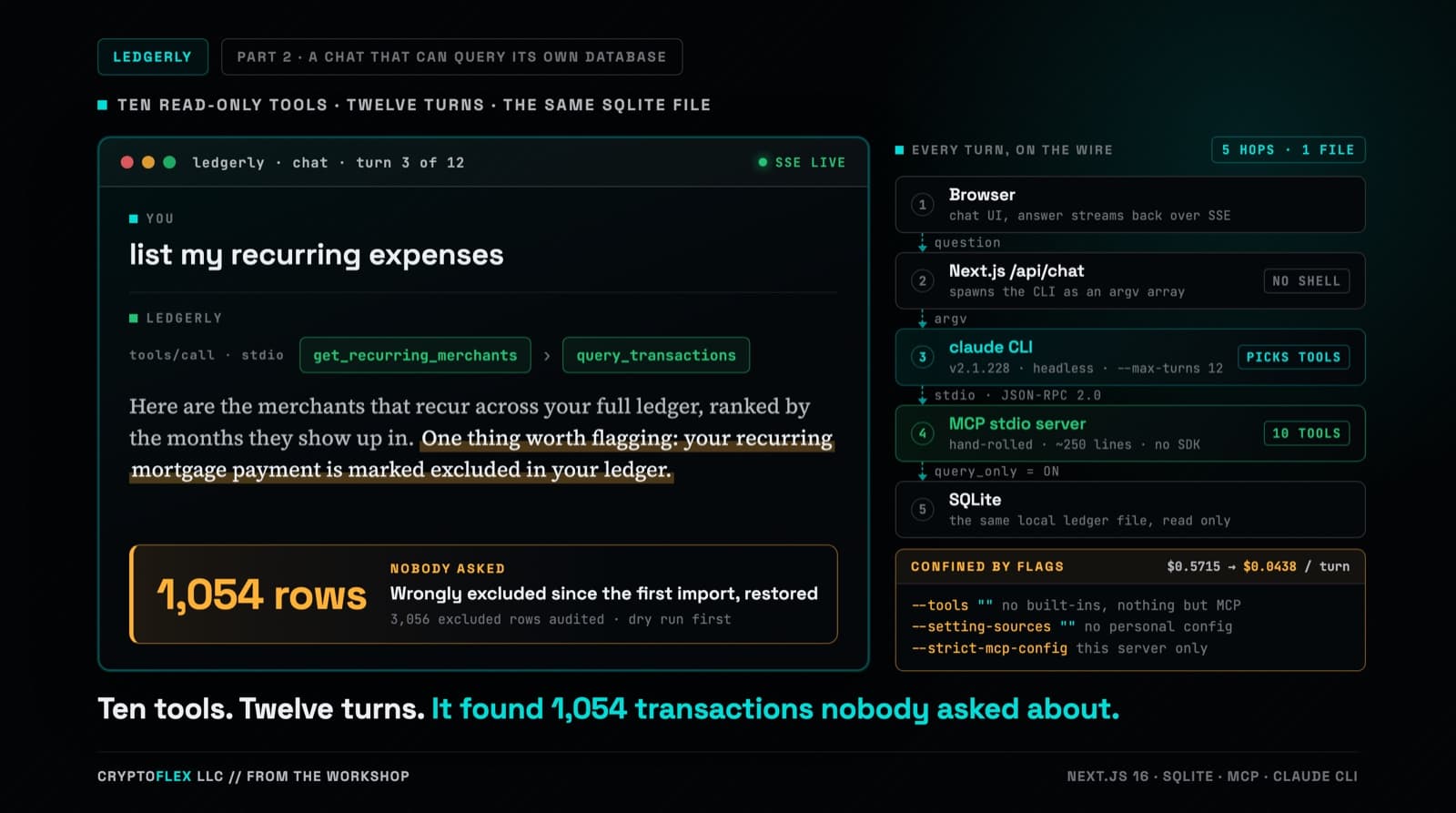
Part one's chat answered from two months of category totals stuffed into a single-turn prompt, and it could not run one query against the database sitting right there. Part two replaces that with a hand-rolled MCP server, ten read-only tools, and multi-turn tool calling confined by CLI flags a de-risking spike worked out against the real claude CLI. Three review passes ran before the commit, and one confirmed finding was a tool-name mismatch that every unit test passed and only a captured NDJSON fixture caught. The same work also turned up a data problem that had nothing to do with any of it: 1,054 real transactions wrongly marked excluded since the original import in part one.
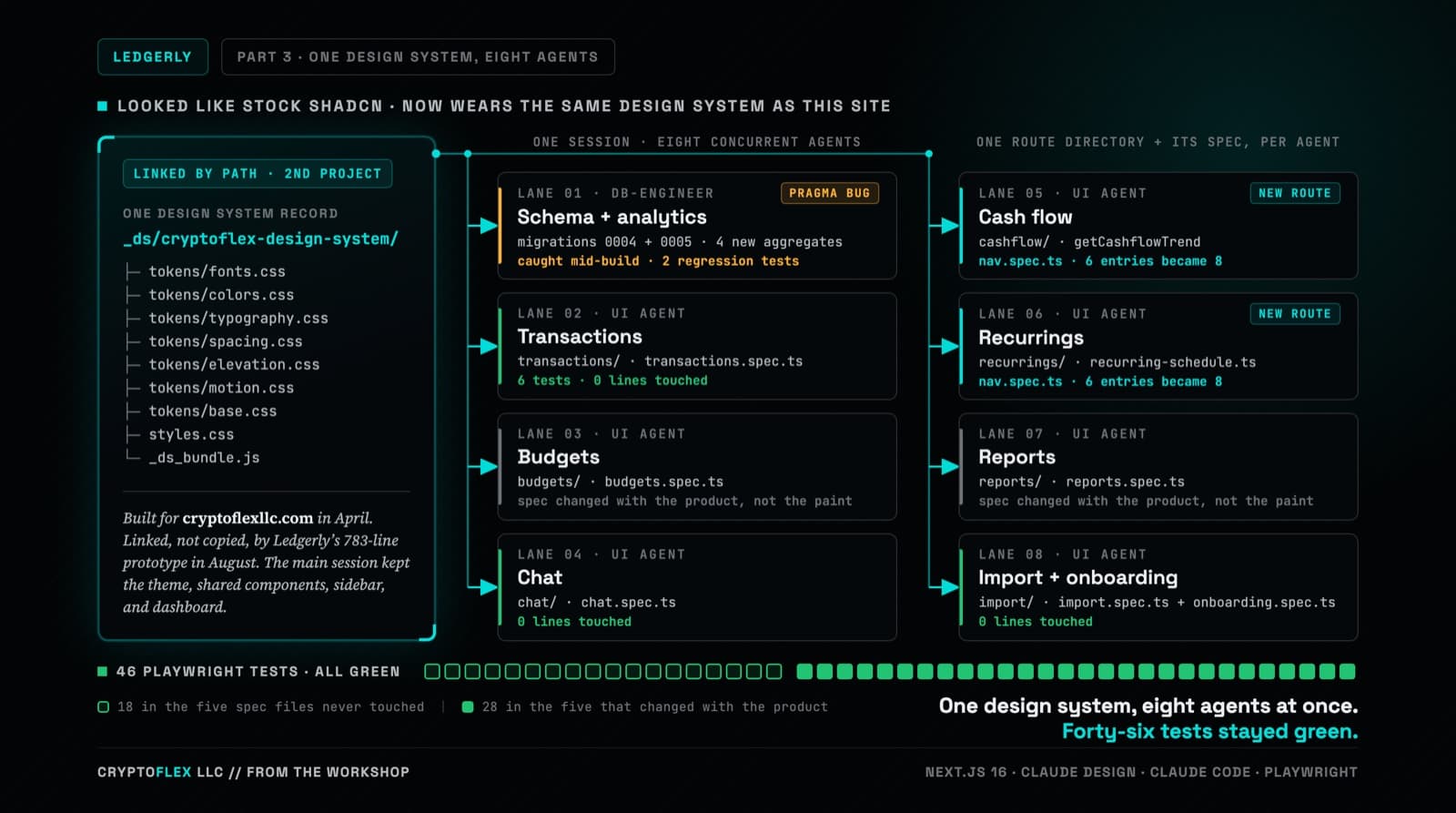
Ledgerly's UI still worked but looked like stock shadcn, so the whole thing went through Claude Design and came back wearing CryptoFlex's Cyber Editorial system, the same one from April's site rebuild. Eight parallel agents rebuilt every screen against real backend constraints while 46 Playwright tests stayed green, one of them written to prove a SQLite migration bug on purpose.
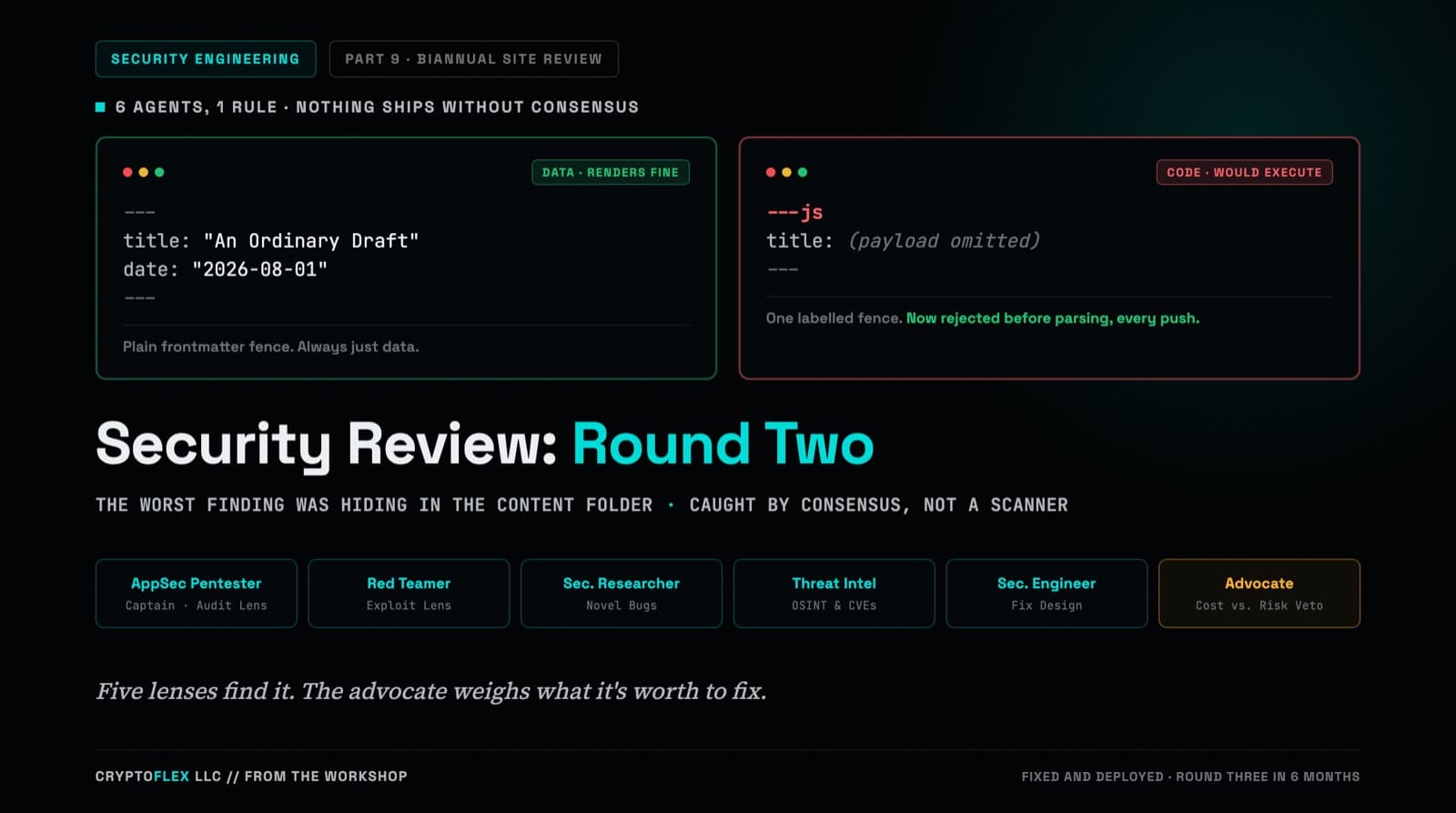
A team of six agents, five security specialists plus an advocate representing the site owner, ran a consensus-driven security review of cryptoflexllc.com. The standout finding: an ordinary-looking blog draft that could have been parsed as executable code instead of data.
Comments
Subscribers only — enter your subscriber email to comment